

Unclaimed: Are you working at Framer?
Framer Reviews: 4.6/5 — Highly Rated
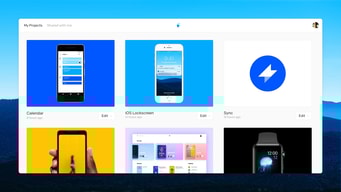
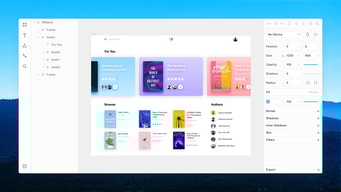
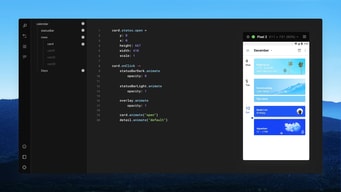
Framer is a design tool for web designers and developers that lets users create production-ready code. Armed with basic coding knowledge, Framers has tools that can create animated effects, build UI components and tap into code libraries, UI kits, or packages. Framers also support typescripts. With Framer, you get a lot of creative freedom, features a cursor chat, a rapid code editor, Spotify integration, as well as Sketch, Figma, iOS, Photoshop, and more.

| Segment |
Small Business
Mid Market
Enterprise
|
|---|---|
| Deployment | Cloud / SaaS / Web-Based, Desktop Mac |
| Support | 24/7 (Live rep), Chat, Email/Help Desk, FAQs/Forum, Knowledge Base, Phone Support |
| Training | Documentation |
| Languages | English |
Framer Pros and Cons
- You get a lot of creative freedom
- Framer is available on multiple platforms, and any device running a web browser
- There are a range of different integrations available, including Sketch, Figma, iOS, macOS, Photoshop, and more
- It’s great for prototyping
- Some users have complained about buggy updates
- To take full advantage of Framer, you’ll need some coding know-how
- It lacks some sought after features like text style, which comes with competitors like Sketch







Compare Framer with other popular tools in the same category.
The flexibility of the platform allows you to do all kinds of customizations whether you're a developer or designer. You're not locked into a box like some of the other no-code services like webflow or squarespace
I wish there was more help from the community / support. I think this will change over time as more people use the platform or more resources are added on their forums
It's easy to use and you can quickly make changes when you need to. I don't have to go through a lengthy process of deploying changes or adding new pages. This especially great for one-off landing pages that are tied to campaigns

I am a designer in a small team and it was fantastic to find a tool where I could both design and "develop" at the same time. Like other tools, everyone can understand Framer to create a useful website, but I thought Framer has way more versatility to design and create something different from the typical templates other tools offer.
Framer is growing so fast, but at the time, it doesn't have all the integrations other tools have. Due to this, I also think there could be more information or videos on the internet to show you how to start using Framer. By the way, I think it's a matter of time, as long as more people will start using it, there will be plenty of useful information on the internet.
On our team, we don't have a lot of budget to spend on developers so it was very useful to find a tool where I (the designer) could do both tasks.
The Framer output is robust and fast. It lets us focus on design and messaging. What you see is what you get, but also in the best possible, quickest and most efficient way.
It is sometimes hard to keep track of all pages and components in a project. It can lead to changes affecting pages without realising it. You always publish everything. There is no granularity there.
We had an issue where publishing new landing page experiments took too long, was too restricted and hurt the development of backend features. Framer solved that immediately, and we can now go from idea to published experiment in minutes or hours rather than days or weeks. And when we ask our dev team to build something now, it is already validated. We do not waste time like before.
I love how easy is to get in the mindset of the tool and start building stuff with it. We needed a new CMS for our website relaunch and Framer was our first choice, even if it wasn't perfect and still in beta. In less than two weeks we were online. It's amazing that everyone, even without coding experience, can create a website or just update some texts and images very quickly. We did a lot of campaigns with different landingpages and the PM created them directly, with no help from dev or des (beside maybe some last touches from design, you know how perfectionist designers are). It's really cool also the staging feature, perfect to test responsive behaviour properly (let's be honest, the preview function in Framer doesn't really do the job and it's broken half the time). We also got a lot of support from you guys and that was really helpful at the beginning (again: thanks Aroa and John, you showed us some of the best tricks and workaround!)
As I was saying, live preview built in framer is kinda useless IMHO. It's broken half the time and you can't really simulate responsive behaviour there. Also the blog-CMS support: we had to do SO many code overrides even for the most trivial things. I know it's hard to ship a product like this perfectly functioning, but the updates on this are well, almost none. There is also some bugs here and there, nothing that isn't solvable by closing the app and opening it again, but it's just uncomfortable.
Going live asap since you don't need to wait for a developer to code your designs. Also small changes or edits: it's super fast and anyone can do it right away without having to open a ticket to even correct a typo.
Prototyping interactions is fun and simple.
Not so great to start a project from scratch. Felt like I'd still need other apps to get the job done from start to finish.
It's an easy way to prototype interactions and cut down on time between iterations and testing with users.
Framer has been really good at quickly wiring up screens and frames for visual designs already made on other platforms. The prototyping is out of this world and deserves praise.
The design aspect of working in Framer - the editor - could be a bit more robust and extensive. The current feature-set in the editor is slightly constrained, could improve.
Framer has brought the ability to give interactions to our designs that are as life-like as possible. The main aim being that, creating life-like animations has never been easier.
The ability to collaborate on any particular idea prototyping online with ease is the most helpful feature of Framer. The code in Framer prototypes is directly usable on live projects, saving time and effort to write similar design codes again.
I find the coding part most challenging to go through while using this application. Furthermore, the interface and workflow are still a bit confusing for new users.
We have been using Framer to collaborate on any web design prototyping online, which has helped us work on any designs smoothly during this pandemic situation.
There is fantastic documentation and a solid community surrounding the product. The open code base means many people add to the libraries and create plugins. It's a great in between for higher fidelity mockups and has really helped improve the workflow of our product development process.
Requires some coding knowledge, which is not a problem, but adds to the learning curve. However, it's worth it.
Helps me communicate interaction design to visual designers and developers much more easily. Before, we had to find other examples and tell everyone to imagine it within our project. Now, we can just design the in between specifically for the product. We can also create our own libraries.

I really like the ability to tweak the interaction parameters, write and edit code to customize the animations. It's a great tool for those who don't afraid of coding, however you don't really need to know how to code, but it extends your possibilities greatly.
The learning curve is somewhat steep, but on the other hand there are already lots of resources. You'll need to know Coffee Script to get the most out of the software.
We're visualizing micro animations for the UI's we create. Also is a great tool for high fidelity mobile app prototyping. I even could make splash screen animations in it, so basically you can see your product right from the loading screen, with all the interactions a user can make, without coding it first.
- Side by side preview (live preview) - Autofill as you type
- Debugging becomes a tough task when misspellings are not highlighted
- Makes me efficient in expressing my ideas to higher stakeholders. Also to coders. - Empowers me as Designer - Can do multiple iterations
