

Unclaimed: Are are working at GanttPRO ?






GanttPRO Reviews: 4.8/5 — Highly Rated
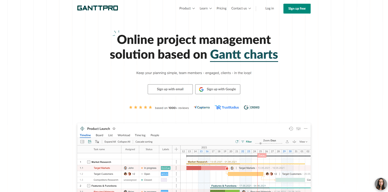
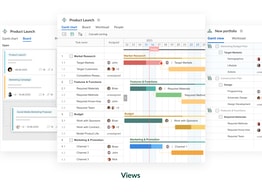
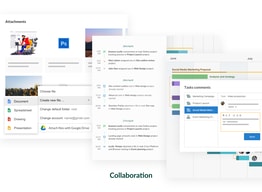
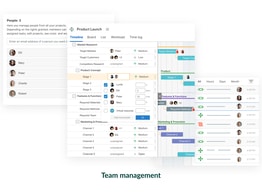
GanttPRO is a user-friendly, intuitive Gantt chart software known for its robust project management tools and features. The platform offers project, product, and portfolio management, making it an ideal software for individuals across numerous industries. From task and deadline tracking, to team collaboration tools, and time logging features, to advanced export and sharing features, GanttPRO has it all.





| Capabilities |
API
|
|---|---|
| Segment |
Small Business
Mid Market
Enterprise
|
| Deployment | Cloud / SaaS / Web-Based |
| Support | 24/7 (Live rep), Chat, Email/Help Desk, FAQs/Forum, Knowledge Base, Phone Support |
| Training | Documentation |
| Languages | English |


Compare GanttPRO with other popular tools in the same category.
Gantt Pro enables the user to operate in a seamless manner with the extremely simple UI/UX and great breakdown visibility for the element level of components and tasks.
For a new beginner, to get hands-on aa quickly as possible the tool lacks a descriptive tutorial hint bubble and at times makes it difficult to browse through multiple options to choose from.
GanttPRO has made my journey as an entry level project manager easy since I am able to visually keep a track of all the tasks and activities and make dynamic changes to the project within a few clicks.
One of the greatest difficulties that arise in the development of master's theses is the organization of time and activities, being able to find optimal work methodologies to achieve the objectives is essential for a good degree thesis. Theses represent a series of activities that are related to each other, which is why GranttPro has allowed me to develop a better form of my thesis. With this tool I have been able to organize my time, find improvement options that allow me to be more efficient and have a better grade in my master's degree. 100% recommending this tool for all people who are interested in achieving the
Nothing dislikme of this program, is a pefect tool for my Studetn Program
With this tool I have been able to organize my time, find improvement options that allow me to be more efficient and have a better grade in my master's degree

I think the best part of of GanntPro is the ability to collaborate on the schedule with team members. This really helps my group organize our deliverables and keeps everyone on the same page, while also allowing the ability to add/adjust/move/remove things if the schedule manager (me) organizes it incorrectly. In addition, i like how all the metrics, graphs and data can be easily generated after populating the chart. No extra work is required to provide good insight into work distribution, tasking, etc. It’s really easy to set up and monitor progress for each team member, and the group as a whole. This is the only class that has required a scheduling component, but I may carry this over to work.
The only thing that is a little annoying is the hour/time component. If you drag out the timeframe of the task, then modify the hours for each team member, the task "bar" shrinks accordingly. So, it requires additional adjustment. My main usage is to show when things are due, AND the expected amount of hours required though the hours and total bar start/end time are different.
Tasking is really helpful. It allows up to add/decrease scope as we make progress on certain milestones. Also, when certain tasking is complete, it helps us to "swarm" and help others finish their items.
GanttPRO's simple and intuitive interface allows for accurate and agile project manangement. Unlike its competitors with their bloated software, GanttPRO's web-based solution provides me with access to anywhere that I have an internet connection. I love how easy it is to interact with my team, especially for some members with no gantt or scheduling experience. They are able to easily understand the clear layout and details of my project. Plus, customer service support is outstanding. They are quick to reply and eager to help.
The only minor issue is the inability to do a quick undo of my last comman (ctrl-z). Fortunately, they offer a historcial record of all changes, so it's easy to revert back to any previous version.
I am working with team members with varying degrees of familiarity with project management tools. GanttPRO makes is easy to share project timelines without having to install software locally.
GanttPRO helps people to see the status of work done with better visual demonstration and easy to share among the members. It is flexible and professional at the same time. GanttPRO helps me to track the status of my work and boosts my efficiency.
Most of the features are excellent and more professional. Undo button and more flexible edit button will make it more user-friendly.
I am mainly using it for tracking the work status to meet the deadline efficiently.
Design and configuration. Is very easy to use
I would like to have the option to hide completed tasks
daily work planning has improved a lot

GanttPRO is excellent for students or researchers who wants to develop and apply their project skills.
It will be great if it provides the tools for meeting online.
Research and Development applicants and students training in project design management.
The interface works nicely with the drag and drop features. I particularly like the way you can see how many hours you and the team have been assigned. I think it compares well with its competitors. It is not as sophisticated as smart sheet, but in its simplicity actually achieves more, with an easy learning curve. It has also been built from a sensible start point with new features integrated directly into the program, whereas smart sheets has added features as 'bolt ons' which make it clunky and frustrating.
It has crashed very occasionaly, but a simple page refresh has fixed that. It's not really been designed with multiple managers in mind, so for a larger organisation that causes some difficulty, however these are features that are in development. From a managers perspective it does need the ability to see all users demands and edit them, aswell as having multiple 'owners'. I would also like to see outlook calender integration.
I'm using it to manage multiple projects, with costings, deadlines, resources and personal task management. It is helping give me insight into future timings and understand the forward implication of actions taken now.
La clasificación en el Diagrama, los tableros, la posibilidad de asignar tiempos y compartir, asignar a los equipos facilmente
No encuentro la parte de asignar tareas a cada tablero, estoy estudiando el programa y me está costando un poquito.
Organización y comunicación con el equipo, en principio estoy aprendiendo, pero en alguna de las empresas a las que me postulo, pueden utilizarla para gestionar sus proyectos.
I like GanttPro very much indeed. I has unique features, and helps me organizing my work both in terms of studies and work. The workload can be distributed between different employees or project members. GanttPro has advantages of being able to add notes for specific tasks, allocating the risks associated with the task, among others. Furthermore Ganttpro provides a lot of good tutorials on YouTube and on their webpage. Being able to work collaboratively is a great feautyre of this planning software, providing overview and commitment from employees/students..
For one person use, it may be a bit expensive at first, but its worth the money in the end. GanttPro ensures that project-scoopes of projects are meet in time-wise and efficient manner
I was able to allocate my time efficiently in a structured manner, providing full overview, from monthly to hourly details. It gives me the ability to set goals and achieve them.