

Unclaimed: Are you working at GetResponse?
GetResponse Reviews: 4.3/5 — Solid Choice
GetResponse is a reliable email marketing software with marketing automation capabilities that can deliver tailored marketing experiences, engage customers, and boost sales through its extensive selection of features. A recent addition to the platform includes web push notifications and an email chat function. Improved automation workflows and SMS marketing features make it a preferred software for users.
Best known for being a platform that provides comprehensive marketing tools for small businesses, bloggers, and marketing agencies, GetResponse is a cloud-based software that simplifies communication with your core audience. GetResponse primary feature is an email creator that allows users to create professionally designed emails for mass sending through its selection of templates. The platform can build marketing automation workflows based on data and behavior ensuring personalized marketing experiences, better-engaged customers, and higher sales.

| Capabilities |
AI
API
|
|---|---|
| Segment |
Small Business
Mid Market
Enterprise
|
| Deployment | Cloud / SaaS / Web-Based, Mobile Android, Mobile iPad, Mobile iPhone |
| Support | 24/7 (Live rep), Chat, Email/Help Desk, FAQs/Forum, Knowledge Base, Phone Support |
| Training | Documentation |
| Languages | English |
GetResponse Pros and Cons
- List building and list automation options available
- GetResponse offers good templates
- Easy-to-use design and spam testing
- Supports powerful lead generation features best for eCommerce sites and webinar promotions
- Lets users monitor Google, Facebook, and Instagram from the GetResponse account
- Some of the landing pages don’t work great on mobile devices
- The drag-and-drop feature could use some tweaks
- The deliverability rate needs improvement
- Basic plan doesn’t offer webinar features
- Phone support is available only for the custom paid price plan








Are you looking for a new comprehensive email marketing solution? If you have an online business that relies on reaching out to and nurturing leads, you’ll definitely need a reliable tool to help you do it.
For many marketers, that solution is GetResponse—a powerful email marketing tool that has evolved into an all-in-one marketing automation platform with a comprehensive selection of inbound marketing solutions.
In this post, we’re going to provide a detailed review of the cloud-based software GetResponse to help you decide if this is the software that your business needs.

What is GetResponse?
GetResponse is an all-in-one email marketing software solution that you can use for all your email marketing needs. It’s a simple, yet robust tool that lets users send customized emails, generate leads, engage customers, automate marketing tasks, and even help boost sales.
Because of its numerous automation features, users spend less time crafting and sending emails and more time driving effective strategies for their brands. This also means users get more timely responses and see more efficiency in their marketing efforts.
The platform is focused on providing solutions for email marketing, which means the tools that it offers are built to help a company grow its audience and contact list, promote its services and sell its products in the most personalized way. Notably, the platform’s user-friendly navigation, affordable price points, and numerous customizable options make it ideal for a wide range of businesses—whether you’re a fledgling start-up or a blue-chip organization.
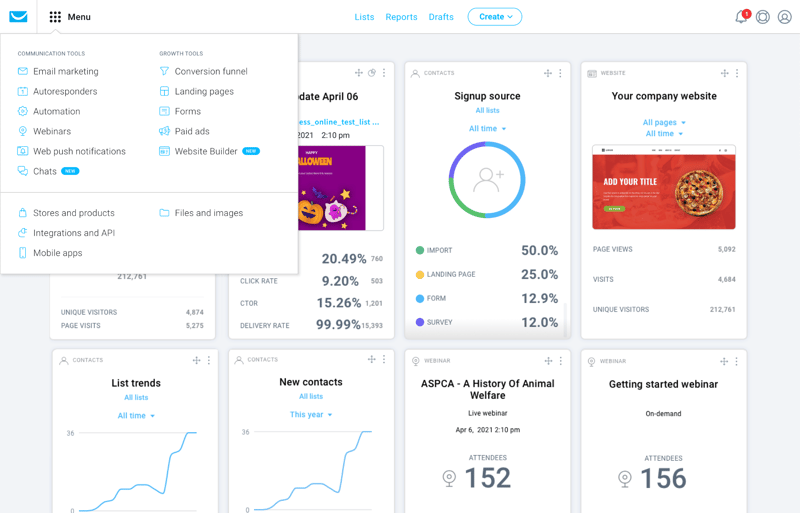
With GetResponse, you also don’t just get email marketing. It touts itself as an all-in-one marketing tool and thankfully, they live up to this promise. With GetResponse, users also get integrated email marketing features, autoresponders, automated landing page tools, and advanced analytics.
GetResponse has added AI-powered features including an AI email generator and AI campaign builder.
How GetResponse Works: Key Features
Now, let’s take a closer look at what features you can expect from this all-in-one marketing software.
Email Marketing
GetResponse’s lineup of key features is designed to get users more opens, clicks, and ultimately sales. The platform gives users the option to create custom emails using a simple drag-and-drop builder or choose from a variety of free, ready-made templates that can be personalized to fit their brand. The customization tools are user-friendly and offer a wide range of professional templates to choose from.
Some notable tools to take note of are:
- Newsletter Templates – GetResponse’s newsletter template feature is a powerful tool for creating professional and engaging emails that let users choose from a wide range of pre-designed templates that can be customized to fit your brand. With this feature, you can create newsletters that are visually appealing and help you connect with your subscribers.
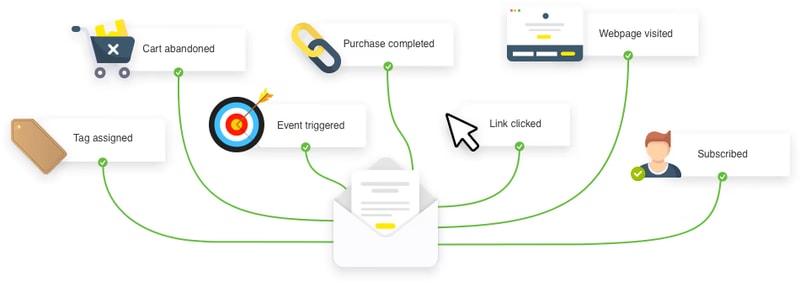
- Autoresponders – GetResponse’s Autoresponders feature is one of the platform’s most useful tools for streamlining email marketing efforts, helping users save time and effort by automating repetitive tasks. Because it’s a fully customizable feature, businesses can tailor the timing, and frequency of autoresponder emails and personalize content to fit a brand.
- Automation emails – To improve the overall effectiveness of campaigns, GetResponse lets users create action-based, automated emails that help engage audiences and encourage more sales.
- Automated Blog Digest – This is a user is a time-saving tool that allows you to send a weekly or monthly email to your subscribers highlighting your latest blog posts. It ensures subscribers are engaged and up-to-date on your latest content, without having to manually create and send an email each time you publish a new post.
- Perfect Timing feature – GetResponse’s Perfect Timing feature is a unique and useful tool that allows users to send emails at the optimal time for maximum engagement. The platform analyzes data from past campaigns and taking into account subscriber time zones, the platform automatically determines the best time to send an email to each recipient.
- Transactional emails – This feature is a paid add-on that uses SMTP-triggered emails so you can send receipts or personalized reminders to your contacts.
- A/B testing – You can also A/B test your emails to ensure you’re sending out the most engaging and relevant emails.

Marketing Automation Builder
GetResponse’s automation feature makes it an incredibly efficient platform for creating a personalized customer journey. By automating your email marketing efforts based on customer data and behavior, it can deliver highly personalized content that is tailored to each customer, resulting in a more enjoyable and engaging experience. In short, the automation feature is what makes GetResponse stand out and helps users achieve their ideal customer journey.
Top features include:
- Visual Workflow Builder: Their visual drag-and-drop automation builder can help you set up your automation to make sure your customers get the experience they want. Once your marketing processes are automated, this can help you save time and focus more on capturing new leads and selling your products.
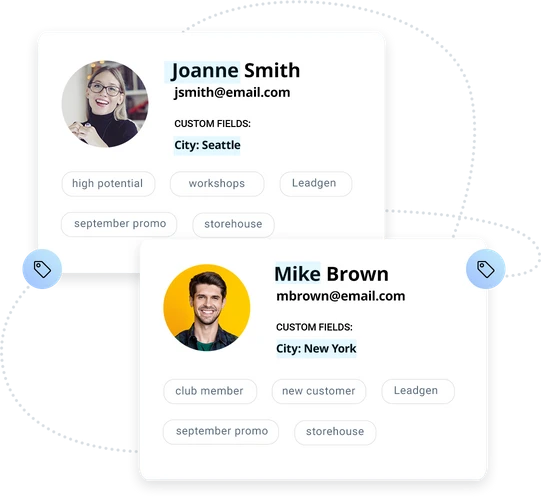
- Customer Segments: By using an unlimited number of tags to appropriately profile your customers, you’ll be able to deliver exactly what they want.
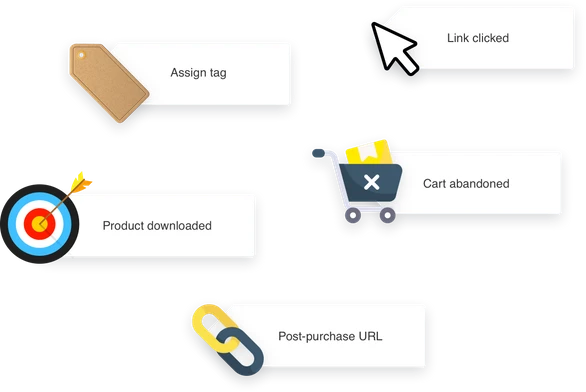
- Web Events: GetResponse let users choose to receive alerts whenever a customer takes a certain action on your website (e.g. logs in, watches a video, abandons a cart, or downloads content). This will help you identify what your customers are engaging with so you can improve their experience.
Conversion Funnel
This is one of GetResponse’s standout features. It’s a lead-generation feature that helps you create sales funnels and landing pages for the different parts of your business. You’ll have access to over 30 conversion-optimized scenarios to help you build your contacts, and sell your offers.
If you’re running an e-commerce store or promoting a webinar or other events, this will be a valuable addition for you.
Landing Pages
Your landing pages are what’s going to convert your traffic into leads as they showcase your product lists and any other promotional content. GetResponse simplifies this process while still ensuring that it’s effective by allowing you to build your landing pages in minutes using a drag-and-drop editor.
This builder also includes:
- Sign-up forms to help grow your contact list
- A/B testing for your pages
- SEO optimization directly from the platform so you can ensure your landing page appears in search results
- Customizable landing page templates
Website Builder
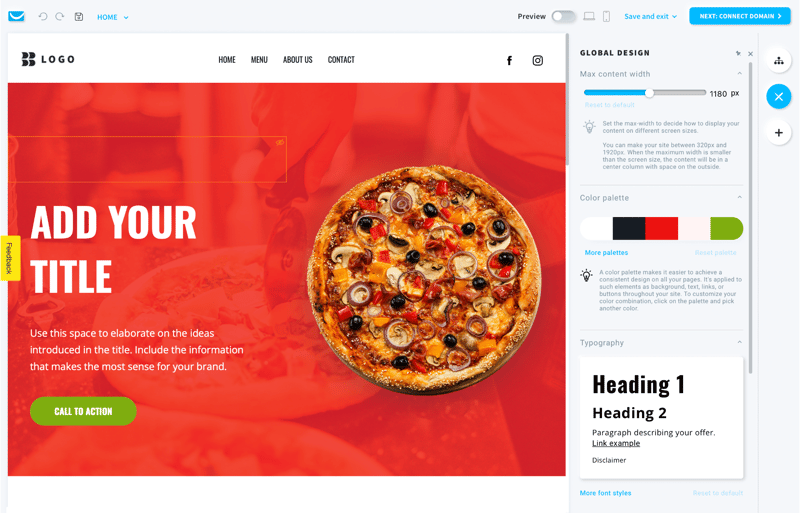
GetResponse has an AI-driven, and code-free website builder. If you need more guidance and don’t want to build from scratch, this feature simplifies the entire process so much that even those with no coding experience can easily build and tailor a site for their specific needs. Simply input your business description and your brand’s visual preferences to receive personalized web templates.
Webinar Builder
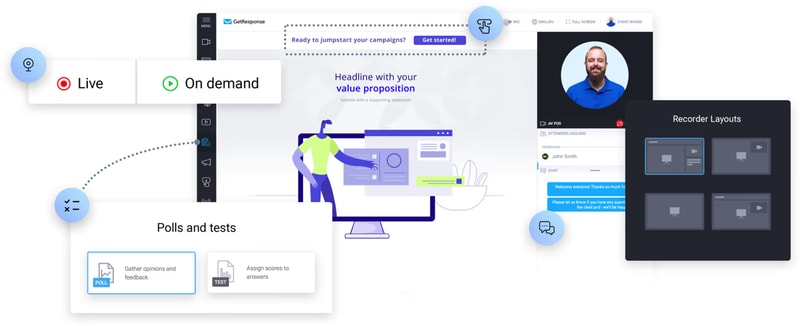
GetResponse’s webinar builder is a no-download tool capable of connecting and engaging with your audience anywhere and anytime, which means it will give users a real opportunity to encourage conversions.
Some key perks to take note of in this specific feature are:
- Ability to host unlimited webinars
- Access to a room for up to 1,000 live attendees
- Platform sharing with two other presenters
- Storage of up to 20 hours of webinar recordings
Who is GetResponse For?
Whether you’re looking to grow your email list, increase engagement, or drive sales, GetResponse is the ideal platform for anyone looking to maximize their email marketing efforts and achieve their marketing goals. But given its range of tools and features, GetResponse is great for:
Entrepreneurs
GetResponse is an excellent platform for entrepreneurs looking to market their businesses online. The platform offers a range of features that are specifically designed to help entrepreneurs reach potential clients and build relationships, including email marketing, a website builder, and paid ads. With email marketing, entrepreneurs can create custom emails, use ready-made templates, and automate their email campaigns to reach their target audience.
Online marketers
For entrepreneurs who are looking to generate and convert leads, this is a great option. The platform offers a range of features specifically designed for online marketers, including sales funnels, popup forms, and autoresponders. These tools provide entrepreneurs with the flexibility they need to effectively reach their target audience and convert leads into paying customers. Whether you’re looking to grow your email list, increase engagement, or boost sales, GetResponse has the tools and features you need to achieve your marketing goals
Marketing managers
With GetResponse, these professionals can easily reach specific customer segments by using personalized and automated messaging across various channels. This includes email, website tracking, and the ability to host live and on-demand webinars. These features allow entrepreneurs to effectively engage with their target audience and drive results, that can help take their marketing efforts to the next level.
Mid and large companies
With its ability to increase return on investment (ROI) with various tools that are tailored to meet the specific needs of businesses, GetResponse is a great platform for businesses. This means that regardless of the size of the business, GetResponse can help achieve key metrics across the customer journey. The platform’s transactional emails and dedicated customer support are just two examples of how GetResponse is specifically designed to help entrepreneurs succeed.
GetResponse Pricing
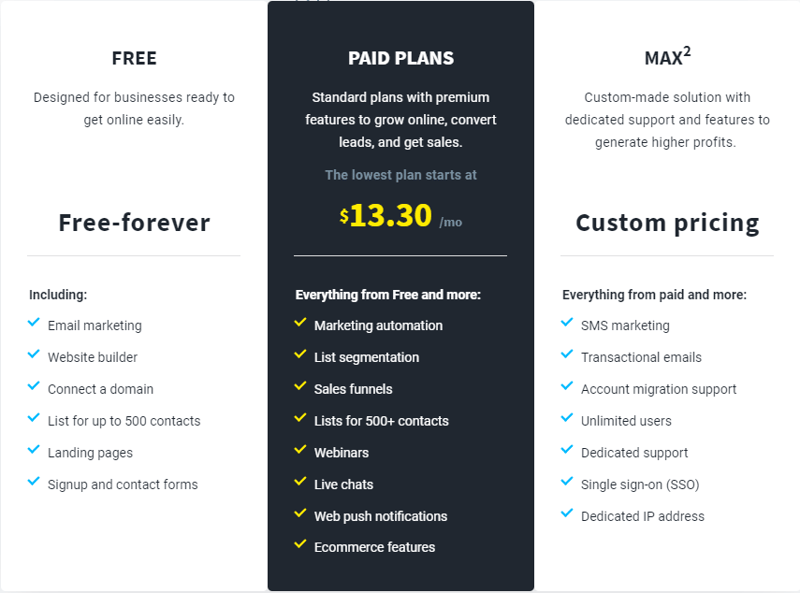
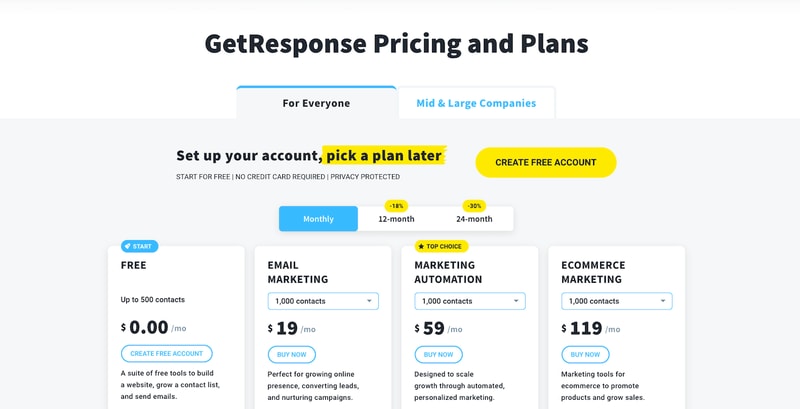
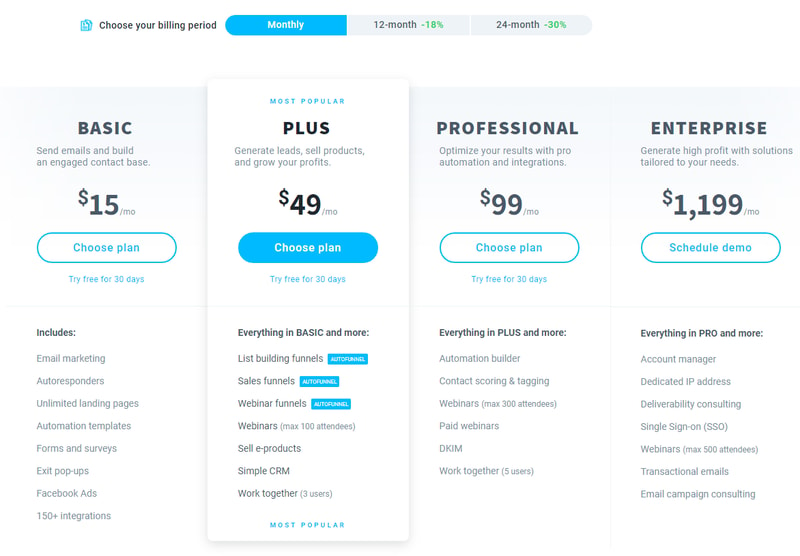
GetResponse offers three main tiers in their pricing; Free , Paid Plans , and MAX² (for large enterprises).
The paid plans are also divided into email marketing, marketing automation, and e-commerce marketing.
Email Marketing Plan
With the email marketing plan, you can build your email list and deliver valuable information to your audience. You’ll be able to create a website with an unlimited number of landing pages to generate signups. You can also segment your subscribers, but only based on the basic information you’ll have collected about them. This plan works best for those who don’t need complex automation, like small businesses, entrepreneurs, bloggers, etc.
Pricing varies depending on your contract length and the number of contacts. See GetResponse pricing for current rates.
Marketing Automation Plan
If you want to include more advanced automation settings and segmentation, then this is the plan for you. It includes all the features in the free plan, and email marketing plan, as well as trigger and event-based sequences to collect more data on your audience. You’ll be able to create automated email chains so customers can receive personalized emails based on their behavior and preferences.
Additionally, you’ll get access to the webinar builder so this plan is typically great for B2B and tech companies that want to nurture their leads.
See GetResponse pricing for current Marketing Automation plan rates.
E-commerce Marketing Plan
This plan includes everything from the two previous plans and includes web push notifications, abandoned cart recovery, product recommendations, transactional emails, and promo codes. Of course, this plan is beneficial if you want to increase sales for your online store.
See GetResponse pricing for current E-commerce Marketing plan rates. Pricing scales with the number of subscribers.
GetResponse Pros & Cons
Pros
- The free plan includes valuable marketing features.
- GetResponse is feature-rich while being easy to use.
- This a great option if you have an e-commerce business.
- GetResponse integrates with over 120 tools. You can also use GetResponse’s advanced API to build your integration.
- Choose from over 2,000,000 Shutterstock images and GIFs from GIPHY to add an attractive and professional touch to your emails. No extra purchases are necessary.
- Caters to various devices so you can design and preview well-formatted emails that look good on any device (desktop, tablet, or mobile).
- You get digital marketing reports to track your marketing campaign’s performance.
- You can create and monitor your paid Google, Facebook, and Instagram ads from your GetResponse account.
- 24/7 live representative customer support is available via email or live chat.
- 30-day free trial available, with no credit card required, for all features.
- A discounted plan is offered for charities and NGOs (50% off every monthly plan)
Cons
- Although GetResponse integrates with over 120 tools, it omits some notable project management platforms. Also, integrations with PayPal and Eventbrite can only be done using Zapier.
- GreatResponse doesn’t automatically create a mobile-friendly version of your landing pages. You need to remember to design the mobile-friendly version separately.
- Although GetResponse’s mobile app is great at showing you the progress of your campaigns, the drag-and-drop editor is difficult to use and makes it hard to make changes while you’re on the go.
Conclusion
GetResponse is a great and affordable tool to help you upstart your email marketing campaigns. They have other offerings that are all designed to complement core features and boost your presence online, including a selection of builders, for websites, landing pages, and even webinars. GetResponse also has a customer support team that is always available to help users onboard and address any concerns.
However, don’t forget that there are still other email marketing software options available—all with their own set of unique features and tools. Be sure to take a look at our wide range of software categories to find the perfect software that your business needs.

Compare GetResponse with other popular tools in the same category.
I like the search filtering so you can sort by custom fields. They also have a wide range of templates to use as well.
Configuring some things like background color are almost impossible to find. I have to go into HTML to try to change it and it gives me a warning
Trying to improve open and click through rates is a challenge. We have 2 sites and getting new customers on the one is HARD>
GR is feature heavy, with a great interface (with one exception--see below). I've had accounts with Aweber, MailChimp, and Constant Contact, and GR offers me by far the best platform at the lowest cost. I can't imagine switching. The templates are good-looking, the statistics are useful--I just love everything about GR.
Only two things: 1. the interface when you're creating a new list is not intuitive, and I can never remember where I need to go to customize the "please confirm" e-mail message. 2. Occasionally when I'm creating a message and put selected text in italics, I'll then send a test e-mail and discover that the entire message has been made italic. I can go back and fix it, but it's a bug.
Benefits: We're a nonprofit, and the people on the list we've created through GR are our most dedicated givers. They've opted in because they're interested in us. They're much more likely to give than the people whose e-mails we got through an expensive e-mail finder service.
the best part about this is the ease to use get response ..the options,features and the whole process is self explanatory and easy to go through
the only thing i miss here in getresponse is "autosave" .
we use get response for our email marketing requirements. we are actually satisfied with the product as we are able to create separate campaigns and communicate with our customers at one go..
Getresponse has been a gamechanger for my business. It makes it easy to communicate with subscribers, organize lists, and get the best bang for my marketing buck. I've been using it for nearly a year now and I'm never going back.
The only thing I could really nitpick is that sometimes that email writing page is a little annoying.
It's allowing me to send autoresponders to my list and sell more of my products. I've realized that getresponse is the best software for doing this.
The A/B testing rocks my socks. I love that function because it teaches me how to tune my emails to my audience.
The email template editor is a little difficult to use at times. Specifically, the text box functionality can be a little frustrating at times. I would also like to see GetReponse create monthly reports of some sort. Allow me to take a look at which emails performed very well in that month so I can pass that information up the chain. Maybe GetResponse does that, but if it does, I'm not aware and I certainly don't know how to do it.
We've solved a huge problem: people not reading our emails. Our prior email provider wasn't fantastic and didn't provide a/b testing at all. We've seen massive increases in open rates thanks to this.
I like the simplicity of the autoresponder sequences and the AMAZING customer support. You guys are so fast at responding to my questions and always have the right answer. Seriously, without a doubt the BEST part about what you do is having a customer support team ready and willing to answer my questions. It make all the difference for me when choosing an email support platform.
Hmmmmm, I would stay that the email deliverability is sometimes a little frustrating. Don't know who to really blame for that as it's probably a mix between myself, google, and Get response. I would love to get a more detailed explanations on why some of my emails end up in the inbox while others are ending up in the spam.
All the problems you can imagine for a small business owner. The benefits of using get response is that I can get all my crazy questions answered in a prompt and efficient manner.
I like the convenience of creating newsletters.
The forms are very difficult. They used to be easy and then the software changed.
Generate readers for my newsletter. Readership is holding steady.
The ease of creating professional looking emails. The mobile app has been fantastic in a pinch when I am away from the office
I would like more customization on the templates.. Other than that I haven't got any dislikes right now...
Getresponse really helps me communicate field conditions for each of or teams in a professional manner. Our customers like the new service also, because they can unsubscribe and subscribe each season.
The reporting, world view, and templates. Also the customer service is top notch.
Issues with uploading suppression files.
Wanted a more professional email marketing tool with better tracking and analytics which GetResponse provides.
I like GetResponse's email creator and autoresponders most.
I haven't found anything that I dislike about GetResponse.
GR makes email marketing insanely easy. I can connect with my readers easily.
Consistent service, awesome delivery and great templates.
nothing the service is on point nothing to complain about.
private funding
It's easy to use, the user face is beautiful, and the app is accurate.
I wish I could see more easily which place the person came from when they signed up.
I don't understand this question.
Customer support is very responsive so I'm not left stuck with any issue.
I wish the system would show a flag when the same email/subscriber shows up on multiple lists.
I need to send weekly newsletters to my readers, and to keep expanding at an affordable price. The emails that go out look better and sharper than the ones from my former email management company.
The ease of use with setting everything up. The layout is clear and simple, and it makes doing things that could be complicated easy. I especially like the layout with setting up autoresponders and how easy it is to create good looking emails.
Some of the menus and navigation could be improved. It would be nice to be able to create more advanced segments for lists, such as creating a segment that includes people on certain lists and excludes people on other lists.
It's helped me reach people quickly and effectively with minimal hassles.
I'm very non techie but with the help of your great customer service agents I was able to use the auto-responder program to send out information to my list. Really great customer service is important and GR has that.
It would be great if you had some way that I could learn how to use the different aspects of GR without having to rely on customer service help. I didn't find the site easy to use. It's not very explanatory without help if you don't have technical knowledge.
I work with entrepreneurs over 40 who want to get to a higher level financially in their business. I use hypnosis with coaching as a tool to help them move past negative mind chatter so they achieve faster results. All coaching and hypnosis is phone or Skype based.
The overall interface is really nice and the stats overview is slick.
There should be a notification option when new subscribers are added via an API connection. Currently the subscriber notification only works if using their web form.
Reaching our customers and prospects in an efficient manner and getting more sales via webinar as a result.
I love the user interface, and the reporting. Putting together landing pages is also very intuitive.
I'm currently having issues with confirmation emails not being delivered to new subscribers.
I help new business people by giving them direction. Using GetResponse, I can easily get leads for my business, and help even more.
Get Response was much more user friendly than Mail Chimp or Constant Contact. The interfaces were easier, stats clearer.
It bumped some names off my uploaded database list, and I don't know why.
I have been able to reach out to more of my Acupuncturist colleagues to offer them my Continuing Education courses.
Easy to use and to train other employees. We have also found we receive less email bounce backs/blocks.
Pasting errors sometimes occur and items move easily. Test email does not always look the same as on screen when working and hard to fix to appear the same.
Communicating to membership groups with various types of campaigns.
I love the email analytics, and the ease of sending out emails to groups. I like how I can use plain text, or some of their templates. I'm excited about the webinar feature too.
How it a bit trick to move people between lists "campaigns"
Simplified email marketing and sharing. Ease of communication.
We like the possibility to create the e-mails the way we like with the simple e-mail builder.
Sometimes the translations in french are not accurate.
We are trying to keep in touch with our clients and it works great. Our revenues have improved with the interaction that was gained from our e-mails.
GetResponse is easy to work with and has nice reporting features.
I wish you could add a cc: or bcc: to an email campaign.
We are contacting current clients asking them to visit various links and provide feed back.
I love how easy it is to use and that it does what I need it to do without complicating my life.
I find it expensive compared to Mail Chimp
It helps me to build my email list and send newsletter. It also allows me to have opt-in
the ease of use, I can whip up an email super fast, intuitive use, I don't have to spend a ton of time learning it and I was able to send out emails fast.
there's no ability to merge email lists, I have to resize images manually sometimes and it's not as intuitive as the other features
I am helping immigrant professionals land their dream jobs and I have realized everyone communicates via email and I've made sales through using getresponse!
I really appreciate the flexibility in customizing templates.
Sometimes it can be challenging working with sorting out contacts who receive multiple e-messages on several lists.
We're able to use one platform for all of our various messengers.
The product is basically easy to use The customer service is pretty good and responsive at answering questions.
Price points for entire suite of products. Should add metric for who reads what when
Email marketing/ greater responsiveness
GetResponse is very simple to use. I have worked with several email marketing platforms and I love how the drag and drop email tools. Although I know html well, it is a time saver for sure.
I can't really think of anything substantial. It works well, from time to time we do have some formating issues that are not anticipated.
The biggest benefit with GetResponse is how quickly we can create new campaigns and sign up forms and that it opened the door for non-tech personal to easily edit emails.
the easy to use templates for building out newsletters
not having the ability to put videos on an email
i send out 1 newsletter per week to our client base
being able to send a quick message from my phone app
i'm not crazy about the editing features of the newsletters
communicating with members has become quick and easy.
I like the different forms and tools that Get Response has. Especially the Autoresponders, email pop ups, and the exit popup. These help us to gather new clients and retain current clients. I like that I am able to schedule when the emails go out - that way I can setup several emails and schedule them throughout the month.
The ability to work within and change the layouts is a bit clunky at times. The exit popup does not seem to work correctly - ie when you move to the side of the page to scroll down you get the exit popup. We use Big Commerce and the integration is ok but at times does not import emails on a regular basis. I have to occasionally check to see if it is up to date.
Keeping our customers informed and promoting our online business.