

Unclaimed: Are you working at Google Analytics?





Google Analytics Reviews: 4.5/5 — Highly Rated
Google Analytics is a platform that runs on the internet designed to give users in-depth insight into their website traffic as well as user behavior. Google Analytics is well known for its ability to track site visitors, monitor website performance, and review user engagement so users can improve their visitor’s site experience and boost conversions.
Google Analytics is also often used as Digital Analytics of choice in Indie Hacker and Marketing tech stacks.


| Capabilities |
AI
API
|
|---|---|
| Segment |
Small Business
Mid Market
Enterprise
|
| Deployment | Cloud / SaaS / Web-Based, Mobile Android, Mobile iPad, Mobile iPhone |
| Training | Documentation |
| Languages | English |

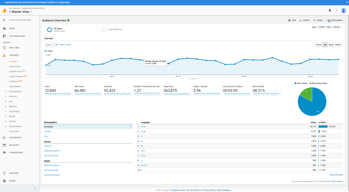
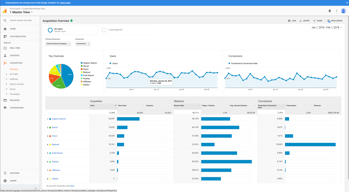
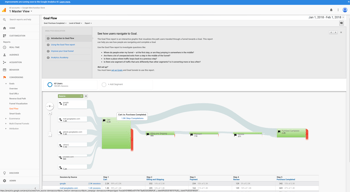

Compare Google Analytics with other popular tools in the same category.
Google analytics is one and only one software for analysis of website traffic, it's source, create funnels and goals. What I like in analytics is there behavior metrics it shows complete over view of traffic page wise
There is nothing i dislike about Google analytics
It help to find the points on website where we are lacking, where exist rates are high.
Google Analytics gives you the ability to gain deep insight into customer behavior, website/app, campaign performance. It also gives you the ability to create custom reports and dashboards tailored to your business needs, which is great for a free product.
The UI can be difficult to learn and master, as the training courses aren't particularly robust. Learning Google Analytics can be a huge uphill battle for many newcomers to digital analytics.
We are able to track, measure, and make decisions for our clients based on the troves of data we are able to collect from Google Analytics.
You can view everything about your website here. You are able to create simple dashboards with important information that can be shared across your team or you can create detailed reporting that's updated automatically for yourself and your immediate needs. The functionality of the platform is limitless.
It does take a bit of training to be able to understand everything that's going on. The good news is that Google provides easy training online to not only get you familiar with the software but also certified in using its software.
We are able to see exactly where our users are entering the website and leaving the website. This allows us to make changes to our strategy for page search and social media. We're also able to see what pages are doing the best and how we can capitalize on those pages performances. We also are able to cross reference data from other sources with UTM tracking abilities which makes sorting out traffic easy.
Honestly, I haven't used Google Analytics so often for the past few months, as the summer months leave us with less time for analytical reviews, but I scoped out our page in order to properly fill out this review, and I've gotta say, I'm excited to get back into Google Analytics! It's an incredibly useful tool in terms of page engagement, website visits, and so much more.
Nothing, really. I wish it was a little easier to diagnose certain issues, but that has more to do with our website than with Google Analytics.
Website viewership, troubleshooting page issues, shuffling marketing priorities.
When it comes to Google Analytics, I love how you can build custom reports.
What I dislike is the accuracy of sales data and the number of visitor data.
With Google Analytics, my team and I can see which emails perform better based on subject lines used. Google Analytics has a lot of data to use.

Google Analytics is the best tool to track your website activity. we can measure and create the goals. it shows a large amount of data. easy to set up for web android or ios having a good user interface. also best for e-commerce, we can track our transaction, page view we can create funnels. we can see real-time visitors. help to make marketing strategies.
the web version is good but needs to be improved android application of google analytics
It shows a large amount of data. I can see my monthly daily visitors and also see their behavior it help me to make marketing strategies. I also check the bounce rate of my website. I also track my campaign how many visitors are coming through ads. I also set goals to track the conversions. track visitors' location, device, and browser. best for SEO
Google Analytics is a must-have in your website. I can't imagine a website without this software integration. Without Google Analytics you have no reports of your site traffic. The best I like is the report's comparison. Is the best way to know which strategy on your layout is working better or what page is engaging better. Whit this information we compare which traffic is converting more in sales and which one is doing rebound. This guides us to work better on our next steps.
There's nothing in Google Analytics that I dislike.
With Google Analytics we solve clients' problems. They not only want results, but they also want to see the process. We show reports in each online marketing meeting, so everyone in the office is in the same boat. That's a benefits we have with Google Analytics.
Easy to understand and therefore produce value
The navigation is a bit long-winded and complicated
Understanding client personas and therefore improving our ad spend
Perfectly scalable and a ridiculous value given vanilla GA is free. When you're large enough, transitioning into GA360 is easy.
It can get slow on the free version, again, not a huge deal given what you get for $0.
Merchandising CRO via Google Optimize Various BI/analytical projects
I love being able to see data about what is happening on my website in real time.
There is so much data possible through Google Analytics that sometimes I get lost and confused in all of it.
It is an easy and effective way to see if our efforts are increasing website traffic.
It's a great tool to understand the use and diversity of analytics, what directions to think in, when it comes to website user data.
It's slightly too DIY itself. There's a steep learning curve, it's not clear as to why certain things are named the way they are, or how those data points helps a developer or website manager.
I use it to understand user data and content impact for an intranet. And GA has helped me better understand my audience and estimate useful content that can be developed.

The ease of use regarding the interface. For someone new to Google Analytics, Google does a good job of laying out the various functions and makes it easy to use. They even provide helpful guides online to break it down.
Some items can be a bit difficult to decipher - I would love to see a more obvious section for engagement increase by percentage.
As far as problems, Google Analytics has made it easy to track where I am and am not receiving foot traffic, as well as highlighting which pages are specifically being looked at.
It's easy to use, free and easy to integrate with Google Ads
The way it defines a conversion, e.g., when a user visits multiple pages and spends some time on the website that can be counted as a conversion even though it isn't a conversion
Tracking Real-Time Conversions & tracking Conversions from multiple ad platforms
What don't I like? I love how user-friendly this software is. Over the past 2 years I've become an SEO/analytics nerd, and I absolutely love how Google Analytics is designed and how easy it is to use. I could get lost for hours going through each tab on my Analytics account analyzing and compiling data for my company's website and making it better for customers and for Google.
There's not much at all that I dislike. Getting the website and everything started at first and linked to the Google Analytics account was probably the trickiest part for me as well as becoming acquainted with the software when I first opened the account.
No problems at all other than recently noticing that it's become very ad-focused and less website focused.

The simplicity of the results show in the form of graphs with the availability of comparison with time span.
Not as such, but multiple account management become a bit tedious from the same account.
i use it for my eCommerce store, and it helps me get in depth analysis of my store and customer relationship and behaviour.
Google Analytics has a variety of premade reports which can provide a lot of information quickly. The ability to create custom reports is handy, as you can use your own custom dimensions for filtering specific audiences.
Setting up custom reports can be a bit tedious, and sometimes it is unclear how specific fields work. Sometimes the UI can be a little laggy depending on how much data you are working with.
Understanding how well a page performs before or after a product release. Using content groups to categorize sessions depending on which section of the site they viewed. Detecting unusual traffic patterns.
1. It is helpful to track website and mobile application traffic online. 2. We can add multiple users and integrate multiple websites into a single account. 3. Easily focus on User Behavior to improve working strategy for sale. 4. Advanced functionality Conversion Tracking, Goal and multi channel funnel. 5. Integrate with Google AdWord and search console to deep analysis. 6. Create a custom report with a comparison to last month's traffic data.
It is a large application. If you run in a low memory computer system, then you will found a slow process. Otherwise, it is the perfect software to track online data.
We used Google analytics for our business to track the conversion of the website. It provides deep analysis of website keywords performance, search query and advanced data filter option. We can set goals for the business website and when someone fills contact form, then one goal is completed. It gives a complete audience database to track which type of user is interested in buying our services and how to generate more new customers for targeted services. We can easily set a fresh mind to improve business sales. Google analytics divide our website traffic into multiple separate sections in the acquisition and also check real time visitor for our website.
Using Google Analytics, we can measure the conversion rate, meaning we can track a potential customer all the way from start to finish. If the customer fails to subscribe to our products, we can use the reports generated to try and modify our services. The audit feature in Google Analytics is great and gives us in depth information on what the end user clicks and which pages he or she visited.
I do not have any dislikes about Google Analytics
Since most of the filters are automated and do not need manual setup, it saves us time and effort that we can apply on other tasks.
easy to use and always updated to get as much information for our sites and content
I guess, after all these years, I will like to understant my data better
content DATA for clients
User behavior is still the most important thing/collection of KPIs to track.
The reporting isn't as fancy as some of the paid tools, but why would it be?
All the standard website tracking needs that we all use Google Analytics for, as well as a way to cross-check that other tools are tracking correctly.
I have used Google Analytics in so many applications. The best part of Google Analytics is integration. They have well-maintained documentation. Regularly GA release their update to optimize bugs and improve performance.
I have been using GA for ten years and integrated this in so many applications, but I didn't see any drawback of GA
I have used GA for all consumer applications to tracking user activity and page events.
For our E-Commerce Sites, we use Google Analytics Extensively and we use the reports generated to modify services to target audiences across the globe. The Business Intelligence Plugin can be incorporated with any cloud based DataBase and the Data collected can be analyzed on the Cloud Infrastructure and then displayed on the Dashboard. Google Analytics also provides real time information about the number of end users connecting to the site and the location can be recorded. The time spent on each page and the number of times a particular product was viewed can be stored for future analysis.
I do not think there is anything to dislike, to begin with.
Using the reports we can modify services to make our customers and clients happy and it also improves our annual revenue numbers
Every actionable piece of information is tracked on the website. You can drill down to find the most minute amounts of data regarding the people who visit your site.
It is sometimes tough to navigate and find the data for which you are looking. There are menus and submenus upon submenus that bog down the user experience. While all of it is necessary, for the uninitiated or light user, it cannot be easy to get acclimated. Power users, of course, should have no issues and benefit from the layout.
I can measure the effectiveness of our ad campaigns and see what users do once they land on our website. This feature is beneficial because ad results only indicate if users land on my site. Google analytics helps me figure out if they stay, what pages they visit, and what actions they take once they're on the site.
Google Analytics is very easy to deploy on any kind of website. The best thing l liked is, it provides me every data accurately and in real-time. Its dashboard interface is clean and makes it very easy to analyze every data.
No dislike, it provides every information that I need.
It gives me deep and detailed visitor reports which help me to analyze and build a user-friendly product. Also, it helps me to build and extract custom reports for presentations.

The best part of Google Analytics is its real-time dashboard. It will show you the real-time status of the website traffic as well as user snapshots which is simply awesome.
Absolutely No dislike, the tool is 10 on 10.
Generating insights about website traffic and stats of users.

1 - It is very easy to Integrate 2 - Has a lot more information to make good marketing and sales decisions. 3 - Deep insights of how and source of the visitors in our website help us to understand and track how users are reacting to our product thus helping us carve marketing decisions
1 - Goal creation can be improved by simplyfying it. It's a bit hard for user to understand but nevertheless it's fine
1 - Help me take marketing decisions 2 - A/B testing features helps me decide the better UI of my website 3 - Goal creation and management has made it really easy to judge how our marketing campaign is performing.

Exceptional organization in the UX, tons of free training especially Google Academy, custom reports, and source medium reports.
There is little to not like with Google Analytics, though I wish they'd release a new tracking code debugger as the legacy one is quite old. Being certain that the data is accurate is always tricky.
Understanding the contribution of your channels
Easy to read the summary from month to month on website statistics.
I would like to have more specific details on website performance, such as particular page statistics.
I like using google analytics to track progress in reaching out and networking to bring more viewers to my website.
The sheer amount of data available makes it a no-brainer to use for every online business / website / marketer.
It can be tough to navigate and the user needs a good understanding of the platform before being able to use it well.
Tracking user activity on websites, bounce rate, time on site, clicks and sales from organic traffic.
Realtime traffic and conversion are the powerful features.
Nothing but some time realtime traffic coming slower then usually...
I am mostly using it to monitor conversation