

Unclaimed: Are are working at Hubstaff ?
Hubstaff Reviews: 4.3/5 — Solid Choice
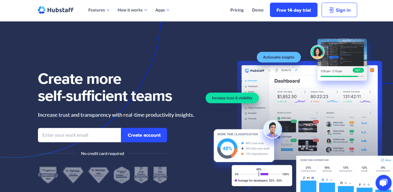
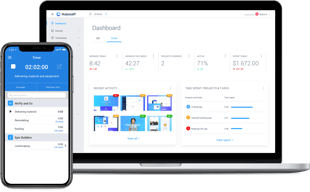
Hubstaff is a project management software as well as a time tracking platform designed to oversee employee productivity and ensure transparency across team projects. Businesses are partial to Hubstaff’s time-tracking tools which are coupled with a budget and financial planning for projects while facilitating better team communication.

| Capabilities |
API
|
|---|---|
| Segment |
Small Business
Mid Market
Enterprise
|
| Deployment | Cloud / SaaS / Web-Based, Desktop Mac, Desktop Windows, Mobile Android, Mobile iPad, Mobile iPhone, On-Premise Linux |
| Training | Documentation |
| Languages | English |




Compare Hubstaff with other popular tools in the same category.
I like using this timer for work because it makes it very easy for invoicing. You can pull reports as needed and screenshots during the time you worked. It helps overall when you're needing to check your work and activity percentage.
The only thing I could say that I dislike about Hubstaff is it tends to glitch often. Sometimes I will be working and the timer will randomly shut off without warning. I have also noticed that sometimes it won't update your total time worked for in real time. So I have to keep refreshing and checking if the time is accurate.
The benefits of having Hubstaff is it makes administrative work easy. Time is money so to be able to accurately have the number of hours worked is important for billing.
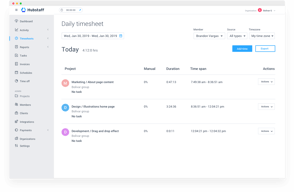
Very good time tracking tool that lets you monitor the performance of your employees. It also allows you to review their activity, generate different reports, integrates payments add/remove time, create notes, tasks etc.
Sometimes it may be a pain in the neck if you are reading something and not moving mouse or typing on the keyboard and your activity can get into the red.
Simple time tracking, generating different reports also allows you to review their activity, generate different reports, integrates payments add/remove time, create notes, tasks etc.
The software has been practically without a hitch in the 4ish years we've used it. It tracks our team's work hours, and our settings have it record 3 screenshots per 10 minute period, which is super helpful. As I explain below, this has helped us address a bunch of issues and in every way makes us a more organized and informed management team. I'd never run a team without this type of software again. (Note: I didn't test this against other providers, so my feedback will be limited in that way).
Support responses are delayed- so you often need to wait a day or so to hear back from them. Sales is quicker than support- which sends the wrong message. I'd prefer more screenshots than the maximum 3 per 10 minute period. I'd prefer to average one per minute. It would allow me to do better problem-solving. They advertise a price per user, but it isn't entirely accurate. They charge in chunks of 5 users, so if you go from 15 to 16 users, you increase not by their advertised $5/user but by $25. Ideally they'd have a smart system that auto-computes usage instead of 5 user blocks.
EMPLOYEE MONITORING - SCREENSHOTS I can see 3 screenshots per 10 minute period of all work done by each member of my team. This is helpful on many levels. If someone is not getting an assignment right, rather than guessing how they ended up at the wrong place I can actually see how they arrived there. This is like back in school when our math teachers wanted to see our work- not just the answer- so that they understood how we got there. Screenshots are also helpful for resolving issues when someone isn't online. So, if on Saturday I get a client email that says "We got a security notice of a login yesterday at 4:42pm- was that you?" I can actually go to the work of the people who might've logged in and confirm it- which gives certainty and peace of mind to our operations. On a coarser level, we can look to see if someone is wasting time or doing things that are not relevant to their work. While we don't patrol our screenshots for this purpose, we do look when we see someone's productivity drop. We've seen all kinds of abuses over the years- things that we felt but didn't know until we saw the screenshots. Abuses meaning a waste of company resources/time, nothing evil. We use it to check in on new hires to make sure that their assignments are clear and that they are allocating time well. This has helped us find a lot of waste. Back when we used to use freelancers this was invaluable as it gave them a heightened sense of responsibility. TIME TRACKING When we implemented Hubstaff- 4 years back- we interestingly saw an immediate drop in time reporting from people working for us remotely. Their hours dropped by 30% immediately. I don't think it was intended deception on their part, I just think that people reported their work hours based on how long it felt as opposed to actual clock hours. The transition to actual clock hours saved us a ton of money. We process our team's payments based on their HubStaff hours. This makes it really easy to do payroll. PROJECT TIME TRACKING For when we are doing client work on an hourly, this tool gives me exact numbers for billing, which is really helpful.
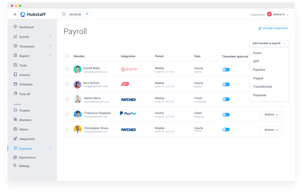
I like that I can pay staff automatically. No need to use manual time sheets. Being able to pay via PayPal is nice.
Wished it had a reminder to always add more cash into my PayPal account. Also wished the search function for finding completed task was easier.
Paying staff members.
I love that i can turn it on and switch between projects, how it tracks idle time and let's me choose what to do with it, and the integration to auto load my time to my QBO project to really see profit per job and the actual hourly rate. user customization is great too, I can choose if I want to see screen shots or not. I love how it reports productivity too, that's interesting to see.
Can't think of anything I dislike yet, it does exactly what I need at a good price point.
tracking per project time without an excel spreadsheet.
Being able to have remote workers with the confidence they're working. We are even able to compare the workers performance and reward those who are more productive
Having no option to select All members in some of the reports/areas
We had tried to have remote workers however they were not productive and sometimes they didn't even wor so we had given up the idea of having remote workers. Hubstaff enabled us to hire remote workers and also to give our existing workers the option of working from home.
I use this for VAs and it's very well organized and easy to track how much they are working and even look at what they are working on.
The only bad thing I could say is I've had to message in to support twice to fix things that were hard to work out by yourself but support was very helpful
I'm tracking time and Im able to see all of my employees work habits.
Hubstaff is friendly and easy to use, and we've not had any resistance from staff who find the tool easier than more traditional time keeping tools. One big factor in smooth staff acceptance the fact they could see everything their manager's were going to see, so they knew the process was transparent.
Logging into the site and having to select the app and not "Talent" each time was frustrating for users who were getting used to using the app. Microsoft Edge support is missing from the URL logging, which gives us only partial usage information for some of our users.
We wanted to allow development staff more control over where they work, and when they work. Using Hubstaff as our time keeping tool and project cost management tool allowed us launch the programme internally with a single new tool, helping acceptance and minimising risk to the business. After trailing Hubstaff with a small team, we decided to extend our planned remote working policy to cover everyone rather than just development staff, as we felt confident we had the tools to manage a company wide rollout.
The possibility to capture my employees' screens and how easy this app is to organize my team.
Pricing was the main factor for me to use Hubstaff.
Control of my associates' tasks.
Customer support seems excellent. Great to see the support staff really making a concerted effort to answer questions or issues.
Nothing at this point as everything seems fine. I myself am not tech savvy so this has been an issue but that has nothing to do with the software.
Accountability of my virtual staff