

Unclaimed: Are you working at Jira Core?





Jira Core Reviews: 4.4/5 — Solid Choice
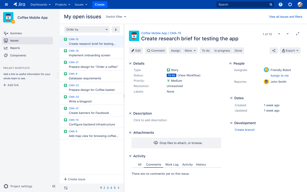
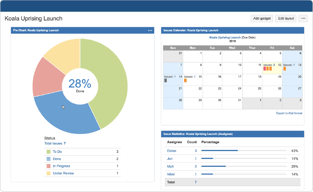
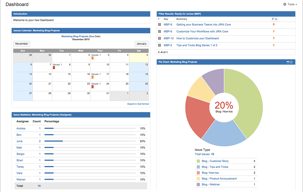
Jira Core is a customizable workflow software solution that allows users to organize projects and tasks into one central location, accessible via a single dashboard. The platform provides the infrastructure to automate business processes and increase productivity for teams, thanks to its core features that prioritize a company’s ability to scale and organize workflows.





| Capabilities |
API
CLI
|
|---|---|
| Segment |
Small Business
Mid Market
Enterprise
|
| Deployment | Cloud / SaaS / Web-Based, Desktop Mac, Desktop Windows, Mobile Android, Mobile iPad, Mobile iPhone, On-Premise Linux, On-Premise Windows |
| Support | 24/7 (Live rep), Chat, Email/Help Desk, FAQs/Forum, Knowledge Base, Phone Support |
| Training | Documentation |
| Languages | English |
Jira Core Pros and Cons
- User friendly, customizable workflows
- Easy to tailor dashboards and task lists
- Support advanced reporting with end to end traceability
- Reported bugs causing issues with tracking


Compare Jira Core with other popular tools in the same category.
Automates your business processes. Great way to increase team productivity. Easy to implement and understand.
I wish this was an complimentary add on to our existing jira software package. But ofcourse, it's a premium add on.
Business process automation. It helps me track all my org projects and tasks in one location.

Tracking project timelines and employee tasks is effortless. Every employee can log in and quickly access their assigned tasks.
Users may find it challenging to navigate through numerous features, leading to confusion.
Facilitates the creation of workflows, monitors employee progress, and tracks project timelines. Can easily assign issues to the responsible lead or developer.
It is highly customizable to fit all your project needs, and if something is missing you can always create a plugin or use one of the tons that are already public
It is so customizable that could be slow to do the first setup and fine-tune it for your project
It helps you to keep visibility of the task you need to complete in your project, it also has metrics and reports so you can refine estimations and, therefore, get a tentative date for project completion

I like that its a go to tool for all ALM needs. Love the scrum boards, team reports, abd best part is the way it works with the addons. Its easy implementation is its most powerful thing.
I just feel it should have more inbuilt features than addon depencies
Its solving the project management and tracking problem for almost 500 clients in our org. We also ise plugins like structure and advanced roadmap for portfolio planning and reporting

Jira core is very helpful in project management specially in ticketing system. It gives us ease to manage and track the overall progress of our business and projects. I'm a user/admin of this ticketing system for almost 5 years now. Aside from being so usefull one of its best upside is that it has a very user friendly UI/UX and a modern easthetics as well. Customer support of jira core is very reliable, fast and professional. Integration of jira in our system is very easy since its already compatible with other development tools. We are frequenty utilizing that can be easily integrated with the jira system.
As far as I have experience there are close to none that I dislike from usin Jira core.
Managing multiple project development and ticketing system that breaks down development of items to its small piece then track it up until its done. Another problem it solves is the reporting its very helpful to us generating the overall report so that we can easily report it to the stakeholders.
I have been using jira in my current company to keep the product managers updated about my progress and tasks on each ticket that I'm working one. It is the best tool to monitor and update on your task which provides multiple features. It is very easy and effective to implement when we are working on agile methodologies. Myself and my team use this daily on our scrum call and update the tickets accordingly. We have also integrated this with our slack channels.
There is nothing I came across as a disadvantage so far to dislike about the jira. It is helpful for any organizationa and teams.
While working on a bigger projects, there are mutliple teams and team members works on different task. So the project management and the reporting becaomes difficult without the product like Jira. There is a complete transperancy on the work done on each task, updating the progress in the tickets, adding the comments, and putting the due dates on the tickets helps the team to well organize and run the projects smoothly.
This project management tool helps to make the day to day work easy.Easy to organize project related works.Can build very effective queries.Easy to find any story with the result returned by this queries.
There is nothing I dislike about Jira.Each and every field in Jira is meant for a purpose.
This well organized tool helps to manage daily works easily.Easy to create stories, Marking the stories to different status definition.Providing components and subcomponents.Providing the required labels,EPICS, Functional themes.

I am using it daily basis and I can say that it is one of the best tool to manage any type of project. You can simply assign ticket of bugs and quires and maintain all types of interface documention to identify working of project.
All things is good. it is very helpful tool.
It helps us to maintain all projects related documentions and helped a lot to deliver product on time.

Jira is a giant project management tool with n number or features. I have been using jira since last 5 years and the best thing about it its user friendliness and its reporting system.
Sometimes I feels that integrating jira with another 3rd party apps or similar is little tricky yet its a very usefull tool.
Managing the entire team's day to day regular tasks. Implementing scrum and other project management methodologies using jira. Intensive reporting system. Burneown and burnup reports. Excel integration is the best feature available.

It is very east to automate proccesses with JIRA roboust set of API's. All the four concepts of JIRA like issue, project, board and workflow are super useful to the team and very easy to use.
Only disadvantage i found is limited size of file upload and reports are not reusable.
Ease of assigning tasks to the team members and version control
Jira core helps to you manage the task over the platform in which user can perform variours task within in the platform. Jira core seeks to tracks the tasks over the platform which helps employee to work on the platform.
as we see from a user point of view, jira core helps you in track over everything witin the platform . so , i dont think of any dislike about any jira core.
jira core as a platform helps you in managing the task over the platfrom with various features which provides you in the platform .
Project tracking, bug tracking and fixing. All reports can be attached to the single JIRA, this simplified.
Less oriented to core mechanical industry workflow
JIRA helps tracking of project status and all the independent activities in it. Each task or activity can be closed as per latest status. We can get final reports of all as per monthly, yearly
JIRA has a very user friendly interface which is easy to use and understand. Also we can customize workflows, track tasks and easily integrate with other tools. It was very good customer support which is very helpful.
it might be a complex setup process in the initial phase when you are new, it might require some technical expertise for initial configuration if you are doing it for the first time when you are new.
JIRA is a one platform which can be used to organize the tasks, track them and facilitate streamlined communication across teams and help in collaboration with other team members and other teams. It is helpful for organizing and tracking day to day tasks, managing agile workflows, and helps in effective collaboration with other team members. Overall efficiency of work and productivity is increased as we are able to track tasks and take them to closure before the deadline.

Easy to use Can use for all kind of works as
Limited file size upload Reports are not reusable
For track issues

It's foster collabration and instant commincation
Need to use more in order to write a dislike
Team collabration
Easy to track project progress. Makds collaboration easier.
The UI can be confusing if not set up well internally.
Hot fixes done fast We can track changes and the reasons behind them without the hassle of documentation like Memos
Jira core provides you a management system in which you can manage different workflows and projects at the same time . You can track down all of the activities in jira and also track down the time of the employees who have been working on the task . Jira core provides you one platform in which you can manage the project differently and customizably.
Jira core has been helpful in all of the stages of the project management. ther is nothing dislike about jira core it meet the user needs.
Jira core has solved a problem by giving this a platform where user can manage different projects and workflows customizeable. you can track down all of the activities that has been performed by hte employees and check the work progress progress through the dashboard.
Jira core helps you in the to create a custom work flow for the users , automate procress so that the productivity get increased by it. You can manage projects in the jira core and align the goals to get the delivery on the time. you can create issues, stories and log hours in the sprint/milestone.
I dont think so that there are downsides of the jira core . they meets all the requirements of the users and make them delivered on the time .
Jira core has been solving all the problems that Management tool should give . you can manage the project here , you can customize the workflows according to your team requirement which helps you in the get the deliveribles on time .

Jira core provides workflow management as well as project tracking feature.
Sometimes software tends to slow but that's fine. that's due to unavailability of resources that can be increased.
Jira provides benifits to the whole team who is involved in particular project and assign workflow to the team.
Jira core basically helps you in work management i.e. manage your products and aligned goals in th teams to get the deliveries on time. It is basically a business teams to manage their work professionaly. You can create business types projects in it and workflows customisability.
I don't think so of any dislike about the jira core . it is providing you a business platform to manage the pojects in it self.
Jira core is solving problems i.e. to manage the multiple projects in the jira core, you can create your workflows customisability and depends on the team. Jira helps in time efficiency and you can allocate the task to others in it and get the track of it .
Jira is helpful in work management, makes communication and content sharing much more convenient by with the help of ticket management system.
Sometimes noticed some performance issues like status of ticket do not update in real time. Although I this happens very rarely.
Managing my work through out the project and keep track of my progress separately for each project individually.

Jira useful for agile project Best planning tool Best dashboard for team Best tool for ticketing All in one solution for kanban board Flexible with all features Open tool
Limited file size upload Reports are not reusable Confusion user interface
Task management solution and very efficient to support multiple teams, projects and work flow
JIRA Core is very customisable, it has all workflow method that you need be it sprint, scrum, epic, anything that you can name. It also integrates well with other atlassian product like Confluence (for documentation) or Trello.
As Jira is very powerful, it can be very complex for users who just want to use a simple project management, Jira is not that. If your team is small and you need a simpler project management software Jira is not your go to software, the pricing might be too expensive as well.
We were using target process and trello to do our project management, however they're not complex enough for our Software Development needs so Jira help solving that. Since we use Jira all our projects are clearly mapped and progress are tracked well.
Kanban boards Sprint reports Personalized filters
It's a little bit slow sometimes when you have a lot of information.
Sprints organization and reviews. Keep track of how many task developers handle.

Best part is how easily you can create sprint board and burn down charts
Cannot create customized Jira interface where we can twist according to project needs
Features can be easily tracked , great visibility to all the stakeholders across the board and provides great effort tracking mechanism.

The flexibility it provides in setting the workflows n seamlessly manage multiple projects whilst allowing to create a linkage between projects n showcasing real-time analytics for selected date ranges.
The import of projects could be simpler as well as it should use AI to sweep through a lot of duplicate fields that get created to reduce redundancy in the overall projects being managed.
1. Helping us track conversion from trial to paid clients 2. Helping us track renewals 3. Helping us track deployment timelines n KRAs 4. Helping us track issues reported, resolved 5. Helping us track n assign tasks related to above 6. Run quick analysis
Jira takes all of the pain out of agile development. The ease of access to the different utilities they have, the in depth sprint planning and execution resources, and the integrations with git providers make tracking development a cinch
The only issue I have ever had with JIRA, is how much you have to understand the product before you can make use of it. There are so many tools and tricks you have to learn, it can be a little overwhelming
Jira allows all users to have a greater visibility of the development cycle

Tasks such as establishing Jira tickets, User story estimations and progressing and closing issues, test cases, and execution on those tickets, as well as the ability to log users, are simple to administer. how long are those tickets taking? Jira boards are straightforward to handle.
If you do not have access to a different jira board, you will not be able to see any information about that ticket or issue. If there was a feature comparable to Microsoft Sharepoint for raising requests.
It is really simple to manage all jobs when using Jira. We can accomplish a lot more in Jira. Micromanagement is also useful on a daily basis. The project manager's job will be made easier.
How easy it is to track, implement, comment, history, worklfows, raodmaps and everything
Nothing as of now eveything is working fine
We are using Jira to track our issues and have a historical playbook, the filters are superb, labels and components lets you create searches to understand your tickets, visiboltiy for all. It amkes our development work easy.
Perfect for managing agile projects, managing product backlog, review sprint burn down charts/reporting. It's also integrated with Confluence which is a great choice for documentation management.
There might be a learning curve for folks who are new to agile or query.
I was managing complex digital marketing projects and Jira was great for product backlog management and we would use it to review story/sprint status during daily stand ups.