

Unclaimed: Are are working at LastPass ?
LastPass Reviews: 4.5/5 — Highly Rated
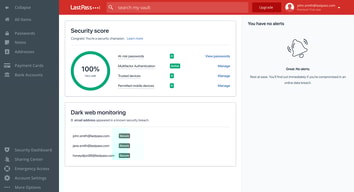
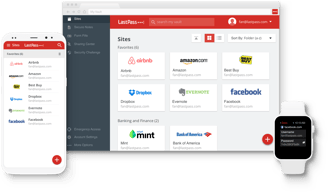
LastPass is a popular and easy-to-use password manager with premium features and great security tools and multiple account recovery options. Adding an advanced layer of security, the platform offers multi-factor authentication and time-based one-time password protection, dark web monitoring, a one-to-one authenticator, and secure notes. LastPass also offers effective pricing, with a freemium plan that covers extensive features and tiered plans with more robust security features and tools.
| Company | LogMeIn, Inc. |
|---|---|
| Year founded | 2003 |
| Company size | 1001-5000 employees |
| Headquarters | Boston, MA, United States |
| Social Media |

| Capabilities |
API
|
|---|---|
| Segment |
Small Business
Mid Market
Enterprise
|
| Deployment | Cloud / SaaS / Web-Based, Desktop Chromebook, Desktop Mac, Desktop Windows, Mobile Android, Mobile iPad, Mobile iPhone |
| Support | 24/7 (Live rep), Chat, Email/Help Desk, FAQs/Forum, Knowledge Base, Phone Support |
| Training | Documentation |
| Languages | English |






Compare LastPass with other popular tools in the same category.
The thing I love about LastPass is that I can set a password on the go on my phone and then use it on my desktop later. Or vice versa. It's just so convenient.
I don't love that from time to time it won't unlock the vault until you click a link sent to your email. I tripped over that a few times. Not very intuitive.
I dreaded having to remember passwords so I kept using the same one for everything. I hate jotting complex passwords down too. So this helped me fix all of those.
The ability to have all your passwords at the tip of your fingers, whether on mobile or on a browser. LastPass also helps with creating unique and secure passwords for all your platforms, without the hassle of writing them down or remembering them.
Occasionally the integration of the LastPass app on an iPhone can be clunky, which is only a mild annoyance and requires only a few extra clicks.
LastPass helps with creating unique and secure passwords for all your platforms without the hassle, and unsecure method of writing them down or remembering them
I like how easy it is to use LastPass on all my devics.
I cannot think of a single downside to using LastPass.
LastPass helps me keep all my passwords organized and up to date.

LastPass has helped me to keep a lot of critical information more securely organized. I do like the ability to auto-generate secure passwords as well. Additionally, I have been able to set this up with family, and family sharing has allowed me to assist my aging parents maintain security on their accounts. In the past, they would write information in notebooks or scraps of paper, and / or rely on my memory for the information. Now, even if they forget, I can login to the family sharing portion of LastPass and provide the details they need in a much more secure fashion.
I'm not sure that I have dislikes at this time. Some of the things that are maybe small annoyances are there to provide for my security, such as the two-factor authentication on my phone where I am logging-in each time I need to log-in to a new app. HOWEVER, those things can be tweaked in your settings.
LastPass identifies where there are data breaches and where my information might be at risk. I understand this is reactive problem solving, but it does help to receive those notifications so I can react quickly. Where they are pro-active is scanning your information to show you ahead of time where your passwords might be duplicative, re-used, or weak. This allows me to either allow the system to auto-create a new password where I might be using a duplicate or create my own new password. There is also information in this scan that shows when it was last changed, etc. I think this detail is all very proactive for the user and can provide for stronger passwords and greater peace of mind.
Ease of storing passwords as I fill them in on sites, as well as offering to fill them when I log in. Password generator with custom options for length, symbols, etc. Sharing folders for passwords shared amongst family.
Sometimes the Last pass button on a field is overlapping with a "Show/Hide" button on a website. I have yet to find a way to get around that annoyance. Not LastPass' fault but a little inconvenient.
Generating secure passwords, keeping them safe. Sharing passwords with others and having private vaults for personal passwords. Helps me keep all my passwords strong and sorted.
We have over 30 employees and 25 online tools and software platforms, and this is the best way to save those links and passwords.
I would love a way for there to be a better way to save the login links.
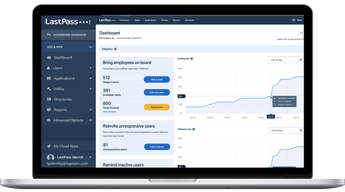
We have a large and growing team, with a few shared logins, and it's easy to onboard new staff with LastPass.
Great tool, simple to install, makes doing everything online easier, more secure and simple.
Nothing. One of the best tools I've ever used.
No more recalling passwords and credentials. Fast and simple logins in the most secure manner possible.
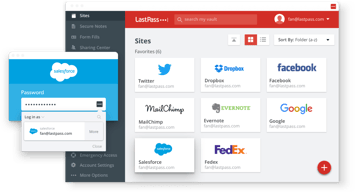
We can access accounts, make notes and store critical information in one easy-to-use app. Data can be shared, and LastPass does a great job launching sites. Creating folders and making favorites helps organize and store volumes of sites and info. I found LastPass intuitive to use and generates strong passwords. Each "card" stored includes complete information, inuitive
Lastpass seems to have a quirk when searching. One oddity is that there doesn't seem to be a way to navigate to a folder via the search bar easily. One can collapse folders, so it is wise to organize entries into folders right from the start. Many of my imported passwords remain unorganized, so I have to wade through many to get to the desired folder.
I store all my business accounts and all the family information. I use a top folder with nested folders for the business and our family members. LastPass provides good support, and their "Notes" area for each entry helps significantly with the many business and other accounts.
I have been using LastPass as my password manager and a central location for all my other personal information like bank account numbers, driver's licenses, credit cards, passports, software licenses, and more.
I can't think of any things that I dislike.
It keeps my passwords, and personal information like passports, driver's license, software license, credit cards, bank accounts, and so much more. I love the ability to update my individual passwords and generate multi-digit passwords on the fly. I also like the one master password with military-grade security to protect my information. I also love using this on my PC, phone, tablet, etc. If I can access the internet, I can get to my account.
I can securely access all my passwords from everywhere I am. I also appreciate that I can use more complex and random passwords than ever, much better than keeping all that in my head.
The mobile phone experience may be a bit clunky; it often prompts me for my LastPass sign-in more than once for the same password input. But it does its job well otherwise.
Helping me maintain stronger passwords. It is a significant burden off of my shoulders to know I am following better security practices without any additional effort.


