
Unclaimed: Are you working at Less Annoying CRM?






Less Annoying CRM Reviews: 4.9/5 — Highly Rated
Less Annoying CRM is a popular customer relationship management solution deployed via the cloud and offers tailored configuration options for users. It’s an all-in-one platform that provides a big-picture overview of contact details, project data, and file management. It also offers applications for contact management and sales force automation. The dashboard is simple and straightforward and includes productivity tools that support lead tracking, note-taking, calendars, and task management.





| Capabilities |
API
|
|---|---|
| Segment |
Small Business
Mid Market
|
| Deployment | Cloud / SaaS / Web-Based, Mobile Android, Mobile iPad, Mobile iPhone |
| Support | 24/7 (Live rep), Chat, Email/Help Desk, FAQs/Forum, Knowledge Base, Phone Support |
| Training | Documentation |
| Languages | English |

Compare Less Annoying CRM with other popular tools in the same category.

Having used some very 'big and expensive' CRM's in my corporate life this was very refreshing. Does what it says on the tin. Less annoying indeed. I can find what I need; track what I want to; integrate to my 'field' devices. Very happy with the product - and the support team are fabulous.
To be fair; the things that I HAVE disliked have all pretty much been resolved as they continue to evolve and improve the product. There is nothing current that I can complain about.
The Fortune is in the Follow-up! Being able to simply create any number of pipelines for products and services has helped to increase sales to new clients and cross sell/up sell to existing.
I live everything about this product from ease of use, intuitive, simple and very cost effective. Awesome support!
I don't really dislike anything about this product. I wish the company would share their roadmap of their new features. I think there is a huge potential to solve/assist many challenges that small to medium size companies face.
We are a small company so we need to have multiple employees training in different tasks. This product helps us streamline our company processes through pipelines. Sharing Calendar and assigning task and events helps us stay organized.
We had previously used Outlook for our 4,000+ donor database. Less Annoying is so much easier to use...creating new clients and exporting is a breeze.
There may be a solution to this but we list the individual's donations under background information and not sure if I would be able to generate a report showing each donor's financial contributions.
Keeping an accurate donor database with exporting capabilities and generating reports.
Having my clients' information readily available and Calendar reminders.
Nothing. There is absolutely nothing I dislike about Less Annoying CRM unless you want me to lie which I CANNOT do.
Easy access to my clients' contact details
Very easy to use and clear visuals. The support staff are excellent and have always answered questions in a thorough and timely manner. Contacts are easily connected to each other. I love the connection to email as well as Mailchimp.
I have a couple of things that I would like to see added but I actually feel like if I reach out, my ideas will be considered, such as being able to make a contact non-current (ie they have left the company or are on temp leave) so that I can keep all of the information connected rather than deleting it)
Our small team all work remotely and we didn't have an effective way to manage leads and contacts with current and prospective clients. We can now easily see who last reached out and what it was about.
the way it captures the email addresses of everyone i email. I now have 2000 emails to keep updated due to lacrm
i wish it did recurring events. Also I REALLY wish it was more project management
records of emails that is easily searchable
I love the fact that it is easy to use and I don't have to spend so much time training a new employee to use it
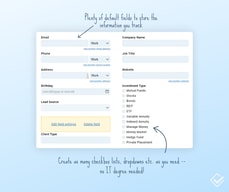
I would love if the add contact page is customizable so that we can add information that is useful to us and remove others
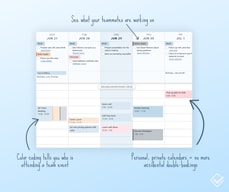
Communication between employees is much easier . The calendar and reminders has helped us a lot
The ease of use of the CRM: moving from one area to next (e.g. calendar to contact), the ability to keep track of project via pipelines, the accessible price point for a company of our size and the additional features with other programs (e.g. Emails and Survey Monkey). I can quickly view information regarding a contact, see which team members (using the "groups feature") have had interactions with that contact and see if we sent them emails. Multiple calendars have allowed me to organize my family agenda, while keeping it private from rest of my team.
Calendar: when multiple appointments overlap in the same day, the entries shrink into a funnel shape. The lack of ability to create automatic reports about late tasks - a manager must oversee this and create a list of overdue tasks and contact each employee about late tasks.
The pipeline system has helped us keep track of prospects for marketing certain of our services. The synching with Mail Chimp has allowed us to easily update audience for our Newsletter.
It was fairly easy to transfer my ACT CRM database to LACRM. Loving having access to all my info from my Mac and iPhone everywhere I go. Great product. Glad I found LA CRM! I highly recommend it.
There w is no way to transfer the ACT groups and notes to LACRM groups.
Cloud access
Rule No. 1 with a CRM is, if it's hard to use, your people won't use it. With LACRM, it has such a simple, user-friendly design yet lots of flexibility for customization, I find it nearly universally used by all who need to be using it. What I particularly like are the short videos attached to learning about how any feature works, and how fast they are to respond to any questions.
They have a good workaround for not having aapp (copy and save a link from the website to your smartphone home screen - it saves a smartphone app-looking icon and opens a smartphone-friendly screen, but a lot of critical features are absent from the smartphone-friendly screen); a workable but somewhat inelegant integration of email correspondence saving; only integrates with MailChimp - no Constant Contact integration (not a big deal if you're launching an email newsletter after the fact but a hurdle if you are already with Constant Contact)
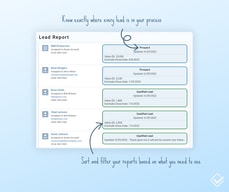
Managing leads and understanding where they all are within their purchase journey; understanding the customer buyer journey better; forecasting revenues,; being able to respond to customer questions at th home office for clients who are in our other territories; etc.
The intuitive, easy-to-use website interface that can be customized without becoming too complicated. The customer service is prompt, personal, and accurate.
The report feature is a little bare-bones and not as customizable as we need. We make it work the best we can, but it requires some more work on our end.
We have downsized from a much larger, less manageable CRM to Less Annoying, and employees remarked immediately how much easier it is now. Even less tech savvy employees are able to check the CRM and perform basic tasks without instruction.
I like the way it can integrate into our exchange email server and keeps all of the info straight, when I need to call people back, etc certainly not the programs fault.
Internet based so sometimes I'm limited if I'm traveling or out of the office. It can be spotty, service wise but not the services fault.
Keeping my call log. Remember details about a customer or customer to be and makes the personal touches simple.
The best part of LACRM is how easy it was to get started and use.
I dislike how records have to be assigned to users. Everyone can still see the record but it still needs a user to be assigned to it.
We were using old database software to manage our members, then importing data to an email service and sending emails. With LACRM we manage all members and the email lists are synced with MailChimp. Plus the best part was that we customized the pipeline functionality to track grievances that we have filed. This was a hidden gem we didn't even realize was possible unitl after we subscribed!
The software is very intuitive and well thought out. The tech support has been excellent
I am pretty happy over all. I am in the contacts area most of all, and it would be helpful if the "Edit Contacts" was at the top of the page instead of on the lower left. I have to scroll down every time I want to edit. Takes time that isn't really necessary.
Managing an effort to contact a mass of new potential customers. These are cold calls and require a lot of attention to time lines and other details
We were up and running within minutes without issue. Customer service was and still is prompt in resolving any issues or questions. It's also easy to import and export our data out, so we don't feel like we are committed to using this forever if we outgrow it.
This is a super simplified CRM which has pros and cons. I could be wrong, but it's not very scalable. I'm using Spark email for a Mac computer, so I have to remember to Bcc the auto log email address to record customer interactions and sometimes I forget which causes a gap in the thread. I don't think there is a way to drop an email into the lead pipeline after it's sent.
Keeping up with leads and contacts from the multiple channels. It has helped our organization stay consistent with who is managing what and anyone can see the last point of contact, or status of a lead.
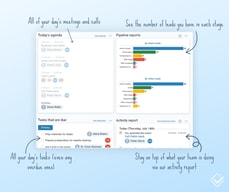
For me, CRM allows you to organize your day. I can not worry and be confident in what tasks are ahead of me today, when they need to be decided, with whom I will communicate, with whom I meet today. A clear and easy-to-use interface allows you to add tasks with a few clicks, convenient reporting capabilities.
There is nothing that I do not like. If I have some problems, thanks to support they are quickly resolved. I definitely like this product.
One of the most convenient features for me is a list of reminders about the task and event that I receive by e-mail every day. I have an endless list of tasks that I need to do and it is CRM that helps me in this and makes my work easier.
I have a place to store anything I need to know about our contacts list. Also, I can see all of the notes, tasks, files and pipeline info connected to a contact. I can say that with our easy search feature, and we will never have distress finding a contact again.
Actually, we have a very useful working process with this platform. I can say that during our work we never had a problem. All stage of the program works well.
We can install sharing with other users at our company so that anyone can stay on the same sheet, and we can synchronize with Google Calendar for a simple approach from our phone devices.
Less Annoying CRM allows me to better organize my day. I know exactly what tasks are in front of me, when they need to be decided, with whom they will communicate and with whom I have a meeting today. Basically, I use it on the iPad (the tablet client is just perfect). Good reporting capabilities. A clear and easy-to-use interface allows you to add tasks with a couple of clicks.
Quite a large price. We looked at cheaper analogs, and they cost less. But our management decided to choose Less Annoying CRM. I use the integration with Google Calendar, but I also wanted to be able to sync with Apple Calendar.
I save a lot of time with this service. Also Less Annoying CRM helps us not to lose more than one customer, that's why we increased our income.

I like that with this software I can optimize the function of the sales group. Also, I can monitoring and assembly of the request of potential clients. Of course, I can say that supporting interior correspondence between all departments it is the great things which will help us to increase our sales.
Actually, I don't have any bad issue with this platform. As for me, I like how is everything works after installing that program. I'm glad that for all of us to work with all of the tools are easy.
We like that our correspondence between colleagues is spent in one scheme and let us react as soon as possible to new tasks from our leader. Manager of departments can track the percent of sales plan realization, see the number of clients that are at one or another degree.
LACRM gives me exactly the level of functionality I need for my new consulting business. The workflows are elegantly designed and there is almost no needless clutter. The clean and simple interface is perfect for me as I juggle CRM with many other tasks and I need to get in and out quickly. Very solid, well-designed, suitable to task product.
My one issue is that the integration with Gmail contacts tends to create duplicate records in the CRM. To be fair I haven't followed up with LACRM tech support (which has been excellent otherwise) about this and it's been a minor problem so far. Right now there is no integration with my email marketing tool (iContact) and that is a bit of a hassle. Integration with MailChimp is there but that's not what I use. It would be nice to have a mobile app, but actually Safari works just fine - just a bit more convenient and probably more functional with a mobile app.
I'm tracking my activities reaching out to and following up with contacts. LACRM keeps me on top of my communications and makes it really easy to manage opportunities through my pipeline. And so I do the work I need to do. What more could I ask for?
I like that software because I can to control all my contacts and of course an easy way to track leads. I would like to say that set up is very simple and takes just e seconds.
I don't have any bad cons about it. And if I have some issues I will have support. Support you can receive for free through email and phone. I like that product.
With all of this nice tools makes my work run and be more clear. With this software, we don't have any complex plans.Helps us to track our sales. Cares about our increase.
Ease of use is the biggest. Also, an ability to create your own pipelines. This is powerful as it can be completely customized to any business; it does not need to be solely sales focused.
No recurring appointments on calendar. LACRM is planning to add this in the future.
Ability to view client contact information anywhere and track client interactions. We have been able to also use this tool for our non-profit work by segmenting the contacts via groups.
Ease of use is great and has great functionality allowing me to run my region in a very organised way
Doesn't do Outlook syncing yet (but does google)
I am able to manage my large region with ease
I am such a big fan of the Less Annoying CRM. I am an extremely organized person who loves making lists and checking off tasks so the task list in my workspace is so efficient and ideal for me.
I don't like how my coworkers don't understand the importance of the CRM!
We're losing less work because our clients don't fall through the cracks as easily.
I really this program because you can get up and started within minutes. As you get more familiar with it you can keep adding more things and it is a great value for price. Some CRM systems just seem to overwhelm me but for this was comfortable using this right from the start.
The only thing is it doesn't seem to have true mobile app. You can get to work work on your phone and I am quite sure they will address this in the future.
We use use it to assign tasks to people and also keep track of leads. I am going to start using it more to track jobs during tax tax season..
I love the fact that it is so easy to use. Everything is available in the top menu making it easy to find where things are located.
There is nothing that I don't like about this product
I have been able to store clients details and jobs online which in turn is available to me on my phone when Im out on the road. It is easy to distinguish high priority jobs from low priority jobs and if I need to bring up an address of a client quickly on the run the my phone can do that for me.
I like the customization level you can reach. We run some campaigns that require strange titles, and it is very easy to manipulate the CRM to your own.
Sometimes after adding or deleting a name, there will be two contacts or one contact for the company as well as one for the contact. Also, updating sometimes will create a new contact. I am sure this is my fault, just cannot figure out why.
I am better organizing our database and keeping in better constant contact with clients.
1) Ability to customize fields 2) Ability to download excel backups and CSV backups (VERY important) 3) Sync with Google 4) Very intuitive 5) Great customer service 6) Pipelines/Groups are helpful 7) The Workspace screen is awesome 8) Affordable
1) I wish the mobile phone screen had all the options available like "Activities" at a glance. I can't seem to find that option. 2) Perhaps a dedicated phone app would be better. 3) I wish we could customize the contact screen. For example, perhaps if the components of the contact screen were modular and could be moved elsewhere on the screen or resized. 4) I wish all fields would backup to Google but I realize that's probably impossible. 5) Perhaps an auto backup feature or "backup" reminder? 6) I REALLY wish I could color code calendar events rather than all being in blue. I also wish there was a "repeating" event feature for vacation days, birthdays, other repeating events.
Ability to track activities with clients and ability to track emails back and forth with clients. Ability to task, group, and "pipeline" are very helpful. Basically helping me keep up with client activity is most important.
Ease of use. Automatic back-up. Very helpful staff.
Nothing noted so far. It seems to do what I ask it to
Appointments, notes, progress
Ease of use, compatibility with Google and MailChimp, and the price
I wish it was compatible with Zapier and more software.
Segmenting contacts into niches and services