

Unclaimed: Are you working at MailerLite?
MailerLite Reviews: 4.7/5 — Highly Rated
MailerLite is straightforward and easy to use. The platform’s simplicity is actually its strength–but only because MailerLite’s simplicity is paired with robust features that are designed to help businesses grow their subscriber base and in turn, the growth of their business. With MailerLite, users can create professional-looking emails without having to use code. Subscribers can get access to advanced targeting features, A/B testing features, supports email delivery by timezones, and offers extensive tracking and monitoring reports.

| Capabilities |
API
|
|---|---|
| Segment |
Small Business
Mid Market
Enterprise
|
| Deployment | Cloud / SaaS / Web-Based, Mobile Android, Mobile iPad, Mobile iPhone |
| Support | 24/7 (Live rep), Chat, Email/Help Desk, FAQs/Forum, Knowledge Base, Phone Support |
| Training | Documentation |
| Languages | English |
MailerLite Pros and Cons
- Offers a forever free version
- Has an auto resend feature
- Click map feature delivers great audience behavior insight
- Supports time-zone based sending
- Deliverability can greatly improved

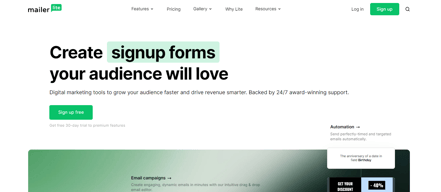
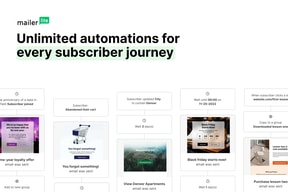

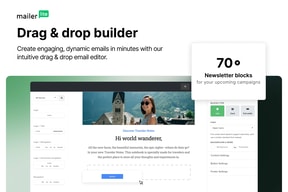







Compare MailerLite with other popular tools in the same category.
The MailerLite interface is easy to use and understand for any user level.
Emails from MailerLite get caught in our server so we have to send to a Gmail account before forwarding to our email accounts. It adds an extra step to our daily newsletter which can be tedious and time consuming.
We use MailerLite for our daily newsletter. The interface allowed us to easily create and manage our newsletter on a daily basis with little to no issues.
I like the design of the panel, it look like apple solution. Price are awensome, better them Mailchimp. Alove to A/B tests, resend option. And for lasthey have probably the best email editor. Eveery noob can create now preaty designed emails.
Guys forum MailerLite promised us a landing page creator, but nothing happened in this case
- Communication with custommers - Product launch camapagins - A/B test of our messages - Autresponder funnels - Automatic mails imported forom our company blog (RSS)
How simple it is to navigate my dashboard. The great customer service.
I wish the new mailerlite was a seamless transition or available as an upgrade. I logged in only to realize I would have to relearn the system. While I embrace challenges, I'll just stick to the clasic platform for now.
They make it easy to reach readers.
It is so eady to use. As I'm not a tech person that is beyond important for me.
No at all for free version. In paid version, hard to find a person for help with problem not addressed in knowledge base articles.
Bulk emailing in campaigns and automated email responses in marketing funnels.
The customer service is fast, friendly and just brilliant. The only online chat model where i feel the staff are still going the extra mile. I love the way you can make a good looking email with your drag and drop editor as opposed to other platforms we've used, you need to be a HTML whiz to make anything that looks professional. I use almost daily and find that the layout of drafts/outbox/in progress makes it very easy to manage.
There are small glitches which as a regular member, you learn to work around but they have gotten me into bother before. The HTML importing tool often wont work for me but doesnt give reasons for the errors which would be very helpful to save the customer service team looking into it.
As an app that provides advertising for industry manufacturers, they can send us their email content and we can upload it to send to our mailing list. Its important that we have a smooth provider to allow us easy and fast upload of content.
The drag and drop editor makes it pretty simple to use. Their documentation is good and covers most things. And their support is extremely good.
I've just migrated from MailerLite Classic to MailerLite New and I have to say that it has been pretty horrendous. Although most things were migrated, they weren't set up correctly, so it wasn't really worth bringing them over. If I'd known, I would have just started from scratch!
I have managed to automate many of the processes I need using MailerLite Integrations, which saves a lot of time.
MailerLite is reasonably priced and easy to use for a small business, non-profit, or blogger that doesn't need all the bells and whistles of some of them more expensive email marketing services.
When it took over a week to approve my client's account, there was no way to contact customer service. I ended up using a different client's account to contact them.
It's getting blog posts/rss feed out to subscribers.
Its automation. I like to integrate it with zapier, and the analytics are great.
I find some bugs with the rich text edition. Some functionality is kind of annoying.
Build a community around newsletters. To write, schedule and send emails.

Piattaforma di semplice utilizzo anche ai meno esperti nel campo ma che offre diverse opportunità di crescita ed evoluzione.
Che non ha una versione ottimizzata per mobile che consentirebbe di gestire eventuali problemi quando si è lontani dal desktop.
Una gestione ordinata e più efficace della lista di iscritti, ottimizzazione dei flussi di lavoro attraverso le automazioni.
It is fairly easy to set up. And the migration, once I started it, was fairly easy to do (once I realized I needed to clear my cache from old data/website information). It was completed easily within 1 day, even with some updates.
I wasn't looking forward to moving my account from the old version to the new one. But I was 1 month away from losing my account so I had to.
Access to my readers. Once they sign up for my newsletter, I now have access to them for other aspects of my author business.
You have access to automations in free plan
When you stop automation, it will not continue from where it was stopped
Automating emails
I had some issues (caused by me) with an automation, and when I contacted support for help, they were fast, positive and fixed the problem quickly.
I wish it was possible to search up addresses and tag them, instead of having to upload a csv
Sends my newsletter, templates and automations. Now my list is growing, it is easy to use and adjust for my needs.
MailerLite is easy to use and 24/7 support is an excellent feature. If subscriber limit overcome, automatic upgrade can be undone before 1 hour.
Lack of native HubSpot integration. Sometimes metrics have no sense for example 4500% open rate.
Email campaings are correctly send and so helps sharing offers and promotions for interested contacts.
Even a non-techie like me can manage most of the features including setting up automations, landing pages and regular newsletter campaigns
Migrating from the Classic Version to the New has had a few challenges. The free 30 days help was needed. The help desk has been brilliant though and the staff have been fast and effiencient.
Having automations for marketing is a massive time saver. It does take me a while to set new ones up but once they're operational they are a stress free way to build my email list
Great support to help me resolve broken accounts so we could migrate them. I like the intuitive environment, the option of a free account with a large number of contacts for beginning entrepreneurs. Easy integration with other systems.
In the new version, it is not possible to add more users in the free version. Cannot save templates. I feel a bit of pressure to move to the paid version. I liked the environment of the Classic version more.
communication and client care, sales
One-on-one customer service as easy as clicking on the chat box makes MailerLite a total win for my business. I have not yet used the features of the new MailerLite platform but I expect the forms, automations, and email creation will be even easier than MailerLite Classic. Great flexibility, reliable, and service I can count on. My plan is free until I reach 1000 subscribers - I like that MailerLite will help me grow.
As I'm on a free plan, I can't really complain, but being forced to migrate to a new platform took several hours to complete - and I will still lose access to 3 years of my old newsletters when MailerLite Classic is discontinued.
Delivering emails to my subscribers
MailerLite is easy to create and duplicate campaigns, and the feature I love most is the customizable auto resend to unopens.
When creating a campaign and getting it set up just the way you want it can be a bit clunky at first, but after getting the hang of it, it's very user friendly.
MailerLite is allowing me to resend campaigns automatically to people who did not open them the first time. I can choose when it goes out so it allows us to get information into our client's hands without having to manually recreate and send it all.
It was a pretty simple and smooth transition importing and exporting my subscribers from Mailchimp to Mailerlite. The interface is easy to use and figure out - form building, campaigns, automations - very straightforward and simple to use. Excellent customer chat service!
Making sure that Mailerlite is integrated with all of my apps, especially Facebook ads, my website, and other integrations has been a bit of a challenge, probably more because of my lack of knowledge in this area than anything else.
Helping me to grow my audience and create efficient emails.

You can have as many as 1,000 subscribers on the free tier before needing to upgrade, you receive a lot of value before spending a single cent, and automation is almost unlimited.
A little more help for workflow creation, some tutorials will be best for beginners, also groups and segments can be somewhat confusing, had to check my newsletter{s link manually, couldn't locate a tool to fix this.
Before using this product we had to create a weekly newsletter by hand, using a lot of time and resources to have it done on time, after setting up, doing the job and automated for future deliveries was so easy.
I love how easy it was to setup and how easy it is to review your campaign metrics.
Honestly, I think it's great for the most part. Sometimes (not often at all) the drag and drop feature can be a little finicky.
It's letting me connect with my audience, get new leads and save hundreds a year.
Simple interface, drag and drop builder, easy contact management, simple automations that fulfil most cases.
It's a little too simplistic. I wish there were more complex automations, or easy ways to really segment and tag subscribers based on their actions
Sending emails to subscribers and turning leads into customers
I was immediately passed to someone other than a bot. That person took it upon themselves to fix my problem and tell me how to deal with it next time.
When you're new to the site, even the videos don't clarify procedures enough.
I was not able to locate a campaign I started, but didn't finish. Hopefully, I'll be able to locate it now and continue.
Easy to use, very quick and efficient customer support.
It is a bit limited in terms of what you can do with design and templates
They have helped me with accessing the company account when we had issues, and also tried to help with figuring out the issues of our campaigns
The reasons I always recommend MailerLite (and MailerSend as well) to my clients are: - Integrated email features with Sites and LPs - Very cost-effective compared to its features - Clean and easy-to-use dashboard - The support team is very uplifting Two things I've been waiting for is: - New API working with Make (formerly Integromat) - Google fonts for Sites and LPs
I don't dislike things, but I wanted to use MailerLite with: - Faster loading when editing Sites and LPs - CDN feature for the global market - Quiz feature with complex logic For me, the Quiz feature didn't work correctly with some complex logic, so I should be trying it once again.
- Integration email features with websites - Cost reduction for SaaS products - Data-driven decision-making with internal tools and external apps
We chose MailerLite because it was cost effective and offered both manual campaigns and automations. What I like the best is the fast and great support, I get help with anything I need in minutes.
A few things bothers me: - Having to manually ask to raise the account approval level when we exceed subscriber count, one time that stopped all our automations without us noticing - Adding emails to automation flow scares me, as it can start over and send to all subscribers again if I dont remove the que, and that might stop some emails I actually wanted to send from being sent - Custom email designs – we had to upgrade to premium for a few months to get help with this, and I didnt get what else we got for paying a lot more
Setting up automations based on our users behaviours and also creating manual campaigns. It is everything I expect from an email tool, at a reasonable, startup friendly price.
Starting to find my way around MailerLite, and one of its best features is the clean, non-complicated layout and ease of use. The documentation and videos are well done to assist with each step.
There is nothing I dislike so far, and I have not had any issues to complain about. The support team is quick to respond in a professional manner which is one of my main criteria when choosing software.
MailerLite is the tool I utilize for marketing, campaigns, and automation. I hope to take advantage and learn the software inside out to apply procedures and cut down on admin time to Maximize every moment and work smarter.
MailerLite is a lightweight, open-source email-sending solution and is very easy to use. Most of the features that you'd expect from an email-sending service are already built into it. You can send emails from your domain and federated domains without extra work. It also supports priority spam filtering, autoresponders, scheduling and tracking. So, if you need to send out large numbers of emails regularly and don't have time to set up a hosted service, MailerLite is the right choice.
Sometimes messages don't get delivered to Inbox when sending in large numbers.
You can use MailerLite to send customised emails to your customers. Depending on your business type, you may want to send one-time promotions or reminders about upcoming events. You can also send regular newsletters and engage with your customers by sharing content on social media. You can track which messages are most effective and analyse the data that goes into each email. It also allows you to create automated campaigns that send personalised emails based on various criteria (like location, time of day, and other factors).
Crea, envía y analiza tus campañas de email marketing fácilmente su facilidad en la entrega de correos electronico. Su usabilidad y Crea, envía y analiza mis campañas de email marketing fácilmente.
El costo de algunos recursos de pago, los planes anuales y mensuales, no son tan asequibles. ah y la dificultad para guardar borradores con imagenes, para los que no tenemos tanto conocimientos.
Me da la facilidad de mantener a mis clientes y alertar a futturos clientes, sobre ofertas de productos y otros detalles mas. Me agiliza la comunicacion y captacion de gente.

Great for mailing lists and blogging with a good customer support team. Spoke with Marianela and she solved my issue.
It's still slow and clunky in places, especially when it comes to consistency across the different sections of the development side.
Gives me a good platform to mailout to subscribers easily

I was easy to move my email list into MailerLite. There were also many templates to choose from for my pop-up form.
Forms were not that easy, and I was missing an option needed for integration with my WordPress site. But when I talked to Joseph from support, he walked me through the issue.
Growing my subscriber list for my newsletter