

Unclaimed: Are you working at Moosend?
Moosend Reviews: 4.7/5 — Highly Rated
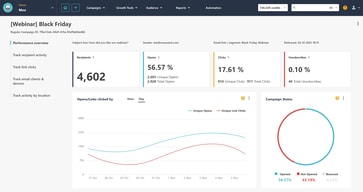
Moosend’s incredibly efficient customer support is the primary reason why people love this platform. Their excellent customer support range provides excellent live chat to access a comprehensive knowledge base, as well as video tutorials. Advanced features are available even under the free plan and the platform provides comprehensive reporting that provides geolocation insight as well as heatmap data. Notably, Moosend has a free forever plan that lets users send unlimited campaigns if they have less than 1000 subscribers. Higher tiers offer more robust tools and features as well.

| Capabilities |
AI
API
|
|---|---|
| Segment |
Small Business
Mid Market
Enterprise
|
| Deployment | Cloud / SaaS / Web-Based |
| Support | 24/7 (Live rep), Chat, Email/Help Desk, FAQs/Forum, Knowledge Base, Phone Support |
| Training | Documentation |
| Languages | English |
Moosend Pros and Cons
- Advanced features available even under the free plan
- Prompt customer support accessible on live chat
- Comprehensive reporting includes geolocation insight and heatmap data
- Email editor and signup for builder can be hard to use
- Design template selection is quite basic







Moosend charges $51 a month for 8,000 contacts and $70 for 10,000. That is $6.38 per thousand at the lower tier and $7.00 at the higher one — growing your list by 25% raises your bill by 37%, and your rate along with it. The same reversal happens again between 75,000 contacts ($4.44 per thousand) and 100,000 ($4.99), and once more between 500,000 and 600,000. Volume pricing here is a general trend rather than a guarantee, so check the tier above yours before you grow into it.
- What it is: An email marketing and automation platform priced by contact count.
- Best for: Small and mid-sized senders who want unlimited sends without per-email metering.
- Pricing: From $7 per month at 500 contacts on annual billing; $9 monthly. Verified July 2026.
- The honest catch: CC/BCC functionality and SSO are add-ons rather than plan features.
What Is Moosend?
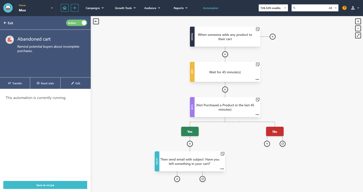
Moosend is an email marketing platform built around unlimited campaigns and sends, with automation workflows, landing pages, subscription forms, an SMTP server, and transactional email. It claims more than 100,000 customers. The distinguishing commercial choice is that you are metered on contacts, not on emails — send as often as you like to the list you pay for.

Three plans sit above the trial: Pro (the standard published tier), Moosend+ (“build a plan based on your needs”), and Enterprise. Only Pro carries a published price; the other two are configured or quoted.
The free trial runs 30 days without a credit card, but note how it is constrained: one published automation workflow, and one unpublished subscription form and landing page. You can build those last two; you cannot put them live.
How Moosend Works
- Contacts are the meter, on a ladder from 500 to 1,000,000.
- Sends are unlimited on every tier.
- Three billing terms — monthly, biannual (−15%), annual (−20%).
- Pro caps team members at five.
- Moosend+ is add-on driven, with nine features listed as extras.
- A 30-day trial, no credit card, with publishing restricted.
Moosend Pricing
Captured from Moosend’s pricing page in July 2026 in US dollars, reading the full contact ladder across all three billing terms.
| Contacts | Monthly | Biannual | Annual | Per 1,000 contacts |
|---|---|---|---|---|
| 500 | $9 | $8 | $7 | $14.00 |
| 1,000 | $16 | $14 | $13 | $13.00 |
| 5,000 | $48 | $41 | $38 | $7.60 |
| 8,000 | $64 | $54 | $51 | $6.38 |
| 10,000 | $88 | $75 | $70 | $7.00 |
| 25,000 | $160 | $136 | $128 | $5.12 |
| 75,000 | $416 | $354 | $333 | $4.44 |
| 100,000 | $624 | $530 | $499 | $4.99 |
| 250,000 | $1,520 | $1,292 | $1,216 | $4.86 |
| 1,000,000 | $5,840 | $4,964 | $4,672 | $4.67 |

What actually decides your cost:
- The volume curve reverses three times. At 8,000 contacts you pay $6.38 per thousand; at 10,000 you pay $7.00. At 75,000 you pay $4.44 — the best rate on the whole ladder — and at 100,000 you pay $4.99. It happens once more between 500,000 and 600,000. If your list is sitting just under one of those points, the tier above costs disproportionately more, and 75,000 contacts is genuinely the sweet spot of the entire rate card.
- The advertised discounts are exact above 25,000 contacts and rounded below it. From 25,000 up, biannual is precisely 15.0% and annual precisely 20.0%. Lower down, whole-dollar rounding distorts them — at 500 contacts biannual saves 11.1% rather than 15%, while annual saves 22.2% rather than 20%. Small lists get a slightly better annual deal and a noticeably worse biannual one than the badges promise.
- Unlimited sending is the real proposition. Every tier includes unlimited campaigns and sends, so a daily newsletter to 10,000 people costs the same as a monthly one. Against platforms that meter emails as well as contacts, that is a meaningful structural difference for high-frequency senders.
- Pro allows five team members. The trial gives two, Pro five, Enterprise “10+”, and on Moosend+ additional members are an add-on. A marketing team of six is already at the boundary of the published plan.
- Moosend+ is a base plan plus a shopping list. Transactional emails, hosted files, CC/BCC functionality, audience discovery, custom report dashboards, an account manager, extra team members, SSO and SAML, and a dedicated IP are all marked “Add-on” on that tier. It is genuinely modular, but it means the Moosend+ price you are quoted depends entirely on which nine boxes you tick.
- CC/BCC is one of those add-ons. Copying someone on a send is basic email behaviour, and on Moosend+ it is a paid extra. It is included on Pro and Enterprise, so this only bites on the middle plan — but it is worth knowing before configuring one.
Who Should Use Moosend
- High-frequency senders. The clearest case — unlimited sends means cadence costs nothing.
- Small businesses starting out. $7 a month at 500 contacts is among the cheapest paid entry points in the category.
- Ecommerce teams. Product view, cart and purchase tracking, plus AI product recommendations, are included rather than gated.
- Lists around 75,000. That tier is the best value on the entire ladder at $4.44 per thousand.
It fits poorly for teams larger than five people on the published plan; for anyone needing SSO without moving to Enterprise or configuring Moosend+; and for lists sitting just above 10,000 or 100,000, where the rate turns against you.
Honest Pros and Cons
Strengths
- Unlimited campaigns and sends on every plan.
- The whole rate card is published, from 500 to 1,000,000 contacts.
- $7 a month at the entry tier on annual billing.
- Ecommerce tracking and AI recommendations included, not gated.
- A 30-day trial with no credit card required.
- Three billing terms, so shorter commitments still get a discount.
Limitations
- The per-contact rate rises at 10,000, 100,000 and 600,000 contacts.
- Five team members on the published Pro plan.
- CC/BCC functionality is an add-on on Moosend+.
- SSO and SAML require Enterprise or a Moosend+ add-on.
- Trial forms and landing pages cannot be published.
- The biannual discount underdelivers on small lists.
Moosend Alternatives and How It Compares
- Mailchimp is the best-known name, with a free tier and steeper paid pricing.
- Brevo meters emails rather than contacts, which suits small lists sending rarely.
- MailerLite competes directly at the budget end with a generous free plan.
- ActiveCampaign is stronger on automation depth at a higher price.
- Klaviyo and Omnisend are the ecommerce specialists.
- GetResponse, AWeber and Constant Contact are the long-standing mid-market options.
For a broader survey, browse our email marketing directory.
The Verdict
Moosend is one of the better-value email platforms available, and the reason is structural rather than promotional: it meters contacts and leaves sending unlimited on every tier. If you email your list weekly rather than monthly, that single decision can halve what you would pay elsewhere, and it removes the quiet anxiety about campaign frequency that email-metered pricing creates. At $7 a month for 500 contacts it is also among the cheapest credible entry points anywhere, and Moosend publishes its entire rate card from 500 contacts to a million rather than hiding the upper half behind a form.
Publishing the whole ladder is what makes its one real oddity visible. The price per contact does not fall consistently as you grow. At 8,000 contacts you pay $6.38 per thousand; at 10,000 you pay $7.00. At 75,000 the rate reaches its best point anywhere on the card, $4.44 per thousand — and at 100,000 it goes back up to $4.99. The pattern repeats between 500,000 and 600,000. None of this is hidden and none of it is large in absolute terms, but it means growing a list from 8,000 to 10,000 raises your bill 37% for 25% more contacts. Check the tier above yours before you plan to cross it.
Two smaller notes. The advertised discounts are exact from 25,000 contacts upward — 15.0% biannual and 20.0% annual, to the cent — but whole-dollar rounding distorts them below that, so a 500-contact list saves 11% on biannual rather than the advertised 15%. And on the Moosend+ tier, CC/BCC functionality is listed as an add-on, alongside SSO, transactional email, and extra team members. Moosend+ is meant to be modular and mostly is; just be aware that its quoted price depends on which of nine extras you need, and that one of them is a feature most people would assume every email tool includes.
FAQ
How much does Moosend cost?
Captured in July 2026 in US dollars, priced by contact count with unlimited sends. On annual billing: $7 a month for 500 contacts, $13 for 1,000, $38 for 5,000, $70 for 10,000, $128 for 25,000, $499 for 100,000, and $4,672 for a million. Monthly billing costs about 20% more, and biannual billing sits between the two at roughly 15% off monthly.
Does Moosend get cheaper per contact as my list grows?
Mostly, but not always. The rate falls from $14.00 per thousand contacts at 500 to a low of $4.44 at 75,000 — then rises to $4.99 at 100,000. It also rises between 8,000 contacts ($6.38) and 10,000 ($7.00), and again between 500,000 and 600,000. Growing across one of those three boundaries increases your cost per contact as well as your total bill.
Does Moosend limit how many emails I can send?
No. Unlimited email campaigns and sends are included on every plan, including the free trial. You are metered on the number of contacts in your list, not on volume, so sending daily costs exactly the same as sending monthly. That makes Moosend structurally cheaper than email-metered competitors for anyone with a high send frequency.
How many team members does Moosend include?
The free trial allows two and the Pro plan five. Enterprise is listed as “10+”, and on the Moosend+ plan additional team members are a paid add-on rather than an included allowance. A marketing team of six people has therefore already outgrown the published Pro plan, which is worth checking before committing.
What is Moosend+?
A configurable middle plan — “build a plan based on your needs” — sitting between Pro and Enterprise, with no published price. Nine capabilities are marked as add-ons on it: transactional emails, hosted files, CC/BCC functionality, audience discovery, custom report dashboards, an account manager, extra team members, SSO and SAML, and a dedicated IP. Its cost depends entirely on which of those you select.

Compare Moosend with other popular tools in the same category.
It's extremely easy adding different types of containers and adjusting media content.
It could use an auto-save while working on an email and more information to get an RSS and Repeatable email working properly.
Getting more brand awareness and creating leads in a world that isn't friendly to marketing our industry.
E-mail sequence flo planner and smooth Automation
May be nothing yet of now may be Moosend going to be great day by day
Email Automation, funnel creation, Landing Page setup, essay integration
It's a very easy-to-use platform, with lots of tools that help you complete the job, plus a very very helpful support team that is always ready to help!
If I had to find something that I don't like, I would say that sometimes the "import users to list" function is giving you a hard time if the list is big and contains mistyped addresses or errors, because it won't skip the bad address and move on, but reject the whole list.
Moosend is a great way to send out your newsletter campaigns fast! It has a very easy-to-use editor and the overall UI is pretty straightforward. It has great Reportings & Analytics features that help you find out what is working better for your clients and help you improve!

Good points that I found about Moosend: 1. Very affordable plans compared to other email service providers. 2. Moosend is affiliate marketing friendly 3. Simple automation workflows to run campaigns.
Features that can be improved: 1. Landing page and form builder user interface can be better and smooth. 2. More customization options for the Landing page and form builder can be provided.
Moosend interface is very simple and a Lehman can also operate it. I use Moosend as a all in one funnel starting from landing page and opt-in forms, writing emails in the email editor, setting automation workflows for specific triggers and finally watching the statistics. It works as a sales funnel for my affiliate marketing.
The UI is very consistent what makes it easy to start working with the platform. You can get started rapidly but when you want to connect to other systems or do more complex stuff, you can. Pricing seems fair for what the product delivers. Documentation is provided and it was easy to find what I was looking for. And if you really have more questions: the chat function helped me out really fast.
Maybe I would also like to start a form from scratch, but for me that is a detail as you can create custom forms outside the platform and use the API as well. But what I would really appreciate is a longer trial - actually get the free tier back but with very limited amount of subscribers and such. This way it's easier to create a free account to show the platform to other people.
Sending out campaigns just got so much easier. Integrating with other systems was also possible so Moosend is being used for what it can do well (mails & automation).
1. Moosend is affiliate marketing friendly. 2. Moosend is very affordable compared to its peers. 3. Email marketing automation is simple compared to competitors.
1. Moosend landing page builder interface is not much user friendly. A bit slow 2. Email templates have room for improvement in the user experience and usability category.
1. Simple Email automation and workflow creation for email list 2. Landing page creation for my business and client's business too. 3. Pop up creation in my website
Moosend is the amazing; the dashboard is very intuitive, setting up campaigns is a user-friendly process from start to end. It is way superior to any other email platform I have ever used. The reports are very intuitive and it makes it so easy to send your campaign to non-opened contacts. Also the customer service via chat is fantastic - I highly recommend Moosend in every aspect.
There may be a few problems with the Google SPF and DKIM since when I updated the Moosend spf and dkim my gmail didnt get through to all my contacts.
a user-friendly email platform where I could easily see open rates, click rates, unsubscribes etc. And a platform that can give me good reporting and the ability to quickly send out emails to contacts that never opened your email in the first place.
Moosend was the easiest to use and get started with after using Mailchimp for the past few years. I tried out a few other systems while looking for a new way to send marketing emails but liked Moosend the best.
Occasionally, some of my lists don't load, and I get an error message, but usually I only have to wait a minute and reload the page to fix the issue. It doesn't slow me down much.
We used Mailchimp for our marketing emails for years, and they kicked us off without any warning. I found Moosend to be a fantastic alternative, and even after Mailchimp reopened our account, we have decided to continue to use Moosend instead because their system and features are so great! I'm excited to explore features like the ability to resend to people who didn't open my email.

The RSS Email Campaign feature. It makes the Campaign easy to configure, and it is better than Sendinblue. The App UX is smooth and does not bother. Campaign reports and performance monitoring is simple and effective.
List Cleaning service must be there to optimize the campaign performance. It is straightforward to integrate, making a lot of difference in the campaign performance.
Able to run campaigns without any downtime. The App is cost-effective and gives good visibility on campaign metrics/ROI. The Landing Page performance is trustworthy, and the data sync is real-time. We can track the conversions. There are options to put a Meta description, which I didn't see before.

It was simple, intuitive, and easy to use. When I had a problem, the support staff was very responsive and resolved the problems within 24 hours. We love the product and its resonance with our mission.
There is nothing to dislike, especially since the main user is Vega, a Cow who is determined to get the world to address the leading cause of climate change - animal agriculture.
Moosend is the perfect email marketing tool for Vega, Cow and Climate Healer (http://thecowintheroom.org ), who prides herself on her MooSense - the sense-making of a cow who is diligent, strong, honest, down-to-earth, and persistent. Much like Moosend. Vega sends frequent newsletters to her growing herd of VEGANs, who eat plants, plant trees, love animals and heal the planet. VEGANs as in Vitally Engaged Guardians of Animals and Nature.

Moosend is a simple and effective email marketing platform. It offers great layouts and customizations in email designs. Its user interface is clean and there is no learning curve. The best thing I liked about using Moosend is its automated functionality, It sends welcome emails and newsletters without any manual effort.
The analytics and reporting ability is lesser than its competitors.
With Moosend we have been able to reach audiences more frequently using its automated emailing system. The designing and customizing new layouts for newsletters were very easy using its drag and drop options.
I loved the pricing, firstly. As a small business with limited funds, this was terrific. It is user-friendly and has lots of features. Having used another provider in the past, I prefer Moosend.
There wasn't really anything I disliked. Everything worked as it should.
I need only the occasional mailshot, and Moosend helped me send out a professional email to numerous contacts. It helped me reach a greater number of people quickly.
Full Analysis of reports on sent mail blast
It takes much time for the mail editor to load.
Being able to share information with our clients made easily
A cannot tell a lie- the thing that drew me into Moosesnd was the adorable little cow. But, once in, I knew this was the place for me. It may sound silly (just as silly as choosing a company for their cute logo) but with my previous email service, I always felt so uninspired and ho-hum when it was time to create broadcasts. There is something about Moosend that makes it funnier for me. I guess the interface just feels a bit funner and not so cut and dry business-like. The setup process was quite painless and I easily imported my list from my previous service. From there, I was too excited to go through the tutorials and easily figured out how to create a beautiful template of my own and send out my first email with images and links. I have sent a few emails now and find deliverability high as well as click-throughs. This is one of those systems where, just knowing a tiny bit of how it works, I already have enough. But every time I go in, I take time to learn a bit more of what I can do and am I really impressed. Also super impressed with everything you get with the free plan. It takes the pressure off those of us with smaller lists and gives us time to breathe and work up to the bigger, paid plans.
So far, I am actually happy with everything I have used within Moosend. The only tiny annoyance I had (and it could just be that I didn't figure it out) was that I couldn't resize the images in my emails.
For me, walking away from a very expensive email service that felt cold and impersonal and into the free version (for now) of Moosend is a dream. It has exactly what I need for my small and growing list and gives me the freedom to find what works for me as I work on growing my list. Benefits are ease of use, actually looking forward to creating email broadcasts, and having high deliverability rates. Plus the helpful emails from Moosend and the space for growth.
It is very easy to use and you can try for free with full functionality as long as the email limit isn't reached. Also, it managed the unsubscribe process automatically!
I might be wrong here but I couldn't find the functionality to classify/tag contacts, which would be useful for the quick setting up of campaigns. I am still exploring, so hopefully this is something I've missed out.
I am trying to send out campaigns emails and also looking at automating and incorporating the email process into my clients' journey. Still exploring but so far, it looks good.
The customer support really helped with the onboarding and references to aid different aspects of setting up the site really helped as well.
Appeared quite complicated at the beginning but soon got used to the different stages involved
The ease of setting up a campaign along with the many different templates and offer make it a one-stop service
the support team was extremely helpful to get started, answered all my questions and gave tips how to improve my newsletter´s deliverability
so far I´m happy about what moonsend is offering .
my goal is to send a great looking newsletter that reaches the inboxes of my cutomers. Moonsend made this job easy
I have been using this tool for a year and I am quite satisfied. For up to 1000 unique subscribers it is completely free with no logo. One can easily set up email templates and it has detailed analytics-email open rate, click rate, etc.
UX/UI part needs improvement also sometimes emails are landing in the spam folder.
Unlimited emails for up to 1000 subscribers is a very attractive offer. Workflow options are available even in the free version.
Moosend is very intuitive and easy to use with an interface that is drag and drop. Truly pleased with all aspects of the program.
Nothing at this point as it's easy to use
We need to send a weekly newsletter to our customers and Moosend allows us to do that is an easy to use platform.
I love the workflow, and the customer support is amazing.
Some rigidity in places, but often there is a viable workaround.
Need to keep our membership base connected and reach out to potential new members. I want to communicate in a way that is enjoyable to visually read etc.
Moosend is an incredible email marketing tool. It provides a wide range of templates to customize layouts according to the campaign. The user interface is clean and super easy to navigate. The subscriber segmentation function is the best thing I liked.
Sometimes its automatic email-sender function fails to deliver bulk emails.
Moosend helped us to increase our campaign conversion rate using its robust user analytics and segmentation. Also, it requires a simple drag and drop process to customize everything.
Ease of getting started with set up for initial campaign and mailing list
Didn't have any walk-though video library on getting started
Problems with understanding creating format from scratch however the benefit was having knowledgeable customer service that understood my question with fast response messaging

My marketing people set up our Moosend account, and lately, I have been the one using it. Once they explained how it worked, I have found it pretty easy to use for editing or creating email campaigns. I can find things pretty well. I also like the ability to preview what goes out and then to edit before my list sees it. It is also easy to add new lists, and designate who gets your particular email campaign.
There are things that I had to dig around and find and could have been a bit more intuitive, like where to go to change the name or title of an email. Again, I found it. But it was harder than it could have been
I have all of my lists together and not buried in Word documents. I get to choose who sees what. It is very convenient, and saves time! I can also see the rate that things are getting opened, and that helps us make decisions about what is working and what is not, ahead of future campaigns.
Love the easy design and straightforward process to create new campaigns and send them to thousands of contacts simultaneously.
Fairly new with the app, but so far the only thing I dislike is the inability to resend campaign
Presently sending mass emails to emailing list of employers as a means of obtaining resources/candidates for my open job positions that are available to work on corp to corp
It is easier to use than other email programs that I've used. I am a novice at using these tools, and need only the simplest elements to be successful. I've managed to use Moosend more adeptly than I was able to use Constant Contact. This makes Moosend my email marketing resource of choice!
I find the Editor somewhat challenging in creating new campaigns -- I am sending notifications every week conveying very similar information, and really only change a few elements (like address locations for my Estate Sales), so I've begun duplicating a successful campaign and changing those elements/information that need adjusted from one week to the next. This alleviates the need to create a completely new campaign each week -- made it simpler for me to use.
It is easier for me to use Moosend each week, than it was to use Constant Contact. Because it is easier, I am using it more consistently than I used Constant Contact.

Easy to use and there is always support along the way. I love the easy to use design platform- editor and the various templates.
Nothing yet, happy so far. I would recommend to anyone who had trouble with other complicated platforms in the past
I was looking for an alternative to malchimp because i felt there was no support on that plat form.

#1 - It has an easy-to-use Editor to create my email campaigns. #2 - Customer Support is Wonderful and Responds Quickly. #3 - Reports are wonderful and show great insight.
Moosend is still being discovered by many but would like to see even more integrations.
Reaching my warm prospective clients is made much easier with Moosend. I also love that I can build sales pages when I have event other promotions.

Templates, Themes and Ideas! The way Moosend contributes to the new way of email marketing.
Missing moosend experts. I mean professionals with deep experience.
Fast and catchy information to our customers and colleagues.
Moosend has so many options, even on the free plan. I love the ability to create detailed aufomations, and it easily integrates with many other sites. Anothe plus: the guided videos and "next step" pop-ups when you first sign up. Usually they annoy me when there are too many, but with Moosend I actually appreciated being walked through set-up in details.
Doesn't directly integrate with Squarespace, but found a way around it using Zapier. Could maybe do with some more beautifully designed template options (even though there are many templates available, none of them really speak to me).
Automating my email marketing! Saving me time and worry about creating my list.

The main thing I like it is the email marketing,which make the work easier
Till now I didn't find what I dislike in it
First of all I realized landing pages with good quality