

Unclaimed: Are you working at Moosend?
Moosend Reviews: 4.7/5 — Highly Rated
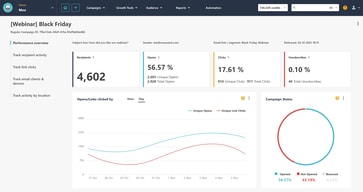
Moosend’s incredibly efficient customer support is the primary reason why people love this platform. Their excellent customer support range provides excellent live chat to access a comprehensive knowledge base, as well as video tutorials. Advanced features are available even under the free plan and the platform provides comprehensive reporting that provides geolocation insight as well as heatmap data. Notably, Moosend has a free forever plan that lets users send unlimited campaigns if they have less than 1000 subscribers. Higher tiers offer more robust tools and features as well.

| Capabilities |
AI
API
|
|---|---|
| Segment |
Small Business
Mid Market
Enterprise
|
| Deployment | Cloud / SaaS / Web-Based |
| Support | 24/7 (Live rep), Chat, Email/Help Desk, FAQs/Forum, Knowledge Base, Phone Support |
| Training | Documentation |
| Languages | English |
Moosend Pros and Cons
- Advanced features available even under the free plan
- Prompt customer support accessible on live chat
- Comprehensive reporting includes geolocation insight and heatmap data
- Email editor and signup for builder can be hard to use
- Design template selection is quite basic







Moosend charges $51 a month for 8,000 contacts and $70 for 10,000. That is $6.38 per thousand at the lower tier and $7.00 at the higher one — growing your list by 25% raises your bill by 37%, and your rate along with it. The same reversal happens again between 75,000 contacts ($4.44 per thousand) and 100,000 ($4.99), and once more between 500,000 and 600,000. Volume pricing here is a general trend rather than a guarantee, so check the tier above yours before you grow into it.
- What it is: An email marketing and automation platform priced by contact count.
- Best for: Small and mid-sized senders who want unlimited sends without per-email metering.
- Pricing: From $7 per month at 500 contacts on annual billing; $9 monthly. Verified July 2026.
- The honest catch: CC/BCC functionality and SSO are add-ons rather than plan features.
What Is Moosend?
Moosend is an email marketing platform built around unlimited campaigns and sends, with automation workflows, landing pages, subscription forms, an SMTP server, and transactional email. It claims more than 100,000 customers. The distinguishing commercial choice is that you are metered on contacts, not on emails — send as often as you like to the list you pay for.

Three plans sit above the trial: Pro (the standard published tier), Moosend+ (“build a plan based on your needs”), and Enterprise. Only Pro carries a published price; the other two are configured or quoted.
The free trial runs 30 days without a credit card, but note how it is constrained: one published automation workflow, and one unpublished subscription form and landing page. You can build those last two; you cannot put them live.
How Moosend Works
- Contacts are the meter, on a ladder from 500 to 1,000,000.
- Sends are unlimited on every tier.
- Three billing terms — monthly, biannual (−15%), annual (−20%).
- Pro caps team members at five.
- Moosend+ is add-on driven, with nine features listed as extras.
- A 30-day trial, no credit card, with publishing restricted.
Moosend Pricing
Captured from Moosend’s pricing page in July 2026 in US dollars, reading the full contact ladder across all three billing terms.
| Contacts | Monthly | Biannual | Annual | Per 1,000 contacts |
|---|---|---|---|---|
| 500 | $9 | $8 | $7 | $14.00 |
| 1,000 | $16 | $14 | $13 | $13.00 |
| 5,000 | $48 | $41 | $38 | $7.60 |
| 8,000 | $64 | $54 | $51 | $6.38 |
| 10,000 | $88 | $75 | $70 | $7.00 |
| 25,000 | $160 | $136 | $128 | $5.12 |
| 75,000 | $416 | $354 | $333 | $4.44 |
| 100,000 | $624 | $530 | $499 | $4.99 |
| 250,000 | $1,520 | $1,292 | $1,216 | $4.86 |
| 1,000,000 | $5,840 | $4,964 | $4,672 | $4.67 |

What actually decides your cost:
- The volume curve reverses three times. At 8,000 contacts you pay $6.38 per thousand; at 10,000 you pay $7.00. At 75,000 you pay $4.44 — the best rate on the whole ladder — and at 100,000 you pay $4.99. It happens once more between 500,000 and 600,000. If your list is sitting just under one of those points, the tier above costs disproportionately more, and 75,000 contacts is genuinely the sweet spot of the entire rate card.
- The advertised discounts are exact above 25,000 contacts and rounded below it. From 25,000 up, biannual is precisely 15.0% and annual precisely 20.0%. Lower down, whole-dollar rounding distorts them — at 500 contacts biannual saves 11.1% rather than 15%, while annual saves 22.2% rather than 20%. Small lists get a slightly better annual deal and a noticeably worse biannual one than the badges promise.
- Unlimited sending is the real proposition. Every tier includes unlimited campaigns and sends, so a daily newsletter to 10,000 people costs the same as a monthly one. Against platforms that meter emails as well as contacts, that is a meaningful structural difference for high-frequency senders.
- Pro allows five team members. The trial gives two, Pro five, Enterprise “10+”, and on Moosend+ additional members are an add-on. A marketing team of six is already at the boundary of the published plan.
- Moosend+ is a base plan plus a shopping list. Transactional emails, hosted files, CC/BCC functionality, audience discovery, custom report dashboards, an account manager, extra team members, SSO and SAML, and a dedicated IP are all marked “Add-on” on that tier. It is genuinely modular, but it means the Moosend+ price you are quoted depends entirely on which nine boxes you tick.
- CC/BCC is one of those add-ons. Copying someone on a send is basic email behaviour, and on Moosend+ it is a paid extra. It is included on Pro and Enterprise, so this only bites on the middle plan — but it is worth knowing before configuring one.
Who Should Use Moosend
- High-frequency senders. The clearest case — unlimited sends means cadence costs nothing.
- Small businesses starting out. $7 a month at 500 contacts is among the cheapest paid entry points in the category.
- Ecommerce teams. Product view, cart and purchase tracking, plus AI product recommendations, are included rather than gated.
- Lists around 75,000. That tier is the best value on the entire ladder at $4.44 per thousand.
It fits poorly for teams larger than five people on the published plan; for anyone needing SSO without moving to Enterprise or configuring Moosend+; and for lists sitting just above 10,000 or 100,000, where the rate turns against you.
Honest Pros and Cons
Strengths
- Unlimited campaigns and sends on every plan.
- The whole rate card is published, from 500 to 1,000,000 contacts.
- $7 a month at the entry tier on annual billing.
- Ecommerce tracking and AI recommendations included, not gated.
- A 30-day trial with no credit card required.
- Three billing terms, so shorter commitments still get a discount.
Limitations
- The per-contact rate rises at 10,000, 100,000 and 600,000 contacts.
- Five team members on the published Pro plan.
- CC/BCC functionality is an add-on on Moosend+.
- SSO and SAML require Enterprise or a Moosend+ add-on.
- Trial forms and landing pages cannot be published.
- The biannual discount underdelivers on small lists.
Moosend Alternatives and How It Compares
- Mailchimp is the best-known name, with a free tier and steeper paid pricing.
- Brevo meters emails rather than contacts, which suits small lists sending rarely.
- MailerLite competes directly at the budget end with a generous free plan.
- ActiveCampaign is stronger on automation depth at a higher price.
- Klaviyo and Omnisend are the ecommerce specialists.
- GetResponse, AWeber and Constant Contact are the long-standing mid-market options.
For a broader survey, browse our email marketing directory.
The Verdict
Moosend is one of the better-value email platforms available, and the reason is structural rather than promotional: it meters contacts and leaves sending unlimited on every tier. If you email your list weekly rather than monthly, that single decision can halve what you would pay elsewhere, and it removes the quiet anxiety about campaign frequency that email-metered pricing creates. At $7 a month for 500 contacts it is also among the cheapest credible entry points anywhere, and Moosend publishes its entire rate card from 500 contacts to a million rather than hiding the upper half behind a form.
Publishing the whole ladder is what makes its one real oddity visible. The price per contact does not fall consistently as you grow. At 8,000 contacts you pay $6.38 per thousand; at 10,000 you pay $7.00. At 75,000 the rate reaches its best point anywhere on the card, $4.44 per thousand — and at 100,000 it goes back up to $4.99. The pattern repeats between 500,000 and 600,000. None of this is hidden and none of it is large in absolute terms, but it means growing a list from 8,000 to 10,000 raises your bill 37% for 25% more contacts. Check the tier above yours before you plan to cross it.
Two smaller notes. The advertised discounts are exact from 25,000 contacts upward — 15.0% biannual and 20.0% annual, to the cent — but whole-dollar rounding distorts them below that, so a 500-contact list saves 11% on biannual rather than the advertised 15%. And on the Moosend+ tier, CC/BCC functionality is listed as an add-on, alongside SSO, transactional email, and extra team members. Moosend+ is meant to be modular and mostly is; just be aware that its quoted price depends on which of nine extras you need, and that one of them is a feature most people would assume every email tool includes.
FAQ
How much does Moosend cost?
Captured in July 2026 in US dollars, priced by contact count with unlimited sends. On annual billing: $7 a month for 500 contacts, $13 for 1,000, $38 for 5,000, $70 for 10,000, $128 for 25,000, $499 for 100,000, and $4,672 for a million. Monthly billing costs about 20% more, and biannual billing sits between the two at roughly 15% off monthly.
Does Moosend get cheaper per contact as my list grows?
Mostly, but not always. The rate falls from $14.00 per thousand contacts at 500 to a low of $4.44 at 75,000 — then rises to $4.99 at 100,000. It also rises between 8,000 contacts ($6.38) and 10,000 ($7.00), and again between 500,000 and 600,000. Growing across one of those three boundaries increases your cost per contact as well as your total bill.
Does Moosend limit how many emails I can send?
No. Unlimited email campaigns and sends are included on every plan, including the free trial. You are metered on the number of contacts in your list, not on volume, so sending daily costs exactly the same as sending monthly. That makes Moosend structurally cheaper than email-metered competitors for anyone with a high send frequency.
How many team members does Moosend include?
The free trial allows two and the Pro plan five. Enterprise is listed as “10+”, and on the Moosend+ plan additional team members are a paid add-on rather than an included allowance. A marketing team of six people has therefore already outgrown the published Pro plan, which is worth checking before committing.
What is Moosend+?
A configurable middle plan — “build a plan based on your needs” — sitting between Pro and Enterprise, with no published price. Nine capabilities are marked as add-ons on it: transactional emails, hosted files, CC/BCC functionality, audience discovery, custom report dashboards, an account manager, extra team members, SSO and SAML, and a dedicated IP. Its cost depends entirely on which of those you select.

Compare Moosend with other popular tools in the same category.

Simple and efficient. The user interface is clean and first-time users can immediately start using it, Dashboard is easy to understand, the statistic is immediately understandable. Mail editor is relatively simple but is more than good enough to make a nice looking email.
Importing contacts is still buggy. CSV files that are imported usually import only 1st name on the list. Mail editor can be better with more multimedia options.
I have finally found a service that can solve many of my problems regarding contacts with old and new clients. Old ways of sending promo emails are history. This solution is much beter and productive.
Love the user interface and its simplicity. They recently revamped the UI, and I find that it's a bit better, even though the previous one was very good. I haven't tried their page builder in some time, but I can see situations where that would be all you would need!
You can't create dynamic email content in automations. It can only be done from a broadcast situation. It's a very technical case, but it affects the usability for me.
Powerful email marketing with none of the headaches and at a fraction of the price of larger more "name brand" tools. There's only one thing I've found that it can't do for now.
Moosend is easy to navigate and use even for a beginner.
Moosend is difficult to use on a mobile device or iPad.
Moosend allows my small business to communicate professionally to my clients.
The editor for the emails automatic and straightforward campaigns.
Την καρτέλα παρουσίασης των μελών για αποστολή καμπανιών
Μπορώ να παρακολουθώ στοχευμένα και αναλυτικά την αποτελεσματικότητα των καμπανιών μου.
Easy to use, all required features available for free, excellent options for customisation
support options not easily accessible, some minor errors in subscription form and mailing lists
it is the one website that I found that fulfilled all my email marketing needs
The platform is simple, and the design is ergonomic and fluid ! No need to be a web developer to use it, and the best is that you can design your forms !!
For now, I don't see any flaws! I use it everyday and i'm very satisfied with the free offert, maybe the price of premium offer are a little hight for me
I use it to integrate it in my store as newsletters, and it works perfectly
I love the automation, including the tags and variables that you can add to the contacts, and that it doesn't show any watermarks in the sent mails. Plus, it is super user-friendly.
It is not that I hate it, but the images of the icons are of poor quality. But it is only a visual thing that doesn't affect the workflow nor the mailing results.
The main problem solved is the time that it takes to send emails to a list of contacts. I am using it for sending automatic emails to a list of contacts. It allows me to have more free time for other important things in the business. It also allows me to send HTML emails that I couldn't do with a simple mail client.

It has a very easy beginners leaning curve that was nice, very easy to set up for basic emails etc, I found it was very easy to import third party built News letters for my emailings. Also very easy to import your own lists into the system , So for me I found it to be very user friendly , Also I like the fact that they are not always bugging their members to upgrade and trying to sell stuff before they need it. Most people know when they need to upgrade. I also think the price they charge for the sevice is very reasonable indeed.
I found the email ( letter building software ) was not really up to the latest software available, such as Stripo and other third-party software. Also, I sometimes have a problem uploading my email lists.all in all not there is not much to gripe about.
I have had no issue with Moosend . Sending my emails with them has been very beneficial to me. and has brought more people to my website
Everything! Esay to use and correct too. Pricing is good for small and middle Businesses. Thankyou for the Support. Can´t say more. Welldone
It took longer to find it. Nothing missing. Thank you!!
Newsletter - getting to all our Reporters, users, and customers world wide. Tracking and more.
They provide templates for newsletters. I foumd the emails I received very inspiring and helpful. I use Microsoft photos, Google photos, and Microsoft word.
I would like to see more templates for artwork specifically. Everything I used worked well. More suggestions for specific lines of business like art. I would like to see some simplified templates.
I don't know of any problems , yet anyway to solve as I have only been using it a short time. The benefits so far have been helping me to get on a newsletter schedule, consequently, it is helping me to be more organized.
I like how easy it is to integrate with any website. The email templates are excellent, and it is straightforward to customize them. Moosend is a multilanguage platform.
I didn't find yet something to dislike. A few months ago, Moosend was just in English but now is a multilanguage platform.
I had to create email campaigns; the email templates were adorable and very customizable. We were very productive in implementing them, in few hours we were able to develop from zero a few email campaigns.
Almost-immediate chat support. I haven't figured out all the features yet, but the features that I needed to get started were fairly straight forward. I tried to sign up with AWeber. (In fact, I paid for the first month), but they were very fussy about my current subscriber list, despite the fact that I had spent a week discussing my requirements with them. I also was about to sign up with Mailchimp, but I got no support from them (I had to send in an email request for the simplest of questions and they took 2 days to get back to me). I was a bit dubious about Moosend at first bcause their plans seemed a little too cheap and it's not as well-known as the other brands. My biggest problem - despite having a clean SMTP server with a dedicated IP and a high sender reputation - was that my emails were often ending up in the junk folder of my recipients: even when they had just received the same or very similar email in their inbox the day before! I have about 3,000 subscribers. Before, it would take a few hours to send to them because of throttling on my server. When I emailed everybody using Moosend, not only did they get it within 10 minutes, NEARLY EVERYBODY reported back to say that it arrived safely in their inbox, and without them having to faff about with whitelisting my email or adding me to their contacts. (I'm not on everyone's buddy list. For many of my subscribers, I'm just a somewhat anonymous newsletter. So why would they want to add me as a friend or something?)
The website is a bit complicated. Minimim characters remaining.
As above, getting the emails delivered to my subscribers inbox.
It was SO easy getting started. The fact that I was led through a step-by-step process when first joining was a GAME CHANGER. There was no question of what I needed to do first, or what I had to do next. THANK YOU for making a (sometimes) confusing system seamless and straightforward!
I have yet to find any to be honest. Though I've only been using Moosend for a few weeks. I'll say I was a bit annoyed that I had to use an external service to "clean my email list" first. However, I believe my frustration came from the fact that I didn't know that was even a thing. So, I believe this had more to do with me and not Moosend. Ah ha! I found a dislike! (Unless I just haven't figured this out yet) I don't like that i can't change WHO my emails are from...I'd prefer them to be coming from "Cayce" or "Cayce Clay" however, the sent option only allows me to send emails coming from "cayceclayyoga" which feels a lot less personal.
-sending out marketing campaigns to my prospective clients (I'm a yoga teacher and wellness coach) -I've found an easy to use platform that helps me connect with my audience and leads -I'm saving money every month (was using Mailchimp at $15/mo) and as a new business owner, every penny saved counts!
I was able to learn how to use Moosend in one evening by watching tutorials and chatting with helpful customer service reps. I can get started free as long as I have under 1000 subscribers. The look of the finished email is pleasing and very customizable.
That I can't attach a file to my emails. But that's ok. Everything works properly.
I was not aware that I could not send large emails from a paid-for email service. I had zero knowledge about bulk mail sending and I learned it all easily with Moosend! Now I can be in touch with hundreds of people easily. I like that I can schedule when the email goes out, if I need to be gone over the weekend without my laptop I can still schedule a reminder email to go out Saturday night.
Moosend is a feature-rich product with a wide range of templates, excellent tracking capabilities at a very low price.
More API face options as one of the API interfaces needed was unaviable. There is still a solution to build our own, but this is costly and takes more time.
The purpose of Moosend is to send newsletters to our clients.
Interface is simpe, yet effective. Many tools for tracking progress, easy to start new campaign, saving mailing list, have unsubscribe link in message (nobody clicked it in my case)...
Nothing. It`s just perfect. Don`t think that I can find this good tool enywhere else...
Sending large ammount of newsletters to clients.
Very easy to use, trial period and cheaper prices than competitors.
I like everything about moosend. There isn't anything I dislike.
I'm solving problems relating to customer acquisition via email channel.
Moosend's interface is simple and easy to use but complete with everything you need for a successful email marketing campaign.
I would like to have more templates available in the library.
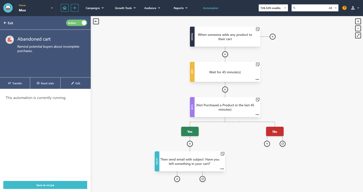
I can keep my clients more engaged and loyal using the abandoned cart and the newsletter automation.

The interface is awesome and allows us to easily see stats. The builder is also easy to work with.
I would prefer phone support sometimes but their chat is perfect.
We have greater open rates and click through than ever before...really great.
I loved the customer support team (John & Nikolas from Greece). I was bothering them for almost a week in a row - they were always willing to help me, although my questions were childish and too many
I can't find something I don't like - at least for now
to do my mailout campaigns more efficiently and to keep my lists clean and right
features, simplicity, wide range of solutions, superb free account option
the old interface was not so friendly (the new one seems better though, need ti test it), making some processes more complex the modifications on templates need to be made carefully since you may lose alignments (texts and images); working with images need some preparation, as it's better to resize and crop before uploading I've lost some old campaigns statistic data, still can't figure out why some automations need tuning
I have managed to get new potential partners and customers to know my company and its different brands, thanks to a wide choice of templates and a very good deliverability
customer service is quick and helpful. great fucntionality. highly recommend
its all good for me. has to be used to know ;)
bulkmailing at ease

I'm currently using the free version but I'm seriously enjoying virtually all similar features of the paid version. I'm a new customer and I'm definitely going to upgrade my account very soon. Thanks for your services Moosend and I highly recommend you to new marketers.
I'm a new customer on a free plan so I'm not yet enjoying the complete features. So I'm limited to certain interesting features.
Email automation and the work flow is lovely 😍 😍. The design templates are simple easy to use and sweet.
The speed that the emails were delivered, and the data on the very explicit. The tool to make email lists and templates. The price is excellent.
They filter email lists well you lose some, but it's better that way
Easy to analyze the results

Moosend is very easy to design and they give video tutorials for each step
I haven't encountered any dislikes. Moosend is awesome! Lied about the $20 Amazon gift card if I gave them a review!
Moosend is gathering emails for me so I can grow my business.
Automations and Mailing Lists are the best. I love the integration with Zapier, as well. I have my clients sign-up on my website, go into Moosend (via Zapier) and then they get a welcome email (via your automations) and I absolutely love that process!!
I have not had the same difficulty with return to sender email addresses. I work with a lot of realtors and unfortunately, they change brokerages a lot, and because of that, they change emails. It is fine, but it means I have to weed through my lists, where before, my system did that for me.
Email Automation. We are now able to send automatic new client emails!! Woooo!! It is amazing, less to remember, super consistent. Love it! Moosend saves me time!
It was so easy to setup with tips and guided help each step of the way.
Not sure what I don't dislike yet since I just started using it
I like that I was able to implement and start using the email capture and newsletter campaigns while im still starting out and testing. The fact that they have a free plan for smaller companies just starting really helps

I like moosend because I am able to use subscription forms, templates, autoresponder, and the automation tool on the free account. Moosend is a great companion for small businesses just starting out and looking to scale...and user-friendly. I like moosend more each day because it helps me reach out to prospective clients every day, for free. Really awesome tool.
The automation flow window is too minimal. You need to keep scrolling endlessly to be able to have a good look at your workflow. The current view is only about half-screen. It ought to be a full screen or at least very close. I think they should be able to do better.
I can reach out to clients for free and grow my small business...
I like that it is a functional platform at good cost that allows me to scale my business quickly.
It lacks bad tag features to be able to manage contacts better. Also, the tools to filter contacts are very basic and predetermined. There is no integration with other active campaign type tools
The problems you have had are the lack of integration with other platforms such as active campaign and hotmart, which means that you have to resort to third-party services to be able to manage them better

If you've used MailChimp, you will find the transition to Moosend to be very seamless. I have my account set up with several sub-accounts for my clients and I find creating email newsletters for them to be a rapid process using Moosend. The User Interface is intuitive and the flow works well for me. Moosend is feature-rich and keeps getting better e.g. love the addition of landing pages. You can literally have a new landing page up in minutes!
As best I know you can't keep media in your Moosend account (if you can, I haven't yet figured out how, which would indicate a problem as well, right?) So when I do a new newsletter, I have to reload the logo, and any other images I may want to reuse from a previous email. UPDATE: This has changed! This feature is available now. A couple of things took me a little while to figure out: 1. How to add my own personalized unsubscribe 'click here' button. 2. How to do the 'text only' version of a newsletter - well, you don't have to do anything. It's automatic (but how do you edit it). Once I figured out 1, it's very easy to do! And Moosend does have excellent help/tutorials/documentation. And their support is quick, friendly and very helpful. There is one feature I'd like them to add - the ability to add a note to a test email - this would be useful for my customers so that when I send them a test email, I can give them some instructions e.g. Version 2: Per your instructions, I changed the preview text. Let me know if there are further changes required or if this email is okay to send out. Thanks. Moosend does have a place where you can put in feature requests and track them.
Moosend is a money making tool for me. I use it to send out email newsletters for a number of customers who pay me monthly for the Moosend subscription and my time to produce the newsletters.