
Unclaimed: Are are working at ProjectLibre ?






ProjectLibre Reviews: 4.2/5 — Solid Choice
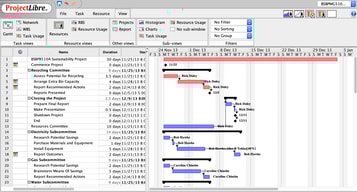
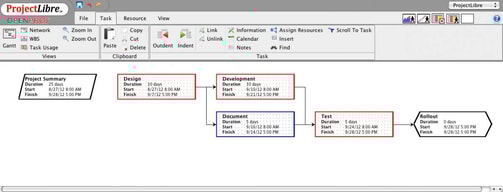
ProjectLibre is an open-source project management solution that provides alternatives for Microsoft Project desktop. The platform caters to sectors such as government, non-profits, and small agencies, and works seamlessly with ProjectLibre Cloud and ProjectLibre enterprise. Key features include Gantt charts, network diagrams, WBS/RBS charts, earned-value costing, network diagrams, resource histograms, multi-project resource pools, and histograms. ProjectLibre is accessible on Linux, Mac OS, or Windows platforms and is compatible with Microsoft Project files.




| Capabilities |
OSS
|
|---|---|
| Segment |
Small Business
Mid Market
Enterprise
|
| Deployment | Cloud / SaaS / Web-Based, Desktop Linux, Desktop Mac, Desktop Windows, On-Premise Linux, On-Premise Windows |
| Support | 24/7 (Live rep), Chat, Email/Help Desk, FAQs/Forum, Knowledge Base, Phone Support |
| Training | Documentation |
| Languages | English |



Compare ProjectLibre with other popular tools in the same category.
What I like the most is that everything related to project management can be applied in a very simple way without the need to load libraries or make advanced configurations as it happens with other programs.
A little more work could be done in the area of the graphic interface to obtain results that are a little more eye-catching for the final presentations of the projects and that are easily understood by non-experts.
Everything related to time and cost management of not very complex projects. However, I did not find the cost analysis part very useful, i.e. breaking down a cost into its parts.

Can read Ms project plans with no problem
Difficult to edit MS files and edited files cannot be read by MS project
Project plans for construction
The software is easy to use and user friendly. It did not take much time to get a handle of its features. I was able to create time phased budgets and Gantt charts for the first time shortly after installation.
The user interface lacks the visual flair of its competitors but this is a minor issue considering the ease of use/ available features.
ProjectLibre has assisted in growing my knowledge about project management. The benefits is that the software affords me the ability to manage and track projects from start to finish without leveraging multiple pieces of software.

Not Only Scheduling, ProjectLibre facilitates flexibility in dates at any point. Its security feature takes care of the aligning dates on its own if you have linked your module to other so change in predecessor module automatically changes dates in its inherited module. Most liked feature, according to me, is its versatility. Just fill the spreadsheet and in output you can generate 4 charts i.e. gantt, network, WBS, network usage chart along with crucial reports. Additionally, resources can also be assigned to individual module and completion status of the modules can be checked at any time.
Once created, changes in the dates can be troublesome. Though its easy to set up but UI is not that great which can lead to confusions while pointing out specific mistakes. Limitation of number of charts in free version but that's one should not be greedy in trial version. Its paid versions are great though. New user can stumble while using it but after some analysis or working for a while would surely change his/her opinion.
Even the smallest project needs proper alignment of modules by planning ahead and estimating completion of various its branch modules along with its budget which should be finished before deadlines. ProjectLibre has been one stop for Kals Infotech. This tool has easy management feature that supports most of our project out of which most are websites, android and iOS developments. ProjectLibre makes employee stick to the plan and allow them to plan their schedule like vacations or some refreshing stuffs if they complete modules before time assuring them that the project would still finish on time.
Is very easy to handle, navigation around the gantt chart and a very intuitive way to add activities and create and easy to follow environment to our activities on field. On our planning aspects we can add from the staff and the cost a project may have, and the possible scenarios to it. Also we can handle the time invested on any work we want to do and the balance cost - profit to evaluate the benefits of our company.
The software stills a little rough and is kink of difficult to add new activities to a complete gantt chart of a project, already defined. When we tried to add some activities, which happens all time on projects development, we tried to add as a new project, is much easier.
I solve all the projects my company address on the last year, since keeping track on the projects we are doing on our company, following the costs and the hours we dedicated on each projects is very important to keep the record and see what areas to improve our behavior, such as design and administrative phase of the project.
Its very simple and easy to use, more easy than microsoft project, its very intuitive . Has a number of advanced features which are very useful for project management.
its cloud support and collaboration features need some improvement. the GUI could be done more user friendly which will make it very appealing.
I use it for managing construction projects, found the software very useful and made my task very easy to achieve.
This is a great solution to MS Project - I've used it to build schedules for various projects and really like it
The only issue I have is that you can not change the colors
schedule

Gantt chart is great. Open source allowed me to install without seeking approval for business licensing cost.
I had a project where timeline would have been ideal to the minute or even hourly, but default "daily" isn't changeable.
Project management on gantt chart.
I you are looking for a good free-purchase software for the tracking and task-setting, as well as resource management, this is likely your option at the time.
Compared with a BIG Project Management software there is a difference on performance and usability as well as exporting the data from one of your projects.
The Fast-Free project management documentation
ProjectLibre is free software to manage a project. Its files are effortless to understand and very practical for an MS Project user. It is easy to use if you have some concepts of project management. It helps in planning calendars for resources.
ProjectLibre does not have zoom on the Gantt Chart. This zoom helps a lot in the planning stage because some details are on the screen. Zoom changing is essential for a detailed project with many tasks outside the main screen. The dates on tasks are difficult to read in other formats. This tool could help.
Managing some works on independent works and using the calendars for tasks is a benefit. Reviewing the overused resource is the main solved problem. Using ProjectLibre, we rescheduled some tasks.