
Unclaimed: Are you working at SonicWall VPN Clients?





SonicWall VPN Clients Reviews: 4.2/5 — Solid Choice
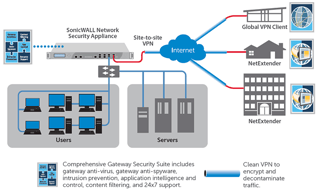
The SonicWall Global VPN Client provides user-level VPN access from any Windows-based device. The platform supports multiple profiles confused and saved for easy and speedy access to various remote sites across numerous network configurations. The SonicWall Global VPN can also be set up to run on the start-up of Windows so that it automatically connects to a VPN connection for faster access.





| Capabilities |
CLI
|
|---|---|
| Segment |
Small Business
Mid Market
Enterprise
|
| Deployment | Cloud / SaaS / Web-Based, Desktop Windows, On-Premise Windows |
| Support | 24/7 (Live rep), Chat, Email/Help Desk, FAQs/Forum, Knowledge Base, Phone Support |
| Training | Documentation |
| Languages | English |

Compare SonicWall VPN Clients with other popular tools in the same category.
Real-time system protection, Internet access application control and user registration. Cache memory and data storage.
Off-system application security parameters.
Control applications and personalized system access, virus-free PC and system propagation.
The administration interface is really esay to use High security software inside. Good quality product, i've some of them working since more than years without any problems.
Security licence are expensive. The interface is going to be slower than before.
Security for the compagny and a lot of features usefull to the IT users.
Sonic wall firewalls are the high performance firewall in current market.It prevent the threats.It protects our network from inside and outside threats.
It is expensive and Complicated to configure.
We are continuously monitoring and preventing unauthorized access using sonic wall firewall.It blocks the viruses.We are monitoring internet usage of our internal employee's computers.It creates reports of blocked threats.
Every organization need the firewall to protect there network.Sonic wall firewall is best option for that.It having great features that helps us to protect our network.
It is difficult to install the firewall.If you have aware about the all things then no issue.
We are using sonic wall firewall to protect our network.We are able to check who is accessing our network.We are monitoring activities which is going on networks.It create threat reports.Threat reports contains activity of firewall means which viruses are blocked by firewall.
It provide high security to our network.It saves our network from outside attacks.It blocks the attack and create a report for the same.
Required qualified person to handle the firewall.Some configuration is hard to understand.
We are using sonic wall firewall to protect our network from attacks.It continuous scanning the network and if firewall found any unwanted then firewall block that things.It also create report of blocked things which is very useful.
Sonicwall is a great all in one tool that allows use of content filtering to whitelisting and many other features.
It can take some time getting used to but it is a great tool overall.
Security
Overall, I like most of the feature of Sonicwall, but here, I would like to mentioned about one the feature from the bundle, and which is IPS. Off course, when IPS is enabled performance may goes down due to multitasking, and consumption of other resource, still it's gives best performance. When IPS is enabled, we can evade number of illegal traffic towards our network. And Sonicwall has great database of IPS signature with perfect classification.
Well, there are couple of things that can be improved, such as when GUI is being access is very slow, rules managing, log monitoring is not available on the device where you need separate device/cloud service to store the data. One more thing, which is when you integrate AD with device, you can not create custom group as it use from AD server.
After the deployment of product, we noticed that many issues was resolved and it's being. Firstly, performance is excellent. when we check the load on device with full function, it was great deal. We did stop many illegal/illegitimate to and from traffic. We believe that it's more stable then the expectation. Off course, remote users are getting no issues while connecting to infra and while accessing through this device.
Las caracteristicas de SonicWall en la familia TZ y NSA cuentas con Advanced Threat Protection de SonicWall basado en la Nube con diferentes motores, los resultados son satisfactorios en nuestra organización administramos mas de 350 ubicaciones que nos demandan estar al pendiente de los ataques y dar continuidad de negocio con el ATP hemos ahorrado tiempo recurso humano en que su plataforma en la nube nos facilite la prevención de amenazas que son día cero
Para la solución de ATP se necesita una licencias adicional y esto eleva el costo si solo se considera adquirir el licenciamiento comprehensive, adicional que si no se tiene un canal que de soporte el servicios 24/7 lo haces directo con la mara levantando un RMA Por otro lado en temas de reportes no me agrada que se tenga que comprar la solución de GMS ya que con los paneles de control que ya cuenta la caja no es de mucha a ayuda ya que no se tiene toda la visualización de lo que esta pasando en mi red, La solución de GMS son licencias adicionales que pueden ser Ompremise - En la Nube - en servidores locales
Nos protegimos de varios Ramsomware y Petia que pudieron afectar la operación de la organización asi como ser mas productivos en temas de soporte
Sonicwall has pretty decent support that if they can't solve it over the phone will do a webex session and collect data to replicate the issue in their lab environment and be able to work a solution up.
Sometimes with the new GUI for our firewall, changes do not save, which requires us to re-enter the data again.
Our setup is 2 SonicWall NSA 5600s setup for HA failover in case of a failure on one. This minimizes downtime as the failover is seamless. This keeps the business operational with little to no downtime.
SonicWall allows me to connect to my home office's network via a VPN and thus, allows me to work remotely. I've even use it internationally to seamlessly establish a remote connection.
It does require a basic knowledge of how VPN's work, which I had to learn prior to using this product. Once you have your network's IP address and other mandatory technical information that SonicWall requires, a remote connection can be seamlessly established.
Prior to using SonicWall, my office used Microsoft Remote Desktop. However, we have since found that SonicWall works well with, and even in lieu of, Remote Desktop to establish a remote connection. My office uses PC computers, and my home machine is a Mac, so I find that SonicWall is better at working around the technical difference in operating systems.
As I have to work remotely from home, its really convenient to connect to the office network through sonic wall. It is secure to even use if i an travelling out of country.
It needs a very good internet connection to work efficiently.
Being a developer i can access the code base by connecting to office network using sonic wall conveniently from any location without worrying about the security issues.

SonicWall products are a great all-in-one solution for small and mid sized companies. It is your firewall, VPN, router, gateway, dmz, content filter (web filter), virus detection and on and on. The other great thing about SW is that it is consistent throughout the device. Once you get the idea of their "object based" setup, you get it and it applies to all sections of the device. SonicWall Global VPN Client is a great piece of software. It works well on Windows and now they have great apps for Android and iOS. I would recommend a SW if your only need was a good VPN solution. Finally, there is a ton of support for SonicWall. From online forums, 3rd party it support, and official SW support, you will find an answer to your question.
SonicWall devices can be a bit more cumbersome to setup than other devices. The "object based" setup is great, but also leads to you having to create 3 objects to setup a simple port forwarding. Sometimes a more traditional setup option would be nice. Also the content filtering is not the best, but workable. Honestly with 4g, blocking the main business internet connection isn't as important as it once was.
Firewall, VPN, content filtering, and gateway. For these items, SonicWall is my first choice.
Simplicity and accuracy of the interface, and a rock solid protection of my environment
Steep learning curve - best to do the basic administration course to enhance skills and get a good foundation of knowledge
VPN Connectivity over a hub and spoke network with a central firewall at head office
SonicWall combines several appliances in one. Instead of having separate Web Filters, IPS/IDS Units, Gateway Avitvirus/AntiSpyware, Application Filter and Router we are able to use a single Sonicwall Device. Add in central Wireless Access Point Management and on device packet capturing and I don't know why anyone would use anything else. SonicWall also includes features like Site to Site VPN tunnels, Tunnel Interfaces, User VPN capabilities through a deployable client, or SSLVPN.
The additional software require to run reports needs a major overhaul and still requires Java for somethings.
We are able to provide rock solid routing and security services, along with backup VPN services using SonicWall.

Easy to use, very few problems. I do lose connection about once a day, but it's a quick, easy re-set.
I lose connection at least once a day which can be frustrating.
Easily access documents and files company wide for a low cost.
I use principally sonicwall firewall appliance, i like the simple installation of this product, it' s easer than other firewall. With the GUI interface i can set all of the configuration. the deep packet inspection function is very useful, I can control all traffic passing from network interfaces
I had some compatibility issues with the truck of a core switch cisco. lacp active mode has not been fully supported. I solved it by changing the mode lacp active in lacp passive.I solved it by changing the mode lacp active in lacp passive. probably this problem was solved with the upgrade to the latest firmware version 6.x
many times I have to manage these firewalls.It was always helped by technical support "DELL". Their help was useful to solve my problem. for example I had to configure a new system into high havaibility.
Dell SonicWall offers an advanced router firewall for small businesses. They have an awesome GUI that allows for simple configuration and easy training of new engineers. We've configured and installed hundreds of SonicWalls without issue and recommend them to all our customers.
Support is not as good as it was before dell purchased SonicWall.
One of the most important features to us is the QOS feature of the SonicWall, we use this for every VoIP phone implementation.
What I like best about SonicWall is that in addition to attack prevention, it supports wireless access points.
What I dislike about SonicWall is that the wireless access points do at times require a power shut off and restart for continued service.
We can access the internet without having to worry about virus or worm attacks. SonicWall also supports website blocking to prevent staff from accidentally going to a virus infected webpage.
it was very best and user friendlly product good security features available in sonicwall acractive dashboard easy configuration and troubleshoot ease to intregare with any 3rd party product
As per my obsevervation the customer support is litel bit delayed SMS and firewall intregation tricky
it was provide us the security from the attackers and threads when i install sonicwall FW the Network management sovled for me. I have solved the routing and ACL problen when i deployed the sonicwall.

Ease of use, great UI, long lifespan of hardware, implementation is on the easier side
Customer support is terrible and lacking compared to other vendors, budget product offered by Dell, need to fine tune the devices in order to get the most out of them
Helps block against cyber attacks (malware, ransomware, viruses, intrustions, botnets, spyware, trojans, worms, and other malicious attacks), assesses and mitigates risk, and provides an ease of management for firewalls.

I like using SonicWall for its strong network security. The ability to detect and prevent cyber threats, along with its intuitive interface, makes security management easy. Additionally, its reliable performance ensures effective protection for enterprise networks.
The SonicWall interface can feel a bit complicated at times, especially for users less familiar with advanced security settings. More simplicity in the user experience would be beneficial, although the protection it provides is still solid.
Using SonicWall, I have solved critical network security problems by detecting and blocking cyber threats. Benefits include robust protection that ensures the integrity of the enterprise network. The ability to efficiently manage security and proactive threat detection contribute to a more secure and reliable environment.

Using TZ370 since 2 years. I really loved the product. It's featured full, light weighted, easy to Configure and use. 24x7 customer support and regular updates are available which are easy to install. Way better than others. :)
Only dislike is that these are such devices that require trained professionals to manage and support.
It provide an additional line of defense against attacks reaching desktop computing systems. I really loved the product. It's featured full, light weighted, easy to Configure and use. 24x7 customer support and regular updates are available which are easy to install.

When i connect using sonic wall my internet is secure and speed get increased.
Once internet fluctuate need to login again.
Provide safe browsing and secure network
Active threat detection. Excellent and easy to read logs. Solid emailed reporting.
The price can become cost prohibitive to small businesses.
The business is one that requires solid security in order to protect client data. Because of the threat management, we felt more secure than previously. Our staff was more productive as we have seen less virus activity and security threats coming through.

Web UI is easy to understand. It has different modules to enhance security. Affordable price and great renewal discounts.
More IA features, learning resources could be better.
Fire walking, network antivirus, anti spam, content protection, nids
It always runs in the background. SonicWall makes me feel safer on both public and private WiFi platforms while handling sensitive HIPAA -protected information.
It is a bit technical for inexperienced users. However, at our agency, the IT department manages this service for us. Our IT department has had no issues using this product.
SonicWall protects our individual users' systems while handling sensitive, protected health information and keeping us HIPAA compliant.
Ability to block traffic by country and reporting.
Occasional false positives. Would like to create custom reports.
Eash to block traffic from rogue states.
Sonicwall allows us to keep our corporate network and data safe while giving our employees the flexibility to work remotely and access files and information on the go.
There isn't anything I dislike, as we have only scratched the surface with all of the solutions and service offerings that SonicWall currently offers. We currently utilize their Network Security services but they also do cloud security and endpoint security as well.
SonicWall helps us safeguard our corporate network by adding an extra layer of security between our employees and our private network. Having this solution in place keeps our business data safe while allowing our employees the ability to work from anywhere.

Setting up of SSL VPN is one of the best of all. Content filtering, vulnerability assessment. All security services under a single module are one of the easy access ways to do.
Bug reporting and patches take months which should be restricted. For TZ500 series for SMEs should at least support 250+ licensed ssl VPN users. Also concurrent sessions is very less
We are managing our traffic flow using their UTM devices PAN india. We have moved from Fortinet to SonicWall and are satisfied so far with the services and support provided.