

Unclaimed: Are you working at TeamGantt?






TeamGantt Reviews: 4.8/5 — Highly Rated
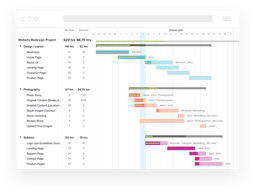
TeamGantt is a cloud-based Gantt chart and project planning solution specifically built for small, midsize, and large enterprises. With its comprehensive project collaboration tools it facilitates better efficiency within teams using Gantt charts, time tracking, file sharing, and task-level communication features. A drag-and-drop interface also ensures better usability and ease of use.





| Capabilities |
API
|
|---|---|
| Segment |
Small Business
Mid Market
Enterprise
|
| Deployment | Cloud / SaaS / Web-Based, Mobile iPad, Mobile iPhone |
| Support | 24/7 (Live rep), Chat, Email/Help Desk, FAQs/Forum, Knowledge Base, Phone Support |
| Training | Documentation |
| Languages | English |

Compare TeamGantt with other popular tools in the same category.
Incredibly intuitive. Many of our team are new to computers yet they understand how to use TeamGantt.
The only minor thing I would change is to add a larger color palette. Not a huge deal, but I'm having a hard time thinking of something I do t like.
I work with a very diverse team, in different contexts, and it keeps us organized.

TeamGantt makes it easy to track complex projects acoss the various departments and assign due outs with deadlines.
TeamGantt could continue to make the interface more and more intuitive.
Large complex projects are problems that TeamGantt easily allows my company to address.
Simple interface but in-depth control that is very intuitive
I have to say the colour scheme is very dry; it would be nice to have an option to match my systems dark setting (less white)
control and management of raodmaps
I spent significant time looking for a Gantt charting app to use with my senior high school students. I needed something free and accessible online as well as being able to see my student's charts. TeamGantt does all of this.
As I only want to work with Gantt charts TeamGantt meets all of my needs.
I had used other apps but they were restricted in terms of number of times students could access their Gantt charts or went from free to a paid option. TeamGantt solved this for me.

I like the details and interface as its easy to use and very convenient to plan my work
I would like the app to be a little more interactive as colorful
I handle a lot of projects and TeamGantt helps me organize and plan my work properly and deliver productive results in a timely fashion.
Functionality is easy to learn and easy to explain and share with clients and other users.
No dislikes, it works well. It has any feature that I would suggest.
Assisting with construction timelines, helping clients visualize project plans and where the team fits, guide for discussions about projects.

What I like most is that is very reliable and trustworthy it's very fast and smart,they have good customer service care
Nothing to dislike about this,buh they need to improve with their technology
The benefits their is that it helps when someone is in hurry of urgent meeting it helps in video conferencing platforms

flexibility and ease of use online and web interfaces is key for everyone to access
Nothing so far, but we need more templates around Consulting and project delivery
Ability to view projects in a clear simple way that everyone can understand
The ability to change the history of your actions and the ease of use. The visual of the program makes this program easy to work.
Having to log in periodically, but maybe it can be adjusted in the settings. I am still new to this program.
At the moment, I have not had any problems with TeamGantt. I love the visual.

I love the "Me" page that shows all my projects and tasks in one place, when they're due, and how my progress/time spent is looking.
I wish it were a little easier to figure out how to sort tasks alphabetically, chronologically, percent complete, etc.
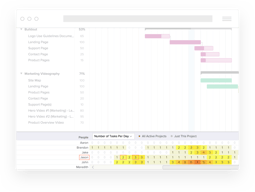
Team productivity is the best I've ever experienced with TeamGantt. I'm able to see how much work everyone has on their plate, and we can manage our workloads accordingly.
It is effortless to use and intelligent. It is effortless to make changes and edits to your Gantt charts, and they are straightforward to see where you should be at in a project and how well you are doing. It is also perfect for projects and easy to use for evidence etc., in projects.
When you download a Gantt chart, it can be confusing what settings you need to have to make it download as you see it online. It can be slow and can freeze up at points but otherwise very good.
I am not solving a problem, but it is a requirement in a course and also a tool that is very useful to see how much time that I am spending on parts of my project.
I am managing a massive house renovation and having a template set up was so easy. I could just modify it to suit my needs. This means I don't miss a date to order supplies etc
It is allvery easy nothing to dislike really
Keeping track of many tasks knowing when to order building supplies to keep the price on time
Very easy to use, easily invite friend and collegues to be part of project. Can highlight name with each task.
I dont feel any thing is miss, every thing is perfect.
We divide the work according to team and highlight the name so it was very clear undersand their responsibilities.
the Grant projection and the possibility to allocate dependency levels giving more or less the critical path needed in a proper planning
the price, although fair in the western world, could be a challenge for some of our project managers in emerging countries
To organize a vast global event with more than 400 participants from all over the world, but also the development and installation of an accounting software settings or the Finance department life over the year from opening to final audit checkings and board approval
I can easily view all my tasks at a glance. I can view all the tasks assigned to me with just a click.
Just the fact that I am not able to get two different assignments at a time.
We are able to communicate effectively even if we are all working from home. This is the first time I have used this kind of platform and I find it very effective.

Clear visuals, easy multiple-methods to make changes. LOVE the integration with Trello
Fixed "Assigned" column. Would like to be able to hide or move
Project management, task planning, timeline visibility.

- drag and drop to change dates and reordenize tasks - possibility to split my tasks into "groups" and hide the subgroup - possibility to hide completed tasks - checklist by task and the possibility to mark it as completed (accomplishment feeling) - product onboarding (tutorial videos) - and the most important one: the possibility to use it for free, even a limited version
- fixed quick links/questions bar - to create a milestone, I've to separate it from the task (as an independent line) - not a clean layout to use every day, just for a weekly/monthly report - not a good layout for presentations - items completed could automatically update the progress percentual - not a shareable dash (the user have to be invited and create an account) - "hide completed" feature could be improved (e.g. possibility to filter by date range) - "zoom" feature could be improved (e.g. possibility to also maximize the size font of a task/line)
Schedule view of the team's main delivery sprints
The fact that is easy and intuitive to edit and organize tasks, (sub)groups and dates, also you can zoom in/out easily to fit everything in one screen to see the whole project. Amazing job, guys!
The "gray group bar". I would like to see the title of it or at least choose a colour to differ on from another.
I work in a group of schools, in a team responsible plan the routine of the students, the timetable, the process of hiring new teachers, etc. We have a lot of small encounters along the year with each school to gather the right information: number of spaces available, number of classes, dining hall capacity, teachers availability, etc. We used to have a lot of difficulties organizing our schedule and knowing properly what could be done at the same time and what needed to wait a step before to be done precisely. We are doing way better this year.

The UI is very intuitive and easy to use. It made my project planning go very smooth
I don't think there's anything I disliked. I haven't tried it on a mobile device, though...
I've planned my house renovation using it :)

I find TeamGantt extremely easy to use. It has made planning extremely effortless and almost a pleasure.
The lack of advanced dependency options was surprising and can cause updates to my gantt longer than I would like. I'd love to see this option introduced!
It has massively helped my business planning. It was quite complex and has had shifting timescales so being able to easily tweak and move things around has been great. I didn't need anything as complex as dedicated project mgt software, so the level of functionality and pricing has been spot on for me.
I love the scheduling tools were you can create a contingency on another tasks completion. Its also nice to have a visual, in weeks, to how long a task might take.
There ins't much, if anything, that I dislike
I am solving the age old scheduling problem but with TeamGantt I am able to see and prepare for these things much easier as I can visually see whats coming next and check with my workers to see where they are at in the process and then adjust accordingly
Creating a project and task management within
The least option of task status also we cant create hourly task
As a product consultant i have multiple deployment project in pipeline and require more from a calendar marking. With TeamGantt i can plan and manage my schedule and task much efficiently.
It was easy to sign up for a free project. It has a shortcut on my phone desktop so i can see it on my phone. It has great training videos. I just could not be happier with Team Gantt. Easy to collaborate ad involve other people too.I am a complete novice to project management software. I now think its the best product ever for organising a multitude of tasks through time.
There is nothing I can say i dislike about Team Gannt Software. They even let you use it for free on your own personal (not for profit personal project) so you can try it and see if you like it before you buy it. I love it.
I had a To DO list that was never getting done. Time was wasted, progress was ramshackle and in fits & starts. I was getting nowhere & i was frankly overwhelmed. My girlfriend & I set up Team Gantt to see if it could hel me and us. Now my head is clear on what to do next. Stuff gets done. I stay on track because in a few mouse clicks the path and order of tasks is clearly laid out. If things change I can easily reschedule. Awesome for my girlfriend & I to collaborate in Team gantt. Instead of getting hounded with overwhelming ever-changing verbal instructions my time is allocated to each task, in an orderly but flexible manner. One of the best features of team gantt is brainstorming an idea into a task list into a Gantt chart. I love it.
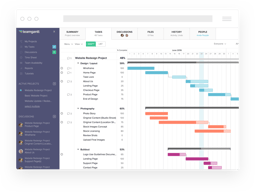
The Gantt chart view helps me the best to review the tasks duration and deadlines.
Milestone can not be put on the same day as the connected tasks last day.
I work on customer projects. Customers can see the project statuses real time. This is a huge advantage.
The clean and intuitive interface. Furthermore, the app gives a great field for learn more about features even inside of the product.
I couldn't deal with later tasks. Is there any way to see the real time of the task? Other question: why do we need to refresh the page after a change by a collaborator?
I can following our product roadmap easily by the internet.
Gant chart and how well it is designed. Looks elegant even when the project is huge. Whoever designed the web application back end should get a huge reward.
You cant add virtual users. ofcourse you can pay and add more users but sometimes we have one account and have to plan for multiple resources.
I like to have a broader perspective when it comes to project management. Gantt chart helps in that. With Teamgantt I can do all project management in a single gantt chart. That is a huge relief. I have used smartsheet, Jira, Zoho, etc. and I like Teamgantt just for this reason.
Clear timeline. Project management. Colours to differentiate tasks.
I wish we can adjust the size of the timeline.
I use TeamGant to manage design projects.
Follow up on questions is very fast. Free Training is great and I actually use it.
Some of the screen function of the product is a little clunky. In particular dragging items from the bottom of a large chart to the top.
The product is a great communication tool.
This was my first experience with gantt charts, yet I was able to complete it quickly and confidently. TeamGantt was very user-friendly. I especially loved that I could then import the dates into my Google calendar.
There really wasn't anything I disliked about it.
Long term planning made simple. Helps me stay on top of multiple tasks without stressing that I (or my team) have forgotten something.
Team Gantt integrated seamlessly into my various existing project management tools and offered me a view for sharing and collaborating that I was missing.
At this stage Team Gantt is offering exactly what I need and in the future I'll be looking to adjust more of our team views into this platform.
Visibility into complex organizational relationships and interdependencies between tasks, milestones and work groups.