

Unclaimed: Are you working at TeamGantt?





TeamGantt Reviews: 4.8/5 — Highly Rated
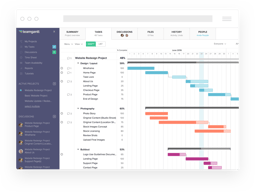
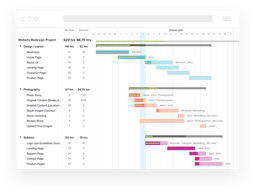
TeamGantt is a cloud-based Gantt chart and project planning solution specifically built for small, midsize, and large enterprises. With its comprehensive project collaboration tools it facilitates better efficiency within teams using Gantt charts, time tracking, file sharing, and task-level communication features. A drag-and-drop interface also ensures better usability and ease of use.





| Capabilities |
API
|
|---|---|
| Segment |
Small Business
Mid Market
Enterprise
|
| Deployment | Cloud / SaaS / Web-Based, Mobile iPad, Mobile iPhone |
| Support | 24/7 (Live rep), Chat, Email/Help Desk, FAQs/Forum, Knowledge Base, Phone Support |
| Training | Documentation |
| Languages | English |

Compare TeamGantt with other popular tools in the same category.
Everyone can access information for projects in one place. Things do not get lost!
I love everything about Gantt. It is a great organizational, collaborative tool.
All the data is in one place. We can all discuss a project and keep everything organized.

The simplicity of the functionality and formatting. It allows me to quickly set up new projects, communicate a clear message, and train staff to do the same. We tried MS Project and Smartsheet first, both of which lagged in these areas. On top of this, they reallly excel with internalizing the needs of project managers. We love the functionality to define collaborators or other companies under resources without assigning them a profile, or paying extra.
Not applicable for our team. The pricing, collaboration and user management work well for our team.
We primarily use TeamGantt as a tool to communicate with our clients. Team Gantt allows me to export the information I want to share in a way that makes sense for executive review.
It's really helping me with project management tasks and it's easy to set deadlines for the whole team!
The limited number of tasks in the free plan
Organization and tasks to each role
It helps the Team to monitor the progress of the project.
Based on experience, I didn't encounter any problems so far.
It is beneficial in terms of decision making.
My business juggles many simultaneous projects. I used to keep track of them using a calendar and written task lists but as the number of projects grew and they became more complex, this approach no longer worked. TeamGantt allows me to visualize all of my projects at once - more than that, I can easily schedule activities for my projects so that things don't pile up unexpectedly. So my project planning and execution has become a lot more smooth. If my team and I get ahead or behind schedule I can shift project activities around. The ability to have dependencies makes this really easy. Move one activity and the dependent activities adjust automatically. Daily progress reports to my email help with a check-in for what I should be paying attention to and give me a head's up before a deadline is on top of me. Templates are also great because I don't have to create a new project from scratch every time I get a new client.
If I finish a task ahead of schedule it still shows up in my progress reports until the original due date; once it's done I would rather not keep seeing it listed as 100% complete every day - a small annoyance. Repeating tasks can't be easily created/displayed. If I want to do the same sequence of tasks multiple times over the course of a project (for example conduct interviews every 4 months: develop/update interview protocol, interview subjects, analyse data, write report) there isn't an easy mechanism to set this up. Rather, I end up typing in long lists of the same tasks over and over and messing around with how to group them to look as ungainly as possible.
Keeping track of many complex projects. Helping me to do long range project planning: I am able to forecast out several years so that I know when I can/can't commit to traveling for example. Helping me do medium term planning: I can see well in advance when periods will be likely slower or busier so I can move activities around based on priority. I spend far less time than I used to on keeping track of when different projects might interfere with one another - because I can take steps to prevent them from doing so well in advance. Deadlines rarely sneak up on me anymore. I can play with different scenarios. All of this fits into my overall business goals of running a more efficient and effective business - spending less time on busy work.
Flexible, quick and easy to use compared to similar tools. Great integration with Trello. Like the regular email updates on progress and the fact there is a free version is great for small teams and startups.
Can't really fault this solution if honest...
Allocating and planning resources, keeping track of progress and allocating tasks across different teams and departments.
Customer Service: The customer service team have been exemplary in providing assistance in a timely,friendly and professional manner. Whenever I was stuck on a particular feature of the system, I was always supported by the team, to mitigate any issues that may have occurred. User-friendly: The website is very easy and clear to navigate. All the features are cleary explained/outlined in the side panel. Furthermore, I particularly love the availability of personalized videos to guide users.
Sometimes exporting the project has been a hassle, due to compatibility issues. However, with the help of their friendly team, I did overcome the issue. In the future, it would probably be recommend that they have an guide on how to export the project in particular format.
It allows project managers to effectively schedule the deadlines and milestones within each stage of development of the final product. Furthermore, it also provides an interactive interface to keep track on the progress of activities.
I like how it's very streamlined and easy to use. I like the aesthetics. Very professional instrument when presenting the charts. I love that you can make segments of tasks.
I don't like that there isn't a popup menu when hovering above a task. I'd like it to show the start date and when it's projected to finish. I'd like to customize more.
i use it for school

The ease of sharing the live schedule with all members of my team, subcontractors, and owners/tenants.
I don't like the fact that when I reduce the time of a line item that is on the critical path all items on that path do not move in with it.
Schedule information live sharing is so helpful

TeamGantt is being very helpful with setting up my exams and projects dates for college. It has all the basic features I need. Therefore, I don't need any other tools for this.
I would provide more print and view options (daily, weekly, monthly).
Having a clear visuals of my deadlines for school. Being able to export as a pdf has been helpful as well.
1. Simple, intuitive interface makes it easy to keep everyone on the same page. 2. It's easy to start and track jobs across the platform. 3. You can invite people inside and outside of your company to just view or participate as needed.
1. The pricing has changed and now restricts each project manager in number of projects, which is a problem for small companies that utilize one or two project leaders to manage many jobs. 2. The default setting on email notices hammers your in-box. We tell everyone coming in to a project to adjust that first.
We looked for a scheduling option that wasn't weighed down by all the other tools we didn't need. All-in-one solutions can be great, but that's not what we needed in this case. TeamGantt let us focus on what we really needed and avoid the bloat.
I like the tutorials that helped me get prepped for using the system. I found it very easy to use and understand. I manage all of my work projects on it.
I have not run into any challenges so far.
It allows our whole implementation team to see where we are on a project and stay in Sync.

The ability to plan a project with a group of people, assigning tasks, deadlines with reminders, and a great Gantt Chart showing the project plan as a whole. It's professional-grade, so happy to pay for the service!
The price - if you are on a budget, as there are free tools out there, but the free ones do not have all of the bells and whistles as this one does.
Kept everyone on the team aware of each other's responsibilities - which meant that any hold-ups were in full view of the entire team.
Lots of reasons to select Team Gantt - not the least is easy adoption by non-project managers. Visualization of workflow and progress to goal is awesome, checklist and detail features are awesome.
Output rendering to .pdf is very close to the core product, but a little visually clunky.
EVERYONE in our teams - including clients - are meeting their deadlines. Revenue cycles are improved, clients are happier and have greater confidence in our ability to execute.

I love the simplicity of it. I never used a Gantt chart before, but the fact they have different views helps tremendously.
It would be great if they provided something similar to what Basecamp provides - the ability to lock/unlock notes on a task.
My company has many projects at once, so there are various stages on any given project on any given day. TG helps keep the team on task, allowing them to meet deadlines.
I love working on many jobs and creating tasks for everything I do, and I don't forget anything!
I want to archive years prior! There are a couple of features not yet available.
Managing a project and the people who are on it. Everything is better set up to multi-task and create an accurate timeline.
It has far more to offer than just Gantt timeline chart ,the tool is user friendly and great for teams with varied experience levels.
Poor in client or contractors management
It's features are geared towards collaboration and ease to use. Everything is about streamlining task management

I particularly like the view where I can see which projects are off track because I use this as a basis for my Monday meetings with the team and only dive in to those that are off track.
It feels a bit overwhelming to start with. The capability we'd really like is the ability to view all projects overlayed on to a gantt chart and the ability to toggle them on and off.
It's giving us a better idea of where the bottle necks are so we can reschedule things.
The most helpful thing about gantt is that it makes progress available to others as well
So far it has been an amazing tool! nothing to change on my part.
Decluttering the Schedule
The most helpful thing is the ease of use. Secondly, you can create and delegate tasks easily to different team members and can capture the progress very efficiently
So far I did not find anything to dislike in the app
The main problems which were addressed by TeamGantt is the scheduling of the work between the team members and capture their day to day progress

Easy integration and sync with Trello Cards
TeamGantt still does not have Cards available
Deand-lines at a glance in Trello
The ability to easily assign tasks (in my case (trucks) to routes on certain days and assign drivers to those tasks (loads). It's effortless for everyone in my company to see what is going with every shipments.
I wish there was a way to make the calendar a little bigger so that it was easier to see the distinction between days. Maybe a weekly version would be helpful.
I needed a way to show my owners a chart showing where our trucks were going to be and who the drivers were going to be at any given time an Gantt allowed m to easily make this information avaialble
A snapshot of the entire project in spreadsheet format, plus being able to share with all colleagues involved in the project
I honestly cannot think of any negatives in my usage so far
None so far

Getting started is free, and the charts can be shared with colleagues online.
The program runs in the cloud, and so despite having a high-speed cable internet, the delay as each key-stroke entry is updated makes for slow editing.
?
It is straightforward to use with the click and drag feature and has been invaluable in allowing me to plan projects ahead of time and work collaboratively with colleagues. I have become more organized as a result. In addition, the ability to watch videos at a faster speed is great.
No real issues so far to note. Everything is working smoothly for me so far.
It is excellent for managing projects which have multiple steps and interdependencies. Specifically, I am a Ph.D. student in a lab, which has helped me plan and organize experiments immensely. Being able to more clearly see the key steps in a project and interdependencies has improved my time management and productivity.
This is an excellent project management tool for teams of any size. It is straight forward to learn and use its got useful features.
I have not yet found an aspect of the tool I dislike.
TeamGantt is helping us plan out a complicated project that has several long lead aspects. These are being broken down into serial and parallel tasks using the tool helping us to visualize how it will get done in the time given to the team.
Standard tasks list that displays ongoing tasks and those scheduled. Visual illustriation of a task help easily see various timelines of each task
Projects run on a budget and improving the section of the project budget will help with estimates
The progress of tasks is measured in percentages and I can see how much work needs to be done within a specific time
Ease of use and ease of understanding the programme
From my use, I don't dislike anything I have came across
Clear project programming
I have never used a Gantt with any real success before. I am not great at tech and Team Gantt is making it so easy for me to make a comprehensive schedule and share it with my clients and team effortlessly.
Have not found anything I don't like yet.
Thus far I haven't had any problems. My application is fairly straight forward. I am definitely not using the power of the software yet.

I like its simplicity. You can get up and running in a few minutes. It is also very intuitive and at the same time powerful. I find time tracking (in Advanced version) very useful. Plenty of help videos. Quick help from customer service (even with the time zone difference).
Not much not to like but I hope it gets integrated with ERP software.
Most importantly: I track my team's workload. Other things: I track project progress; clears up the mind to see what's critical, it's a great coordination tool also, the team is looking on same page when it comes to project management.