

Unclaimed: Are you working at TeamGantt?






TeamGantt Reviews: 4.8/5 — Highly Rated
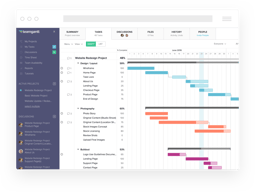
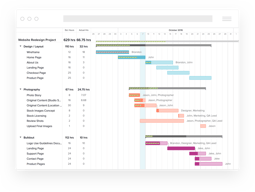
TeamGantt is a cloud-based Gantt chart and project planning solution specifically built for small, midsize, and large enterprises. With its comprehensive project collaboration tools it facilitates better efficiency within teams using Gantt charts, time tracking, file sharing, and task-level communication features. A drag-and-drop interface also ensures better usability and ease of use.





| Capabilities |
API
|
|---|---|
| Segment |
Small Business
Mid Market
Enterprise
|
| Deployment | Cloud / SaaS / Web-Based, Mobile iPad, Mobile iPhone |
| Support | 24/7 (Live rep), Chat, Email/Help Desk, FAQs/Forum, Knowledge Base, Phone Support |
| Training | Documentation |
| Languages | English |

Compare TeamGantt with other popular tools in the same category.

I really like the smoothness of the chart. I have tried some other gantt charts with other web-based software packages, and they are extremely slow to render, especially if you have multiple projects.
I'm a general contractor, so it would be nice to have the ability to assign a sub-contractor's information to a task.
I'm managing the entire build process for a new-construction home. Having a timeline for the multitude of tasks involved with building a house, along with managing over 20 different trades' timelines requires a very robust gantt system.
Really simple to setup and get going. Using it for 5 year planning of Information Technology projects. Easy to create links between items and change to milestones. Couldn't be simpler.
A grouped task within another grouped task is not indented so it doesn't read so well. Just a small thing though!
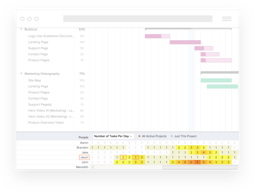
Ability to see an overview of a lot of projects over a long period of time. Can picture the plan - got rid of task lists and now just using TeamGantt for smaller actions to achieve large projects. Also able to use the chart to show the board as well as my team.
I love that my whole team is able to be on TeamGantt and see the progress being made, and how their projects affect others.
I don't like that only people who can edit the whole gantt chart can assign tasks. I don't want everyone to be able to change the whole chart, but I want for my system managers to be able to assign tasks to people.
This platform is so user friendly, so there was very little time in learning how to use the software.
The ability to keep track of multiple resources and people in a clean and efficient system. That is web based and easily accessible from where ever you are. As well as the mobile based APP that gives you even more freedom to interact with their system.
The only down side I find with team gantt is its lack of shortcut keys or its ability to select large groups of data and alter their assignment all at once.
We are solving several problems with team gantt. Our internal communication and understanding of what as an organization as a whole we are doing has increased drastically. As well as keeping a detailed record of all aspects of our business that is easily deciphered by any one in our organization.
The teamgantt tool is streamlined and easy to use. It doesn't take long to get a project off the ground and you can be as detailed – or high level!- as you want. The collaborative aspect of the product makes it great for working on teams and the various filters available make it easy to conceal sensitive information and share views with our clients or consultants.
I'd prefer to be less granular when assigning hours to a task. My teams tend to be on multiple projects at once, and view their workloads +/- 2 weeks at a time. I'd like to assign an estimated 'hours needed to accomplish' number to a task or milestone (say 16) and a separate 'work window' (say 10 days), then assign 4 hours of the 16 to person A and the other 12 hours to person B. The reality is that the deadline (the 10 days) might change, but the 16 hours will not, so I need that relationship – and the conflicts that could potentially arise from it– to become visible. I may view person A's workload for the month and see 8 projects, all with unique deadlines and hourly requirements. It's essential that the conflicts ( more than 40 hours needed per week) be visible.
I typically use teamgantt very lightly, as a calendar visualization tool. I drop in major milestones and sprints, but rarely list tasks or make assignments. I would LOVE to be able to track staff across multiple projects to uncover conflicts. Unfortunately, it would need to be adopted by my whole office to really be effective. I would need buy-in from leadership and I don't believe they would feel the product is robust enough to be worth the cost.
Sincronization with Trello and easy to manage
The cost for not free upgrade. The limited number of people for project sharing
Interaction among colleagues about projects and activity list management and resources involved in the tasks

Low cost Online access Easy to use Multiple project view
Nothing at all Compares well comparable Microsoft tools at cheaper price
Managing large complex projects Working with internal resources while reliant on customer resources Keeps us on track Allows us to share accurate timelines with customers

The overview of the ganttchart. It's super simple and userfriendly
The abillity to have a dark theme and the abbility to add more user or names to the chart (in the free version)
Realtime overview of ongoing projects to make sure we keep our promises.

I love the interactive nature of the program and the ability to work as a team to update the planning and the results of our project. To be able to use it online is amazing because we work so far away from each other.
There is nothing that I dislike about the program.
We are working across the country to help improve the green energy solutions available to the world.
Great user friendly interface that gives incredible amount of insight into any past, ongoing and/or future project.
This is not something that has to do with the App per se nonetheless it is worth mentioning, I have found it difficult to promote the usage of TeamGantt within my team since they find it unnecessary because they don't see the big picture of it and find it a bit confusing since their specialty is not project management but rather operations per se.
I am tracking all of my teams ongoing projects with it and it gives me great insight into deadlines, conditional tasks, timeframes and much more. I also keep track of some software solutions that I'm creating for the benefits of the team and project and it helps me to organize myself better in these terms.
Embedding the Gantt Chart in our project cockpit gives our clients 24/7 access to the project status and they can easily see, what missing deadlines will mean for the project progress and it helps everyone in our Team to stay on track. Having an overview how busy your resources are is also key for me as a project manager and the solution TeamGantt provides is absolute stunning.
Limiting access and features for the client isn't self explaining and we have some issues finding the right settings. Renaming Baselines would be a great feature!
Transparency for our clients and MOST OF ALL they get the whole picture and really understand how missing their deadlines will impact project progress. No more discussions with our clients why missing their deadlines result in additional project costs. We also use Team Gantt to plan our resources and to have an overview of how busy everyone is. This really helps us to plan and manage our projects in a more efficient way.
Easy to use, Great visuals and easy to share with Guest users at our customers to align on our onboarding process
Gaant chart behavior is sometimes wonky when moving dates around.
Customer onboarding is our main use case. It has been easy to train new members of our implementation team and to create deliverables for customers on the process, timeframes, and how each step of the process impacts the overall timeline.

I love the intuitive functionality and the flexibility of the tool.
perhaps a function to send to all team members through the interface?
I can keep the whole team and clients in the loop at all times.
Simple drag and drop functionality Great for sharing across departments and organisations Good power up integration with Trello enabling people to use the platform that best suits their work style, while maintaining status updates for the project in both platforms
Sometimes Power Ups break causing rework
Saves time No need to run costly training as it is WYSIWYG
The chart and maps allow you to visualize the entire project and see deadlines and to-do. Inviting team members to see where the project is at. Delegating tasks and tracking the progress and finally, email updates on deliverables and project changes.
Too many emails and notifications on every changes
Tracking project progress and deadlines. Sharing documents easily and getting feedback and notifications from clients.
I turned to TeamGantt when our small startup got a government grant for Research and Development of some innovative technology. With ongoing client and current product support layered on top of this new research, I was concerned that tracking the new project would fall behind. With its intuitive interface, TeamGantt let me divide each element of the project into smaller, achievable, and discreet tasks we could assign and track.
The free version is sufficient for one project. More projects would require the paid version.
Team Gantt allows me to track what we've achieved and what we are falling behind are, catching problems before they become crises.

TeamGannt is an easy, free, and productive web app. It replaces the many expensive software by providing all those features which expensive software contains.
There isn't anything which I can say that I dislike it. But there could be some enhancements in UI for better usability.
I've used the TeamGantt to organize my project and I found it the best choice for my project organization.
I've used many project management tools including MS Project and even EPM. This tool allows PMs, but more importantly all resources to see the full project in one screen. So often resources get lost in there own work with there own individual task times being their only focus. TeamGantt allows us all to see the big picture which aids in calling out risks earlier.
If I had one criticism it would be the lack of of an option to turn on WBS numbering. Being somewhat of a PM purist and finding easier to reference WBS numbers than task names would help.
The product is being used as the centralised IT project management and scheduling tool. The holly grail of of all department projects. The benefits realised are almost instantaneous when you can see over allocated resources or clashing projects on the Gantt bar view. Plus the dependency linkages are awesome.
TeamGantt allows my team to all know what everyone is doing, which is a HUGE benefit because most of the work we do is very co-dependent on other projects.
The only dislike that I have is that we do not have that higher level plan to include more people.
Historically, one of my team's biggest problems was not knowing due dates. Now there is a concrete deadline that everyone can see.

Easy way to visualize workstreams and balance multiple priorities across teams and departments.
I wish that it had a option to upload files into a Folder
It has greatly improved our institutional data and information sharing. Which gives us all more time to move our work forward as well as streamline our staff meetings.
I love TeamGantt because the layout is so straightforward and clean. I love using different colors to help keep areas separate. Creating new categories and subcategories is so simple. I feel like I have full control of what and how I want to manage.
I dislike the few features of how to save or project settings. I want to be able to export the Gantt chart into an excel or sheet document so I can share it with other departments who may not have the program. I hope more features regarding sharing or saving will become available sometime.
My team is successfully staying on track and executing tasks on time. Things that would typically get lost in the mess are now being completed in a timely manner.
I really like that I can view the projects in real time, and I can extract fresh information that I can offer to clients
The only problem is the slow speed with which the program moves. I would enjoy a much faster speed.
As I mentioned before, my benefit as a salesman is that I can track the projects in real time, so I can confirm accurate information to my clients.
Easy to use, easy to digest, AND a mobile app. I love switching to calendar view to see all of the goals together.
I wish I could see all of my charts together in waterfall view. I technically can, but its cumbersome. Then again, it's 7 gantt charts...
I have taken my 7 goals for the quarter and broken them into manageable steps.I never would have gotten through without this.

The easy of use, Being able to see all my projects schedules and resources.
When changing a task due date changes the project go live. If I move the due date to an earlier time other task further out change. Could just be a training issue.
Organizing all projects and tasks. Less time to manage project schedules..
it is so easy to use. It very clearly shows what task need to finish along with the timescales
I check the Gantt chart on my phone and am not able to adjust the percentage of completion for a certain task
I am using TeamGantt for my school engineering project it helps keep me on track so I don't miss important deadlines

The fact that it is so intuitive to use, and the features are exactly what I need, nothing too fancy or unnecessary. I have tried many scheduling tools and am so glad to have found TeamGantt - no need ever to look elsewhere.
I'm at a loss of words! Stumped. Cannot think of anything to write.
Simply coordinating activities among team members. Making sure things get done on time and according to plan. The dependies make it easy to change the timeline and observe the impact on milestones. We all just feel so much in control.
Team Gantt is very user friendly, it has options on the left hand side to bring you to where you want to go such as your profile or your projects. We love how the system will show you how much of the project has been completed in percentages. You can also check on your completed projects, held projects and your active projects. Overall it's a great system to use and we highly recommend it
It would be nice to be able to add users to the projects or to be able to add someone to a project as someone who can only view the project and not edit it. Other than just that we really like everything about team gantt.
It's a lot easier to create and manage our projects and see our project and deadlines. It's also really easy to read when we need to print off a copy of the chart or if we need to add it to another document.

TeamGantt is the only web based Project Management solution that, for the most part, actually looks, feels, and behaves like what you expect from desktop Project Management software. It is superior to MS Project for web, in my opinion. For all its features and ease of use, I think it is priced more reasonably than former leaders in its category. I say "former" because I think TeamGantt should be taking the lead now if it hasn't already done so.
There are still some very minor areas where the web-based nature of the app makes it slightly more cumbersome than desktop counterparts. I've seen usability improvements in the short time I've been using it, however.
I was 23 years in software and I wish I would have been using this then! Now, I use it as a personal "life management" tool - TO DO list on steroids, you might say. For me, flat TO DO lists are not enough. I need dependency management, scheduling, various views and reports, and the ability to work both on Windows PC and my iPad. For my personal work and project needs, TeamGannt delivers. I am guessing that it's also great with team collaboration and more sophisticated project management needs than my own.

Most helpful: easy to use gantt charting. Export function works really well. List view is second best feature.
Tasks are separate from projects. It is a bit less intuitive to spill out tasks from a Gantt chart than I’d like, but still useful.
Very easy to communicate project status with non-PM management.
Easily set up templates, projects, and tasks. Way less clunky than other tools that offer similar or same functionality.
There isn't much to dislike once you are accustomed to the layout and tools.
I keep track of my entire operational structure from project management to submittals to fabrication to install. It does it all.