

Unclaimed: Are you working at Workamajig?






Workamajig Reviews: 3.8/5 — Good for the Price
Workamajig is a cloud-based HTML5 project management solution built for creative ad agencies and in-house advertising teams of all sizes. Primary features include opportunity tracking, project management, time tracking, resource management, and complete finance and accounting. The platform can reliably create project tasks, assign them to people and collaborate on these tasks from a single message portal to help seamlessly facilitate collaboration.





| Capabilities |
API
|
|---|---|
| Segment |
Small Business
Mid Market
Enterprise
|
| Deployment | Cloud / SaaS / Web-Based, Mobile Android, Mobile iPad, Mobile iPhone |
| Support | 24/7 (Live rep), Chat, Email/Help Desk, FAQs/Forum, Knowledge Base, Phone Support |
| Training | Documentation |
| Languages | English |

Compare Workamajig with other popular tools in the same category.
Workamajig works well. We understand it is designed to accommodate a variety of clientele, but for a small agency, having everything in one place has served us well. Sales, Project Management, Timer Functions (our producers love this feature), Billing and Accounting, it is the entire life cycle of a project.
Workamajig can help to scale down for a smaller agency and help create some customization. There is a lot the program can do, but not always needed for a smaller scale. Reports can be difficult to create, and when thinking of FP&A, it is lacking, especially when looking at clients and projects holistically. Additionally, our employees feel Workamajig is behind on the interface for project schedules and project management. There are systems like Monday or Asana that are light-years ahead. Lastly, we get complaints from our producers about the timer function being challenging to use. They'd wish it to be easier. For example, fewer windows for confirming/editing time, not erasing time when you change the date on a timer, and having new timers add to existing time entries vs. creating a new line.
The full life cycle of the project, including accounting.
It's a one-stop shop for all things budget and timesheets and getting reimbursed. It's a great source to find all budget and estimate related information needed.
Navigation is a bit confusing for me still, but I am learning.
No problems at the moment; I can figure things out for myself right now.
You can view a lot of different calendars
It can be glitchy and not show all the calendars
We use it to book meetings and for project management
I like how this Software helps track and organize Graphics jobs for the marketing department at the college. It incorporates detailed tracking and scheduling.
Unfortunately the drawback to this software is that it is not tailored to using on one's cellphone yet. This is unfortunate since I've been working from home coming up on a year now. I also wish its navigation was a bit easier to use, or maybe its the dashboard. Anyway, a learning platform would be nice. Our faculty, who have to use the software on the "customer " end are always complaining they don't know how to use the software and it is not self explanatory. There are always issues with uploading and retrieving documents which is pretty much why we use the software, to approve proofs of PDFs.
This software is helping our small department to track and document its projects to show how the workload of the department has grown.
Intuitive interface and easy to navigate. Creating a project is a fairly quick process. As a manager, I appreciate quickly being able to review and approve my team's hours.
Task management is way too cumbersome. Would like to see something a lot simpler when it comes to creating, assigning and managing tasks.
Needed to track time spent on projects by a small staff and accurately estimate future projects based on a scope of work. Would also like one system to assign and track tasks as well.

The ease of use and flow of workamajig is much greater than before.
Integration with other applications is a bit cumbersome.
ease of communication and tracking of projects
Interface is much better than the old version, great way to manage projects and keep schedules up to date, efficient for time tracking
Lots of bugs within the new app, I often have to go into the old version to update schedules. Could be more visually appealing, seems a bit old school when compared to other project tracking software, unaware of all of the features
as a project manager it is a great tool for staying on track and managing multiple projects, good for time tracking, useful for budgeting
It has a clean design. Features are cool and looks very updated. Some features like estimating are easier than the older version.
Cannot search inactive jobs. Not sure if this is a setting we need to change. Also that every time you want to open something it comes as a new tab. The tabs start to add up and then I become unorganized!
Project management
Easy navigation to what I'm looking for. The user experience to click through to headings flows well and makes it easy to find project details.
Not being able to create reports on my own or view billing once it has already been approved. This may be a setting my administrator has set for my user.
Project management. Multiple teams working on one project with multiple tasks and deadlines. Able to see who is working on what and when items are due.
Time sheets are easy and jobs are relatively easy to look up
A bit clunky and slow at times. Sometimes it is hard to find jobs.
I like that you can fill a whole week in at one time
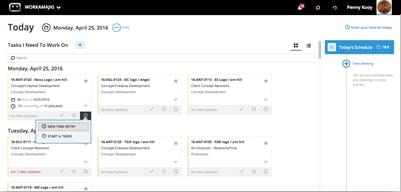
Timer/stopwatch for time tracking on projects.
App is frequently not available in my browser.
More accurate time tracking. Platinum also handles scheduling of meetings more efficiently than the original version of the app.
The time tracking app is absolutely fantastic for multiple projects.
The calendar on mobile is horrible and nearly impossible to utilize beyond the current day.
We’re sreaamlining projects and workflows mostly to help accounting and scoping accurately all in one place.
I like the interface. It's modern and intuitive.
A lot of steps in order to get to the PA, and it's hard to tell if you're in the right place.
Internal communications and financial tracking, all in one place.
It's my first user experience with a project management software so I don't have much to compare it to but it seems sufficient for the task at hand.
There are way too many steps for what should be a more simplified task. I also do like all the additional windows that stack when you are trying to enter a project request. It needs a better UI.
Lack of tracking the many projects we process in our department on a weekly, monthly and annual bases.
project management system is awesome and really helps agency. the system also allows different usage by users, however, we can't lock numbers in the system to not allow changes after posting.
financial accounting system limits what is able to happen and not the most compliant
custom reporting is a great feature within the system
Platinum is much more aesthetically pleasing than flash as well as contains additional features that are not available on flash.
Platinum seems to have many glitches and is, to my experience, gotten glitchy-er as each monthly update is rolled out. For example, I frequently will have to refresh a page and re-enter report filters which can often be time consuming.
Our biggest problem we have been solving is decreased time utilization, thus resulting in lower revenue. With Platinum we have been able to address those with lower utilization numbers, increasing their billable hours, consequently increasing our revenue.
The fact that I can see all days in one week and keep adding time to the same job, instead of having to look up jobs each and every day.
Having to go to timesheets, select a day, and then click another button to "Try It Now" (seems like a lot of steps)
I'm only using it for timesheets
It's easy to use once you get the hang of it.
I find that there are a lot of small glitchest that make it difficult to work with.
It helps keep track of time and projects.
I like that it is now html based and no longer flash.
too many clicks compared to previous version
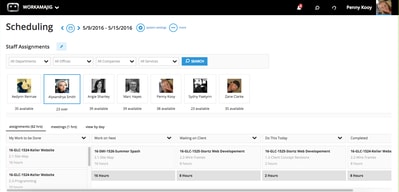
I mostly use for scheduling and managing my team. Visually, easier to use.
Dashboards, but Accounting dashboard is what we are really needing and that has not been developed yet. Weekly time entry capabilities. Main Menu is easy to maneuver around.
You don't have the ability to keep multiple windows open. You can't edit vendor invoices and timesheets in the approval screen.
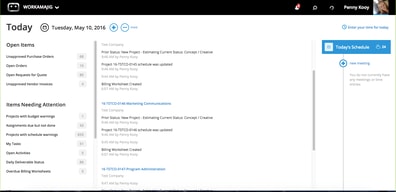
Today's screens are helpful in addressing open tasks and to do's.

I like the sleeker new design and the search capability of WMJ platinum. You are able to easily see where projects are in the process and if any are at risk - this feature is much better in the platinum version than in the standard WMJ application.
I find the long-form view of projects difficult to navigate and the collapsing of diary posts to be confusing. I've often missed the latest diary post in the new format, I much prefer seeing all listed ensuring I haven't missed anything.
I'm used to leveraging WMJ in general and aside from a new user interface and greater visibility into project status, I do not see any additional benefit to the platinum version
I really enjoy the new interface. It's much sleeker and aesthetically pleasing. I also enjoy how some things save automatically such as the time sheets.
I feel like there are a lot of kinks left to work out in Workamajig Platinum. My team is working on converting our entire company over to Platinum. We currently have our project managers working out of it now, however, we've come across a few bugs so we're still not confident in adopting Platinum agency wide.
Nothing yet that hasn't been solved with Workamajig classic.

The organization of everything. I like how it's divided amongst everyone, project managers, etc.
Not being able to have two windows open at once, such as the staff schedule and a schedule you're working on. I dislike that it does not have a project snapshot like the previous version of WMJ.
It lists your pages in a more organized, cleaner manner.
the idea, concept of the program makes sense, and definitely seems like it should work, but it's very hard to use.
friendly user experience really isn't there, tough to navigate and learn
online action planning, keeping up to date with multiple projects at once spearheaded by multiple people
Workamajig does provide strong reporting on time tracking if employees are comprehensive and honest in filling out their timesheets.
Very clunky, flash based UI and limited functionality in providing project financial analysis
Workamajig has provided us with a system to traffic projects across the agency and identify hours involved in those projects.
is a tool that gives you various functions with which you can manage and track all the information necessary to carry out new projects, it is easy and practical to manage, thanks to its functions you can keep a constant documentation of what the progress is. draft
its learning curve can be a bit complex to handle, so during the first days using the tool it will not be easy to handle it in its entirety, but in a matter of days it is managed in a very useful and practical way
it is a tool with which you can obtain multiple benefits when using it, which helps to better manage projects and to better direct the execution of them
the ease of getting around, there ar templates built in which you can personalize by company and/orjob.
so many windows to do one simple task, so many steps to do one simple task
ggant charts

I like how you are able to add in as many projects as needed and list as many job functions as needed. There is a lot of flexibility when it comes to project functionality. Th search bar is very hand when looking for a specific project. It's nice to submit all time cards all at once. There is a lot of detail in each project.
It takes a while to get used to all the buttons and pages. The user interface is pretty confusing. They have icons for one page but I don't think they are very communicative of what they represent. Overall the user experience is not the best. There are many ways to achieve the same goal but it is actually more confusing than helpful. For someone to wear different hats during a project, I would have to be added as additional roles.
The problems we are solving are tracking hours that we spend on projects. We do not bill based on time logged but it's good to know how much time we are spending on different clients.
The overall interaction and design. The layout is easy to understand
There are some complications that could be easier such as the deliverables and internal review process
Communication with teams, sharing files, getting approvals and expensing things
This is an improved ux. They took the past product and they added a more intuitive interface
It's really just a reskin. Really, it's just a reskin. There isn't additional features that I can see, it's just a better interface on top of the same functionality.
tracking hours/projects