

Unclaimed: Are you working at Wrike?
Wrike Reviews: 4.2/5 — Solid Choice
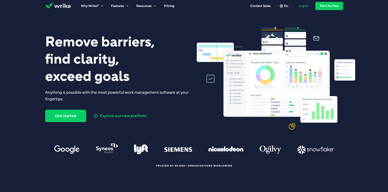
Harping on its versatility, Wrike is a project management software that features highly customizable dashboards and workflows and team-specific automation to give businesses a project platform that adapts to their current ways of working and not the other way around. Wrike’s functionalities involving over 400 tools revolve around giving a 360-degree view of projects, true interdepartmental collaboration, approvals acceleration, smarter data use, efficient workload management, and enterprise-grade security. Wrike has more than 30 well-documented use cases involving more than 15 departments and teams. Wrike also has a proprietary AI-powered capability called Work Intelligence that catalyzes results through smart automation and project risk prediction.

| Capabilities |
API
|
|---|---|
| Segment |
Small Business
Mid Market
Enterprise
|
| Deployment | Cloud / SaaS / Web-Based, Desktop Mac, Desktop Windows, Mobile Android, Mobile iPad, Mobile iPhone |
| Support | 24/7 (Live rep), Chat, Email/Help Desk, FAQs/Forum, Knowledge Base, Phone Support |
| Training | Documentation |
| Languages | English |
Wrike Pros and Cons
- Easy to use Gantt charts
- Customizable dashboard and schedule
- Comprehensive reports and insights
- Time-tracking tools included
- Excellent customer service
- A little pricey
- Can be difficult to get used to at first
- Frequent reports of unresponsive support
- Recorded incidents of unreliable software functionality


Wrike Review: Is It the Right Project Management Tool for Your Business?
Wrike has been empowering professionals and teams to better manage their work since its launch in 2006. It’s a comprehensive solution for professional service providers, marketing teams, and agencies. But all this versatility comes with a high price tag.
Is it worth it? In this Findstack review, we’re going to find out.
What is Wrike: A Quick Overview
Wrike has introduced Work Intelligence, an AI engine that powers risk prediction, task automation, and smart recommendations.
Wrike is an all-in-one work management platform that helps teams collaborate, plan projects, delegate tasks, and track progress. The platform offers a range of plans designed to meet the needs of almost any kind of business. Whether you’re a solopreneur or a department head at a Fortune 500 company, Wrike has a plan for you.
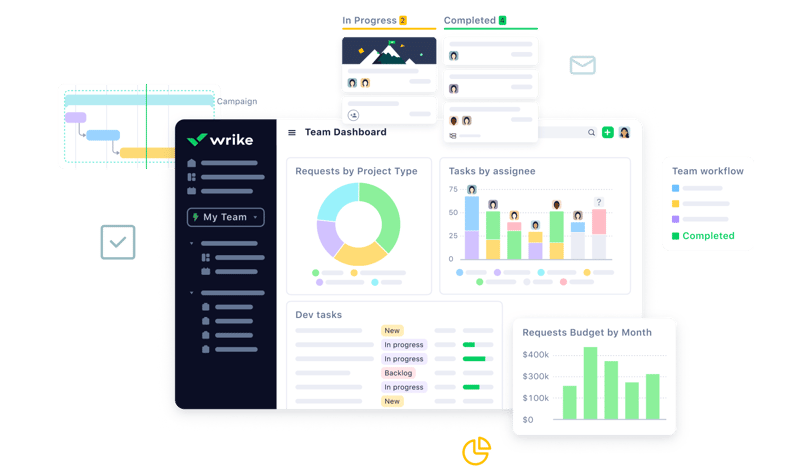
Wrike’s power lies in its ability to support both project management and collaborative work, which explains its appeal to a wide range of industries. The tool boasts a user-friendly dashboard that’s pretty simple to set up. It’s also very easy to create tasks, assign them to team members, set due dates, and track their progress.
Getting Started With Wrike
Wrike is one of the more intuitive project management tools for a new user to get started with—especially compared to competitors like ClickUp.
Wrike is available to users via web browser, desktop application, and mobile application for both Android and iOS devices.
To get started with Wrike, new users have the option to register for a free account using their business email. Once the email address is verified, users will be redirected to Wrike’s homepage to complete the initial registration process—which involves a guided walkthrough.
How Wrike Works: Key Features
Dashboards
If you’ve ever used a project management tool, Wrike’s Dashboards will feel very familiar.

For every project you create in Wrike, you can create Dashboards to display, manipulate, and analyze the project data that you’ve collected within it. They essentially give you an overview of project KPIs, metrics, due dates, and progress at a glance—saving you the hassle of seeking out each piece of data at the source.
When you create a Dashboard, you can start with a template or build one from scratch. If you go the latter route, you have quite a bit of flexibility thanks to a modular design and a wide selection of interactive widgets, including:
- Assigned tasks
- Overdue tasks assigned to you
- Overdue tasks that you assigned
- Tasks you’re following
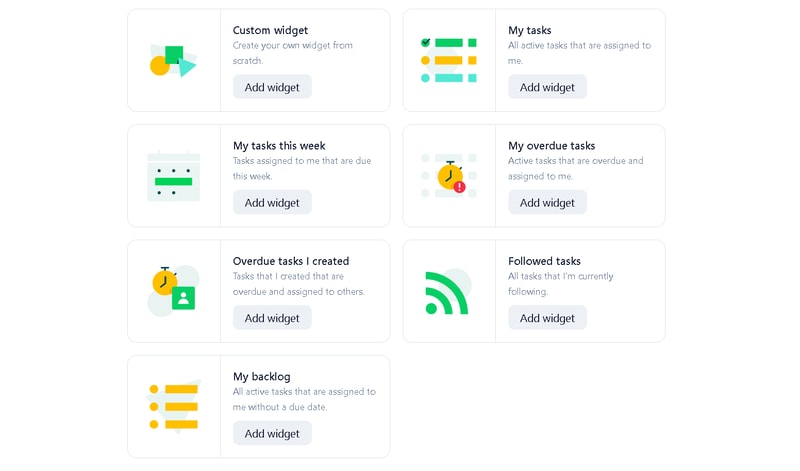
Wrike is unlike a lot of project management tools because everything you need is right at your fingertips. You don’t need to navigate to another window to see it all.
Automation
Like most modern project management tools, Wrike features an automation engine that works in the background to synch related tasks, assign workloads, and ensure tasks are completed on time with botted @mentions and comments.
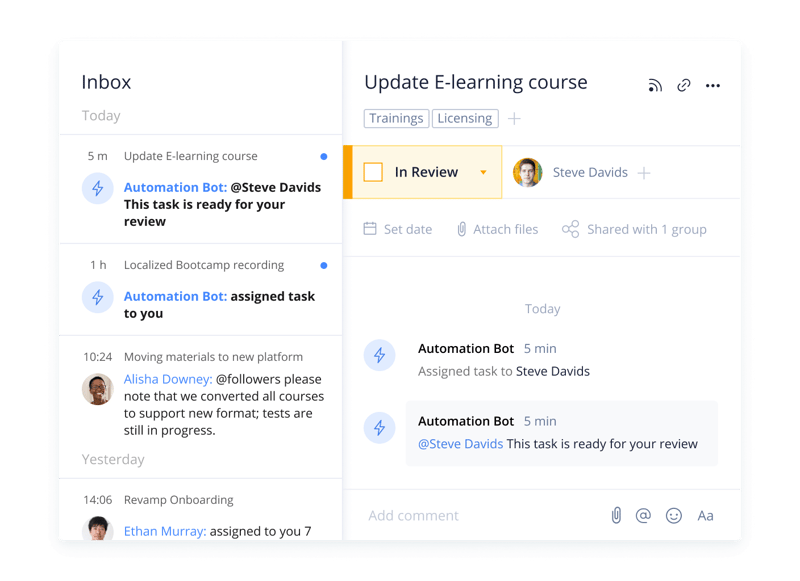
Wrike’s automation engine may not be the most complex or versatile on the market, but it’s intuitive and practical. There’s no feature bloat here—every feature is sure to get some use.
Integrations
On a related note, Wrike’s automation capabilities are supported by 400+ integrations with third-party tools. Pretty much every tool category is covered, including:
- CRM
- Communication
- BI
- Calendar
- CMS
- Storage
- Accounting
- Reporting
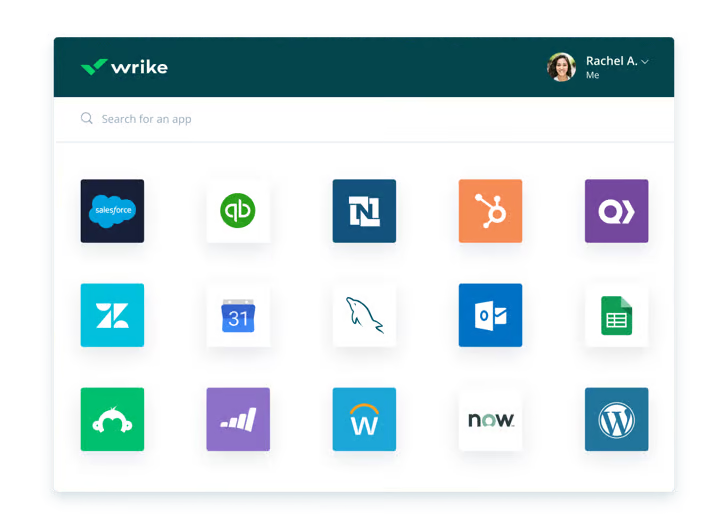
Integrating Wrike with other tools in your stack is a great way to cut out some busy work from daily workstreams and improve productivity. It’s also a surefire way to minimize human error.
Live Analytics
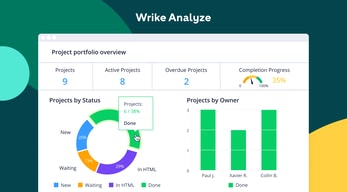
Wrike automatically updates every report, chart, and dashboard every 15 minutes, so you never miss a thing. 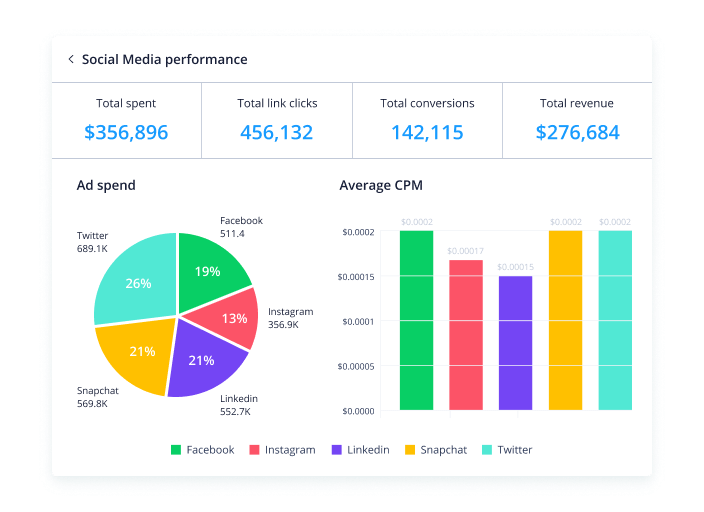
That’s a huge benefit—it means project managers don’t need to manually collect and input data from multiple sources to draw meaningful insight. Less time on busy work means more time analyzing the data for patterns, trends, and inefficiencies.
This feature is also great for project managers who are juggling multiple projects. They get a real-time overview of project statuses, team workloads, pending approvals, and tasks waiting to be assigned, so they can easily prioritize work and make meaningful progress.
Customizable Forms
Wrike has a custom form builder that you can use to create almost any kind of form—from simple team surveys to content request forms.
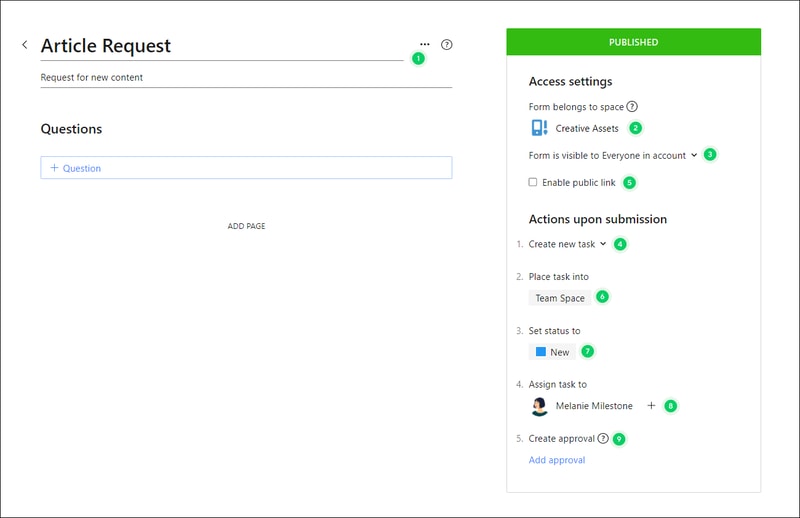
Wrike’s forms are fully customizable, and you can take advantage of role-based access controls to grant or deny access to certain pages or sections. Plus, when you create a new form, it can automatically assign tasks, set due dates based on the submission date, and populate subtasks.
Enterprise-level project management tools
Wrike offers advanced project management tools that you can access on your Home workspace to help you measure key performance indicators.
These tools include time tracking to assist in managing billable hours, visualizing cost and budget calculations, and business intelligence to assess project risk. While these tools are particularly useful for large enterprises with complex needs and a variety of teams, they can also be beneficial for small businesses that plan to scale.
In addition, the platform allows you to share files and publish assets with enterprise-grade security. The sheer number of features may be overwhelming for teams new to project managers, but Wrike provides great walkthroughs and tutorials. You may even discover features by accident that end up accelerating your workflows.
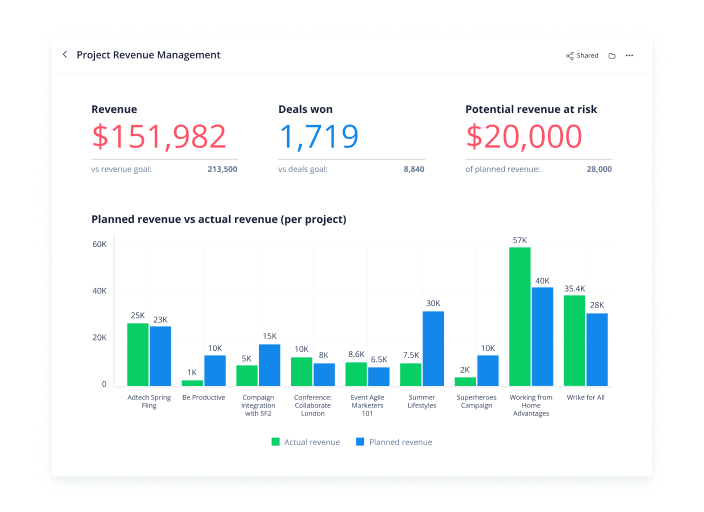
Wrike offers pre-built templates based on team roles to simplify task creation. Some of these templates include:
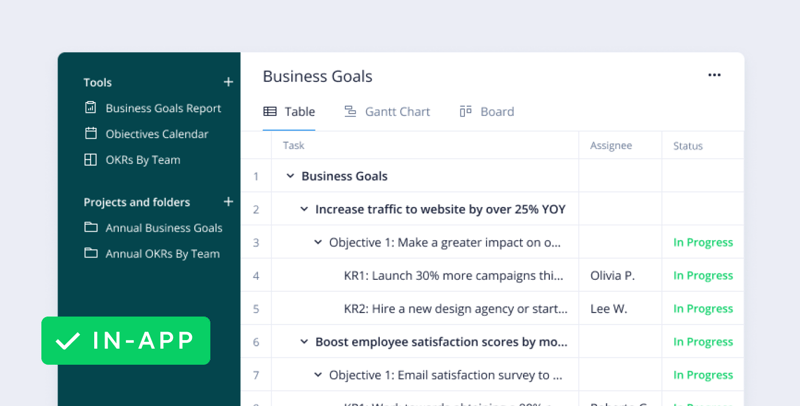
- Project performance templates
- OKR templates
- Weekly to-do list templates
- Kanban board project templates
- Agile and IT templates
- Content operations templates
- Quarterly business review templates
- Ticketing and help desk templates
Collaboration Tools
Wrike—like most project management tools—is designed to make it easier to collaborate with your teams.
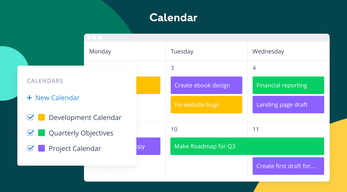
All team members have access to a global or project-based live stream of task activity, so nobody is left behind. Team members can easily communicate on specific tasks via comments and notes so that conversations are kept organized. Shared team calendars can be added to the dashboard to help with awareness of progress and submission dates. 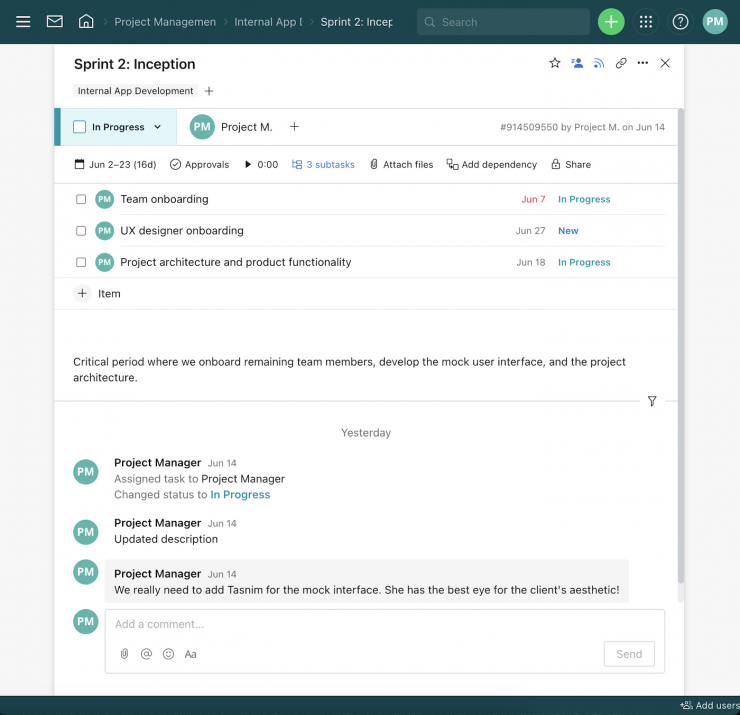
You can also invite third parties such as clients, vendors, or contractors, at no extra cost, to view the status of their projects and provide input that goes towards successful project completion.
Wrike Use Cases
Wrike’s use cases are quite impressive. Over 20,000 companies in over 140 countries have relied on Wrike to streamline their planning processes. These are companies that span a range of industries, including:
- SaaS
- Technology
- Healthcare
- Education
- financial services
- Construction
- Manufacturing
- Retail
What makes Wrike stand out from other project management platforms?
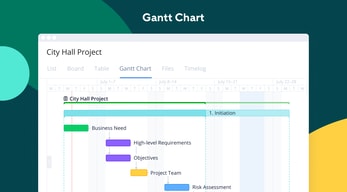
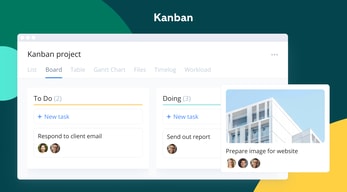
Wrike’s easy-to-create (and even easier-to-understand) Gantt chart view sets it apart from many other popular project management platforms. Plus, Wrike offers a range of other views, such as List, Board, Table, File, and Timelog. While this isn’t unique to Wrike, it isn’t super common to have that much flexibility,
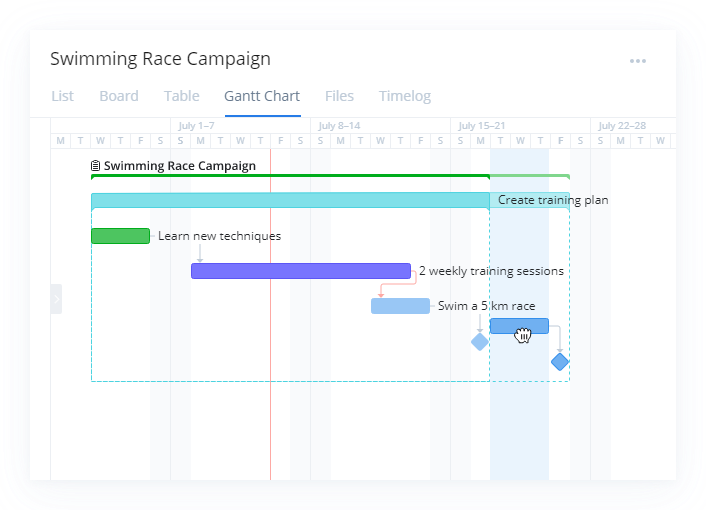
Overall, Wrike’s differentiating factor is the ease with which you can use it to manipulate project data to gain new perspectives and insights.
Wrike Pricing
Wrike offers a total of five plans, starting from a basic Free option, all the way up to an advanced Pinnacle option for large enterprises with complex needs.
Here’s a breakdown of the plans: 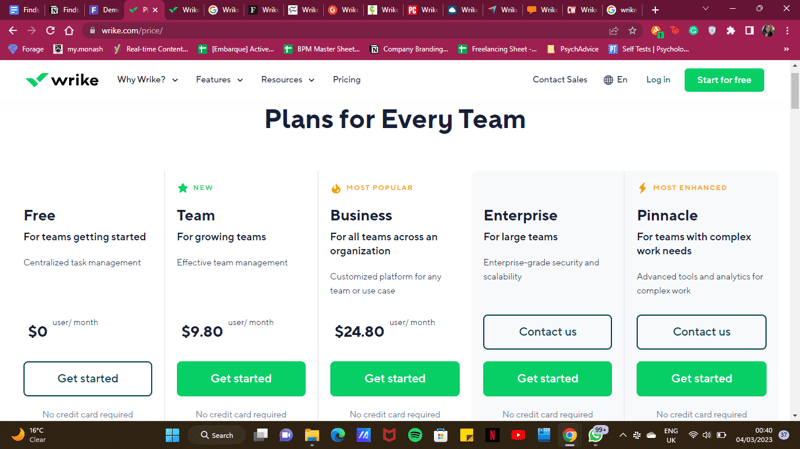
- Free : Wrike’s free plan is suitable for small teams that are just starting with project management software. However, it has limited feature options, including limited storage space, and excludes Gantt charts, time-tracking, and many customization tools.
- Team : Tailored for small teams that want to plan and collaborate on projects. This plan includes the Gantt chart view and the option to integrate with a wide range of services.
- Business : Provides access to advanced project management tools. The Business plan has everything you may need for project management for a large team.
- Enterprise : The Enterprise plan has custom pricing because Wrike will draw up a plan depending on your business needs. It is a plan to consider for large businesses that require more security controls.
- Pinnacle : This plan is for large businesses with complex work needs, including billable hours tools, job roles, and tools for planning and tracking effort put into different projects.
See Wrike pricing for current rates and plan details.
Pros and Cons of Wrike
Pros:
- Wrike offers plans for everyone, from small teams to large corporations.
- Real-time analytics are updated every 15 minutes.
- Wrike offers department-specific solutions which help different departments across your business align and communicate projects on one platform.
- Special customization is available for professional services and marketing and creative teams.
- Wrike offers training resources to help you get started on the platform.
- The free plan offers up to 2 GB of storage.
- It supports eight languages.
Cons:
- Although the project dashboards are user-friendly, those new to project management software may find Wrike overwhelming due to the wide array of features.
- Wrike’s costs can be a burden for mid-sized teams – there are cheaper project management tools with roughly equivalent features.
- Many of Wrike’s useful advanced features are offered as add-ons that can effectively double the price of the tool.
- The mobile app is not as user-friendly as other project management apps (e.g., Click Up). Managing tasks from the mobile app is not as smooth as using a desktop, and you may find that you’re unable to move and edit tasks.
- The interactive Gantt chart view is only available in the paid plans.
- The time-tracking in-app timer is only available on the Business plan and higher, and even small collaborative teams should be able to benefit from this feature.
Is Wrike right for your business?
Wrike is a comprehensive project management platform that also functions as a collaborative work management tool, making it ideal for businesses of all sizes. If you offer professional services or are part of a marketing or creative team, you can certainly benefit from Wrike’s highly customizable features.
It’s important to note that Wrike can be a bit pricey—especially with add-ons. Plus, it may be a bit overpowered for small teams who are looking for simple project management capabilities. That said, it’s a solid tool for managing multiple departments and complex projects.
If you want more insight and information into other project management software, Findstack has more helpful reviews you can take a look at.

Great way to connect all members of our team while also being able to bring in outside aspects.
Can be complicated to get everything set up. Setting up dependencies is also challenging when you want multiple things due on one day.
Keeping everyone on task, being able to track projects. Since getting Wrike we have had two team members move to a difference city so this has been crucial.
I like the ability to create projects and assign team members and due dates. we were able to add all our clients and ongoing assignments along with company folders
Some additional tools did not come with the plans we purchased, and we were not aware until after we signed our agreement. The Onboarding process was a little too involved- we had to learn some things on our own due to our transition time frame- it would have been helpful if we could have customized it to our needs instead of following their process.
Wrike allows us to create projects for all agreements and track the tasks, along with reporting options. They offer great support.
I like that everything that is shared stays in one "ticket." If you need to find a link to something, sometimes it's just easier to find it in Wrike instead of digging through your Slack or Email. The app makes it very easy to quickly reply to messages, which keeps things efficient.
I am not always able to find my tickets as quickly as I'd like. I go to the "home" area and click on the "Created by Me" link on the right. It feels like the process could be handled in one click. I'd love a calendar view based off of due dates. That might exist, but I haven't been able to find that type of feature.
Our business uses Wrike to submit projects to other teams. They are able to set up a "checklist" that is required for submission, so you're confident you're sharing all of the information that is needed. Benefit of having all details in one place is great.
I like how Wrike allows you to create custom columns to track the data that is important to your team. The reporting feature also makes it very easy to send that data to the interested parties in your organization.
I would love the notification features to be more robust throughout Wrike. Currently, task owners need to be @tagged directly to get instant notification of a conversation that is taking place. It would be great to have task owners automatically alerted to conversations on their tasks.
I use Wrike to track my team's time and human effort on projects. It has been beneficial to track project timing, and scope creep using the reporting feature in Wrike.
Keeping track of open tasks, allowing me visibility to see what is needed to do amongst my team
Difficult to view macro level data, segregated folders for departments makes it difficult to track projects across multiple areas
Project tracking, one place to communicate for open tasks

I like being able to track my tasks and what I assign to others all in one place.
The subtasks and the dependency tasks are not very user friendly. Everyone in our business gets confused trying to set them up universally.
Streamlining the task process has been wonderful. Being able to track what I've assigned helps a lot. This is the biggest benefit, although it does seem to be able to be manipulated more than I would like.
Customizable, functionality, great for organization
Occasional technical issues, mostly delays and slowness, that do get resolved within a reasonable about of time.
Managing a large number of projects through multiple dashboards. Tracking time and productivity. Logging requests for support.
For tech professionals, it is a great tool that is easy to use and can be easily modified for the use case. It tends to be more flexible than other planning tools and allows for easier documentation.
The only main issue that I have is how it is somewhat difficult to find closed tickets and completed work.
It is a great system for receiving work requests and talking with end users.
UI design, it is wasy to use and navigate through different features
It can lot more interactive anf integrated to other applications
We are solving issues such have streamlining our project timelines and collaborations with crossfunctional teams
Great way to stay on top of where a project is up to the minute.
Uptake and full understanding of how it works can take a bit.
Process flow management and getting the right parties engage at the right time. Use to differentiate levels of work between projects and task level.
I like the ability to share projects across different folders/teams.
Sometimes when you add a task to a project, it won't show up in particular views. It either has to be a sub-project or a folder to show up. Also, if you click on the main project, it doesn't show you all of the other tasks associated with it. You have to leave that view and go to a table vie to see it.
Wrike is helping us coordinate across teams and organizations. It has helped us streamline our request process for different groups.
The Google Drive integration is very helpful for syncing all the related files and images for tasks. I also like how the following dates adjust when one date is changed, as well as the review/approval process.
It can be a little difficult to find tasks that you're looking for when using the search function, since they don't always pop up.
We're using Wrike to manage our projects, share feedback, and track bandwidth.

The user interface and setup are extremely simple. Making it easy to use as well as providing the ability to customize data inputs to improve reporting. Blueprints also allow you to get off that ground with a new project quickly.
Collaboration between tasks is lacking. If I complete a task to upload a new webpage the next task isn't notified of where that webpage is. I either need to go back in and update the next task or the next person needs to go back and find my update.
We are keeping our projects organized and at the top of mind. This also allows managers to see how backed up one might be to adjust their workload in real time.
It is a good and easy tool to track tasks, get approvals and communicate.
For me, it is just another method of communication on top of the 6+ other formats that my company requires. It can be difficult to know or remember which communication method to be used and when Wrike should be updated if another is used.
It is nice to @ communicate with people in a chat format rather than getting a bunch of emails. It is easy to see what the next tasks are ad how you affect the following steps of a project.
Creation of project request forms from cross-functional teams.
Not as user-friendly interface as other applications.
We are establishing a process of submissions for request for marketing and creative requests.
the simplicity of adding or removing tasks;
Tasks cannot be resorted, so if you remember a new task, getting it added into the list of tasks in the correct order means you have to retype in tasks. (yes, there might be a way to do it, but it's not intuitive). Adding in a due date; when you get the reminder, that email does not serve well; i'd rather receive a simple list, rather than what feels like a marketing list with lots of larger text. ick.
tasks managed within a larger team
The ability to track the progress of a project quickly and easily.
Deciding when to email someone or tag them in wirke.
Project collaboration

I do like the fact that that there are so many customization options in the way things are set up for your specfic company/org.
I dislike that the user interface seems so complex. I am someone who is pretty tech savy and I miss the ease of use of Basecamp. (Yes, I know that the Wrike capablities are far beyond) It visually presents as something very backend and not super visually pleasing. I dislike how hard it is to find things that may have not been filed correctly/at all. The search feature performance is not my favorite. I dislike that I can't tell if certain things are actual Wrike flaws or just the way my company utilizes wrike. For example, I don't know much about outlook/wrike plug in. I don't know if there is a reason my company doesn't encourage/require the use of that plug in.
Wrike helps us to put information all in one place and assign tasks to other team members/departments accordingly. I have realized the benefit of being able to look at things from the year prior when planning things for this year. Definitely love the benefit that I'd rather look in Wrike than in one of our many messy network drives.
Love the customization of Dashboards to each person's or team's workflow needs and the ability to use request forms for so many purposes.
Wrike can be a bit overwhelming and is difficult for many new hires to digest.
We are eliminating tons of back and forth emails about a project or new hire!
I like Wrike because I can manage my own tasks while viewing what my teammates are working on.
It could be slightly more user-friendly, but once you understand the platform, it is great.
I have streamlined requests and created dynamic calendars for development projects.
The ease of collaboration, customization, etc.
There's not much I dislike about it, but it was hard to get used to at first. I also always forget to time track.
Organization at work, the ease of sharing things with a whole team, etc.
Wrike is great to track projects that have multiple stakeholders and multiple levels of tasks that need to be completed. It is very easy to use and one of my favorite functions is the notification function.
Customization and the UI/UX are very limited. Project Management might run into situations where I need to use different ways of managing it inside Wrike and I feel like most of the extra functions that I am looking for are not supported.
Project Management for all Web Sites for the company. I believe Wrike brings a lot to the table in terms of keeping everyone up to date and telling everyone what they need to do prior to the deadline.
The project management features are great and we're able to separate out our work amongst different teams.
Sometimes it can seem a bit too over engineered and makes it more complicated than it needs to be.
We're solving project management and now we have better insight into the different tasks that are being asked of our team and we can report out on it at the end of a quarter/year.
The ability to list task items, as well as keep track of project hours and time lines.
It is not the most user-friendly program. It takes a while to get used to how it all works together.
I am able to keep track of my hours on projects, down to the individual task, which helps get an accurate read for the amount of time spent on projects/tasks.
La diversidad de vistas, las integraciones
Es un poco confuso en su navegación el costo es bastante caro ya que es por plug-in
La organización de los Proyectos

I have used Asana, Monday and Wrike. Out of the three, I feel Wrike can be improved to a much better level. What I like best about Wrike is that I get emails about new comments on the tasks I'm assigned, something I didn't see with the other tools. Wrike gives you the ability to time-track your projects, another feature not available on other tools.
What I personally disliked about Wrike is the inability to see what level you are assigned. Am I an admin or am I just a regular user? Can I change much of a project being a regular user? Need a little more clarity on that front.
Wrike really helps with project management and project collaboration. Have been using the tool for more than 6 months and while I feel it is good, there are better tools out there.
The tutorials are top-notch; the best I've seen! I recommend them to any new Wrike member as a great way to learn the tool. This is especially true for those who do not have a project management background. It really humanizes the product.
Some tools are not as intuitive as could be. Some features are too rigid and I would like to have more flexibility to customize views. For the nature of our project, it would be helpful to be able to design our own unique critical path and ways to capture items in ways other than tasks that wouldn't not impact the completion percentages.
Keeping our project on time and our people on task.
Wrike can store a vast amount of data and still run quickly. I like the proofing feature a lot.
It has become more and more frustrating to use over time. Things that used to be easy to find have been hidden behind several layers of menus and interface clutter.
Tracking projects and viewing their history. When a recurring job comes up it's easy to see what was done before.
It is easy to collaborate with other people and teams, share for visibility, and assign out tasks. The templates, blueprints, and forms functions are very helpful for our team.
The UX is sometimes a bit clunky. It is difficult to get to the main project page and the automation feature is clunky at best. Sometimes in forms we want to add custom fields, but they aren't available and it takes a while to figure out why. Things will break/change and it is often difficult to figure out why.
Collaboration/visibility cross-functionally, easily able to assign and share tasks across teams, request forms, project management. We have been able to share a marketing calendar easily across teams, manage email schedules, and drive accountability on projects.
Dashboards and ease of creating a new task are what I like best about Wrike
What I like the least about Wrike is that it is so powerful and has so many capabilities that a task could be easily lost, or it may be hard to adopt in a large organization with many departments. Due to this, I would recommend that the organization that uses Wrike has a dedicated owner/admin that governs the system, new fields, forms and blueprints. Also, it would be helpful to be able to edit in bulk on tasks like an excel spreadsheet (cut/paste).
We use Wrike for task management and internal 'ticket' requests. Some also have adopted action plans and onboarding task items. The tool is very flexible and can be used for various business needs that include tasks with owners and timelines.