

Unclaimed: Are you working at Wrike?
Wrike Reviews: 4.2/5 — Solid Choice
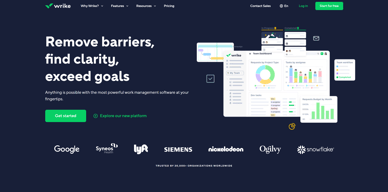
Harping on its versatility, Wrike is a project management software that features highly customizable dashboards and workflows and team-specific automation to give businesses a project platform that adapts to their current ways of working and not the other way around. Wrike’s functionalities involving over 400 tools revolve around giving a 360-degree view of projects, true interdepartmental collaboration, approvals acceleration, smarter data use, efficient workload management, and enterprise-grade security. Wrike has more than 30 well-documented use cases involving more than 15 departments and teams. Wrike also has a proprietary AI-powered capability called Work Intelligence that catalyzes results through smart automation and project risk prediction.

| Capabilities |
API
|
|---|---|
| Segment |
Small Business
Mid Market
Enterprise
|
| Deployment | Cloud / SaaS / Web-Based, Desktop Mac, Desktop Windows, Mobile Android, Mobile iPad, Mobile iPhone |
| Support | 24/7 (Live rep), Chat, Email/Help Desk, FAQs/Forum, Knowledge Base, Phone Support |
| Training | Documentation |
| Languages | English |
Wrike Pros and Cons
- Easy to use Gantt charts
- Customizable dashboard and schedule
- Comprehensive reports and insights
- Time-tracking tools included
- Excellent customer service
- A little pricey
- Can be difficult to get used to at first
- Frequent reports of unresponsive support
- Recorded incidents of unreliable software functionality


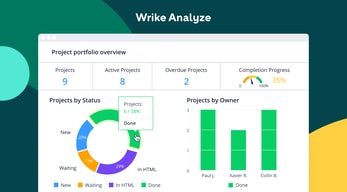
Wrike Review: Is It the Right Project Management Tool for Your Business?
Wrike has been empowering professionals and teams to better manage their work since its launch in 2006. It’s a comprehensive solution for professional service providers, marketing teams, and agencies. But all this versatility comes with a high price tag.
Is it worth it? In this Findstack review, we’re going to find out.
What is Wrike: A Quick Overview
Wrike has introduced Work Intelligence, an AI engine that powers risk prediction, task automation, and smart recommendations.
Wrike is an all-in-one work management platform that helps teams collaborate, plan projects, delegate tasks, and track progress. The platform offers a range of plans designed to meet the needs of almost any kind of business. Whether you’re a solopreneur or a department head at a Fortune 500 company, Wrike has a plan for you.
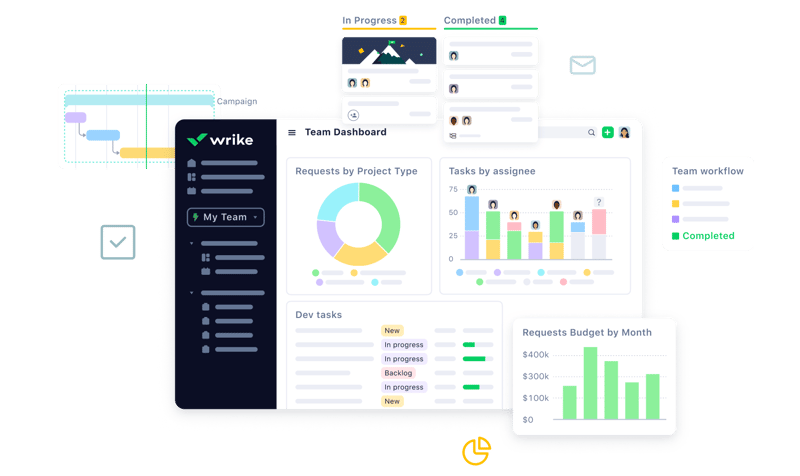
Wrike’s power lies in its ability to support both project management and collaborative work, which explains its appeal to a wide range of industries. The tool boasts a user-friendly dashboard that’s pretty simple to set up. It’s also very easy to create tasks, assign them to team members, set due dates, and track their progress.
Getting Started With Wrike
Wrike is one of the more intuitive project management tools for a new user to get started with—especially compared to competitors like ClickUp.
Wrike is available to users via web browser, desktop application, and mobile application for both Android and iOS devices.
To get started with Wrike, new users have the option to register for a free account using their business email. Once the email address is verified, users will be redirected to Wrike’s homepage to complete the initial registration process—which involves a guided walkthrough.
How Wrike Works: Key Features
Dashboards
If you’ve ever used a project management tool, Wrike’s Dashboards will feel very familiar.

For every project you create in Wrike, you can create Dashboards to display, manipulate, and analyze the project data that you’ve collected within it. They essentially give you an overview of project KPIs, metrics, due dates, and progress at a glance—saving you the hassle of seeking out each piece of data at the source.
When you create a Dashboard, you can start with a template or build one from scratch. If you go the latter route, you have quite a bit of flexibility thanks to a modular design and a wide selection of interactive widgets, including:
- Assigned tasks
- Overdue tasks assigned to you
- Overdue tasks that you assigned
- Tasks you’re following
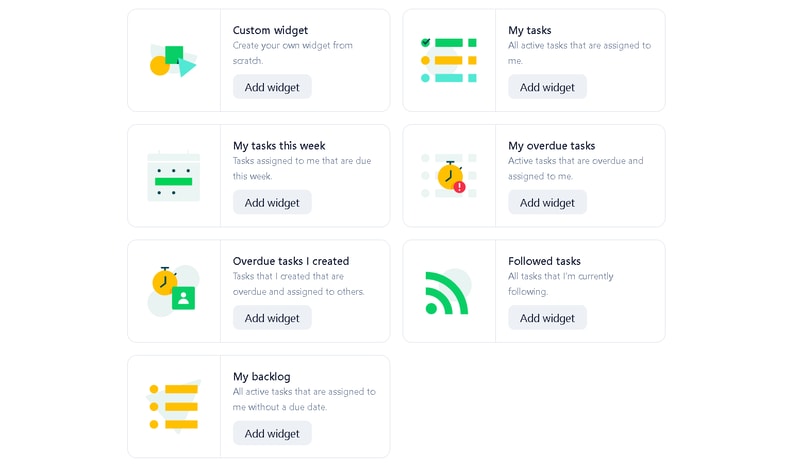
Wrike is unlike a lot of project management tools because everything you need is right at your fingertips. You don’t need to navigate to another window to see it all.
Automation
Like most modern project management tools, Wrike features an automation engine that works in the background to synch related tasks, assign workloads, and ensure tasks are completed on time with botted @mentions and comments.
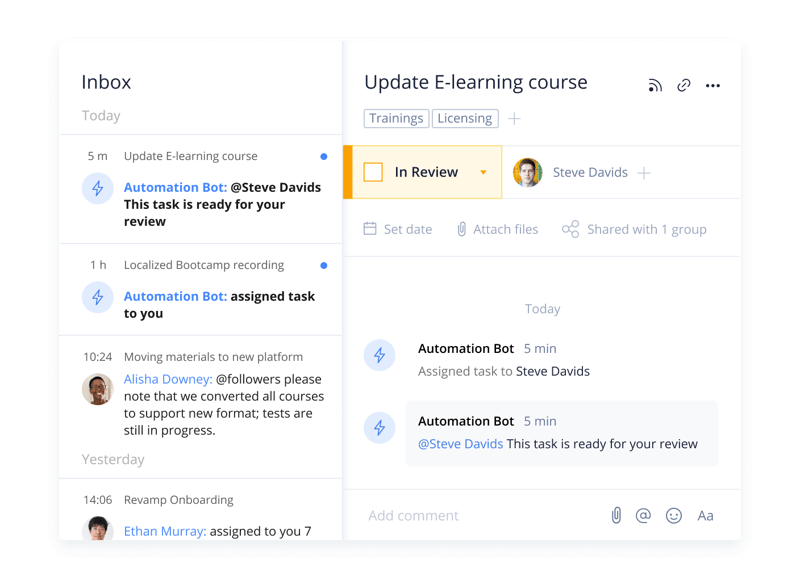
Wrike’s automation engine may not be the most complex or versatile on the market, but it’s intuitive and practical. There’s no feature bloat here—every feature is sure to get some use.
Integrations
On a related note, Wrike’s automation capabilities are supported by 400+ integrations with third-party tools. Pretty much every tool category is covered, including:
- CRM
- Communication
- BI
- Calendar
- CMS
- Storage
- Accounting
- Reporting
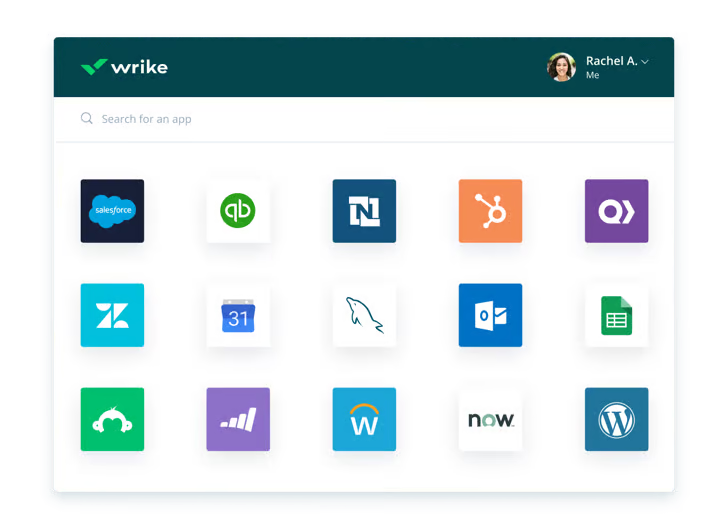
Integrating Wrike with other tools in your stack is a great way to cut out some busy work from daily workstreams and improve productivity. It’s also a surefire way to minimize human error.
Live Analytics
Wrike automatically updates every report, chart, and dashboard every 15 minutes, so you never miss a thing. 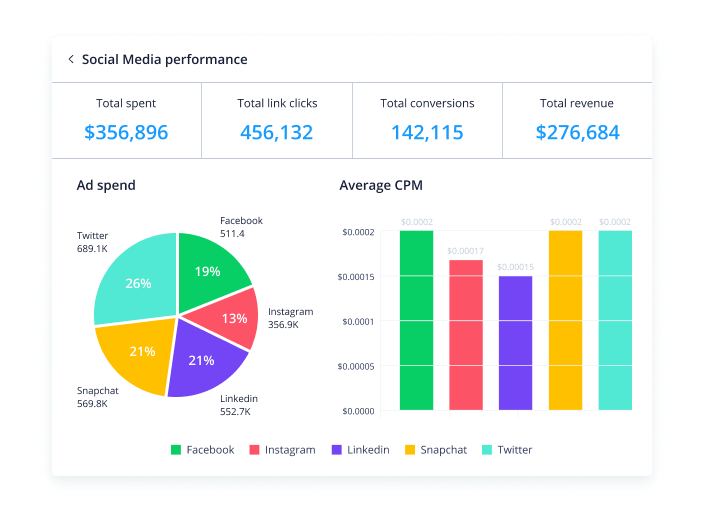
That’s a huge benefit—it means project managers don’t need to manually collect and input data from multiple sources to draw meaningful insight. Less time on busy work means more time analyzing the data for patterns, trends, and inefficiencies.
This feature is also great for project managers who are juggling multiple projects. They get a real-time overview of project statuses, team workloads, pending approvals, and tasks waiting to be assigned, so they can easily prioritize work and make meaningful progress.
Customizable Forms
Wrike has a custom form builder that you can use to create almost any kind of form—from simple team surveys to content request forms.
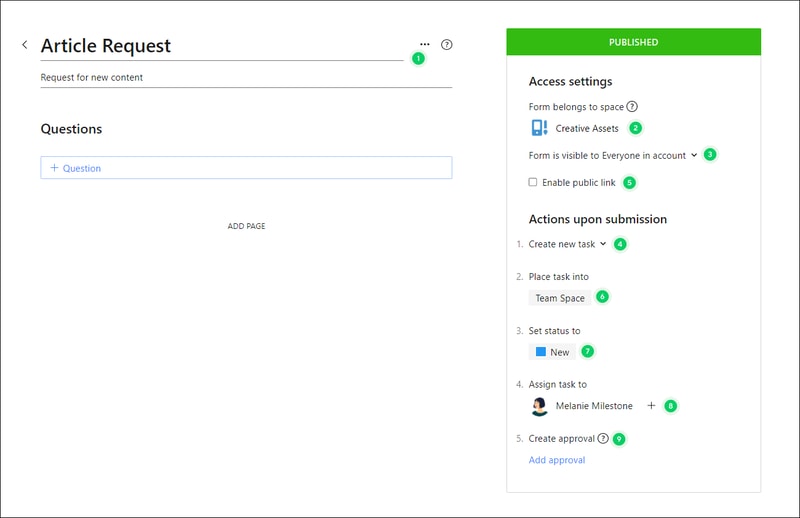
Wrike’s forms are fully customizable, and you can take advantage of role-based access controls to grant or deny access to certain pages or sections. Plus, when you create a new form, it can automatically assign tasks, set due dates based on the submission date, and populate subtasks.
Enterprise-level project management tools
Wrike offers advanced project management tools that you can access on your Home workspace to help you measure key performance indicators.
These tools include time tracking to assist in managing billable hours, visualizing cost and budget calculations, and business intelligence to assess project risk. While these tools are particularly useful for large enterprises with complex needs and a variety of teams, they can also be beneficial for small businesses that plan to scale.
In addition, the platform allows you to share files and publish assets with enterprise-grade security. The sheer number of features may be overwhelming for teams new to project managers, but Wrike provides great walkthroughs and tutorials. You may even discover features by accident that end up accelerating your workflows.
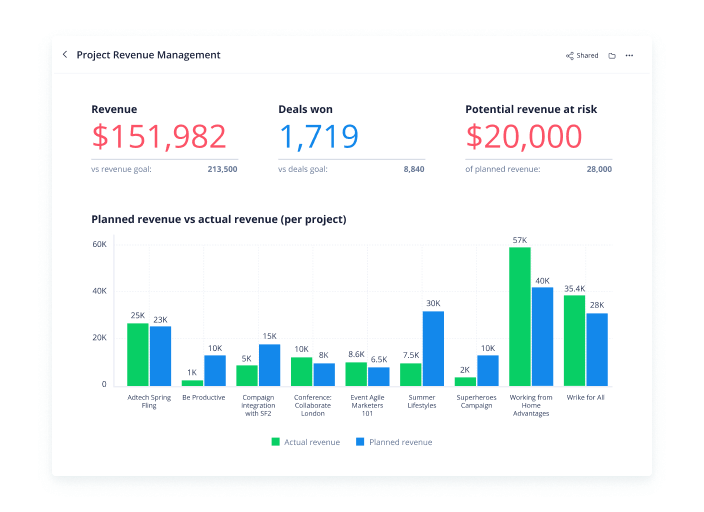
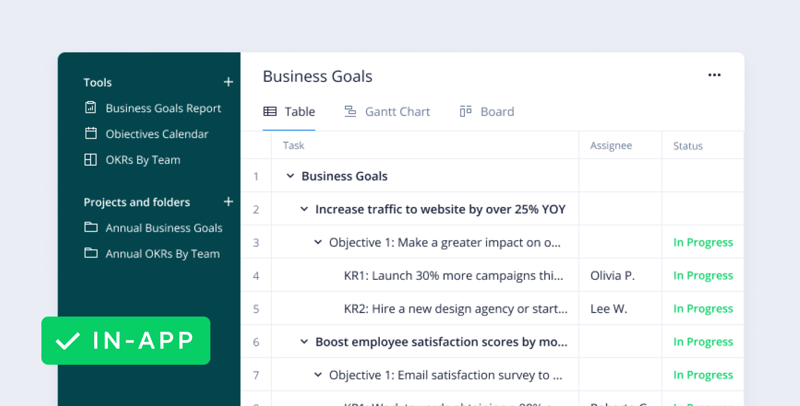
Wrike offers pre-built templates based on team roles to simplify task creation. Some of these templates include:
- Project performance templates
- OKR templates
- Weekly to-do list templates
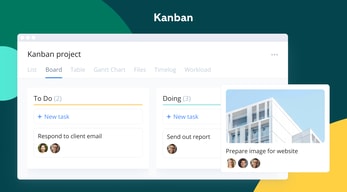
- Kanban board project templates
- Agile and IT templates
- Content operations templates
- Quarterly business review templates
- Ticketing and help desk templates
Collaboration Tools
Wrike—like most project management tools—is designed to make it easier to collaborate with your teams.
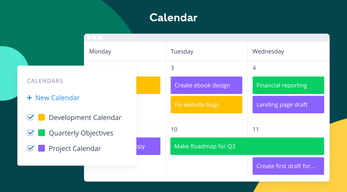
All team members have access to a global or project-based live stream of task activity, so nobody is left behind. Team members can easily communicate on specific tasks via comments and notes so that conversations are kept organized. Shared team calendars can be added to the dashboard to help with awareness of progress and submission dates. 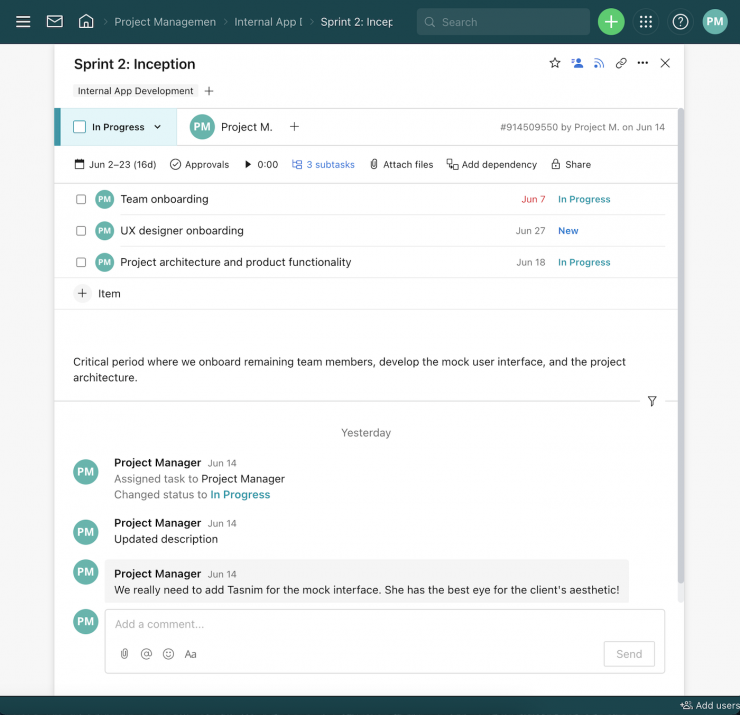
You can also invite third parties such as clients, vendors, or contractors, at no extra cost, to view the status of their projects and provide input that goes towards successful project completion.
Wrike Use Cases
Wrike’s use cases are quite impressive. Over 20,000 companies in over 140 countries have relied on Wrike to streamline their planning processes. These are companies that span a range of industries, including:
- SaaS
- Technology
- Healthcare
- Education
- financial services
- Construction
- Manufacturing
- Retail
What makes Wrike stand out from other project management platforms?
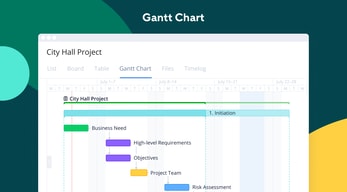
Wrike’s easy-to-create (and even easier-to-understand) Gantt chart view sets it apart from many other popular project management platforms. Plus, Wrike offers a range of other views, such as List, Board, Table, File, and Timelog. While this isn’t unique to Wrike, it isn’t super common to have that much flexibility,
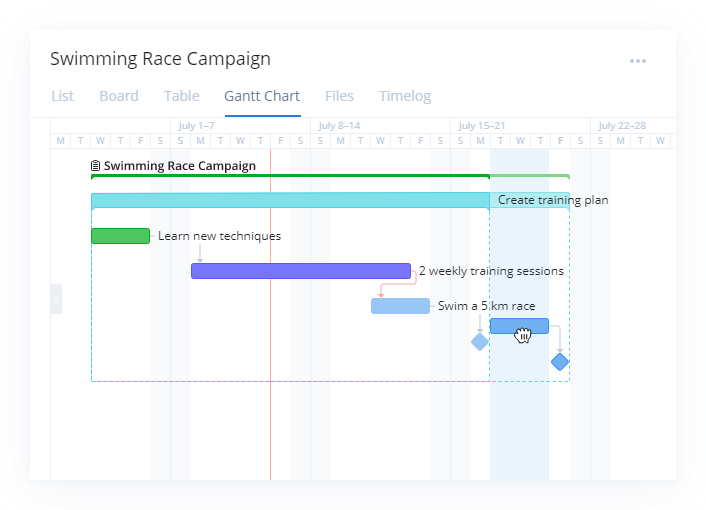
Overall, Wrike’s differentiating factor is the ease with which you can use it to manipulate project data to gain new perspectives and insights.
Wrike Pricing
Wrike offers a total of five plans, starting from a basic Free option, all the way up to an advanced Pinnacle option for large enterprises with complex needs.
Here’s a breakdown of the plans: 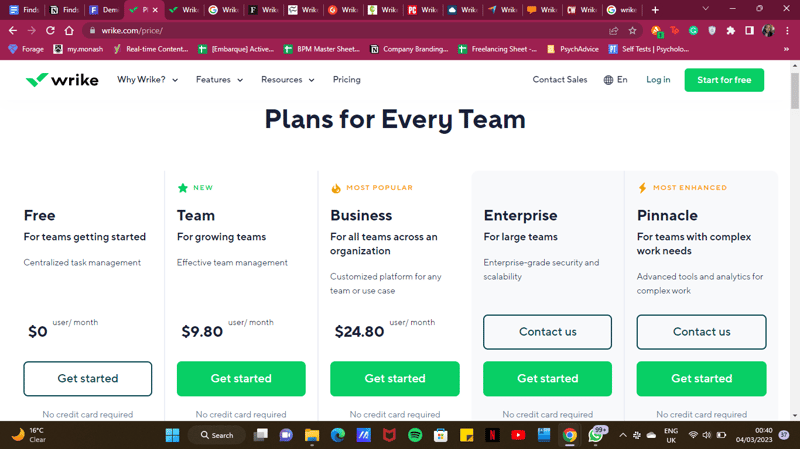
- Free : Wrike’s free plan is suitable for small teams that are just starting with project management software. However, it has limited feature options, including limited storage space, and excludes Gantt charts, time-tracking, and many customization tools.
- Team : Tailored for small teams that want to plan and collaborate on projects. This plan includes the Gantt chart view and the option to integrate with a wide range of services.
- Business : Provides access to advanced project management tools. The Business plan has everything you may need for project management for a large team.
- Enterprise : The Enterprise plan has custom pricing because Wrike will draw up a plan depending on your business needs. It is a plan to consider for large businesses that require more security controls.
- Pinnacle : This plan is for large businesses with complex work needs, including billable hours tools, job roles, and tools for planning and tracking effort put into different projects.
See Wrike pricing for current rates and plan details.
Pros and Cons of Wrike
Pros:
- Wrike offers plans for everyone, from small teams to large corporations.
- Real-time analytics are updated every 15 minutes.
- Wrike offers department-specific solutions which help different departments across your business align and communicate projects on one platform.
- Special customization is available for professional services and marketing and creative teams.
- Wrike offers training resources to help you get started on the platform.
- The free plan offers up to 2 GB of storage.
- It supports eight languages.
Cons:
- Although the project dashboards are user-friendly, those new to project management software may find Wrike overwhelming due to the wide array of features.
- Wrike’s costs can be a burden for mid-sized teams – there are cheaper project management tools with roughly equivalent features.
- Many of Wrike’s useful advanced features are offered as add-ons that can effectively double the price of the tool.
- The mobile app is not as user-friendly as other project management apps (e.g., Click Up). Managing tasks from the mobile app is not as smooth as using a desktop, and you may find that you’re unable to move and edit tasks.
- The interactive Gantt chart view is only available in the paid plans.
- The time-tracking in-app timer is only available on the Business plan and higher, and even small collaborative teams should be able to benefit from this feature.
Is Wrike right for your business?
Wrike is a comprehensive project management platform that also functions as a collaborative work management tool, making it ideal for businesses of all sizes. If you offer professional services or are part of a marketing or creative team, you can certainly benefit from Wrike’s highly customizable features.
It’s important to note that Wrike can be a bit pricey—especially with add-ons. Plus, it may be a bit overpowered for small teams who are looking for simple project management capabilities. That said, it’s a solid tool for managing multiple departments and complex projects.
If you want more insight and information into other project management software, Findstack has more helpful reviews you can take a look at.

I liked the video proofing tool - it made it easy to provide feedback on a video project.
It was a little hard to navigate at times.
It allowed me to communicate with and manage a video editor effectively. It had a nice feature allowing me to provide feedback right on a video.
Easy ability to collaborate with teammates
Dashboards can be a bit difficult to set up and there's some limitations for easily integrating other apps.
Communication improvement between teams. A centralized hub for tasks that acts as a source of truth.
I like best the to do list and the ability to see what I have coming up on the schedule.
The downsides of using Wrike is the learning curve it takes to find everything. The links to different pages are not laid out very intuitively.
Im using wrike as a checklist.
The mobile and desktop apps are great. I also like the dashboard freature.
It can be difficult to set up new processes and work flows for me.
It is helping me to keep tasks organized and easy to recall when needed. It is an effective way for me to communicate with my creative teams.
Insight into overall progress at company
Not super easy to use + not intuitive ui
Organization and project management. Staying on track with timelines
I like the calendar feature and being able to see all of the projects that everyone is working on
There are a max number of full users per office, so I'm not able to use all of the features on Wrike
Wrike makes it easier to keep multiple projects across our office organized
The program is very easy to use. Keeps track of how your projects are progressing.
Sometimes the layout can be a bit glitchy in overall time calculations.
We can now better track our project times and increase productivity by assigning relevant resources more efficiently.
Project templates that create a series of tasks automatically after a request were very useful for our team. It allowed us to quickly and easily assign an entire workflow (for example, the creation of an email being assigned to the copywriter and the graphic designer in a dependent Gantt chart) to the correct people at the click of a button.
There are a lot of features we don't use simply because the adoption of Wrike within our company is limited to the marketing department. Our payment tier is honestly far too large compared to the use we get out of the software, especially when compared to a program like Monday, which would give us most of the features we need at a fraction of the price. I can see the use at an enterprise level, but I wonder if there is a way to offer a narrowed-down version of your service at a more affordable price range.
Wrike solves the problem of dependency quite well for us. By that, I mean handling the notification of employees when work is ready for them. For example, a video project often requires distinct stages of work (preproduction, production, and postproduction) that engage different people—the scriptwriter may be working on all three, while the colorist is likely only working in post. It's great to be able to mitigate huge lists of upcoming projects by only giving notifications at the moment someone's services are needed.
Easy to create programs, and projects, and assign activities to the team.
It is hard to create a routine in the group to support the management of the tool. Especially when daily tasks are required, it becomes an extra time-consuming task.
Helps me follow up on everyone's activities and manage the simultaneously different projects.
Enjoy being able to see tasks that are sent to me by coworkers.
I'm sure it's an operational error but it did take some getting use to
Better communication and easy to use on the go tools.
Live edits and comments directly on the document
the interface is not very user friendly and it can be hard to navigate
not having to go back and forth in long email threads about a specific project and then having to go dig in my inbox for it. its all organized on Wrike.
Very clear and comprehensible layout for discrete tasks. The permanent links make it easy to bookmark useful reference material. Blueprints are pretty easy. Notifications are cleanly laid out.
It's often veeery slow to load, takes much more CPU than other tasks. The search feature is bad, some simple operators would go a long way "from:Jane qauartely report." For interactive tasks / bundles it gets ugly to look at and confusing.
The accounts team needs to get the attention of the Analytics team in a way that lays out specific needs and allows the Analytics team to assign an owner to it. This has worked for us for years.
Wrike has so many features and functionality available. It really does a fantastic job of allowing you to customize the workflow to your exact needs. Additionally, the data and reports available are seemingly endless.
It's a bit dull and stale as an experience. It's not very engaging, the design is a bit outdated... it can feel tedious using daily. And when a team is not motivated and intrigued to use a project management software, all the great reporting and data features become pointless.
We have a very large team with many departments and workflows. Each team has a customized space tailored to the needs and requirements of the job. With many moving pieces, it allows us to work in unison, remotely, as one connected team.
I like the different spaces you could create. In each space, you can do a timeline of essential steps and easily mark the steps completed.
Some of the displays can be confusing at times but this is not a problem because there are multiple and you can choose the one you like best.
Wrike is solving our project management problems and is helping us keep track of what stages we are in for multiple projects.
I like the flexibility to move cards around and collaborate with my team on tasks and projects.
Running reports for time-related tasks/activities in Wrike is difficult and not accurate.
We are using Wrike as a development project management tool. It's easy to form queues for different stages of development through Wrike.
I like the ability to tag individuals in my company on relevant tasks so that we can all stay up to date on each task within a larger project, even ones that are for other individuals to manage.
It is very tough to onboard a new individual to a project because of the many folders to navigate through. I would like that to be a little more simplified or streamlined. The app constantly refreshes and IT isn't able to fix it. It wastes so much time.
We have stopped allowing individuals to create their own tasks and instead use a blueprint for similar projects, which is very helpful.
The collaborative aspect. It's nice to have the entire team on the same system.
Unable to add hyperlinks in custom columns.
Engineering flows.
I find the interface easy enough to use. None worth mentioning that I really appreciate.
All the notifications! And that each task has to be separated out.
Better tracking of projects. Not sure what the benefits are for me, personally.
Keeps track of project schedules and tasks.
The views are a bit confusing, and I have to change the view each time I open a project. The viewable screen content is pretty small. Don't need to see/keep track of all of the small updates made. Notifications are wordy and a bit unclear of what project each task belongs to.
Project timelines
I cannot say too much about it, because I just got it.
as long as I start using it then I will have a better feedback
I opened my profile today, so once I explore a little bit more, I will give you more details.
Report presentation of content. Active update saving.
Similar to MS excel in that there are a lot of features, so there is a bit of a learning curve to unlock full potential.
(Gradually) consolidating a bunch of different info, metrics, trackers, presentations, etc into one platform.
They keep making it better and easier to use. Their customer service is awesome.
Hard for me to get up to speed, but not true for some others.
Communicating with colleagues about where I am with projects
notification inbox custom dashboard commenting using @ assignees or followers having custom fields
inability to move around subtasks custom fields can't be used to sort tasks custom fields are somewhat hidden can't prohibit multiple assignees desktop app sometimes the speed is too slow
Accurately showing the time it takes to complete a project. Identifying what team member is responsible at what stage of projects. Working together synchronously with multiple team members.
I love how much you can customize your Wrike environment
I dislike how complicated the system is to use. It's not very user-friendly, and the UI is difficult to understand at times. It's not intuitive.
Our team is solving for time/project tracking with Wrike. The benefits allow us to determine how long certain projects take to complete
Wrike is easy to navigate, and the how-to video tutorials are especially useful for new users. It's also versatile and able to be used across a wide variety of projects, from sales to editorial to marketing.
The notifications are not immediate, and the syncing can take time esp if you're working across app and desktop versions. As a result, I've missed some notifications and that is a loss of time, ultimately. Also, it would be nice to have some level of chat functionality in the app.
There is greater visibility across various departments. I know what each group is working on, what has been completed and what is yet to be done. This is very useful from a project management perspective.
Wrike has a lot of useful functions, e.g. the subtasks and workflow levels but some of it does feel superfluous.
It feels a bit cluttered a lot of the time, like a lot of the features don't serve a useful purpose necessarily.
It's largely okay as a way to upload and deliver video assets. Comments are alright too although the timecode element could be improved.
Ease of use....this system is easy to use; however, it could do alot more to help with day to day office tasks
I dislike the calendar system and how there is no where to set yourself a task to follow up on
Keeping an organized system of our clients and when to touch base with them as well as storing all their contact information
Wrike helps me keep all upcoming projects organized. I enjoy being able to tag people and send email alerts to keep projects on track. Internal team communication is much more efficient. I've also been able to brainstorm with users on what's needed for a task through tagging each other in a project. It's also helped us submit tickets with our analytics team and keep an eye on progress toward different changes.
The folders can get confusing and sharing a master folder with people doesn't share the sub-folders, meaning you have to to manually share each sub folder so they can see all details. The dashboard feature can get confusing unless you have training.
I'm able to stay organized with recurring projects easily and less deliverables are forgotten since I'm reminded each week and month on what is coming up for the week. Wrike has made communication much smoother, as well as helping visualize a calendar of tasks.
integration with other platforms like Microsoft teams
integration could be better, links don't always work
everyday projects and helping meet deadlines more efficiently
Generating invoices and defining team splits on deals
The user experience/user interface isn't the most user friendly.
Solving the issues that come with invoicing deals the old fashioned way.