

Unclaimed: Are you working at Wrike?
Wrike Reviews: 4.2/5 — Solid Choice
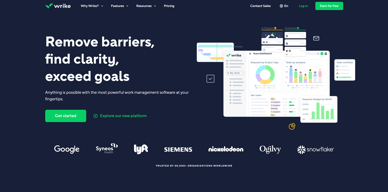
Harping on its versatility, Wrike is a project management software that features highly customizable dashboards and workflows and team-specific automation to give businesses a project platform that adapts to their current ways of working and not the other way around. Wrike’s functionalities involving over 400 tools revolve around giving a 360-degree view of projects, true interdepartmental collaboration, approvals acceleration, smarter data use, efficient workload management, and enterprise-grade security. Wrike has more than 30 well-documented use cases involving more than 15 departments and teams. Wrike also has a proprietary AI-powered capability called Work Intelligence that catalyzes results through smart automation and project risk prediction.

| Capabilities |
API
|
|---|---|
| Segment |
Small Business
Mid Market
Enterprise
|
| Deployment | Cloud / SaaS / Web-Based, Desktop Mac, Desktop Windows, Mobile Android, Mobile iPad, Mobile iPhone |
| Support | 24/7 (Live rep), Chat, Email/Help Desk, FAQs/Forum, Knowledge Base, Phone Support |
| Training | Documentation |
| Languages | English |
Wrike Pros and Cons
- Easy to use Gantt charts
- Customizable dashboard and schedule
- Comprehensive reports and insights
- Time-tracking tools included
- Excellent customer service
- A little pricey
- Can be difficult to get used to at first
- Frequent reports of unresponsive support
- Recorded incidents of unreliable software functionality


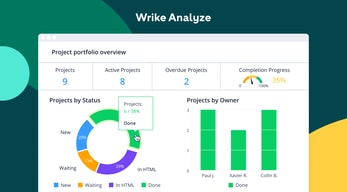
Wrike Review: Is It the Right Project Management Tool for Your Business?
Wrike has been empowering professionals and teams to better manage their work since its launch in 2006. It’s a comprehensive solution for professional service providers, marketing teams, and agencies. But all this versatility comes with a high price tag.
Is it worth it? In this Findstack review, we’re going to find out.
What is Wrike: A Quick Overview
Wrike has introduced Work Intelligence, an AI engine that powers risk prediction, task automation, and smart recommendations.
Wrike is an all-in-one work management platform that helps teams collaborate, plan projects, delegate tasks, and track progress. The platform offers a range of plans designed to meet the needs of almost any kind of business. Whether you’re a solopreneur or a department head at a Fortune 500 company, Wrike has a plan for you.
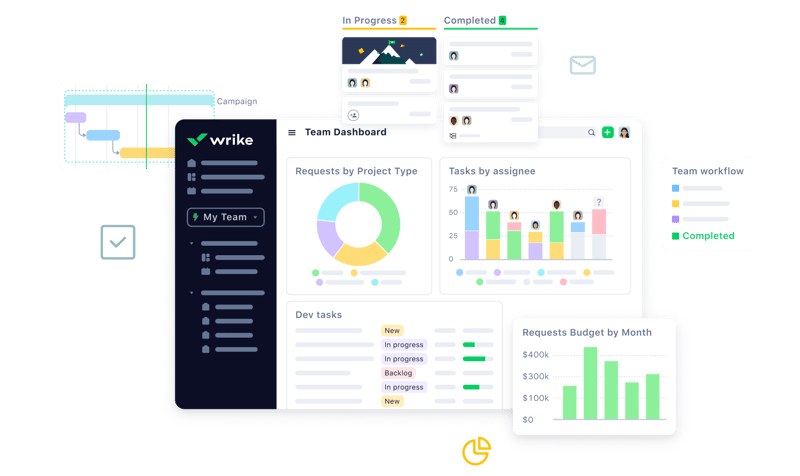
Wrike’s power lies in its ability to support both project management and collaborative work, which explains its appeal to a wide range of industries. The tool boasts a user-friendly dashboard that’s pretty simple to set up. It’s also very easy to create tasks, assign them to team members, set due dates, and track their progress.
Getting Started With Wrike
Wrike is one of the more intuitive project management tools for a new user to get started with—especially compared to competitors like ClickUp.
Wrike is available to users via web browser, desktop application, and mobile application for both Android and iOS devices.
To get started with Wrike, new users have the option to register for a free account using their business email. Once the email address is verified, users will be redirected to Wrike’s homepage to complete the initial registration process—which involves a guided walkthrough.
How Wrike Works: Key Features
Dashboards
If you’ve ever used a project management tool, Wrike’s Dashboards will feel very familiar.

For every project you create in Wrike, you can create Dashboards to display, manipulate, and analyze the project data that you’ve collected within it. They essentially give you an overview of project KPIs, metrics, due dates, and progress at a glance—saving you the hassle of seeking out each piece of data at the source.
When you create a Dashboard, you can start with a template or build one from scratch. If you go the latter route, you have quite a bit of flexibility thanks to a modular design and a wide selection of interactive widgets, including:
- Assigned tasks
- Overdue tasks assigned to you
- Overdue tasks that you assigned
- Tasks you’re following
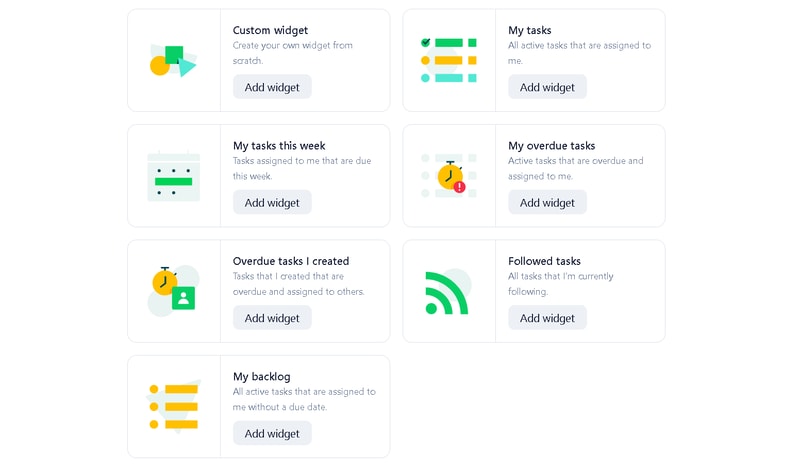
Wrike is unlike a lot of project management tools because everything you need is right at your fingertips. You don’t need to navigate to another window to see it all.
Automation
Like most modern project management tools, Wrike features an automation engine that works in the background to synch related tasks, assign workloads, and ensure tasks are completed on time with botted @mentions and comments.
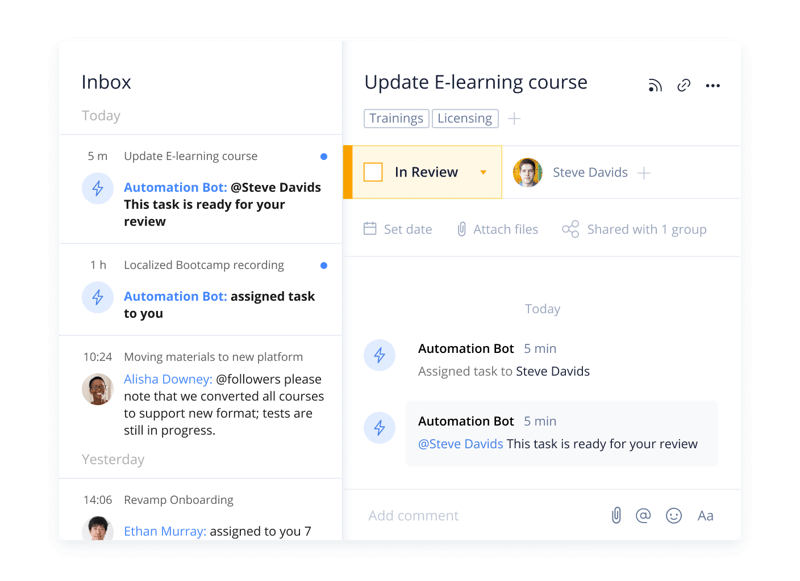
Wrike’s automation engine may not be the most complex or versatile on the market, but it’s intuitive and practical. There’s no feature bloat here—every feature is sure to get some use.
Integrations
On a related note, Wrike’s automation capabilities are supported by 400+ integrations with third-party tools. Pretty much every tool category is covered, including:
- CRM
- Communication
- BI
- Calendar
- CMS
- Storage
- Accounting
- Reporting
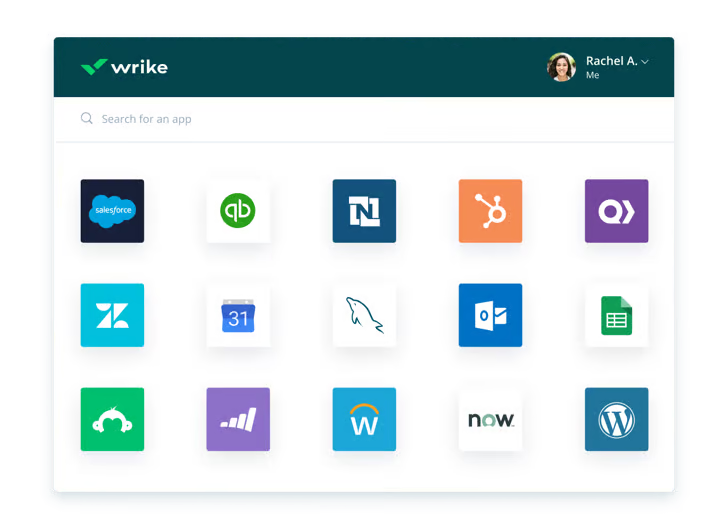
Integrating Wrike with other tools in your stack is a great way to cut out some busy work from daily workstreams and improve productivity. It’s also a surefire way to minimize human error.
Live Analytics
Wrike automatically updates every report, chart, and dashboard every 15 minutes, so you never miss a thing. 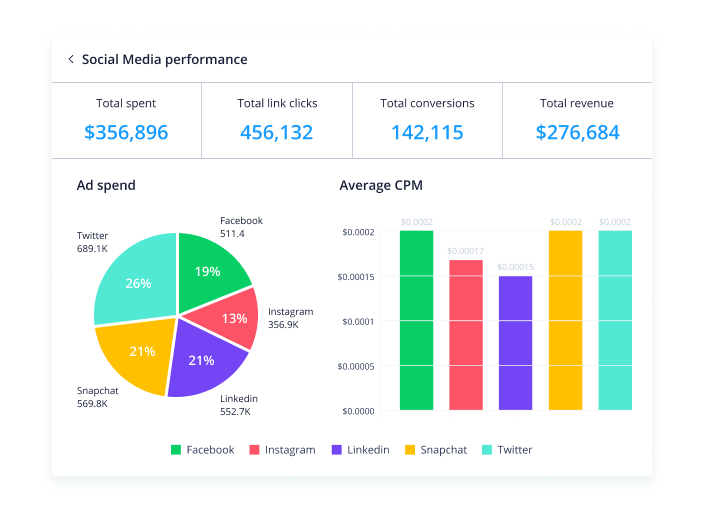
That’s a huge benefit—it means project managers don’t need to manually collect and input data from multiple sources to draw meaningful insight. Less time on busy work means more time analyzing the data for patterns, trends, and inefficiencies.
This feature is also great for project managers who are juggling multiple projects. They get a real-time overview of project statuses, team workloads, pending approvals, and tasks waiting to be assigned, so they can easily prioritize work and make meaningful progress.
Customizable Forms
Wrike has a custom form builder that you can use to create almost any kind of form—from simple team surveys to content request forms.
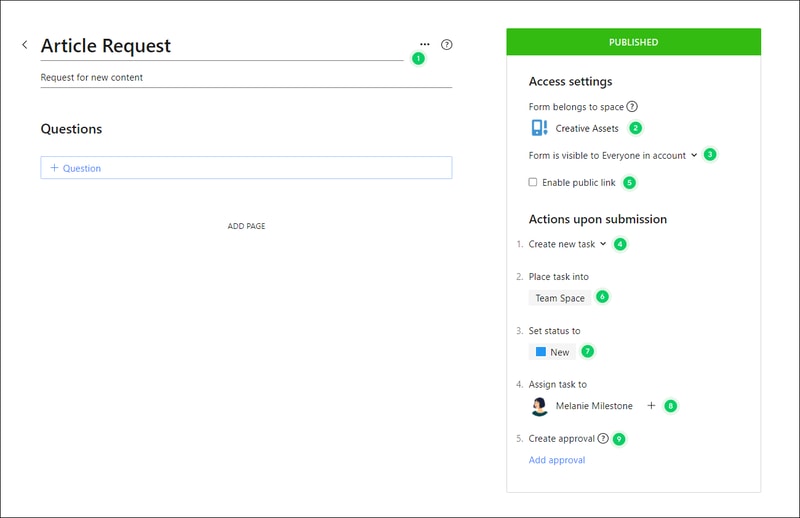
Wrike’s forms are fully customizable, and you can take advantage of role-based access controls to grant or deny access to certain pages or sections. Plus, when you create a new form, it can automatically assign tasks, set due dates based on the submission date, and populate subtasks.
Enterprise-level project management tools
Wrike offers advanced project management tools that you can access on your Home workspace to help you measure key performance indicators.
These tools include time tracking to assist in managing billable hours, visualizing cost and budget calculations, and business intelligence to assess project risk. While these tools are particularly useful for large enterprises with complex needs and a variety of teams, they can also be beneficial for small businesses that plan to scale.
In addition, the platform allows you to share files and publish assets with enterprise-grade security. The sheer number of features may be overwhelming for teams new to project managers, but Wrike provides great walkthroughs and tutorials. You may even discover features by accident that end up accelerating your workflows.
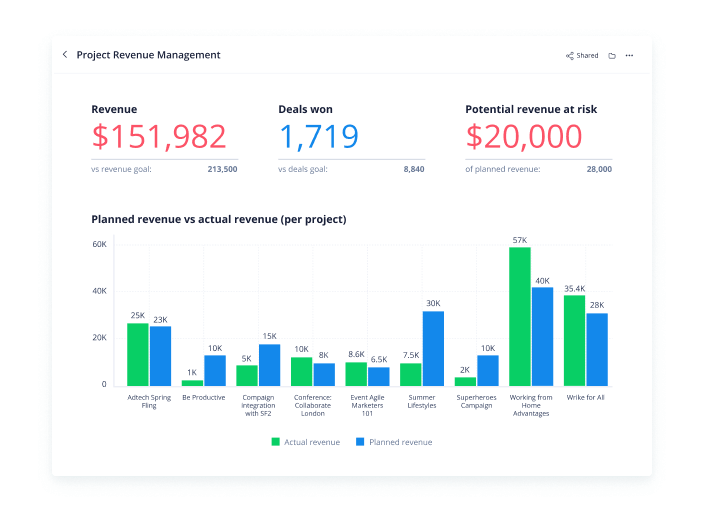
Wrike offers pre-built templates based on team roles to simplify task creation. Some of these templates include:
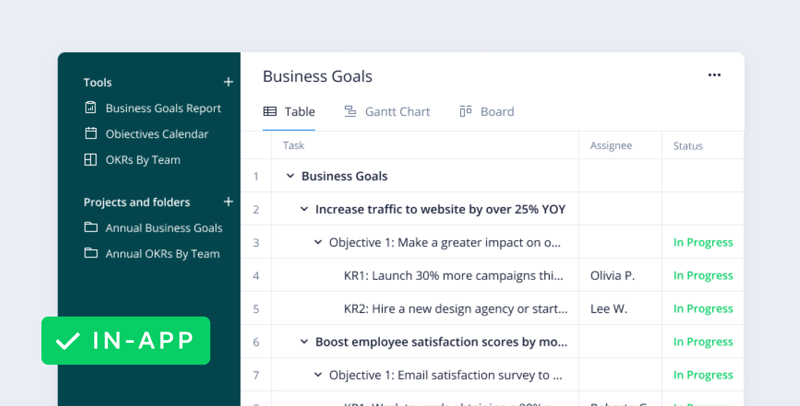
- Project performance templates
- OKR templates
- Weekly to-do list templates
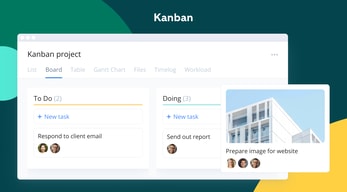
- Kanban board project templates
- Agile and IT templates
- Content operations templates
- Quarterly business review templates
- Ticketing and help desk templates
Collaboration Tools
Wrike—like most project management tools—is designed to make it easier to collaborate with your teams.
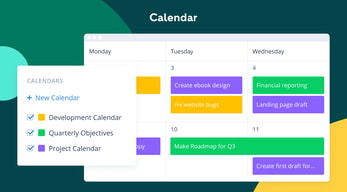
All team members have access to a global or project-based live stream of task activity, so nobody is left behind. Team members can easily communicate on specific tasks via comments and notes so that conversations are kept organized. Shared team calendars can be added to the dashboard to help with awareness of progress and submission dates. 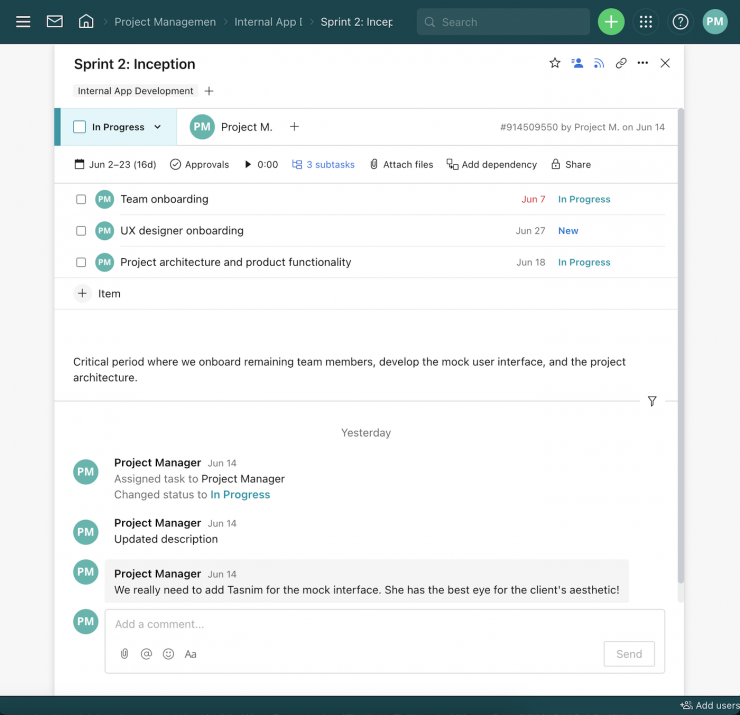
You can also invite third parties such as clients, vendors, or contractors, at no extra cost, to view the status of their projects and provide input that goes towards successful project completion.
Wrike Use Cases
Wrike’s use cases are quite impressive. Over 20,000 companies in over 140 countries have relied on Wrike to streamline their planning processes. These are companies that span a range of industries, including:
- SaaS
- Technology
- Healthcare
- Education
- financial services
- Construction
- Manufacturing
- Retail
What makes Wrike stand out from other project management platforms?
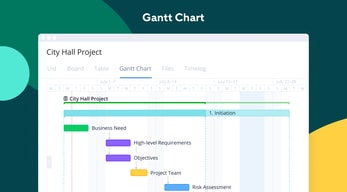
Wrike’s easy-to-create (and even easier-to-understand) Gantt chart view sets it apart from many other popular project management platforms. Plus, Wrike offers a range of other views, such as List, Board, Table, File, and Timelog. While this isn’t unique to Wrike, it isn’t super common to have that much flexibility,
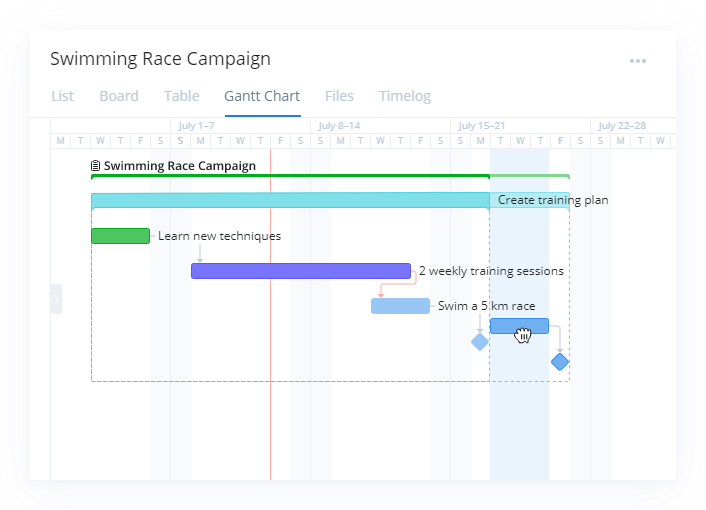
Overall, Wrike’s differentiating factor is the ease with which you can use it to manipulate project data to gain new perspectives and insights.
Wrike Pricing
Wrike offers a total of five plans, starting from a basic Free option, all the way up to an advanced Pinnacle option for large enterprises with complex needs.
Here’s a breakdown of the plans: 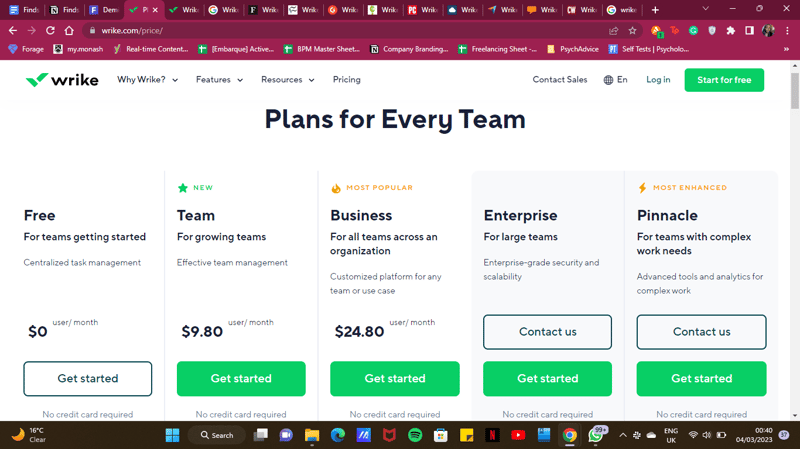
- Free : Wrike’s free plan is suitable for small teams that are just starting with project management software. However, it has limited feature options, including limited storage space, and excludes Gantt charts, time-tracking, and many customization tools.
- Team : Tailored for small teams that want to plan and collaborate on projects. This plan includes the Gantt chart view and the option to integrate with a wide range of services.
- Business : Provides access to advanced project management tools. The Business plan has everything you may need for project management for a large team.
- Enterprise : The Enterprise plan has custom pricing because Wrike will draw up a plan depending on your business needs. It is a plan to consider for large businesses that require more security controls.
- Pinnacle : This plan is for large businesses with complex work needs, including billable hours tools, job roles, and tools for planning and tracking effort put into different projects.
See Wrike pricing for current rates and plan details.
Pros and Cons of Wrike
Pros:
- Wrike offers plans for everyone, from small teams to large corporations.
- Real-time analytics are updated every 15 minutes.
- Wrike offers department-specific solutions which help different departments across your business align and communicate projects on one platform.
- Special customization is available for professional services and marketing and creative teams.
- Wrike offers training resources to help you get started on the platform.
- The free plan offers up to 2 GB of storage.
- It supports eight languages.
Cons:
- Although the project dashboards are user-friendly, those new to project management software may find Wrike overwhelming due to the wide array of features.
- Wrike’s costs can be a burden for mid-sized teams – there are cheaper project management tools with roughly equivalent features.
- Many of Wrike’s useful advanced features are offered as add-ons that can effectively double the price of the tool.
- The mobile app is not as user-friendly as other project management apps (e.g., Click Up). Managing tasks from the mobile app is not as smooth as using a desktop, and you may find that you’re unable to move and edit tasks.
- The interactive Gantt chart view is only available in the paid plans.
- The time-tracking in-app timer is only available on the Business plan and higher, and even small collaborative teams should be able to benefit from this feature.
Is Wrike right for your business?
Wrike is a comprehensive project management platform that also functions as a collaborative work management tool, making it ideal for businesses of all sizes. If you offer professional services or are part of a marketing or creative team, you can certainly benefit from Wrike’s highly customizable features.
It’s important to note that Wrike can be a bit pricey—especially with add-ons. Plus, it may be a bit overpowered for small teams who are looking for simple project management capabilities. That said, it’s a solid tool for managing multiple departments and complex projects.
If you want more insight and information into other project management software, Findstack has more helpful reviews you can take a look at.

Convenient, adequate Project Management Platform.
Only the base plan is offered monthly. Above that, plans are only offered yearly. This is not something they tell you when you start a trial, but rather once you want to pursue past the first 14 days. This is not appropriate for startups and shows that Wrike does not consider the cash flow reality of businesses. They also ignore the fact that today's companies are fast paced and may have a need to pivot rapidly when requirements change. Instead they try to lock you in for good. Be aware in advance, as I would have liked to be, even if you are ok with the base plan right now, you'll be stuck with their yearly upfront payment policy if you ever decide to upgrade.
Planning and coordinating team's work across projects. It would be beneficial if they would let us pay monthly and pursue past the trial period.
Peer community where people can unite in being baffled at the bad UX and the refusal to implement basic things. I can update the due date on tasks without clicking into a task .
Wrike continues to make their product worse. During their last rollout they removed the ability to see your project list at the same time as your task dashboard. Refuses to create a way to migrate a list of tasks from a template into a project. Something like 20 different threads are devoted to this request, all with their "required 60 upvotes", but they refuse to implement something as simple as Multiple Task Copying. What? So if you have a project that has, say, 40 tasks that always are included, you can't simply create a template and copy all of them into a project. J ust as a quick insight into their TERRIBLE UX. Want to search for something? Their search function doesn't provide results for partial words (like EVERY OTHER search engine out there). So, for instance, we give project project names "PJ12345". If I search just "12345" the project will NOT come up. I need to put the full and complete search term (in this case PJ12345) - partial search terms will yield NO results. This is so basic. Project list is continually recollapsed every time you are forced to click away from it. So if you have projects sorted into many submenus, and you want to do a topdown review of projects, or view the list of projects within one sub-menu you continually have to click Every Single Menu to expand. Basically their UX team is SO BAD AT THEIR JOB, and they refuse to implement really basic functioning and hear feedback on it
We used to love this product for task management and project management. We used the gantt charting as well. However with their latest updates its been very tedious and inefficent to use Wrike for the primary reasons we bought it. For top-down project review meetings, it involves many more clicks now. For task management, you are often clicking from task dashboard over to (unexpanded for some reason) project list, and back and forth. You used to be able to view both at once. No more.
I like everything about this product. However, what I like the most is that one can save a lot of time when having to schedule time-sensitive tasks.
I wouldn't say I do not like it, but this software requires some time to learn how to use. Otherwise, everything else is impressive.
I use Wrike mainly to schedule time-sensitive tasks, for which it has been highly excellent and more efficient.
I like that you are able to tag your teammates.
I dislike that it is not easy to navigate.
Using the platform allows for collaborative communication and checklists.
Basic functionality of a task management software
The calendar/gannt chart never worked well for me; I wish I could collapse/hide specific tasks (and not have to do it every time). It would be nice to be able to hide stagnant or old tasks that are on hold (due to other teams) Structure/page layout has changed twice in the last years
None, I only use it to appease management
that our team can collaborate on questions, but was pitched as a way to reduce emails...now its just endless tickets.
not organized enough, all over the place and seems like overkill compared to our old msr.
involving different team members on projects they normally wouldn't see.
There is nothing i live about this program
Their customer service is very bad. When you request to talk with a supervisor or manager, it not going to happen. They have excuses for not letting you talk. All if you need to talk with the billing department about your account for get it, they will only email you and what they said goes. Ask for a refund, forget it. I feel that this company is a mom and pops shop because of how they conduct business. I never work with such a poor project management company in my life until i use this program.
There is no problem solving with this company. No benefits if you dont like sorry they dont care they have your money

Absolutely nothing - Wrike team are con artists. We were tricked during the sales process - they told us they had many clients who migrated implementation work from wrike to smartsheets and that they would help us do migrate. After going live they suddenly couldn't find any examples, clients or provide any help and we are forced to abandon the system completely. What's worse , they refuse to give us a penny back on our 1 year contract.
Their ethics and their team above all; software should not be sold for implementation management, it's a task management tool
Tried to track implementation projects (with time tracking). Wrike does not work for this at all; no benefits realized
There is nothing I like about Wrike. It is a confusing and expensive piece of software.
There is nothing good about Wrike. They claim to be a helpful project management software platform, but for my team of 10 people, it nearly broke us. Wrike is complex and often unintelligible. We were persuaded by them to pay money for a Wrike expert to help us, which only added to our confusion. They refused to reimburse any money, even for licences we never used and this is incredible since we are a charity trying to save lives in Africa. Please avoid this avaricious company at all costs.
Nothing - it harmed my charity
Workload management Detailed task management
there was not one thing we liked about Wrike
We engaged with Wrike after reviewing multiple project management solutions to help with managing our agency. After multiple phone calls with the sales rep and him showing us the demo account, we landed on an agreement with Wrike with very specific needs we needed to solve for. 1. Workload management, 2. Management of Retainer and Project Client billables and reporting including time roll-up, 3. Integration with our account software to eliminate manual invoicing 3. Planning option to share with clients for transparency and detailed planning. We were given access to a demo account and played around with it as much as we could however, we were not sure how to set up the account because the reps demo account was not structured for agency management even though he pushed the fact Wrike is built for agencies. We signed-up trusting that all of our primary needs would be solved for even paid for professional consulting. We were then given a consultant who didn't know anything about agency management and we walked away extremely worried that we received the classic bait and switch. Sales reps sells you a product. Ops tells you sorry we can't solve for your needs. We were given another consultant who tried to solve for our needs however after three meetings he was not able to fully help us. We even reach out to tech support and they told us we could not do what we needed to do. We found that roll-up times were wrong, reports were wrong, we could do billing even exporting. Then when I informed our account manager that the solution that we were sold and the requirements we laid out were not being met by their software I received 0 response until after 3 follow-ups. Then he brought in his Regional Manager who again just said he couldn't help us. After the blatant lack of customer support from these two and them only allowing us 30 minutes of their time, I demanded to speak to the VP of Sales. His response was nice and cordial unlike the other two reps we dealt with. However, as the trend of Wrike, no one again followed up after our call. I offered to pay for what we have used and the consulting but there is no way I'm paying $8k for a product that was sold to me and promised would work for our needs and doesn't. Customer support is the absolute worst, sales will sell you anything. If you are a marketing agency and only want a glorified task management system then spend the money however, we lost a lot of functionality going from Teamwork to Wrike. Teamwork solved for 80% of our needs - Wrike solved for 30%. These worst decisions for a marketing agency project management solution and even worst customer support.
The program itself is helpful in monitoring large projects with lots of moving parts and multiple people with varying responsibilities, but a lot of front loading is required to make it useful.
Wrike operates on a no-notice auto billing for full year subscriptions. Our organization had planned to cancel for the upcoming year, but was billed only a couple of days before we asked for cancellation. I had asked for a refund to be issued (as this charge is for the upcoming year and our organization is unable to use this program at this time) and was told that they do not issue refunds. Period. I am very disappointed that they are unwilling to work with their customers and operate on a no-notice auto billing cycle with not opportunities for modification, based on fine print in their user agreement. There is no way to speak to a human being about this issue either as Wrike operates exclusively on a contact form / email chain.
I find it interesting that this review platform requires you to have positive things to say about this service even if you don't really have anything positive to say.
Nothing Bad UI Bad CS auto billing even after you cancel Just sucks all around
Wow! Wrike is essentially a scam. They have quick talking sales people that promise you everything under the sun but their software is far from what is sold. I expressed my dissatisfaction after only 2 sessions and asked to cancel. (Terrible UI, limited automaton, don’t try to manage multiple custom projects with varying requirements) WATCH OUT- they automatically charge your card even after you try to cancel- very shady business practices. Check out anybody else, you can’t do worse. DONT BUY- SCAM
I tried to solve my project management issues for my manufacturing company but this software is terrible
That it is a SaaS based solution with SSO integration. It has a lot of flexibility in workflows and what it can do. The chattyness and emails help keep everyone informed.
Interface, literally too many features, poor metrics. Very frustrating to visualize what is going on. Errs on the side of features and not getting work done, In the org it is often found that people will try going around the tool and not using it. It is actually a barrier to getting work done.
General project management. We have a platform to show our work and yes, we can put the work in. It can do that. We keep everyone abreast of waht is going on.
There wasn't much I liked about Wrike--it was good to have all team members in the same spot, but it was difficult to manage the stream of communication.
The tasks and topics were difficult to manage and keep track of. Wrike is not an intuitive system, and it was difficult to ensure that all team members were following the threads they were connected with.
I was part of a team trying to streamline and centralize communication. It was our goal to have all projects and task in one place, so people can see what is assigned to them and supervisors could see what progress was being made. We did not realize those benefits.
It's a good way to get all projects for a creative team in one spot, but aside from that there wasn't much that is standout worthy with Wrike.
It's outdated and difficult to use. Trying to add outside people like an agency is very time-consuming and their alert system is terrible.
Wrike hasn't made our lives as easy as it claimed. I worked for an agency and one of our biggest client's creative teams used it and it was an absolute nightmare.
It is detailed and useful to have a detailed list of tasks, which Wrike provides
The dates in the entire project don’t shift when you change the start and end date, for projects with 40+ tasks changing dates for each task is impossible. Wrike gets cluttered fast when you have a lot of projects with a lot of tasks in each one. Whole system is over complicated.
It is over complicated, hard to collaborate, and hard to keep organized. The notifications become a mess when timelines have to shift, its like the system can’t keep up. The benefits are, it is very helpful tool for each upcoming task in a project, and the level of detail allowed for projects is helpful.
Feature rich, but honestly I don't have much good to say about Wrike at all.
Hard to setup, hard to get team members to adopt, sold us much more than we needed, awful pricing model. Felt taken advantage of and refused to give any type of refund when we weren't using their service after many months.
Project Management, team coordination, business building and organization
Wrike was a good tool for project management, though the interface is frustratingly complex in places.
After being a customer for 2 years they massively increased our renewal price. It's now totally unaffordable and we're having to move to an alternative, which is especially annoying after the amount of time it took to train our staff in Wrike.
None. The amount of time spent training staff was never recovered.
The comment features were useful but overall we did not like the product.
It was hard for multiple teams to collaborate on this project as a group. There was a lot of confusion caused by duplicate projects/tasks. There was not a streamlined way to use this product - there was no training offered by the support.
We were trying to use this product as our main product for project management involving 5 teams and 20+ contractors.
Ease in adding one-off tasks and modifying them
Everything else: duplicating repetitive tasks. the complicated nature of setting up templates and request forms, the inflexibility of the sorting options, etc. I can go on and on.
None. We want to easily communicate with each other on projects and track all the tasks involved. While our projects are highly repetitive, they aren't always on the same timeline or always require every task, and adjusting for this on each project is a full-time job. In addition, our support from Wrike is sorely lacking. I'm not sure these people know all the stuff Wrike can do, or all the issues it has.
it has a lot of useful features, that many established companies can take advantage of.
Hard to get everybody on it. Also didn’t help that their team said we can get out of contract, but sent me to collections anyway
We wanted the office to be more organized and transparent with tasks.
Wrike includes a LOT of features, and depending on a team's needs it could be right (or configured to be right) for that team. It combines traditional project management tools and methodologies with more agile tools within a communications framework.
I am often confused at where I should be looking in Wrike. There are so many ways to do the same thing and it doesn't allow me to focus on what I need. Everything is there and the functions all work well, but my experience is painful because it feels really cluttered.
Shared project and task management for a growing team of 10+.
Make sure Wrike can do what you need. They hit the basics and their sales team is super responsive, but once you sign on they are gone and you are on your own with very poor customer support. I have tried emailing folks at wrike all the way up the chain of command and have not gotten a response or even interest on how they can improve and I was trying to provide feedback most companies are trying to get their customers to provide. Very disappointed.
Customer support. Billing. Time management system (horrible and they should not list that as a feature).
Want to use to manage client projects, which include tracking time and tracking project progress. It doesn't do any of these well.
Nothing, this software is really bad. Nothing works as it should and no one should use this.
It doesn't update printing tickets, marking a task as complete does not mark subtasks as complete.
We wanted to solve productivity, but it just made it worse.
We may not be using best practices but we've established a hierarchy and workflow that works for our team.
Their on boarding is terrible. Talking to anyone from the company is terrible. To get anything done they require you schedule a 30 minute meeting which ends up being a discovery call so they can set up an actual meeting and go over your questions. You ask for a meeting on a Monday morning and schedule it for Wednesday mid-day, but they don't respond with meeting information, the conference line, or any call-in details until 9pm on Tuesday. I would never recommend this to anyone. In fact, had we not already paid and implemented, my team considered ripping it out and going with Asana.
Our busy of team of 3 can track all of our projects in one place with work flows.
Wrike seemed to have all the features we needed and SAS model was great. We were able to customize it to meet our specific project needs.
Wrike's flexibility was too easy to get ourselves into trouble. A few well intended people made it way to complex and difficult to manage all our work. Onboarding was also very lacking in the beginning.
We are using Wrike to manage all of IT's work.
We liked the price and what it said it could do. My partner loves it but I'm not a fan.
Way to confusing. I have a partner that uses it to track projects. It sends me alerts all the time but I have no idea what project they are for or where to locate the items. There are streams and projects, but it's dependent on the person setting it up to make it more user-friendly. For example, she assigns me a task titled COPY. But it takes too long to determine what project needs copy. No intuitive. There are better solutions available.
We are a virtual agency and communication and tracking projects is critical.
I personally don't like this product at all.
It is not user friendly, it complicates list making and to-dos, and just in general isn't streamlined to my thought and organizational process. I use it only because it's mandatory at work.
There are zero benefits to using this product. I personally would not recommend it at all.
As a cloud consulting provider we have tried various project collaboration and task management software of all sizes and shapes both for our internal use and recommendation to our customers. While the functionality is getting better and they have been building it based on "Task management" and not project management principles. So if you are looking purely to address your task management needs then this is the tool.
Vendor product support is surprisingly harsh and rude. I have dealt with 3 different reps and their attitude and response has been - sorry this is how its is, so take it or leave it. One, their contracts are one-sided and locked in. So if you are looking to get out, you better watch out for those dates, as if you realize they charged the CC and you call them to cancel it, too bad, its already paid - no refunds. Even its one day after they charged.
Task Management only. We tried for project management and there is no way, this can scale for task management.