

Unclaimed: Are you working at Wrike?
Wrike Reviews: 4.2/5 — Solid Choice
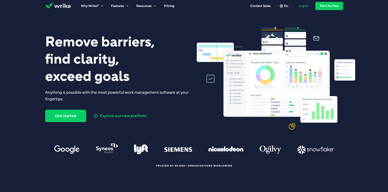
Harping on its versatility, Wrike is a project management software that features highly customizable dashboards and workflows and team-specific automation to give businesses a project platform that adapts to their current ways of working and not the other way around. Wrike’s functionalities involving over 400 tools revolve around giving a 360-degree view of projects, true interdepartmental collaboration, approvals acceleration, smarter data use, efficient workload management, and enterprise-grade security. Wrike has more than 30 well-documented use cases involving more than 15 departments and teams. Wrike also has a proprietary AI-powered capability called Work Intelligence that catalyzes results through smart automation and project risk prediction.

| Capabilities |
API
|
|---|---|
| Segment |
Small Business
Mid Market
Enterprise
|
| Deployment | Cloud / SaaS / Web-Based, Desktop Mac, Desktop Windows, Mobile Android, Mobile iPad, Mobile iPhone |
| Support | 24/7 (Live rep), Chat, Email/Help Desk, FAQs/Forum, Knowledge Base, Phone Support |
| Training | Documentation |
| Languages | English |
Wrike Pros and Cons
- Easy to use Gantt charts
- Customizable dashboard and schedule
- Comprehensive reports and insights
- Time-tracking tools included
- Excellent customer service
- A little pricey
- Can be difficult to get used to at first
- Frequent reports of unresponsive support
- Recorded incidents of unreliable software functionality


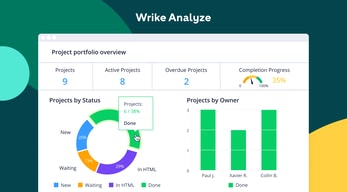
Wrike Review: Is It the Right Project Management Tool for Your Business?
Wrike has been empowering professionals and teams to better manage their work since its launch in 2006. It’s a comprehensive solution for professional service providers, marketing teams, and agencies. But all this versatility comes with a high price tag.
Is it worth it? In this Findstack review, we’re going to find out.
What is Wrike: A Quick Overview
Wrike has introduced Work Intelligence, an AI engine that powers risk prediction, task automation, and smart recommendations.
Wrike is an all-in-one work management platform that helps teams collaborate, plan projects, delegate tasks, and track progress. The platform offers a range of plans designed to meet the needs of almost any kind of business. Whether you’re a solopreneur or a department head at a Fortune 500 company, Wrike has a plan for you.
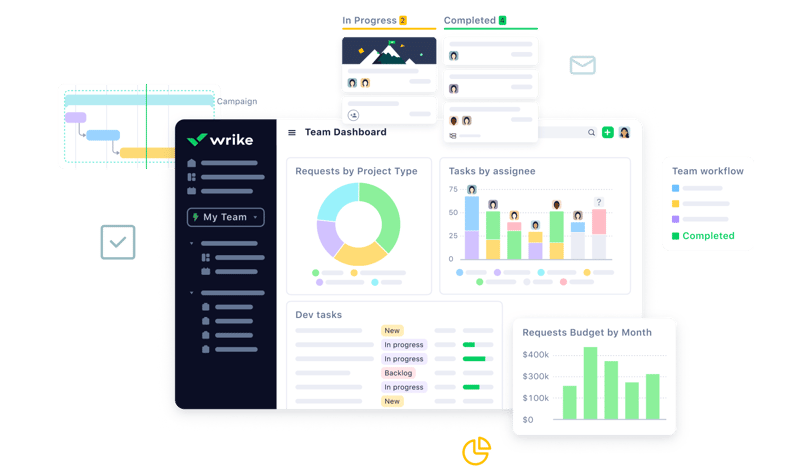
Wrike’s power lies in its ability to support both project management and collaborative work, which explains its appeal to a wide range of industries. The tool boasts a user-friendly dashboard that’s pretty simple to set up. It’s also very easy to create tasks, assign them to team members, set due dates, and track their progress.
Getting Started With Wrike
Wrike is one of the more intuitive project management tools for a new user to get started with—especially compared to competitors like ClickUp.
Wrike is available to users via web browser, desktop application, and mobile application for both Android and iOS devices.
To get started with Wrike, new users have the option to register for a free account using their business email. Once the email address is verified, users will be redirected to Wrike’s homepage to complete the initial registration process—which involves a guided walkthrough.
How Wrike Works: Key Features
Dashboards
If you’ve ever used a project management tool, Wrike’s Dashboards will feel very familiar.

For every project you create in Wrike, you can create Dashboards to display, manipulate, and analyze the project data that you’ve collected within it. They essentially give you an overview of project KPIs, metrics, due dates, and progress at a glance—saving you the hassle of seeking out each piece of data at the source.
When you create a Dashboard, you can start with a template or build one from scratch. If you go the latter route, you have quite a bit of flexibility thanks to a modular design and a wide selection of interactive widgets, including:
- Assigned tasks
- Overdue tasks assigned to you
- Overdue tasks that you assigned
- Tasks you’re following
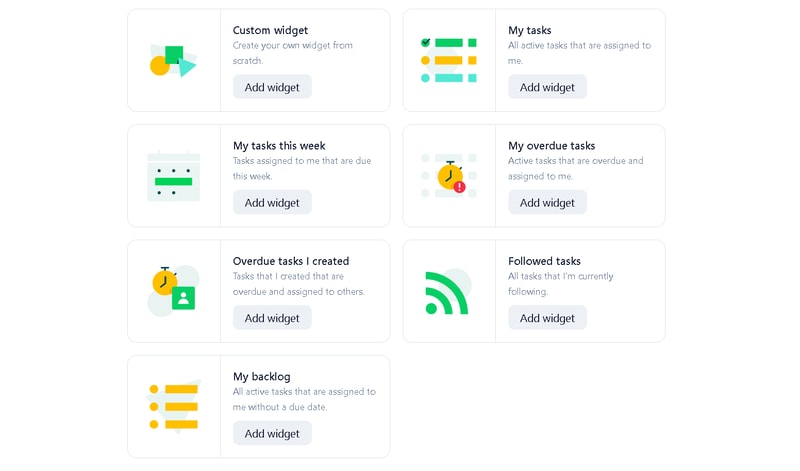
Wrike is unlike a lot of project management tools because everything you need is right at your fingertips. You don’t need to navigate to another window to see it all.
Automation
Like most modern project management tools, Wrike features an automation engine that works in the background to synch related tasks, assign workloads, and ensure tasks are completed on time with botted @mentions and comments.
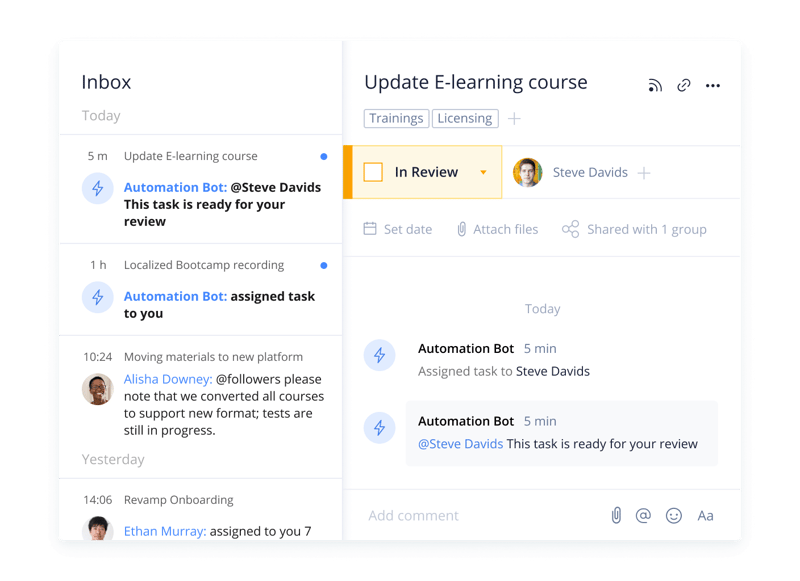
Wrike’s automation engine may not be the most complex or versatile on the market, but it’s intuitive and practical. There’s no feature bloat here—every feature is sure to get some use.
Integrations
On a related note, Wrike’s automation capabilities are supported by 400+ integrations with third-party tools. Pretty much every tool category is covered, including:
- CRM
- Communication
- BI
- Calendar
- CMS
- Storage
- Accounting
- Reporting
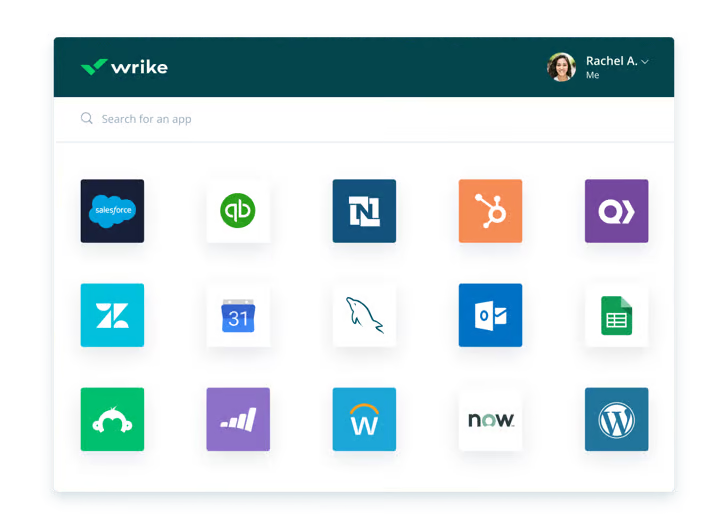
Integrating Wrike with other tools in your stack is a great way to cut out some busy work from daily workstreams and improve productivity. It’s also a surefire way to minimize human error.
Live Analytics
Wrike automatically updates every report, chart, and dashboard every 15 minutes, so you never miss a thing. 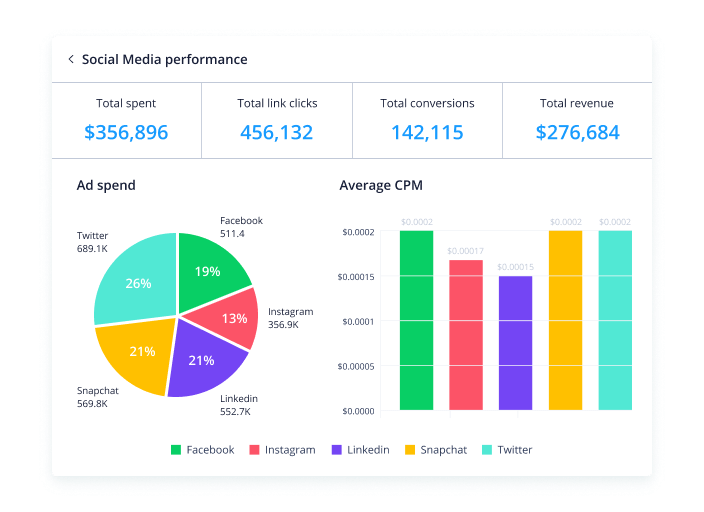
That’s a huge benefit—it means project managers don’t need to manually collect and input data from multiple sources to draw meaningful insight. Less time on busy work means more time analyzing the data for patterns, trends, and inefficiencies.
This feature is also great for project managers who are juggling multiple projects. They get a real-time overview of project statuses, team workloads, pending approvals, and tasks waiting to be assigned, so they can easily prioritize work and make meaningful progress.
Customizable Forms
Wrike has a custom form builder that you can use to create almost any kind of form—from simple team surveys to content request forms.
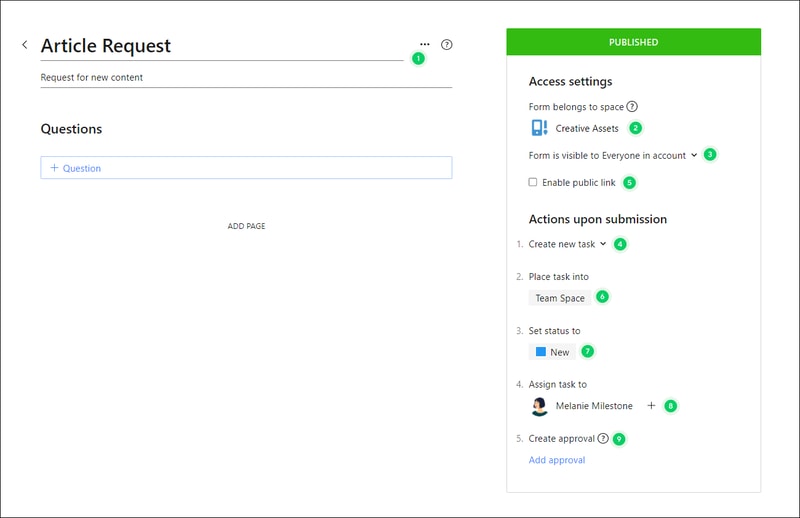
Wrike’s forms are fully customizable, and you can take advantage of role-based access controls to grant or deny access to certain pages or sections. Plus, when you create a new form, it can automatically assign tasks, set due dates based on the submission date, and populate subtasks.
Enterprise-level project management tools
Wrike offers advanced project management tools that you can access on your Home workspace to help you measure key performance indicators.
These tools include time tracking to assist in managing billable hours, visualizing cost and budget calculations, and business intelligence to assess project risk. While these tools are particularly useful for large enterprises with complex needs and a variety of teams, they can also be beneficial for small businesses that plan to scale.
In addition, the platform allows you to share files and publish assets with enterprise-grade security. The sheer number of features may be overwhelming for teams new to project managers, but Wrike provides great walkthroughs and tutorials. You may even discover features by accident that end up accelerating your workflows.
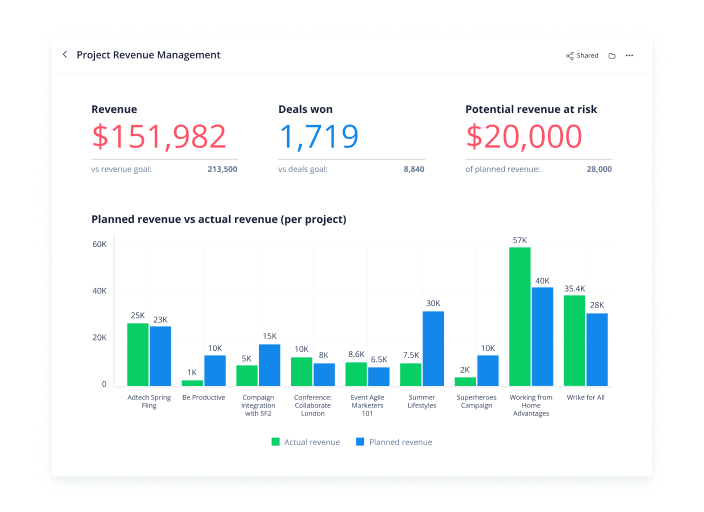
Wrike offers pre-built templates based on team roles to simplify task creation. Some of these templates include:
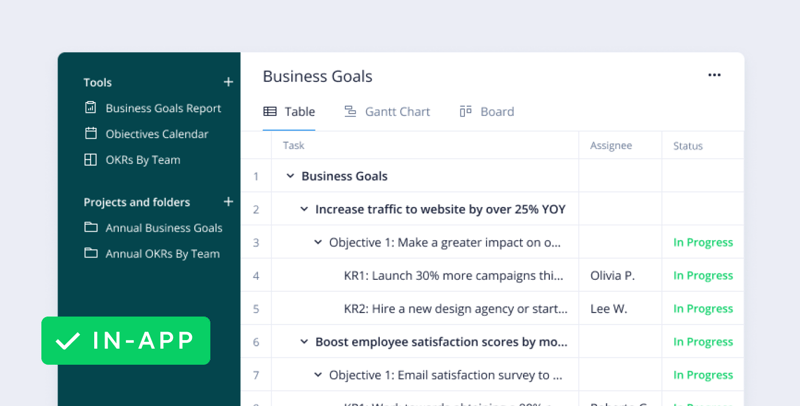
- Project performance templates
- OKR templates
- Weekly to-do list templates
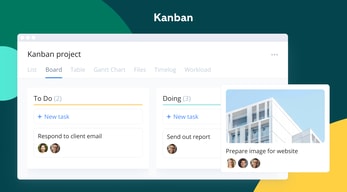
- Kanban board project templates
- Agile and IT templates
- Content operations templates
- Quarterly business review templates
- Ticketing and help desk templates
Collaboration Tools
Wrike—like most project management tools—is designed to make it easier to collaborate with your teams.
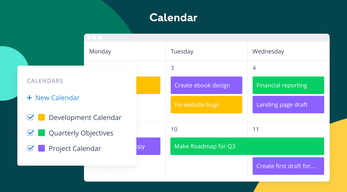
All team members have access to a global or project-based live stream of task activity, so nobody is left behind. Team members can easily communicate on specific tasks via comments and notes so that conversations are kept organized. Shared team calendars can be added to the dashboard to help with awareness of progress and submission dates. 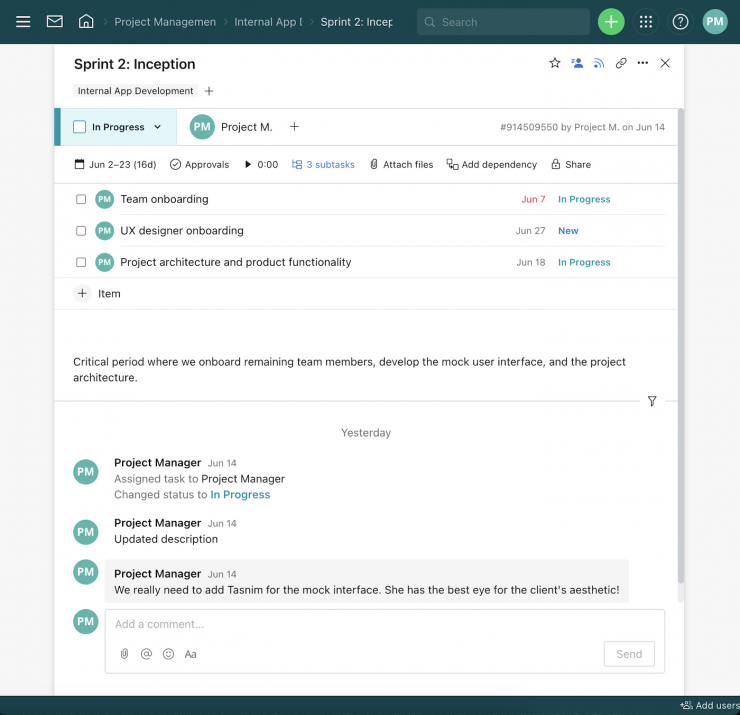
You can also invite third parties such as clients, vendors, or contractors, at no extra cost, to view the status of their projects and provide input that goes towards successful project completion.
Wrike Use Cases
Wrike’s use cases are quite impressive. Over 20,000 companies in over 140 countries have relied on Wrike to streamline their planning processes. These are companies that span a range of industries, including:
- SaaS
- Technology
- Healthcare
- Education
- financial services
- Construction
- Manufacturing
- Retail
What makes Wrike stand out from other project management platforms?
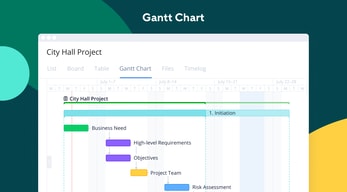
Wrike’s easy-to-create (and even easier-to-understand) Gantt chart view sets it apart from many other popular project management platforms. Plus, Wrike offers a range of other views, such as List, Board, Table, File, and Timelog. While this isn’t unique to Wrike, it isn’t super common to have that much flexibility,
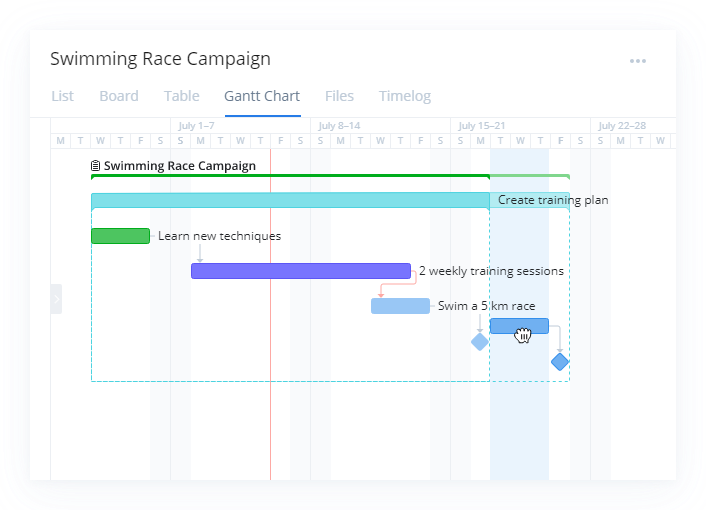
Overall, Wrike’s differentiating factor is the ease with which you can use it to manipulate project data to gain new perspectives and insights.
Wrike Pricing
Wrike offers a total of five plans, starting from a basic Free option, all the way up to an advanced Pinnacle option for large enterprises with complex needs.
Here’s a breakdown of the plans: 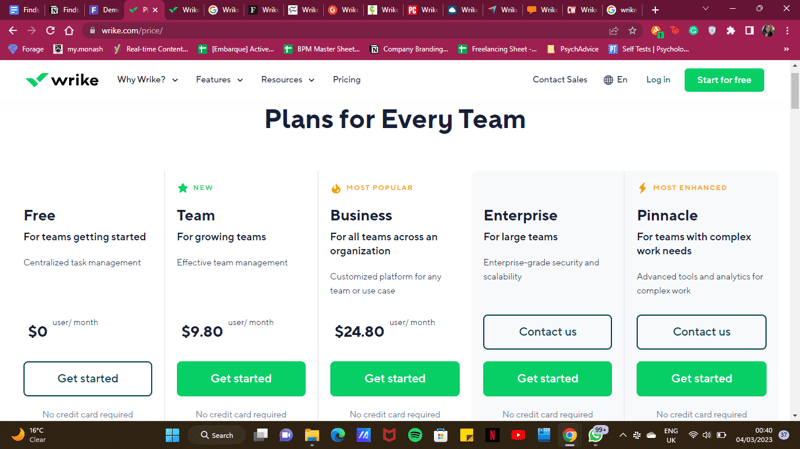
- Free : Wrike’s free plan is suitable for small teams that are just starting with project management software. However, it has limited feature options, including limited storage space, and excludes Gantt charts, time-tracking, and many customization tools.
- Team : Tailored for small teams that want to plan and collaborate on projects. This plan includes the Gantt chart view and the option to integrate with a wide range of services.
- Business : Provides access to advanced project management tools. The Business plan has everything you may need for project management for a large team.
- Enterprise : The Enterprise plan has custom pricing because Wrike will draw up a plan depending on your business needs. It is a plan to consider for large businesses that require more security controls.
- Pinnacle : This plan is for large businesses with complex work needs, including billable hours tools, job roles, and tools for planning and tracking effort put into different projects.
See Wrike pricing for current rates and plan details.
Pros and Cons of Wrike
Pros:
- Wrike offers plans for everyone, from small teams to large corporations.
- Real-time analytics are updated every 15 minutes.
- Wrike offers department-specific solutions which help different departments across your business align and communicate projects on one platform.
- Special customization is available for professional services and marketing and creative teams.
- Wrike offers training resources to help you get started on the platform.
- The free plan offers up to 2 GB of storage.
- It supports eight languages.
Cons:
- Although the project dashboards are user-friendly, those new to project management software may find Wrike overwhelming due to the wide array of features.
- Wrike’s costs can be a burden for mid-sized teams – there are cheaper project management tools with roughly equivalent features.
- Many of Wrike’s useful advanced features are offered as add-ons that can effectively double the price of the tool.
- The mobile app is not as user-friendly as other project management apps (e.g., Click Up). Managing tasks from the mobile app is not as smooth as using a desktop, and you may find that you’re unable to move and edit tasks.
- The interactive Gantt chart view is only available in the paid plans.
- The time-tracking in-app timer is only available on the Business plan and higher, and even small collaborative teams should be able to benefit from this feature.
Is Wrike right for your business?
Wrike is a comprehensive project management platform that also functions as a collaborative work management tool, making it ideal for businesses of all sizes. If you offer professional services or are part of a marketing or creative team, you can certainly benefit from Wrike’s highly customizable features.
It’s important to note that Wrike can be a bit pricey—especially with add-ons. Plus, it may be a bit overpowered for small teams who are looking for simple project management capabilities. That said, it’s a solid tool for managing multiple departments and complex projects.
If you want more insight and information into other project management software, Findstack has more helpful reviews you can take a look at.

I believe the training is well thought out and repeatable until you get it right. If you forget no problem just go back. Loving it. :)
For me being able to do something several different ways can be confusing but I bet others like that flexibility.
Keeping everyone on the same page and being able to delegate and easily follow the progress of a task, project, or item.
The reminder for tasks that have not been touch in a while is very useful.
Sometimes the site does not work well when you have a smaller window if you use multiple windows at once
Other sites would lose tasks and leave us wondering why; they could not tell why it was happening. Wrike works well at keep us informed about any issues.
It's very easy to use and intuitive. I was able to navigate my way around on the first day.
I wish there was more customization of screens available. There might be and I just don't know how to do it.
Everyone knows the status of every project and nothing falls between the cracks.
My all-time favorite feature of Wrike is the approval/comment/editing feature. It makes approvals and feedback sooo easy, especially on PDFs and videos. I also love the ability to add projects to multiple folders/projects because sometimes there's going to be overlap in projects and it's very helpful to see it in all the places it impacts.
Wrike is super powerful which is awesome, but not always the easiest to get up and running on. It's not plug and play when it comes to how your team wants to use it. (But working through that is super worth it.)
As our team has grown, staying all on the same page has gotten harder and harder. It's a lot easier to know what's going on across the marketing organization when there's 8 people vs 18. Wrike has helped us stay on track on projects and know how projects are progressing without adding more meetings.
Here at FAR we love the in-task Mark-up tool so copy & design tasks can be stakeholder reviewed & marked up in the task simplifying how projects are managed across multiple teams. I also love the blueprints, custom request forms, and custom workflows.
The notification management & that you can't navigate directly to a projects' tasks from a project notification in inbox.
It's made it much easier to track, manage & report on our creative projects.

I really like the timeline option in Wrike for project managers. I have used several tools such as Smartsheet, Excel, Teams, etc. to keep up with dates and timelines. Again, I say that Wrike is user-friendly.
That you cannot duplicate folders, while you are in a folder. You have to duplicate only from side bars. I don't quite like that.
Wrike makes our jobs as project managers easier. The tool is a great information storaging tool.

I like the note section to keep track of what has happened and what action was taken.
I wish it alerted me to the more important items I need to keep track of.
None that I know of. The program itself benefits me.
ease to use, very effective to keep track of projects and assignments, and help to keep work organized.
At this point, I don't have anything negative to say about Wrike.
Keep my team informed with updates and new procedures. My sups have learned to use it easily and have helped them to keep their work organized.

the mobile platform is amazing, the alerts are nice as reminder.
just like any platform, its tough to use in the beginning. my suggestion would be to do some video training for it:)
keeping all the projects that I collaborate with people on, straight.

Wrike is a great tool to help streamline communication and updates on projects across multiple teams.
N/A - Wrike is a great tool and I've enjoyed using it and learning more about it to help streamline any projects with internal team members in our company.
Wrike is being used by our team for any design or digital projects. It helps the team keep projects all in one place and allows for edits and communication across different teams so everyone is on the same page.
Tagging, organization, timeline management and video review are the main items we use. I also love it as an asset collection service.
Gannet chart is hard to use. Users find it hard to find things if they are not the main organizer
Wrike helps our team align and organize projects very well. It helps our video team review and collect notes. Also provides assets and archival search.

You can do almost everything in Wrike! Total package for marketing teams
When the latency or its downtime. Since i use Wrike heavily on my tasks.
Its a platform where requestors and services meet.
I love the dashboard option. All of my teammates can see each other assignments, we have weekly meetings to discuss each other's workflow.
I dislike that you can not customize your "Folder" with colors of your choice, or designs. If you can I am sorry, I would love to learn.
Work organization is hard to keep up with but I feel like Wrike helps us all benefit from it.
Auto-reminders and the ability to plan ahead, while keeping on top of current projects too. High-level and intricate views of projects.
Sometimes there are tiny abilities missing, like changing the status of a task from a high level view. But it's inconsequential!
Keeps the whole team aligned on task and project progress. Ability to quickly see where you're at, which helps us define who and what we need to chase, and when. Solving the issue of following up in a timely way (difficult to remember with 400+ clients to manage for one person)
Knowing the status of tasks and projects across the entire team. Being able to cut down on emails and use it as a communication tool. Features like adding documents to tasks/projects is great for collaboration outside of email.
The tool depends on how much certain team members update their Wrike tasks/projects. It can be hard to get entire teams on board with inputting all their work into it. Sometimes work isn't reflected as it has not been added to Wrike.
Keeping track of work and being able to collaborate on large projects with the tool. This allows for teams to be more collaborative and can cut down on unnecessary emails asking if a certain task has been completed because you can just check Wrike.

I can find my assignments for my job easily
I forget to always check it to see if I have assignments I need to work on
It helps me with assignments assigned to me for my job and keeps me on track in doing them

easy to use, i use it for work because we have to manually fill out if there is anything wrong on our ecommerce site so we connect with IT.
no downsides, it is very easy and simple to use.
We file any tickets or reports on Wrike to connect with IT
The daily remainders, To-Do list, Scheduling
Nothing as such. I am using it less than an year, still exploring more on this.
To keep track of things without missing deadlines.
The UI is friendly and there are a lot of customizable features.
Sometimes the Gantt chart won't refresh on it's own and I need to click the reload button.
We have a lot of projects on the go at once and the custom dashboards help to organize priorities.

Wrike allows me to work seamlessly with my team to ensure every detail of every project is covered. I can see all my tasks in one place, create tasks from my inbox with the plugin for Outlook, and more. I cannot go back to work without Wrike. It has made life so much easier for our very busy and highly collaborative team!
It's difficult for me to find anything. If I had to say, it would be that the Outlook plugin is sometimes slow and finicky. Otherwise, it is great!
Our team's project management was with Excel sheets and Word documents before. Now, we can quickly build out projects and assign tasks in one place so we are not looking through multiple documents to manage our workflow. I can also keep my inbox cleaner by creating tasks quickly with the plugin so I don't have an abundance of unread emails to remind me of a task.
I am an Admin on the account so I have access to everything. Even with all the information I have access to it's always easy to find what I need with minimal clicks. The UX is set up in a very intuitive way which is great for onboarding new users. They get in easily and figure out how to use Wrike with little if any assistance.
I wish more storage was included. When you are in marketing you work with some very large files...having to store files in Google Drive or Creative Cloud adds an extra step when you need to retrieve final files. Storage is cheap these days and Wrike is already at a high price point compared to other PM systems.
Wrike solves the problem of keeping your creative team connected. This "connectivity" became very important once our team became fully remote. We all have visibility to what we need and can pull information that we need without having to ask a team member for it.
I used to be an Asana power-user, but Wrike is so much better these days. It helps our team stay aligned and moving forward as we use Agile and work in sprints, and Wrike allows us to tally up our effort points, set due dates, and visualize our projects on calendars. I love that it's so customizable, and our scrum lead has been able to truly tailor Wrike for us and our needs. Highly recommend!
The only feature I wish Wrike had was a way to bulk select/de-select checkboxes for custom fields. Otherwise, it's perfect for our needs! It keeps us aligned and moving in the same direction as a team.
Wrike is definitely helping our team in terms of visibility into projects. Our team is growing larger, and being able to depend on Wrike to show us who's working on what has been a true godsend for our team's productivity.
The ability to @ different users, including ones not currently "active" on a task.
The search function can be a bit finnicky
My company uses Wrike for IT. I use it to submit requests and bug reports to the IT department. I like the ticket system and the interface. It took me about fifteen minutes to figure it out on my own.

Wrike allows me to pinpoint what I need to work on right now and helps me stay organized for work ahead.
Learning how to use it took quite a bit of time. With the help of Wrike's how-to videos as well as my team/department's help along the way.
We are creating forms to help narrow focus on what our team needs to produce for an online course. Wrike helps by having an in-take form and then creates a project based on that information. From there, its status changes until the final status of completion- going through various reviews across the department.
I have to maintain and create multiple video and online training projects. It was always a project management nightmare - including scheduling the various content pieces and their various editors and talent coordination. I have set up Wrike Dashboards for all my work partners, I can at-a-glance follow their progress, modify and/or add new tasks in a snap! The MUST HAVE piece for us was non-internal user file approvals via Wrike. I can send an unlimited amount of 'file for your approval' notices to our outside clients, and none of them need a Wrike license! This is a hard-to-find feature from other PM vendors. When we were shopping for a PM solution, when I asked other vendors about this feature, they'd say things like, "We don't have that, but you can make a PDF and email them that for approval, etc." NO THANK YOU... I love having the approval of the file built right into my workflow, and I get email alerts when my clients respond with approvals or feedback. This also works smartly with our internal team approvals as well. Another KEY FEATURE is the ability to make forms... I have replaced my old HELP TICKET software with a new Wrike form that I can publish on the internet. Now my Help Tickets auto-trigger a task for me to investigate and solve. They get email alerts and so do I when the forms are triggered. I've also created work intake forms for my internal team too! No more emails with fuzzy goals like, "Would you make this?" Now I get alerted when work requests come in and the customizable forms let me tailor exactly what I need. Wrikes update reminder emails also helps me make sure tasks get done as specified and on time!
This is one of the most powerful and integrated software packages I've used in over 30 years of IT management... changes are saved on the fly - there is nothing I don't like about this product!
I have to build custom online courses with dozens of varying and complex components and sub-steps. Wrike lets me lay out all the steps once, turn it into a blueprint for future projects, and saves huge amount of time tracking where I'm at in the design - production - assembly - approval phases. I have one process that takes bout three hours on the clock to complete. Dozens of steps, some very complicated and often done by new hires. I can add screen shots and links to all the components I need for myself, or someone else to complete the steps. I then duplicate these steps out for each new series which ensures me that nothing gets missed in the long chain of events.
it simplifies my workflow and speeds response time
There are times it get cumbersome, but I believe that is more to do with how we use it and not the platform itself
It gets rid of a lot of emails on a regular basis
Members are able to accomplish project located far from each other having communication and discussion as it progress editing and modifying without any delay.
With Wrike everything is easy and effective manageable,nothing wrong with it.
Forwarding assignments to top management as well as consulting professionals in between. Making quick requests and receiving responses.

The ability to work on projects digital amongst both team members and yourself is invaluable today. As someone who values communication and collaboration, this is a fantastic platform that allows me to get things done how I like it.
How Wrike's platform organizes certain tasks based on title, completion date, creation date, etc., sometimes conflicts with how I'd like tasks to be organized.
Wrike is letting my team - who contains certain members who work with other teams a lot, and others none at all, work on their respective projects with the same efficacy as any other project, regardless of collaboration level.
The Wrike Approvals Process is the best in the industry. We were able to review and approve files seamlessly throughout the Work-From-Home years. We looked at several other project management systems and nothing compared.
There is a real danger of overdesigning in Wrike because it is so robust. Keep it simple to start and build as you learn.
Wrike continually improves and bases development on user input. They post surveys and schedule phone conversations at the beginning of new feature development. Beta testers are welcome. All users can participate in the growth of the platform.
Wrike is highly customizable so you get what you need out of it. For example, we can create custom workflows so that a task or project can have custom-made statuses beyond the standard new, in progress, review, approved and complete. It's intuitive and therefore easy to onboard new users. It has training videos that help too. It's reporting features are robust and helpful. But beyond Wrike's features, if I had to tell you what I like best about Wrike has been my experience with our account's customer success manager, Alexander. The quarterly check-ins with him have been vital to our success and further integration of Wrike into our processes. He is like the sidekick you never knew you needed but legit makes my world easier after every meeting with him. He shows me how we could possibly set things up in Wrike or how to do things better. This feature of having someone like Alexander be paired with us has been phenomenal and crucial to our success.
With a focus on being a project management system for marketers, I wish it was more accommodating to written content creation and content planning (i.e., a social media content calendar). We currently have to use another app for our social media calendar and have workaround to be able to include related tasks in Wrike. It could be much more seamless process if Wrike had this capability. Secondly, the collaborator role for clients and colleagues (not team members you need in Wrike, those are users) cannot type/update a task description. This limits our ability to collaborate with collaborators with text and copy. We have to put in a link to another app (in this case Microsoft Sharepoint) to be able to draft, edit and review content. Wrike for Marketers is perfect for graphic design and video creation. I wish this extended to native in-the-app features for content creation.
Wrike provides our marketing team with clarity on priorities, what needs to be done and who's being counted upon to do it. Prior to Wrike, we were getting information in numerous ways with no way to manage it. We had to have long meetings to verbally go through projects that are now Blueprints in Wrike that we generate and run like clockwork. We had multiple missed requests because things came in emails that would get buried in your inbox. Now they come in through Wrike forms. Wrike solves multiple problems for us because it is so customizable. You get what time you put into Wrike by exponential time savings in the future.