

Zoho Mail Reviews: 4.4/5 — Solid Choice
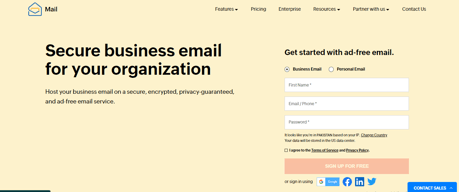
Zoho Mail is a component of the wider Zoho ecosystem–a popular choice among small to medium enterprises. It’s preferred for smaller organizations that are working with smaller budgets. The platform offers access to mobile applications and other productivity features, at very affordable rates. Zoho Mail is also secure. The simplicity of the control panel is certainly an advantage and it provides a big-picture overview of communications.
| Company | Zoho Corporation |
|---|---|
| Year founded | 2000 |
| Company size | 10,001+ employees |
| Headquarters | Chennai, Tamil Nadu |
| Social Media |

| Capabilities |
API
|
|---|---|
| Segment |
Small Business
Enterprise
|
| Deployment | Cloud / SaaS / Web-Based, Desktop Mac, Desktop Windows, Mobile Android, Mobile iPad, Mobile iPhone |
| Support | 24/7 (Live rep), Chat, Email/Help Desk, FAQs/Forum, Knowledge Base, Phone Support |
| Training | Documentation |
| Languages | English |
Zoho Mail Pros and Cons
- Great for email attachments
- Email hosting with your own domain
- Tasks and bookmarks included
- Lots of technical support for paid plans
- Affordable pricing
- Limited in terms of advanced features
- Not the best for cloud storage

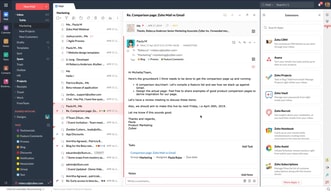



Compare Zoho Mail with other popular tools in the same category.
Zoho mail is quite helpful in many ways. With it's free email program, you can register on Zoho with ease and there are a lot of solid program options on Zoho for personal use and for small business as well. The best part about this mail is that it helps in connecting to various other email accounts and collects all the messages from them so that I can view them in a single inbox. Zoho mail registration not only allows you to get access to it's mail service but give you a pass to use various types of services offered under the Zoho Brand, which are also helpful in many ways. It's app is so nicely designed, it is also nice feature of zoho mail.
The thing I dislike the most is that zoho mail does not allow me to import contacts to the contact list of my mail from my social media accounts. If I need to add people from my social media directly to my mail by syncing them, then that is not a possibility for me if I am using Zoho mail. Zoho mail's UI is good, but it could be better in many ways like it's other counterparts. Sometimes UI matter so much.
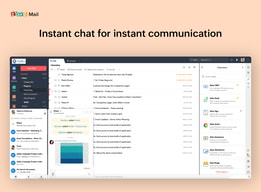
I've already explained, so many features of Zoho mail. Other benefits of using Zoho mail is that it has some great business based programs which are also free of cost. Zoho projects and Zoho expenses are two of the most helpful ones. Since they are free, anyone can use them. There is also a chat feature for connecting to your personal contacts. Zoho offers so nice services under it's brand.
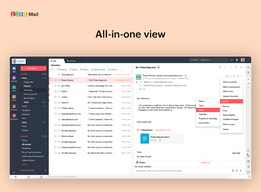
If you use certain zoho services, Zoho Mail is an ideal system. It seamlessly combines with its CRM, which is a great bonus. This includes everything that's essential to a decent e-mail system, including models, attachments and file format. Businesses can use the chat feature. It offers all the basic features as an email provider and does not charge extra for additional features.In short, it is an all-in-one system for e-mail.
Zoho Mail is thus perhaps not suitable if you want to give your subscribers large amounts of text because it has a limit .
Zoho Mail makes it easy to create business communications easily by looking for details in the contact categories to be included in your address. It is a pleasant experience to use Zoho maiil. Zoho email on mobile phones is easy to set up.
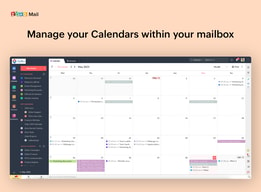
This secure all email hosting for business. it is easy to design a really nice and professional looking template. it helps in the mailing between two colleagues as well as by integrating with gmail it helps processing mailing conversations through gmail via this app. this software is easily integrate with each other which makes the working very easy. all feature are excellent. it is allow to visit calendar, contact and any task. the mobile version are excellent. document presentation are excellent. it is easy to manage lot of emails. in this software layout are very attractive. the free version are very user friendly. it is easy to navigate each and every email and client profiles. it is easily link with the domain manager panel. it is cheap in price and UI services are excellent.
In this software sometime email take time to load file and create some problem after upgrading the mail client. it does not run in good connections. sometime it is difficult to find some feature. it takes some time to set up work. sometime admin panel is difficult to find and it looks little bit confusing.
In this software user interface are excellent. it is easily connect with mobile device and computer. it is excellent software for mailing services. it is easy to install and set up. now this time i am not using this software because there is no feature to set automatic replies to the email received.
Simple to use Zoho mail You could build many users and allow each user enough inbox space. The metrics feature can be used to monitor the way certain people use the inbox. It's a fun experience with Zoho email ,on Android phones is easy to set up, too.
You could open too many tabs and become frustrated when you seek too much. I hope this can be improved.
To business users, Zoho Mail offers great functionality. It is better for business users than Gmail because it provides most new features. You will show in your inbox all attachments that are great advantages.
Very easy and simple but professional. Easy for startups to organizer their client meetups.. Having less or no ad is a big plus..
The mobile app is not getting notification or pop up when new email comes. The contacts and directory could been imporved. Also if the free users can be like 10 for a organization it could been better small organization.. The notification in mobile is not coming in real time.
Easy to setup and the application is good.
This software give secure email hosting services. it is easy to recover any lost data. ease of use. in this software advanced search option helped me find emails from long ago. it is easy to set up. The UI system is very easy and powerful. The company provides lot of excellent feature for user. customer service is excellent. This software provides a secure IMAP connectivity.
This software does not provide many plugins or connectors to external parties. It is little bit expensive for full premium feature. it takes times to learn some learning curve. sometime it is complicated to set up. The user interface is amazing.
It is easy to get support from supportive team. it is very user friendly app. The mobile app is excellent. easy to use and install. it is easily find a new client. now this time i am not using this software because in this pop ans IMAP option are not available.
Zoho Mail is an application that keeps your email professional by linking your domain name and for free (providing you limit yourself to 5 users). This can be done right from an enterprise level down to a small business level.
There is nothing that springs to mind when trying to conjure up a point of dislike. It functions perfectly as intended which is a great thing.
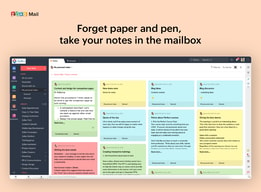
I'm able to represent my organisation professionally by displaying my domain name in my emails, both on in internal and external level. The quick notes function is particularly useful for jotting down important info on the fly. Synchronising your inbox across both PC/Laptop and Mobile Phone applications is crucial for when you need to send and receive emails but you're not in the office (Really, this is a massive benefit if you have to travel often).
I like what the app has to offer in terms of being able to create a domain and such.
The main issue myself and others seem to come across are the settings when building your domain. The steps becomea bit confusing and if an error is made, you have to reset your settings.
Having a domain is key when running a business.

Zoho has excellent Support and their interfaces look great, they are always coming up with new features that rival G-Suite and O365. Their Pricing is also very affordable considering all the features you get versus what other big companies offer.
There isn't much not to like, but from an admin point of view their admin panel is a bit bland and hard to navigate for the first time.
Zoho mail comes with streams which allow you to group mail based on the groups you have withing the company, it also allows easy document collaboration at really affordable
The most helpful thing about Zoho Mail is that it easily connects with our CRM which allows us to have more data on who we are emailing, emailing campaigns and whether or not things have been opened up or not.
I think some of the downsides to using Zoho Mail is that it takes a little getting used to if you are used to using things like hotmail or outlook products. You have so many opportunities with Zoho Mail that it is difficult to find out all those functionalities if you aren't familiar with it.
Having a better understanding of who my customer I am contacting is is a must in our industry. This coupled with our CRM it has helped immensly
The interface and simplicity and I liked the fact that everyone else used it.
Not much, i think it is the best solution.
Saving time
I got a free business email from Zoho and their application is very easy to use and user friendly
What I don't like about Zoho mail is that with their free plan you can only get one email address for a user
Having a business email addresses makes my business look legitimate and that results in getting more emails rather than a Gmail address
It's free, easy to set up. Friendly UI. Could like to Gmail or outlook later so don't have to login to zohomail every time.
A bit confusing at first as guides are based on old UI.
Creating personalised email for works

Low Cost Domain based email that is fast and reliable.
The Setup can be a bit difficult to complete.
I have used Zoho email for SMB domain based accounts.
I like that zoho mail feels lightweight to run and is quick to send and receive emails with.
The main look of the application is dated and doesn't look up to the standard of Microsoft Office 365 or google mail apps.
Zoho mail is very quick to use. It feels lightweight and nimble. Users have a good impression of the speed of the application and nearly no downtime!

Zoho mail is the mail app which I needed and it is very easy to use and also it organizes your work, so it becomes more effective. It is very easy to send and receive the mails through this app and also it is accessible on both the web browser and mobile application too.
Mostly I use mobile app and this app sometimes shows mail on the notification but doesn't shows the mail when opened. So it might be a bug. There is no con from my side but this issue should be corrected quickly.
Zoho mail is a perfect mail app used by me daily in my company for receiving and sending the mails. I'm very satisfied with the functioning and usability of this software and I'll keep using it.
The simplicity of use, the extent of functions, the thorough usability and friendly user interface
For first timers, the software may seem a tad daunting, with a somewhat complex overview
Zoho Mail has helped my business in terms of organization and professional touch

- Good free tier for small business - Ability to manage users - use both POP/IMAP - use SMTP for quick mail delivery - also while signing up they ask you to verification on all fronts so your email will never go to SPAM
- Complicated settings - User management is not that much straightforward - App is very limited
Helps to have your own domain name powered email address for nearly no cost at all.

Quick and prompt registration to the service. In comparison to i. e. Google, where the process can be dragging, Zoho mail was set up to go in under 2 minutes.
Not necessarily downsides, but rather I don't think it will stand out of the crowd. Where almost everyone is using gmail, Zoho Mail is nice, and visually appealing, but it's missing the inter connectivity will all the services Gmail has. On the other hand, it can serve very nicely as a secondary mail.
Nothing serious, but when I was testing the receiving period of emails, sometimes it was taking several minutes to receive an email I've sent to myself (normally it should be almost instantly). On the other hand, the interface is very appealing.
Good mobile version / app, no stupid grouping of messages, easy to read, lots of features, good colour scheme and layout... compared to Outlook it is MILES better, Outlook has late messages, messages going missing, a really bad search feature, and it keeps changing its interface which is infuriating
Nothing that I can think of at the moment really, i have never had to ask for help or complain about anything to the Zoho Mail team at all
I can rely on it to get all my messages through to me and my employee who works with me at Theme Queen, it's really important to have a reliable email service otherwise my business cannot run
I like how you can have up to 25 users have a 2gb mailbox for free, allowing small business to have a professional looking mailbox
If you want to use your own mail client you have to pay, otherwise the web version is ok, along with its own mail app for iOS and Android
I have made our club email look much more professional with a unified look
It is free. They have great web app also they have a mobile app for admin management.
The mobile for email is not very great UX wise. They need to catch with other apps. They have disabled IMAP, POP on free plans.
Its a great solution for professional company email with fast servers. Facilitates team communication and collaboration.
In this software it is easy to handle all appointments and meetings while reading emails. it is simple in use as well as design customizable. This software learn lot of many business simply by amplifying the controls and features users have access to when monitoring when emails are opened and links are clicked. mobile app of this system is very user friendly app.
Sometime control panel is easy to access and understand. setup take little bit some extra time. some e-mail showing small letters. this software does not have a feature to save searches and self-learning folders. sometime it take little bit time to load some e-mails.
It is cheap in price. security system is excellent. feature are excellent and ease of use. UI system and design are excellent. easy to understand by any user. now this time I am not using this software because sometime it is hard to understand to figure out that domain mapping email address.
It is a nice software where you can use your business email address either for free or for a monthly/yearly plan. Creating an alias email using this software is very easy and you get also many other useful features with this tool like calendar, contacts, tasks and many more. feature are excellent.
Setting up your business email at the first time is the hardest to understand. Sometimes emails take a while to load completely and the size of the files you can upload is somewhat limited. Sometime there is a problem after upgrading the mail client.
It is easy to use and very user friendly app. it is easy to get support from supportive team. feature are excellent. now this time I am not using this software because e-mails sometimes load for quite a long time.

Zoho Mail is a nice software where you can use your business email address either for free or for a monthly/yearly plan. Creating an alias email using this software is very easy and you get also many other useful features with this tool like calendar, contacts, tasks and many more. feature are excellent.
Setting up your business email at the first time is the hardest to understand. Sometimes emails take a while to load completely and the size of the files you can upload is somewhat limited. Sometime there is a problem after upgrading the mail client.
It is easy to use and very user friendly app. it is easy to get support from supportive team. feature are excellent. now this time I am not using this software because e-mails sometimes load for quite a long time.
I like the most securiy of mail host and controlled by system so more efficient or manageble
Rentntion policy and price model of this serive in business use.
Mail host for our small business so users can securly send information
I like the info organization once logged in and how the mail's history Is logical and Easy to visualize.
Is not actually about zoho, but It botters me to have to loggin every day on two emails platfforms (because I use zoho and Gmail)
The all Zoho platform zoho Is connected, so Is easier to attach a file that is already uploaded on Zoho's files.

Zoho Mail is a nice software where you can use your business email address either for free or for a monthly/yearly plan. Creating an alias email using Zoho is very easy and you get also many other useful features with this tool like calendar, contacts, tasks and many more. The attachment filter is very cool to use which carry out every picture and PDF present in the inbox of the user. It has spam filter too which works as a security guard to the user inbox.
Setting up your business email at the first time is the hardest thing I have gone through. It was very much complicated then I contacted customer service and they helped me very much. Also the designing and layout of the zoho mail is not very beautiful, it is a little bit outdated which I think should be updated.
I am a daily customer of Zoho mail and this app is really doing a fantastic job for me and my industry. This tool has everything which is needed by every industry, and it one of my personal favorite feature- to schedule a mail before time that when it has to be sent. Also the customer service team is very helpful and responsive too.
Eh implementado zoho mail recientemente en mi proyecto de empresa, y hasta el momento me ha gustado mucho,
Una de las cosas que no me gusta es que en la aplicacion movil las firmas de correo no se pueden seleccionar al momento de enviar un correo, si quieres incluir tu firma tendrás que hacerlo por la web.
Con zoho eh podido tener mi correo de empresa, y manejar todos mis correos.
I have used Zoho mail to create the emails of one of the branches of the company I work for, the truth is that the process has been very simple and fast. After configuring the mail, i did perform security tests to evaluate how safe Zoho mail is and the response was very positive. I also did send and receive tests to validate that there are no spam problems and everything was positive as well. Based on the above, I can recommend Zoho as a good choice when it comes to mail apps
What I don't like about Zoho mail is that the administration panel is a little hard to find, it should be more visible. Another thing I do not like is that the Spam filter is a little limited, you can only block by mail or domains, it would be good to add an option to block by type of attachment, words, etc.
Zoho has been of great benefit to the company in which I work since we do not have a local mail server in the branches, Zoho has helped us create our mail service in a fast, secure and efficient way. In addition to email, Zoho gives you other important features such as: create notes, add tasks to the calendar, you can store contacts, create tasks and much more.
