Zoho Sign background blur-sm
Zoho Sign E-Signature Software logo
Zoho Sign
Effortless Digital Signatures
4.3

( 54 )

Why Findstack is free?
Findstack is free for users because vendors pay us when they receive web traffic and sales opportunities. Findstack directories list all vendors — not just those that pay us so that you can make the best-informed purchase decision possible.
Advertising disclosure: Findstack offers objective, editorially independent comparisons to help you find the best software. Some links on this page are affiliate links — we may earn a commission when you visit a vendor through our links, at no additional cost to you. Affiliate relationships never influence our ratings, rankings, or reviews. Disclosure policy | Methodology

Zoho Sign Reviews: 4.3/5 — Solid Choice

Zoho Sign Overview
What is Zoho Sign?

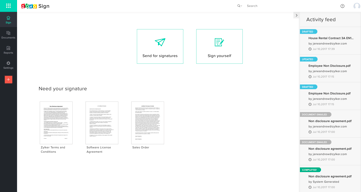
Zoho Sign is an electronic signature platform that allows businesses to securely sign and manage documents from anywhere. Unlike other signature solutions, Zoho sign supports easy integration with the Zoho Suite, providing seamless access to multiple business tools. Its standout features include signature templates, signature request tracking, signature analytics, and a mobile app for easy document signing on the go.

Company Zoho Corporation
Year founded 2000
Company size 10,001+ employees
Headquarters Chennai, Tamil Nadu
Social Media
Zoho Sign Categories on Findstack
Crevio E-Commerce Platforms logo
Crevio
Sponsored
5.0
(1)
Free plan available
Crevio is an AI-powered platform that runs your business while you sleep. Describe what you want to se... Learn more about Crevio
Ask Questions about Zoho Sign
What Zoho Sign is best for?
How does Zoho Sign compare to Dropbox?
What are the pros and cons of Zoho Sign?
Zoho Sign Product Details
Capabilities
API
Segment
Small Business
Mid Market
Enterprise
Deployment Cloud / SaaS / Web-Based, Mobile Android, Mobile iPad, Mobile iPhone
Training Documentation
Languages English
Zoho Sign Features
Advanced Reporting
Audit Trail
Bulk Send
Compliance Tracking
Conditional Logic
Customizable Branding
Customizable Signer Fields
Data Validation
Document Collaboration
Document Storage
Document Templates
Drag-and-Drop Document Upload
Electronic Notary
Form Fields
In-Person Signing
Integration APIs
Mobile Signature
Multi-Party Signing
Multi-language Support
Offline Signing
Payment Collection
Real-Time Status Tracking
Reminders and Notifications
Reusable Forms
Role-Based Permissions
Secure Encryption
Signature Certificate
Signature Workflow Management
Signer Authentication
Third-party Integrations
Zoho Sign Media
Zoho Sign video thumbnail
Zoho Sign 0
Zoho Sign 1
Zoho Sign 2
Zoho Sign 3
Zoho Sign 4
Zoho Sign Screenshots
Zoho Sign screenshot 1
Zoho Sign screenshot 2
Zoho Sign screenshot 3
Zoho Sign screenshot 4
Zoho Sign screenshot 5
Disclaimer
Our research is curated from diverse authoritative sources and meant to offer general advice. We don’t guarantee that our suggestions will work best for each use-case, so consider your unique needs when choosing products and services. Feel free to share your feedback.
Last updated: May 01, 2026
Zoho Sign E-Signature Software logo
54 Zoho Sign Reviews
4.3 out of 5
Mid Market (51-1000 emp.)
Nov 28, 2023
 Source
Overall Rating:
4.5
FS
Faizan S.
Marketing
Share
"Very Easy to use Tool"
What do you like best about Zoho Sign?

Very simple and easy-to-use tool with a free plan available. Plus it is easy to integrate with other tools

What do you dislike about Zoho Sign?

Sometimes the UI becomes little complex if they can update it

What problems is Zoho Sign solving and how is that benefiting you?

It is solving our digital signatures where we can take care of all of them be it company side or employee side

Mid Market (51-1000 emp.)
Nov 27, 2023
 Source
Overall Rating:
4.5
AS
Aviral S.
Assistant Vice President
Share
"One the best platform"
What do you like best about Zoho Sign?

Each and every feature provide all type of solution

What do you dislike about Zoho Sign?

Nothing as of now, nothing I found out so far

What problems is Zoho Sign solving and how is that benefiting you?

To sign digitally

Mid Market (51-1000 emp.)
Nov 27, 2023
 Source
Overall Rating:
4.5
AG
Verified Reviewer
Founder
Share
"A total Game Changer for the Organizations"
What do you like best about Zoho Sign?

Simplified signing process Automatic Notifications and Reminders Integrations

What do you dislike about Zoho Sign?

Instead of Watermarking "Zoho Sign" in emails, it should provide the options to be "Sent by the Organization" and remove own watermark. Multiple Authors or Users Signing

What problems is Zoho Sign solving and how is that benefiting you?

Simplifying the process of Signing multiple docs along with different G-suite Integrations, solves the problem of achieving faster and productive results.

Small Business (50 or fewer emp.)
Oct 17, 2023
 Source
Overall Rating:
4.5
LB
Lucia B.
Consultant
Share
"Signer master"
What do you like best about Zoho Sign?

It's very easy to use the platform. It is intuitive, allows you to create multiple types of contracts or documents that require a firm. Additionally, you can personalize your form documents quickly. A large company for small, medium and large businesses.

What do you dislike about Zoho Sign?

When customizing contracts, there are many changes in font, size and spacing. Even though the support team tried to help, the problem persists. So time is wasted arranging the document at the end. They have a lot of problems with custom fields that are extracted from the CRM. Because they do not have much compatibility with the fields of the app. It does not give you the possibility to make font and size changes when creating a template, so it makes the process at the end for customizing the document very tedious.

What problems is Zoho Sign solving and how is that benefiting you?

It's a time saver for us when comes to creating contracts for our customers. It's a nightmare to create a contract for each customer, so it's very easy to plug the system to the CRM and pull the information automatically.

Small Business (50 or fewer emp.)
Nov 29, 2021
 Source
Overall Rating:
4.5
Juan Vinay F. avatar
Juan Vinay F.
Java Software Engineer
Share
"Software to sign from anywhere"
What do you like best about Zoho Sign?

It is an excellent tool that facilitates legal processes, they can sign several documents with a single click, for example, sign the payroll of your collaborators or a set of payment orders through your email, and you can integrate it to other platforms such as microsoft teams .

What do you dislike about Zoho Sign?

Zoho Sign helps automate proposals, contracts and other documents for clients safely, quickly and efficiently

What problems is Zoho Sign solving and how is that benefiting you?

With the electronic signature, the time consumed is less as documents can be assigned instantly online.

Small Business (50 or fewer emp.)
Nov 29, 2021
 Source
Overall Rating:
4.5
Aini T. avatar
Aini T.
Software Engineer
Share
"Get or send signed documents instantly."
What do you like best about Zoho Sign?

I love its integration with Zoho Books, it allows signing invoices and estimates, even restricting the sending of invoices and estimates to people who have not signed.

What do you dislike about Zoho Sign?

I have a great experience with Zoho Sign, it offers secure signature processes.

What problems is Zoho Sign solving and how is that benefiting you?

Zoho Sign allows us to import and export signed documents to cloud applications: Dropbox, Box, Google Drive, OneDrive, Zoho Docs, Zoho WorkDrive

Mid Market (51-1000 emp.)
Nov 24, 2021
 Source
Overall Rating:
4.5
Zachary Michelle  M. avatar
Zachary Michelle M.
Software Engineer
Share
"Secure software for digital signature of documents."
What do you like best about Zoho Sign?

It allows you to sign digital documents from Gmail, as well as send documents from Google Drive, DropBox, Box, OneDrive and many more. Documents can be easily downloaded by pdf, jpeg, doc, and more.

What do you dislike about Zoho Sign?

It is an excellent electronic signature software, send and sign each legal document, it has never been so easy.

What problems is Zoho Sign solving and how is that benefiting you?

It is a simple and easy-to-use software, which simplifies and allows us to store, search, send or receive through our email, all kinds of documents to sign as independent contracts, proposals, all kinds of reports and more. Integrations with other platforms such as G-Suite and Microsoft Office 365.

Small Business (50 or fewer emp.)
Aug 02, 2021
 Source
Overall Rating:
4.5
Gavin P. avatar
Gavin P.
Director
Share
"Zoho Sign a good alternative to the rest esp. for Zoho Eco system users"
What do you like best about Zoho Sign?

Zoho has covered a lot of bases here with the newest versions of Zoho Sign. Our organization migrated to Zoho Sign after paying over the odds with Docusign, who were the pioneers back in the day (2013-2018). Zoho sign allows various departments to organise contracts and legal documents in an efficient manner, track progress, extract signature receipts, and even sends auto-reminders (which in this situation is better than a human reminder). The self-sign feature is also handy for generic documents which you may need employees or contractors to sign.

What do you dislike about Zoho Sign?

Every now and then, I notice some bugs when sending a multi-signatory document which requires various (usually 3) users to complete different parts of the documents and signatures in different places. The bug occurs when preparing to send the documents in the back end; the system sometimes does not allow you to proceed if you enter the user details in a particular manner.

What problems is Zoho Sign solving and how is that benefiting you?

The level of automation and time-saving benefits of moving to e-sign is no doubt tremendous. We have been able to get a lot of contracts, business agreements, declarations completed in a lot less time than we did previously.

Small Business (50 or fewer emp.)
Oct 30, 2020
 Source
Overall Rating:
4.5
MG
Marcus G.
Founder
Share
"Nothing but the best e-signature tool"
What do you like best about Zoho Sign?

Having control over all files and the software ensuring we are all well informed about any changes made makes it extraordinary application for us.I like that it is easy to use and accessible from any device and browsers.

What do you dislike about Zoho Sign?

I have nothing i dislike about Zoho Sign,it worked perfectly for us.

What problems is Zoho Sign solving and how is that benefiting you?

Zoho Sign has helped us avoid errors and save time.It has completely eliminated tedious manual process in our real estate company.Closing deals with our clients is now fast and easy with Zoho Sign.

Mid Market (51-1000 emp.)
Jul 05, 2019
 Source
Overall Rating:
4.5
AW
Aaron W.
Account Executive
Share
"Zoho Sign is a great solution for getting documents signed"
What do you like best about Zoho Sign?

I can manage all of the document creation, managing and sending through the Zoho Sign portal. Rather than faxing or getting documents printed and signed by hand, I can get documents signed digitally by myself or by those that I send my documents to. The layout and design of the Zoho Sign platform is very neat and organized well. The instructions on how to create new documents and send them is fairly simple. It's also quite simple for recipients to sign documents, which is important since I work with people that often have limited technical capabilities.

What do you dislike about Zoho Sign?

I suppose the only thing I don't like is the pricing. It's not the least expensive pricing model I've seen, so if it could maybe look at some of its competitors and align the pricing with some of the lower cost digital signing services, then I would be more enthusiastic about using it.

What problems is Zoho Sign solving and how is that benefiting you?

Any type of software that can make processes easier and save time are usually a plus. Zoho Sign can certainly be that type of software for our contracts and invoices. It's probably given me the most improvement in my daily work flow and helps to keep me accountable of documents that are signed and still need to be signed. The status updates keep me in the know at all times and help me to react and respond after document transmissions in a timely manner.