

Unclaimed: Are you working at Act!?
Act! Reviews: 3.9/5 — Good for the Price
Act! is one of the pioneer brands in its space that evolved into a customer relationship management platform, and cloud-app with a browser-based front end. It offers an integrated email marketing platform that is ideal for small to mid-sized companies. The software also has an easy-to-use dashboard designer with a good marketing automation workflow builder.

| Capabilities |
API
|
|---|---|
| Segment |
Small Business
Mid Market
|
| Deployment | Cloud / SaaS / Web-Based, Desktop Windows, Mobile Android, Mobile iPad, Mobile iPhone, On-Premise Linux |
| Support | 24/7 (Live rep), Chat, Email/Help Desk, FAQs/Forum, Knowledge Base, Phone Support |
| Training | Documentation |
| Languages | English |





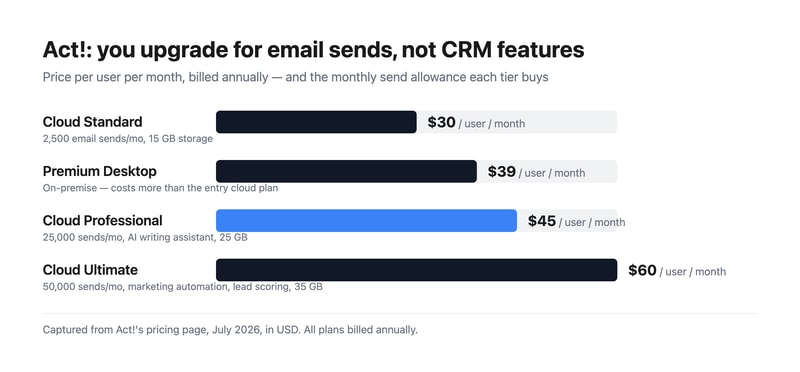
Act! sells three cloud tiers at $30, $45, and $60 per user, and what actually separates them is how many marketing emails you can send. Standard allows 2,500 a month, Professional 25,000, and Ultimate 50,000. The CRM underneath is broadly the same product throughout. Understand that and the pricing page stops looking like a capability ladder and starts looking like what it is — an email volume plan with a CRM attached.
- What it is: A long-established CRM for small and mid-sized businesses, bundling contact management with email marketing and, unusually, still offering an on-premise option.
- Best for: Small businesses that want CRM and email marketing from one vendor, and organizations with a genuine need to host data themselves.
- Pricing: Cloud Standard $30, Professional $45, Ultimate $60 per user monthly, billed annually. Premium Desktop $39. Verified July 2026.
- The honest catch: Premium Desktop costs $39 — more than the $30 entry cloud plan — so choosing on-premise is a premium, not a saving.
What Is Act!?
Act! is one of the oldest names in contact management, dating to the late 1980s and passing through several owners since. That history explains both its strengths and its reputation: it is deeply featured and genuinely mature, and it carries an interface lineage that reviewers routinely describe as dated next to newer competitors.
What distinguishes it in 2026 is scope. Most CRMs at this price handle contacts, deals, and activities and expect you to buy email marketing separately. Act! bundles both, and at the higher tiers adds marketing automation, lead scoring, quotes and payments, appointment scheduling, forms and surveys, website chat, event management, project management, and accounting integration. For a small business that would otherwise assemble four subscriptions, that consolidation is the real argument.
It is also one of very few CRMs still selling a genuine on-premise product. Act! Premium Desktop runs on your own infrastructure with networked access, which matters to businesses with data residency requirements or a firm preference for not putting their customer list in someone else’s cloud.
How Act! Works
- Cloud or desktop. Act! Advantage is the hosted line; Act! Premium Desktop is installed and managed by you.
- Email sends as the metering dimension. 2,500, 25,000, or 50,000 per month by tier — the clearest differentiator between plans.
- Contact and pipeline management. The core CRM, full-featured on every tier including the cheapest.
- Bundled marketing. Campaigns and nurture sequences from Professional, full marketing automation with lead scoring on Ultimate.
- Quotes, scheduling, forms, and chat. Standard versions from the entry plan, advanced versions from Professional.
- Cloud storage by tier. 15 GB, 25 GB, and 35 GB respectively.
Act! Pricing
Captured from Act!’s pricing page in July 2026, in US dollars. All plans bill annually.
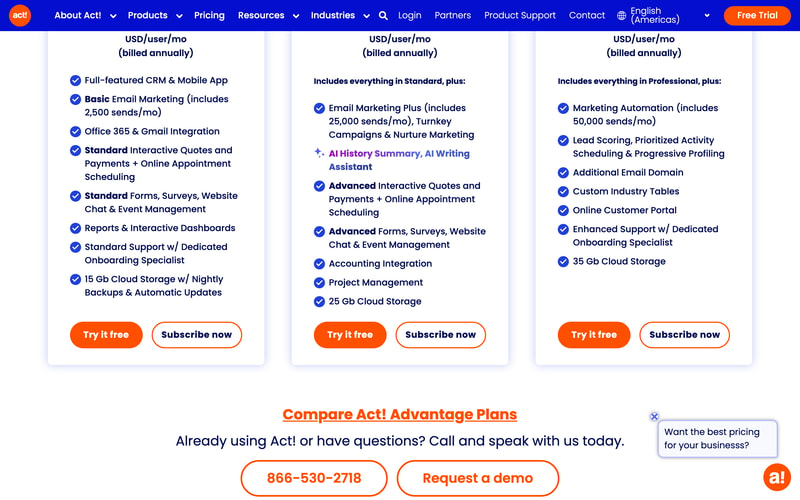
| Plan | Price/user/mo | Email sends/mo | Storage | Key additions |
|---|---|---|---|---|
| Cloud Standard | $30 | 2,500 | 15 GB | Full CRM, mobile app, Office 365 and Gmail, standard quotes, forms, chat |
| Premium Desktop | $39 | — | On your servers | On-premise deployment with networked access |
| Cloud Professional | $45 | 25,000 | 25 GB | AI writing assistant, nurture marketing, accounting integration, project management |
| Cloud Ultimate | $60 | 50,000 | 35 GB | Marketing automation, lead scoring, customer portal, custom industry tables |
What this means for your decision:
- The upgrade trigger is email volume, not CRM capability. Standard is described as a “full-featured CRM,” and it is. If you send 2,000 marketing emails a month, Professional’s extra $15 per user buys you send headroom and some marketing tooling, not a better CRM. Work out your send volume first — it is the number that picks your tier.
- 2,500 sends is genuinely tight. A list of 1,000 contacts emailed twice a month exhausts it. Any business doing real email marketing lands on Professional, making $45 the practical entry price.
- Desktop costs more than entry cloud. $39 against $30. On-premise is often assumed to be the cheaper, no-frills option; here it is a deliberate premium for control. Choose it because you need to hold the data, not to save money.
- Everything is billed annually. There is no monthly option advertised, so the free trial is the only low-commitment evaluation.
- Per-user pricing compounds normally. Five users on Professional is $225 a month, ten on Ultimate is $600.
- Consolidation is the value case. At $45 per user you are getting CRM, email marketing, quotes, scheduling, forms, surveys, chat, and project management. Assembled separately from best-in-class tools, that stack costs considerably more.
Who Should Use Act!
- Small businesses wanting one vendor. The clearest case. CRM plus email marketing plus quoting from a single subscription genuinely simplifies both billing and integration.
- Organizations needing on-premise. Act! Premium Desktop is a rare option in a category that has almost entirely moved to cloud.
- Established businesses with existing Act! data. Decades of contact history is a real reason to stay, and migration is genuinely painful.
- Teams doing moderate email marketing. Professional’s 25,000 sends covers most small-business campaigning without a separate platform.
It fits poorly for teams that prize interface quality, where Pipedrive and monday CRM are markedly more pleasant; for businesses wanting a free tier, which HubSpot CRM and Zoho CRM provide; and for sales-led organizations needing deep pipeline analytics, where dedicated sales CRMs go further.
Honest Pros and Cons
Strengths
- Genuine breadth. CRM, email marketing, quotes, scheduling, forms, chat, and project management in one subscription.
- Full CRM on the entry plan. The cheapest tier is not a crippled version of the product.
- On-premise option. Rare, and decisive for organizations with data residency requirements.
- Mature and stable. Decades of development show in feature depth.
- Bundled marketing automation. Lead scoring and progressive profiling at Ultimate, without a separate platform.
- Dedicated onboarding specialist included from the entry tier.
Limitations
- The interface shows its age. The most consistent criticism, particularly against newer competitors.
- Tight email allowance at entry. 2,500 sends pushes most marketing-active businesses to $45.
- Desktop costs more than entry cloud. $39 versus $30, which surprises buyers expecting on-premise to be cheaper.
- Annual billing only. No monthly option for a low-commitment start.
- No free tier. Where several major competitors offer one.
- Bundled tools are adequate, not best-in-class. The forms, chat, and project management are convenient rather than excellent.
Act! Alternatives and How It Compares
- Zoho CRM is substantially cheaper with a free tier, and far stronger if you use other Zoho applications.
- HubSpot CRM has a genuinely free CRM tier and a more modern interface, with costs rising sharply as you add marketing.
- Pipedrive is the better sales-focused pipeline tool, with a cleaner interface and less bundled marketing.
- Keap is the closest philosophical competitor — CRM plus marketing automation for small business — at a higher price.
- Insightly combines CRM with project delivery, which suits services businesses.
- Freshsales and monday CRM are the modern-interface options at comparable cost.
For a broader survey, browse our CRM directory.
The Verdict
Act! is a consolidation play, and judged on those terms it holds up. For $45 per user a small business gets a full CRM, 25,000 monthly marketing emails, quotes and payments, appointment scheduling, forms and surveys, website chat, event management, project management, and accounting integration. Buying those capabilities separately from category leaders would cost noticeably more and require the integrations to be your problem. If you want one vendor, one invoice, and one support number, that is a legitimate and underrated reason to choose it.
The way to price it correctly is to start from email volume rather than user count. Standard at $30 includes the full CRM, so the $15 step to Professional is buying send headroom — from 2,500 to 25,000 a month — plus marketing tooling. A business emailing a list of a thousand contacts twice a month has already exhausted Standard, which makes $45 the realistic entry point for anyone doing marketing at all. Conversely, if you genuinely only need contact and pipeline management, Standard is a complete CRM and there is no reason to move up.
Two honest caveats. The interface is the most consistent criticism in reviews, and if your team has used Pipedrive or monday, Act! will feel dated — that is a real cost in daily use, even if the functionality is there. And note that Premium Desktop at $39 costs more than entry cloud at $30; on-premise here is a deliberate premium for holding your own data, not a budget option. Choose it for control, and if control is not your requirement, the cloud plans are both cheaper and less work.
FAQ
How much does Act! cost?
Act! Advantage cloud plans are $30 per user per month for Standard, $45 for Professional, and $60 for Ultimate, all billed annually. Act! Premium Desktop, the on-premise option, is $39 per user per month. Prices were captured from Act!’s pricing page in July 2026 in US dollars. A free trial is available; there is no free tier.
What is the difference between Act! plans?
Primarily email send volume and bundled marketing. Standard includes the full CRM with 2,500 monthly sends and 15 GB storage. Professional raises that to 25,000 sends and adds an AI writing assistant, nurture marketing, accounting integration, and project management. Ultimate provides 50,000 sends plus marketing automation, lead scoring, a customer portal, and custom industry tables. The core CRM is full-featured on every tier.
Is Act! Desktop cheaper than Act! Cloud?
No — it costs more. Act! Premium Desktop is $39 per user per month against $30 for the entry cloud plan. On-premise deployment here is a premium option for organizations that need to host their own data, rather than a budget alternative. It also means you take on hosting, backups, and updates yourself, which the cloud plans include.
Is Act! still a good CRM in 2026?
It remains functional and unusually broad, bundling CRM with email marketing, quoting, scheduling, and project management in a way few competitors match at the price. Its weakness is the interface, which reviewers consistently describe as dated relative to newer tools. It suits businesses valuing breadth and vendor consolidation over daily polish, and existing Act! customers with substantial contact history.
What is Act! best for?
Small and mid-sized businesses that want CRM and email marketing from one vendor rather than assembling a stack, and organizations with a genuine requirement to host customer data on their own infrastructure. It is a weaker fit for teams prioritising interface quality, for anyone wanting a free tier, and for sales-led organizations needing deep pipeline analytics.

Compare Act! with other popular tools in the same category.
Act really simplified things. You can keep track of every salesmen and it was easy to install!
The licensing is a bit weird and expensive.
We replaced a windows 2000 server running lotus notes on it. Having a stable program on a stable server makes for a much easier work day.
ACT has been a great tool too keep all of our contacts in order as well as store valuable information.
It can crash at times and also have issues synchronizing.
It allows an easy way to keep all of our contacts in order.
Honestly, not much. The only thing i do a lot is export data out, so for me that's pretty easy.
Ha! Do I have a character limit? The dashboard and navigation is clunky. Too many navigation panes that do the same thing in multiple areas. It's not very intuitive, when entering a contact, you never know if all or parts of the contact info is already in the database. Emarketing needs some serious R&D as it's no where near what a marketer would want or need for campaigns. It's only good for short and sweet sales letters I've found. I could keep going.... but I've said enough.
It's our CRM, quoting system, and lead capture system.
keeps all my clients info readily availabke, can access from anywhere with login, and can update fields needed for my business.
took a while to get used to the setup and still dont use all of the features of Act.
Being able to pull up lists of certian clients by product, or by age, or by any category so we can do mass rmailing for specific clients.
Easy to sort and filter searches of contacts, several ways to categorize contacts
Very expensive and you only get a limited number of accounts to use.
consolidating all contacts into one place
Flexibility in creating custom fields.
Software does not keep up easily with Outlook
Basic email communications. Understand who to call on.
The efficiency of the built in filter options on ACT! are superb and give us the end user very few limitations for what we use the database for. Another fantastic feature of ACT! is the ability to caption and attach files to each record, giving full tractability across the database.
ACT! Emarketing templates need to be resembled to create a blank template. The alignment of paragraphs is viewed differently across devices such a PC's, tablets and mobiles. It is rather difficult to gain uniformity throughout the mailshot - Some letters become obscured and fonts change sizes.
Filing has become a easy in-house process without the need to outsource. We have used the Emarketing to reach our entire audience and in some cases targeted mailshots with a good open rate. We received updates though the portal regarding our successes.
The price was appealing, fairly easy to operate
Didn't like that it wasn't cloud based and that it only works on windows
We needed a CRM system for our mailshots. Act! dealt with this well. The templates were very easy to use.
Customize all fields to make it work for you.
This still has some ugly and old looking UI.
Contact management.
What I liked about ACT! was its ease of use as a CRM, low cost and a one-time fee for the program (for when we used it) vs a SAAS with ongoing monthly or annual fees to remain a user of the software.
Not so much a dislike as we as a business out grew the limited functionality of the CRM and it capabilities as somewhat cumbersome to use as a cloud version across platforms and for the fact that it did not have native email marketing built in (at the time of our use) but instead integrated with a third party program called Swift. Also the limits of the size of the contacts in the database do not lend itself to the campaigns that we now set up and use in our business.
We needed a CRM to store and work with all of our contacts send one-off emails and we were able to use it for its intended function as a smaller low-cost limited capability CRM.
tech support team (Some of the tech support members are very knowledgeable) I like the short wait time to get connected to a live person, unlike previous years. Also fast and easily automated ivr menue.
I dislike the tech support members that are not very knowledgeable which can take hours to resolve software issues due to act system glitches
Customer management and scheduling followups
I like the ability to create specific lists of your contacts based on certain criteria. We have over 50,000 contacts and pulling up a list of people that meet very specific criteria is very efficient.
I don't like that it isn't very easy to customize on our own, and that we have to hire a 3rd party. Also, it tends to be glitchy.
We love the alarms, ability to sync with outlook, and the ability to email customers straight from act.
ease of use keeps me organized and focused
customer service was an issue but they resolved it and its pretty good now
organization
Ease of use - straightforward and self explanatory, so fairly quick to train new staff on
The fact that it's not very customisable - bespoke features are not really an option
Better control of our customers
Search facilities are very in depth and enable accurate reporting
Inability to integrate with a MAC would be very useful
It enables us to maximise revenue by keeping track of customer activity and spending patterns. Have realised increased revenue through many of the features available
While not the most advanced CRM on the market, I really appreciated the flexibility provided for building custom queries - it was fairly intuitive and easy to manipulate to drill down to the information desired.
Fairly outdated, bulky, old school system
Identifying lead sources, contact points and methods, and sales data. Act! gave my team the ability to sort our database by a variety of data points and save/share custom queries.
I like the ability to organize all of our customers by different data fields. Being able to create groups and separate different kinds of customers is very important where I work. For example, I am currently putting thousands of different business cards into ACT! so that my company can send out different email blasts to different groups of people. It really helps keep me and my coworkers organized!
Referring back to the business cards, I wish ACT! was compatible with a business card scanner program, that way I wouldn't have to type every single card in... That takes a lot of time. My company has a card scanner, but we would rather use the scanner if it was able to be linked to ACT! directly so we didn't have another program full of information to deal with.
We are solving our organizational and time-management problem (aside from the card scanner issue) because with ACT!, everything is in one place and everyone who works here can access the information at any time, which saves time and helps keep everyone organized and on track. I know ACT! has a lot more features, but this, by far, has been most helpful for us.
The ability to keep track of customers, make notes on accounts that are available to authorized users, keep track of contacts, networking associates, prospects and customers.
Not an excellent product for project management and is therefore a tough product to utilize for companies that are involved not only in the sales aspect but also the installations or project aspect. You would need another software.
ACT! Solves all issues surrounded by customer management and relationship management. It helps to show which clients are most active as well as those that are less active. This would indicate which customers you would want to spend more time on.
The ability to house documents within the database specific to contacts.
The inability to update the database from a mobile device.
Documenting contacts and custom information specific to the contact. Having the ability to store documents scanned in (like background check reports) specific to the contact.
The Group options, mail merge and how easy it is to add fields to a contact.
That my Outlook and Act don't seem to communicate very well.
Communication with other co-workers is really easy thanks to the note field.
Helps me easily manage my customers and prospects. I also use it to integrate with QuoteWerks. which I use for creating all of my quote. This is very handy. Does everything I need it to do.
There is nothing that I don't really dislike about it, however I would like to see a more user friendly mobile app.
Tracking prospects for sales team, and managing existing customers. This has helped me and my team more organized and efficient.
It is so easy to integrate emarketing with backend databases. Import and export solutions are very close to what we need in business to work between 2 different tools.
Calendar integration with outlook is not always smooth. Sometimes the screens stuck while loading. Upgrade to newer version is also little painful. Upgrade is not always smooth and it requires technical support. Same goes with windows OS upgrades like moving from Win7 to Windows 10, we saw lot of compatibility issues.
Able to manage our contacts for events. It has solved us managing large invitee and contacts to some extent.
It was easy to import large lists of contacts into a database. I loved that you can customize your view when searching through the database.
Swiftpage e-marketing function performed inconsistently at my former place of business. Sometimes I would wait hours for a test e-mail to go through to myself.
Time-sensitive marketing. Easy to search and update contacts. Easy to track clicks.
Ease of entering notes and navigating through the interface
Integration with Outlook isn't easy. Doesn't have the ability to toggle between two contacts.
Keeping contacts organized with reliable notes. Easy to create a history of interactions

Integrated Email Marketing: For a small business, you can have a strong method to handle email marketing in an integrated non-disparate solution. Tailoring: There are no limits on what data you can store in the system and the ease of making changes can be done by a nontechnical person. User Interface: The tool is easy to get around in both the desktop (fat client) and (webclient) which both are quite similar in functionality. Integration: The tool integrates with Word, Excel, and Outlook nicely. And, it integrates with Google Mail and Contacts. There is a nice selection of third party tools available for various needs like AddressGrabber which allows for easy input of contacts from various sources such as email signatures, webpages, etc. Templates: I have enjoyed being able to store tons of various templates for letters which we use over and over for various communications like sales proposals, quotes, and nudging clients along the funnel and sales process. Automation: SwiftPage ACT! has a small business automation engine which allows for reminders and workflow to be administered by the system. It's not as sophisticated as some enterprise workflow automation solutions but for the price it's an awesome addition. Maintenance: Very rarely have a problem which needs to be dealt with and costs to upgrade are minimal at best. We hosted the system internally for the web client and implemented it ourselves initially but had upgrades subsequently done by a local partner simply due to time/cost scenario. In other words, less to have someone else do it.
Social Integration: The tool has a basic feed for LinkedIn information to feed into the system. The infusion of more Social Selling "signals" and "feeds" would be very helpful to instill more social selling into the framework. Account vs. Contact: If you are a company which works to B to B rather than B to C there is a still a bit of cumbersome way to handle "joining" accounts and contacts through links. It is better with 16.1 release but still it's a "contact" centric solution which is great for some business relationships like realtors, insurance, & financial services etc.
The tool was used for leads and prospects. And, one of the compelling reasons for using the system was the integration with SwiftPage email marketing solution which provided Lead Call Lists which allowed our email marketing, surveys, and database to be integrated. With the integration, we could easily see who was a "hot" lead based on times they opened an email campaign and then assign out for proper handling by a telemarketer.

Robust features for the small business person. Can tie opportunities to companies, as well as easy to create reports. Nice tool for sales people to create call lists.
Hard to describe but often felt clumsy trying to navigate around. Sometimes it took too many manual steps to do something. Trouble scaling if business is fast growing.
Not provided
It is a standard sql database that makes tables and fields easy to create and change. ACT also has add-on apps that allow for improved reporting and dashboard creation. Because of the dashboard creation app, our organization was able to move from a paper environment to a paperless one.
Often, the database seems to become corrupt and the server (separate from regular server) needs to be restarted. Both are rep and ACT support has been unable to resolve the issue. I will add that the marketing piece was expensive and did not work for us.
As mentioned previously, the 3rd party apps have provided the tools needed to create dashboards across the organization and enabled us to make the transition from a paper environment to a paperless one.
I can add companies, groups and contacts, and the marketing software is decent. The program is not easy to use- as some of the features are not self-explanatory so expect to have to hire a consultant or have an IT guy you can refer to for situations when you have no clue how to use a certain feature.
We work in finance and if we do another loan with a customer they have to be entered in as a second entry instead of having them on the same file- this makes it difficult to differentiate between a duplicate entry and an actual file. Also, there is no way to remove duplicate entries so you have to go in and manually delete each one or pay for an additional program to handle this- when you add that charge to the cost of ACT, and the cost of having a consultant- the main selling point of ACT which is the cost has now gone down quite a bit- which is why I have given it 6 out of ten. The cost is still better than the top-notch CRM like salesforce and Pipedrive but sometimes cheaper just isn't better- especially with the lack of features and ability to connect it to other popular programs like zoom info which you would have with the better CRM software.
Keeping track of our prospects, deals and customers in at least some kind of order- we have been using ACT for years which is the only reason we have stayed with it- well that and the cost differential compared to Salesforce and PipeDrive. However, if I were to compare ACT to either of those the difference is immense I would give ACT a 2 and SalesForce and PipeDrive a 10.
ACT! was easy to input and sort customers. I liked how you could customize the database.
The price. There are other CRM platforms cheaper and even free (Hubspot) that are better.
It's good for all your employees to store all their customers in one database, which saves time whenever someone else is looking for a contact they are not always interacting with.
Forms and document merge work well. Good UI and the ability to manage form views is good
The networked/syncing function is slow. We tried to use the caller ID/record popup feature, but the network sync to get data had such a lag in pulling the info that you were typically done with your call before the record came up. Seems to be sold off all the time, too, which seems to leave some program functionality lagging.
Contact management and document merge for mass mailing.