

Unclaimed: Are you working at Act!?
Act! Reviews: 3.9/5 — Good for the Price
Act! is one of the pioneer brands in its space that evolved into a customer relationship management platform, and cloud-app with a browser-based front end. It offers an integrated email marketing platform that is ideal for small to mid-sized companies. The software also has an easy-to-use dashboard designer with a good marketing automation workflow builder.

| Capabilities |
API
|
|---|---|
| Segment |
Small Business
Mid Market
|
| Deployment | Cloud / SaaS / Web-Based, Desktop Windows, Mobile Android, Mobile iPad, Mobile iPhone, On-Premise Linux |
| Support | 24/7 (Live rep), Chat, Email/Help Desk, FAQs/Forum, Knowledge Base, Phone Support |
| Training | Documentation |
| Languages | English |







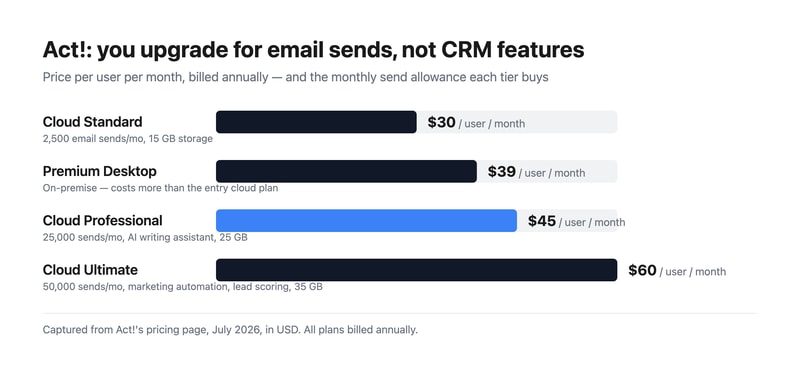
Act! sells three cloud tiers at $30, $45, and $60 per user, and what actually separates them is how many marketing emails you can send. Standard allows 2,500 a month, Professional 25,000, and Ultimate 50,000. The CRM underneath is broadly the same product throughout. Understand that and the pricing page stops looking like a capability ladder and starts looking like what it is — an email volume plan with a CRM attached.
- What it is: A long-established CRM for small and mid-sized businesses, bundling contact management with email marketing and, unusually, still offering an on-premise option.
- Best for: Small businesses that want CRM and email marketing from one vendor, and organizations with a genuine need to host data themselves.
- Pricing: Cloud Standard $30, Professional $45, Ultimate $60 per user monthly, billed annually. Premium Desktop $39. Verified July 2026.
- The honest catch: Premium Desktop costs $39 — more than the $30 entry cloud plan — so choosing on-premise is a premium, not a saving.
What Is Act!?
Act! is one of the oldest names in contact management, dating to the late 1980s and passing through several owners since. That history explains both its strengths and its reputation: it is deeply featured and genuinely mature, and it carries an interface lineage that reviewers routinely describe as dated next to newer competitors.
What distinguishes it in 2026 is scope. Most CRMs at this price handle contacts, deals, and activities and expect you to buy email marketing separately. Act! bundles both, and at the higher tiers adds marketing automation, lead scoring, quotes and payments, appointment scheduling, forms and surveys, website chat, event management, project management, and accounting integration. For a small business that would otherwise assemble four subscriptions, that consolidation is the real argument.
It is also one of very few CRMs still selling a genuine on-premise product. Act! Premium Desktop runs on your own infrastructure with networked access, which matters to businesses with data residency requirements or a firm preference for not putting their customer list in someone else’s cloud.
How Act! Works
- Cloud or desktop. Act! Advantage is the hosted line; Act! Premium Desktop is installed and managed by you.
- Email sends as the metering dimension. 2,500, 25,000, or 50,000 per month by tier — the clearest differentiator between plans.
- Contact and pipeline management. The core CRM, full-featured on every tier including the cheapest.
- Bundled marketing. Campaigns and nurture sequences from Professional, full marketing automation with lead scoring on Ultimate.
- Quotes, scheduling, forms, and chat. Standard versions from the entry plan, advanced versions from Professional.
- Cloud storage by tier. 15 GB, 25 GB, and 35 GB respectively.
Act! Pricing
Captured from Act!’s pricing page in July 2026, in US dollars. All plans bill annually.
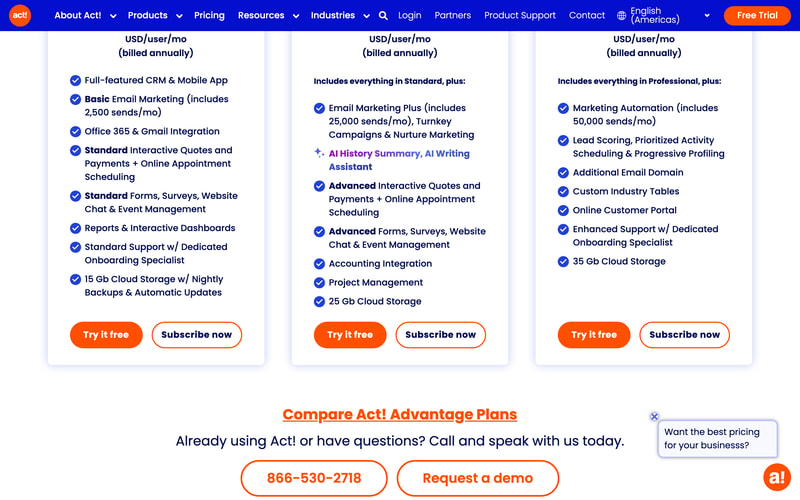
| Plan | Price/user/mo | Email sends/mo | Storage | Key additions |
|---|---|---|---|---|
| Cloud Standard | $30 | 2,500 | 15 GB | Full CRM, mobile app, Office 365 and Gmail, standard quotes, forms, chat |
| Premium Desktop | $39 | — | On your servers | On-premise deployment with networked access |
| Cloud Professional | $45 | 25,000 | 25 GB | AI writing assistant, nurture marketing, accounting integration, project management |
| Cloud Ultimate | $60 | 50,000 | 35 GB | Marketing automation, lead scoring, customer portal, custom industry tables |
What this means for your decision:
- The upgrade trigger is email volume, not CRM capability. Standard is described as a “full-featured CRM,” and it is. If you send 2,000 marketing emails a month, Professional’s extra $15 per user buys you send headroom and some marketing tooling, not a better CRM. Work out your send volume first — it is the number that picks your tier.
- 2,500 sends is genuinely tight. A list of 1,000 contacts emailed twice a month exhausts it. Any business doing real email marketing lands on Professional, making $45 the practical entry price.
- Desktop costs more than entry cloud. $39 against $30. On-premise is often assumed to be the cheaper, no-frills option; here it is a deliberate premium for control. Choose it because you need to hold the data, not to save money.
- Everything is billed annually. There is no monthly option advertised, so the free trial is the only low-commitment evaluation.
- Per-user pricing compounds normally. Five users on Professional is $225 a month, ten on Ultimate is $600.
- Consolidation is the value case. At $45 per user you are getting CRM, email marketing, quotes, scheduling, forms, surveys, chat, and project management. Assembled separately from best-in-class tools, that stack costs considerably more.
Who Should Use Act!
- Small businesses wanting one vendor. The clearest case. CRM plus email marketing plus quoting from a single subscription genuinely simplifies both billing and integration.
- Organizations needing on-premise. Act! Premium Desktop is a rare option in a category that has almost entirely moved to cloud.
- Established businesses with existing Act! data. Decades of contact history is a real reason to stay, and migration is genuinely painful.
- Teams doing moderate email marketing. Professional’s 25,000 sends covers most small-business campaigning without a separate platform.
It fits poorly for teams that prize interface quality, where Pipedrive and monday CRM are markedly more pleasant; for businesses wanting a free tier, which HubSpot CRM and Zoho CRM provide; and for sales-led organizations needing deep pipeline analytics, where dedicated sales CRMs go further.
Honest Pros and Cons
Strengths
- Genuine breadth. CRM, email marketing, quotes, scheduling, forms, chat, and project management in one subscription.
- Full CRM on the entry plan. The cheapest tier is not a crippled version of the product.
- On-premise option. Rare, and decisive for organizations with data residency requirements.
- Mature and stable. Decades of development show in feature depth.
- Bundled marketing automation. Lead scoring and progressive profiling at Ultimate, without a separate platform.
- Dedicated onboarding specialist included from the entry tier.
Limitations
- The interface shows its age. The most consistent criticism, particularly against newer competitors.
- Tight email allowance at entry. 2,500 sends pushes most marketing-active businesses to $45.
- Desktop costs more than entry cloud. $39 versus $30, which surprises buyers expecting on-premise to be cheaper.
- Annual billing only. No monthly option for a low-commitment start.
- No free tier. Where several major competitors offer one.
- Bundled tools are adequate, not best-in-class. The forms, chat, and project management are convenient rather than excellent.
Act! Alternatives and How It Compares
- Zoho CRM is substantially cheaper with a free tier, and far stronger if you use other Zoho applications.
- HubSpot CRM has a genuinely free CRM tier and a more modern interface, with costs rising sharply as you add marketing.
- Pipedrive is the better sales-focused pipeline tool, with a cleaner interface and less bundled marketing.
- Keap is the closest philosophical competitor — CRM plus marketing automation for small business — at a higher price.
- Insightly combines CRM with project delivery, which suits services businesses.
- Freshsales and monday CRM are the modern-interface options at comparable cost.
For a broader survey, browse our CRM directory.
The Verdict
Act! is a consolidation play, and judged on those terms it holds up. For $45 per user a small business gets a full CRM, 25,000 monthly marketing emails, quotes and payments, appointment scheduling, forms and surveys, website chat, event management, project management, and accounting integration. Buying those capabilities separately from category leaders would cost noticeably more and require the integrations to be your problem. If you want one vendor, one invoice, and one support number, that is a legitimate and underrated reason to choose it.
The way to price it correctly is to start from email volume rather than user count. Standard at $30 includes the full CRM, so the $15 step to Professional is buying send headroom — from 2,500 to 25,000 a month — plus marketing tooling. A business emailing a list of a thousand contacts twice a month has already exhausted Standard, which makes $45 the realistic entry point for anyone doing marketing at all. Conversely, if you genuinely only need contact and pipeline management, Standard is a complete CRM and there is no reason to move up.
Two honest caveats. The interface is the most consistent criticism in reviews, and if your team has used Pipedrive or monday, Act! will feel dated — that is a real cost in daily use, even if the functionality is there. And note that Premium Desktop at $39 costs more than entry cloud at $30; on-premise here is a deliberate premium for holding your own data, not a budget option. Choose it for control, and if control is not your requirement, the cloud plans are both cheaper and less work.
FAQ
How much does Act! cost?
Act! Advantage cloud plans are $30 per user per month for Standard, $45 for Professional, and $60 for Ultimate, all billed annually. Act! Premium Desktop, the on-premise option, is $39 per user per month. Prices were captured from Act!’s pricing page in July 2026 in US dollars. A free trial is available; there is no free tier.
What is the difference between Act! plans?
Primarily email send volume and bundled marketing. Standard includes the full CRM with 2,500 monthly sends and 15 GB storage. Professional raises that to 25,000 sends and adds an AI writing assistant, nurture marketing, accounting integration, and project management. Ultimate provides 50,000 sends plus marketing automation, lead scoring, a customer portal, and custom industry tables. The core CRM is full-featured on every tier.
Is Act! Desktop cheaper than Act! Cloud?
No — it costs more. Act! Premium Desktop is $39 per user per month against $30 for the entry cloud plan. On-premise deployment here is a premium option for organizations that need to host their own data, rather than a budget alternative. It also means you take on hosting, backups, and updates yourself, which the cloud plans include.
Is Act! still a good CRM in 2026?
It remains functional and unusually broad, bundling CRM with email marketing, quoting, scheduling, and project management in a way few competitors match at the price. Its weakness is the interface, which reviewers consistently describe as dated relative to newer tools. It suits businesses valuing breadth and vendor consolidation over daily polish, and existing Act! customers with substantial contact history.
What is Act! best for?
Small and mid-sized businesses that want CRM and email marketing from one vendor rather than assembling a stack, and organizations with a genuine requirement to host customer data on their own infrastructure. It is a weaker fit for teams prioritising interface quality, for anyone wanting a free tier, and for sales-led organizations needing deep pipeline analytics.

Compare Act! with other popular tools in the same category.
The trickle down system from Companies to Contacts
The interface. With the world of smartphones- ACT feels like I am looking at a computer program from 2000
It is nice to print "activities reports" instead of sending my director word typed summaries.
I like nothing. It used to be good around 2000. It was the best of its kind in fact.
They "update" the system once a month. When they do that it throws everything out of Whack. It takes 2-3 hours to fix with Indian tech support out of Chennai every month. Sometimes it takes 2-3 hours just to get someone on the phone. It's not cheap either. $420 per year. I give this company an F.
I help companies get more clients through Internet marketing
There is absolutely nothing that I would say I like "best" about this product. It is truly a terrible CRM system. With that being said it's not awful if you know the company* and/or name (and it's complete correct spelling) of a person that you'd like to look up their phone number or email address. If I had to pick the best thing though it would be the price because it's very cheap compared to other CRM products. You are absolutely getting what you're paying for in this case.
I don't even know where to begin. Let's start at the user level since I am also an administrator of this product. 1) Old Clunky UX -- The User Interface and experience is a jump back to the early 90's and Sage has not put any resources into updating it since then. Even if you make your own interfaces for some of the contact screens the system will attempt to wedge them into a frame that never quite fits the way you'd expect it. 2) Searching -- The search functionality of ACT! does not support wildcard searching or fuzzy searching. This means that if you don't know the full spelling exactly of something you'll never find it. Additionally, the search function(s) require that you select what field of the entity (contact, company, task, etc) that you'd like to search. Technically, there is a global search, but it's very slow and still doesn't have wild card functionality. 3) Integrations -- ACT! comes with the "ability" to sync with Outlook (emails, contacts, and calendars), but it rarely works. It may work for a few days and then go out of sync. The built-in calendar will often duplicate items for almost no reason whatsoever. Outlook will also run very poorly when the sync is enabled for tracking of emails and synchronization of calendar/task items. 4) Installations - Now we're getting into the administration of this production. The installation of Act! loves to force users to install SQL Server on their local machines when it isn't required (unless the installation will be functioning as the Act! Server). This is a huge pain when you now need to then uninstall SQL Server from that machine, which would have caused it to slow to a snails pace on a sales person's laptop. Technically, you do need the local instance for performing synchronizations if a user will be off network, but a cloud based solution would be a far better offering. Lastly, in the realm of installations, there is little to no support in performing silent installs or pushing out with group policy. 5) Archaic Administration - Although this is a SQL Server based application it rarely allows you to actually perform maintenance on the database and utilize the scheduled tasks available in the rdbms. Instead you need to use their built-in tools that are kludgy at best with very little insight on what they are actually doing. Additionally, the administration and security features leave a lot more to be desired. 6) Support - The support of this product is terrible. They outsource most of the support to their Partners rather than the company doing any on their own. This leads to working with people that are trained very poorly and there is very little communication between representatives. Very often will you get 3 different answers on how to fix a problem, and none of them will be correct until you call back for the fourth time.
The standard business problem of tracking clients & contacts, sales leads, and managing resources. We have only realized the benefit of this CRM system in giving us an inexpensive centralized place to store this information, but at the most basic level possible.
It's ability to create merged customer information into email templates. Of course this is only possible if you open both Outlook and ACT! as an Administrator.
When connecting to a database on an internal network with a desktop it forces you to install a local SQL instance that you don't need. The add-in makes Outlook run slow and stops working about twice a month. I have another customer that can't send GTM invites through the meeting request. There is another person that has various calendar issues every week - items missing, items rolling over when they're not supposed to, fonts getting changed on their own.
The sales team uses it in conjunction with QuoteWerks to send quotes. It integrates with social media in an acceptable way.
I have been with Act! for nearly 15 years and I have finally had it!!!! Who doesn't have an interface for Apple these days? Who doesn't have an App to access their site? I have tried to integrate to Google since their upgrade three weeks ago, on three different computers and still no success. The wait times on hold are ludicrous this whole company is a joke! I am in silicon valley and know how technology works, no one cares about being up to-date or current at Act! They don't care about the customer experience with hours of wait times or care about doing what they say they are going to do!!! It's been over a week since they said they would call me back on a problem I had that they said is an issue on their end!!!
I have never written a review before but.....Where do I begin with what I don't like???? I have the Cloud Premium, what a joke, the word "premium" is, there is nothing premium about their technical support HOLD TIMES in access of TWO HOURS!!! I am self employed and waiting on hold or paying my assistant to do so, cost a fortune in down time!!! The program in archaic and my engineer husband has been telling me to dump Act for over a decade but did I listen? NOOOOO and I am paying dearly for not taking his advise!!
NONE!!!

ACT gives you a lot of the features of a good CRM, such as contact lists, company listings/linkings, integration with Outlook, email word processor, email templates, To Do Lists, Calendars, book appointments on behalf of other users, see other user's calendars, create groups, task lists, reports, dashboards, contact history, and allows integrations and pulling of data from many other software packages available on the market. For example, we use QuoteWerks for our quoting process and it nicely integrates with ACT to be able to pull contact information into a quote to quickly populate a client's name, address, email address, phone number, etc.
I have never been a big fan of ACT because I have always had problems with it. Many times I have issues where it crashes, or freezes, or the calendar integration with Outlook does not work correctly. We have even had problems in the past with it deleting items from people's calendars when trying to sync up! The bottom line is that I, at least personally, have always had problems with it. To me it has always been problematic and I have never liked using it. Unfortunately it is the CRM our Sales team uses and therefore I am forced to use it in order to align with the sales team and see their calendars, prospects, notes, and so on. Particularly the calendar sync with Outlook has also always been problematic for both me and other users.
As a CRM we use ACT to store all of our leads, prospects, clients, and it basically is the main storage system of all of our client contact data. I use it mainly to look up contact information for my clients and allows sales members to see my schedule and as well to see theirs.
As a software engineer who's worked in the field of IT for over 12 years I can say that this software is, without a doubt, the least user-friendly application I've ever encountered. It took myself and another highly trained, Microsoft / Cisco certified IT professional 14+ hours to upgrade to next version of ACT for Desktop (on 10 user PCs) and update it with it's latest service pack. The upgrade process for ACT requires you to remove the previous version. Fine. However, the ACT uninstaller doesn't remove everything it should (registry keys and app-data folders abound). If the Protexis security service doesn't give you headaches over activating your copy of ACT you'll most likely run into a missing or corrupt COM error, and god forbid you intend to use this to sync with Outlook because Every time you change your password in ACT you will have to also change the password inside of the plugin's preferences and then re-sync the two applications. User's don't like being bothered, and ACT has a bad habit of getting in the way. Negativity aside, you will have your own unique experiences with ACT. You may have 0 issues with it, or you might not be able to get it to run without IT support. Best of luck to you.
As an IT professional who is also a software engineer and works with the .NET framework I can get around ACT's blaring issues.... The rest of the folks I work with however, can't. Every year when we upgrade to the new version of ACT it's a circus. I figure with all the pain and suffering we've gone through the IT costs (not including ACT's licenses) might just make the case for us to move to Salesforce. Salesforce isn't cheap, but it works.
It is a large rolodex of contact information, and weak relationship manager. It allows us to store contact info with custom fields and link contacts to a company object.
The software is relatively easy to navigate, but falls flat in modification. the user interface is mostly simple to navigate. Top navigation works fine for switching between contacts and companies - those of which propagate each other pretty consistently. The organization of information is clearly stated on the left toolbar. Adjusting search queries as well, has enough options for cross value comparisons. Opportunity function and dashboard reporting seems to have potential but i have yet to try them out.
I don't have much experience with CRM software but ACT! feels dated - we are currently using version 17 - from what I can tell, version 18 (cloud based) looks much sleeker and user friendly. Biggest complaint is the inability to calculate fields from other calculated fields - this much needed feature greatly reduces the benefits of the CRM. Supposedly there are "tons" of add-ons to beef up the software, but most are paid and bundled with unneeded features
The software is current;y used for sales team prospecting management. We are a small team, but must handle thousands of prospects. The system has been set up and works as intended mostly. We are still working on full implementations within the full workflow. I do not wish to continue using this product - but will make do
I have been a dedicated user since 1999. It is better than outlook for tracking events and customers. I do not use any of the social media features btw.
ACT Pro simply does not work with Windows 10. Activities do not roll. Outlook email does not integrate at all. Customer support offered a knowledge base article on the first problem with two fixes. One was for beginners and did not work. The other referenced menus and options that do not exist. Customer support did take over my pc remotely and caused my activities to roll - once. They have ignored my followup requests ever since.
It is a good program when it works - tracking many customers, clients, meetings calls and projects is easy using ACT. Their integration with outlook and google doesn't work well. I use companion link, a third party program, to sync with my android calendar.
I have years of invested use and customization. So, I like that I am familiar with how to customize it to fit my business.
The support is difficult to get, long waits, and not always correct.
Manages sales activity for remote sales agents.
I like the price and that about it at this point in time.
The customer support is the worst. I called to cancel today after less than a week buying a subscription.
I have not been able to solve anything yet. I cant get support on the phone long to get outlook integrated with Act so that I can set up my calendar. The service sucks!!
It used to be a perfect program. Alas, no more.
I've used ACT religiously for the last 10 years. It used to be a wonderful product. I recently switched to the cloud based version. My first question to the sales person at Swiftpage was, "How fast is it?" She assured me it was much faster than the trial software they let you try. After I paid for a year's subscription and downloaded the software it turned out it was much worse. Unbelievably, Swiftpage would not refund my money and switch me to a desktop based version. When I say slow, I don't me a little slow, I mean unworkably slow. Put it this way, I'm currently trying to look up one of my clients in the database. I've written this review in that time and it still hasn't located the record. Avoid at all cost!!!
I've run my business with this software for more than a decade. I am now switching.
Sage is a solid starter CRM that allows you to many of the basic things you would want in CRM tool. It's a desktop offering, however, with limited integration to web services. It's pretty solid on Windows, I'm not sure on Mac. The tool is also simple enough that an in-house team could set it up if necessary.
It's not a SasS offering, and has limited integration capabilities beyond Outlook and a few other services. I would not recommend this product to anyone who is looking to scale beyond a few users.
Not provided
modestly priced. some integration with MS Office products.
slow, clunky interface, difficult to get the reps to adopt it, required frequent help fro a third party to configure
Not provided