

Unclaimed: Are you working at Act!?
Act! Reviews: 3.9/5 — Good for the Price
Act! is one of the pioneer brands in its space that evolved into a customer relationship management platform, and cloud-app with a browser-based front end. It offers an integrated email marketing platform that is ideal for small to mid-sized companies. The software also has an easy-to-use dashboard designer with a good marketing automation workflow builder.

| Capabilities |
API
|
|---|---|
| Segment |
Small Business
Mid Market
|
| Deployment | Cloud / SaaS / Web-Based, Desktop Windows, Mobile Android, Mobile iPad, Mobile iPhone, On-Premise Linux |
| Support | 24/7 (Live rep), Chat, Email/Help Desk, FAQs/Forum, Knowledge Base, Phone Support |
| Training | Documentation |
| Languages | English |






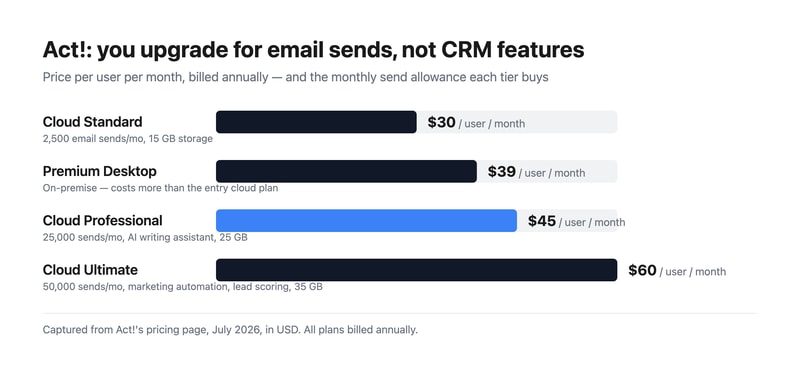
Act! sells three cloud tiers at $30, $45, and $60 per user, and what actually separates them is how many marketing emails you can send. Standard allows 2,500 a month, Professional 25,000, and Ultimate 50,000. The CRM underneath is broadly the same product throughout. Understand that and the pricing page stops looking like a capability ladder and starts looking like what it is — an email volume plan with a CRM attached.
- What it is: A long-established CRM for small and mid-sized businesses, bundling contact management with email marketing and, unusually, still offering an on-premise option.
- Best for: Small businesses that want CRM and email marketing from one vendor, and organizations with a genuine need to host data themselves.
- Pricing: Cloud Standard $30, Professional $45, Ultimate $60 per user monthly, billed annually. Premium Desktop $39. Verified July 2026.
- The honest catch: Premium Desktop costs $39 — more than the $30 entry cloud plan — so choosing on-premise is a premium, not a saving.
What Is Act!?
Act! is one of the oldest names in contact management, dating to the late 1980s and passing through several owners since. That history explains both its strengths and its reputation: it is deeply featured and genuinely mature, and it carries an interface lineage that reviewers routinely describe as dated next to newer competitors.
What distinguishes it in 2026 is scope. Most CRMs at this price handle contacts, deals, and activities and expect you to buy email marketing separately. Act! bundles both, and at the higher tiers adds marketing automation, lead scoring, quotes and payments, appointment scheduling, forms and surveys, website chat, event management, project management, and accounting integration. For a small business that would otherwise assemble four subscriptions, that consolidation is the real argument.
It is also one of very few CRMs still selling a genuine on-premise product. Act! Premium Desktop runs on your own infrastructure with networked access, which matters to businesses with data residency requirements or a firm preference for not putting their customer list in someone else’s cloud.
How Act! Works
- Cloud or desktop. Act! Advantage is the hosted line; Act! Premium Desktop is installed and managed by you.
- Email sends as the metering dimension. 2,500, 25,000, or 50,000 per month by tier — the clearest differentiator between plans.
- Contact and pipeline management. The core CRM, full-featured on every tier including the cheapest.
- Bundled marketing. Campaigns and nurture sequences from Professional, full marketing automation with lead scoring on Ultimate.
- Quotes, scheduling, forms, and chat. Standard versions from the entry plan, advanced versions from Professional.
- Cloud storage by tier. 15 GB, 25 GB, and 35 GB respectively.
Act! Pricing
Captured from Act!’s pricing page in July 2026, in US dollars. All plans bill annually.
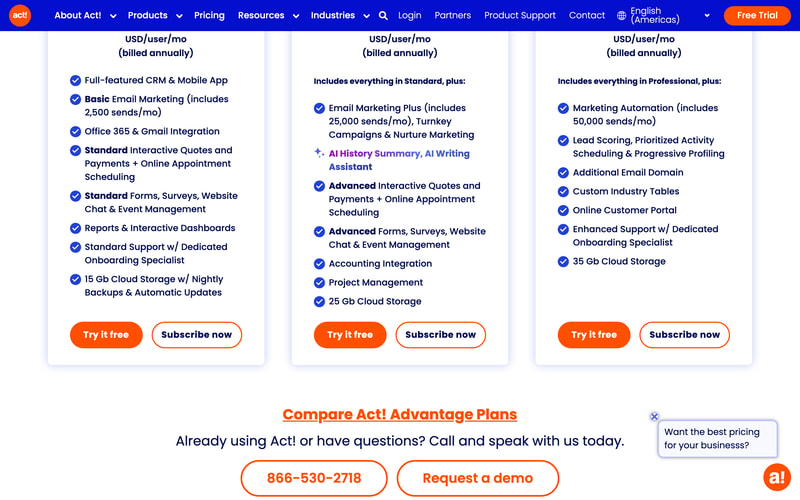
| Plan | Price/user/mo | Email sends/mo | Storage | Key additions |
|---|---|---|---|---|
| Cloud Standard | $30 | 2,500 | 15 GB | Full CRM, mobile app, Office 365 and Gmail, standard quotes, forms, chat |
| Premium Desktop | $39 | — | On your servers | On-premise deployment with networked access |
| Cloud Professional | $45 | 25,000 | 25 GB | AI writing assistant, nurture marketing, accounting integration, project management |
| Cloud Ultimate | $60 | 50,000 | 35 GB | Marketing automation, lead scoring, customer portal, custom industry tables |
What this means for your decision:
- The upgrade trigger is email volume, not CRM capability. Standard is described as a “full-featured CRM,” and it is. If you send 2,000 marketing emails a month, Professional’s extra $15 per user buys you send headroom and some marketing tooling, not a better CRM. Work out your send volume first — it is the number that picks your tier.
- 2,500 sends is genuinely tight. A list of 1,000 contacts emailed twice a month exhausts it. Any business doing real email marketing lands on Professional, making $45 the practical entry price.
- Desktop costs more than entry cloud. $39 against $30. On-premise is often assumed to be the cheaper, no-frills option; here it is a deliberate premium for control. Choose it because you need to hold the data, not to save money.
- Everything is billed annually. There is no monthly option advertised, so the free trial is the only low-commitment evaluation.
- Per-user pricing compounds normally. Five users on Professional is $225 a month, ten on Ultimate is $600.
- Consolidation is the value case. At $45 per user you are getting CRM, email marketing, quotes, scheduling, forms, surveys, chat, and project management. Assembled separately from best-in-class tools, that stack costs considerably more.
Who Should Use Act!
- Small businesses wanting one vendor. The clearest case. CRM plus email marketing plus quoting from a single subscription genuinely simplifies both billing and integration.
- Organizations needing on-premise. Act! Premium Desktop is a rare option in a category that has almost entirely moved to cloud.
- Established businesses with existing Act! data. Decades of contact history is a real reason to stay, and migration is genuinely painful.
- Teams doing moderate email marketing. Professional’s 25,000 sends covers most small-business campaigning without a separate platform.
It fits poorly for teams that prize interface quality, where Pipedrive and monday CRM are markedly more pleasant; for businesses wanting a free tier, which HubSpot CRM and Zoho CRM provide; and for sales-led organizations needing deep pipeline analytics, where dedicated sales CRMs go further.
Honest Pros and Cons
Strengths
- Genuine breadth. CRM, email marketing, quotes, scheduling, forms, chat, and project management in one subscription.
- Full CRM on the entry plan. The cheapest tier is not a crippled version of the product.
- On-premise option. Rare, and decisive for organizations with data residency requirements.
- Mature and stable. Decades of development show in feature depth.
- Bundled marketing automation. Lead scoring and progressive profiling at Ultimate, without a separate platform.
- Dedicated onboarding specialist included from the entry tier.
Limitations
- The interface shows its age. The most consistent criticism, particularly against newer competitors.
- Tight email allowance at entry. 2,500 sends pushes most marketing-active businesses to $45.
- Desktop costs more than entry cloud. $39 versus $30, which surprises buyers expecting on-premise to be cheaper.
- Annual billing only. No monthly option for a low-commitment start.
- No free tier. Where several major competitors offer one.
- Bundled tools are adequate, not best-in-class. The forms, chat, and project management are convenient rather than excellent.
Act! Alternatives and How It Compares
- Zoho CRM is substantially cheaper with a free tier, and far stronger if you use other Zoho applications.
- HubSpot CRM has a genuinely free CRM tier and a more modern interface, with costs rising sharply as you add marketing.
- Pipedrive is the better sales-focused pipeline tool, with a cleaner interface and less bundled marketing.
- Keap is the closest philosophical competitor — CRM plus marketing automation for small business — at a higher price.
- Insightly combines CRM with project delivery, which suits services businesses.
- Freshsales and monday CRM are the modern-interface options at comparable cost.
For a broader survey, browse our CRM directory.
The Verdict
Act! is a consolidation play, and judged on those terms it holds up. For $45 per user a small business gets a full CRM, 25,000 monthly marketing emails, quotes and payments, appointment scheduling, forms and surveys, website chat, event management, project management, and accounting integration. Buying those capabilities separately from category leaders would cost noticeably more and require the integrations to be your problem. If you want one vendor, one invoice, and one support number, that is a legitimate and underrated reason to choose it.
The way to price it correctly is to start from email volume rather than user count. Standard at $30 includes the full CRM, so the $15 step to Professional is buying send headroom — from 2,500 to 25,000 a month — plus marketing tooling. A business emailing a list of a thousand contacts twice a month has already exhausted Standard, which makes $45 the realistic entry point for anyone doing marketing at all. Conversely, if you genuinely only need contact and pipeline management, Standard is a complete CRM and there is no reason to move up.
Two honest caveats. The interface is the most consistent criticism in reviews, and if your team has used Pipedrive or monday, Act! will feel dated — that is a real cost in daily use, even if the functionality is there. And note that Premium Desktop at $39 costs more than entry cloud at $30; on-premise here is a deliberate premium for holding your own data, not a budget option. Choose it for control, and if control is not your requirement, the cloud plans are both cheaper and less work.
FAQ
How much does Act! cost?
Act! Advantage cloud plans are $30 per user per month for Standard, $45 for Professional, and $60 for Ultimate, all billed annually. Act! Premium Desktop, the on-premise option, is $39 per user per month. Prices were captured from Act!’s pricing page in July 2026 in US dollars. A free trial is available; there is no free tier.
What is the difference between Act! plans?
Primarily email send volume and bundled marketing. Standard includes the full CRM with 2,500 monthly sends and 15 GB storage. Professional raises that to 25,000 sends and adds an AI writing assistant, nurture marketing, accounting integration, and project management. Ultimate provides 50,000 sends plus marketing automation, lead scoring, a customer portal, and custom industry tables. The core CRM is full-featured on every tier.
Is Act! Desktop cheaper than Act! Cloud?
No — it costs more. Act! Premium Desktop is $39 per user per month against $30 for the entry cloud plan. On-premise deployment here is a premium option for organizations that need to host their own data, rather than a budget alternative. It also means you take on hosting, backups, and updates yourself, which the cloud plans include.
Is Act! still a good CRM in 2026?
It remains functional and unusually broad, bundling CRM with email marketing, quoting, scheduling, and project management in a way few competitors match at the price. Its weakness is the interface, which reviewers consistently describe as dated relative to newer tools. It suits businesses valuing breadth and vendor consolidation over daily polish, and existing Act! customers with substantial contact history.
What is Act! best for?
Small and mid-sized businesses that want CRM and email marketing from one vendor rather than assembling a stack, and organizations with a genuine requirement to host customer data on their own infrastructure. It is a weaker fit for teams prioritising interface quality, for anyone wanting a free tier, and for sales-led organizations needing deep pipeline analytics.

Compare Act! with other popular tools in the same category.

It's easy to see territories and dial your territory quickly
So so ugly on the eyes. it's largely material but it is not a pleasant experience working in the program all day.
Managing customer relationships, separating sales territories, keeping notes through the sales process between phases. Much better than using paper like days of old

It has the basics of what we need and is able to integrate without email marketing
The platform itself looks out of date, is not ux friendly, and does not allow us to track some of the data that we really need. Not great for tracking the sales cycle email marketing within does not compare to MailChimp There support is terrible and not easy to get problems fixed
Keeping track of our customers Shipping Gifts delivered Marketing efforts email communications and employees tracking leads
At this point... not much...I seem to be spending too much time during my day trying to fix the problem. Customer support at Keystroke CA are either out of their league with my issues are just don't care...either way, I am fed up enough that I am putting this review together.
The software was ok when I had one office. We had many syncing issues with the mobile version of it HandHeld by J2X Technologies which meant any information we got lacked credibility. We eventually cancelled that subscription and tried to use the one with access to the web server but we've had too many issues to use it so we have stopped using that. Once we opened a 2nd office we purchased 2 brand new pc's and set the network up but have had nothing but syncing issues sincce day one. It has been 3 months so far and it seems that everyday we have a syncing issue. Again, any info that we get lacks credibility because we don't know how current it is. The support staff has tried to address our concerns but, to date, has been unable to fix the issue(s) and now I am told that if they are to continue providning support that we will need to buy a support contract, which I wouldn't have a problem with except that the software syncing has never worked properly. Is it wrong to expect the software to work properly without having the company require that I pay more to make that happen. To be fair to Act, we are using a reseller....Keystroke CA. I cannot imagine a scenario that we would continue to use this reseller...or Act.
Keeping track of contacts history. Unfortunately, this is difficult to do with multiple locations due to many syncing issues
Allows you to keep track of customer interactions
Frequently crashes/very buggy can go down at times
Reaching out to the same customers. Helps you manage interactions.
I like that it is familiar and easy to use the basics.
Definitely not intuitive. It is hard to find help for advanced tasks.
Keeping a my database organized and tasks on track. ACT has definitely kept me organized.
I like that this is web-based. It allows my team to use the product without the burden of a long testing and review by our IT department.
It's not intuitive. I'm constantly finding that I'm in the equivalent of a screen-within-a-screen while I'm working. I'd like to be able to find a customer and then go back to the entire customer list without having to use the drop-down menu. I like to think of myself as tech savvy so maybe I missed that in training? I don't know. We've also had issues with the marketing features. After multiple attempts at contacting the Act support team, we resigned to the fact that we can't customize the functionality of the marketing lead generation forms. We had to create a separate form outside of Act and we are now uploading data periodically instead of having the leads load automatically into the database.
I'm in a new division of my company, and we wanted a pseudo-AMS that could operate outside of the one the company uses. This fit the bill, and the price was right at the time. Now that we've used it for a while, it's just not working. We will probably switch to SalesForce for next year.
We have the ability to store and pull the data we need and were able to customize some of the fields.
Functionality: we had a glitch in the system that caused us to need to import all of our contacts into a later version of the CRM manually. Also, we've had trouble when we've pulled groups in order to segment our email campaigns via SwiftPage because people who should not qualify to be in the group are pulled in anyway and there is no way to see this ahead of time. It has created confusion and increased our opt-out rate. Anesthetics: the system looks very out-dated.
We are keeping track of contacts and their submitted contracts.
I'm a small business owner and have been using ACT for at least 20 years. I know it very well but don't require much so it works well for me. I also like how the emarketing integrates easily with the data base.
Have just started to use it for emarketing and it has been a struggle. It is very poor and needs lots of work. It does integrate nicely with ACT however, but getting a template designed is difficult. There is absolute no help on the template editing page. I've had to call for support at least 10 times for very simple things. They do have video's but they are more marketing video's rather than training ones. This could easily be fixed with some simple how to video's. Now that I have struggled through this learning phase I am comfortable but how many hours were wasted?? Also, the reports section is very slow. The terminology is not explained. The reports don't tell you which campaign it's about. Again, I had to call support several times. Now this survey has little buttons that you can press if you want that function defined. Not available in the emarketing. I will say the support staff is very nice and helpful but I had to waste time with them. .
Now that I'm through the very steep learning curve I feel that I can make emarketing campaigns on my own, Just maybe it will increase business.
Document sharing. The ability to link files to contacts and to share them to remote users is huge for my company and since our own infrastructure is pretty robust, we're able to circumvent the need for a lot of cloud services and just use ACT! as our own cloud and file-system. The customizability of the layouts is very useful and having multiple dedicated layouts is just perfect. Ease of use is tremendous, it's simple to get started and the Excel and word integrations are good enough to warrant pursuing the regular updates. I'm very interested in the upcoming native Mobile-Device versions of ACT! and I think they're smart to be going in that direction so quickly.
Having to buy a new version every year puts a bad taste in one's mouth - in particular as XP comes to the end of its life and older office applications need to be replaced, it neccessitates a lot of cascading budget issues, and ACT's price, while reasonable - is non-trivial. The integration with Outlook is... Insufficient. I would also complain about the calendar - except that I can't find a better calendar anywhere - it's very comparable to outlook's - but since every user has had a different (but largely bad) experience trying to synch their calendars - I've got people throughout the company that simply use one or the other, or have abandoned electronic type calendars altogether. There are many add-ons that can make ACT! snap and be a lot better than it is out of the box, but some of these features should really be included. It's inexpensive to find a contact-numbering add-on for instance - but heaven help you if you try to decode ACT!'s super-secret SQL tables and try to decipher the unique identifier of all the contacts entered. Having something as simple as a unique identifier on the front end of the program would immensely aid in software integration, but ACT! is built to be indecipherable. For no decipherable reason.
Not provided

Price can be competitive and for a very basic CRM its ok.
Its old, its clunky and hard to integrate with, even hard to integrate with other Sage applications and services! There are better CRMs out there.
Not provided

Comprehensive CRM solution that will store all your customer information
It was not very user-friendly. It's net to impossible to deploy a multiuser shared database.
We were trying to solve the problem of staying in contact with customers. We did not realize any benefit.
Good for basic contact management... tracking, updating, and recalling contacts and companies. Normal CRM-type needs are well met.
The cloud version that I use is sooooooo quirky and features randomly stop functioning for no apparent reason. I call your support team multiple times monthly and often multiple times weekly, mostly about quirky oddities.
Basic CRM is the real benefit to using Act! It's also relatively inexpensive, which is helpful for a small nonprofit managing under 1500 records.
It is compatible with DejaOffice and I like that.
Not intuitive and difficult for me to change.
It helps me keep a good record of accounts, their contact info, and notes about my visits.
THE ABILITY TO KEEP LONG DETAILES HISOTORY ON CONTACTS
CONSTANT CONFLICTS WITH WINDOWS AND NOT APPLE COMPATIBLE
NOT SOLVING ANYTHING
It's easy to use other than that the company will screw you!
Anytime you have a problem the answer is ALWAYS to pay for the new version. The newer versions are emailed to you, they will NOT provide any physical form of the program. Thus when buying a new computer you MUST buy their newest version of the program even if you don't need it! Otherwise, all your information will be lost because they will not let you have a copy of the program you paid for. NEVER EVER USE the products from these thieves!!
The program keeps your client relationship information well. But if you switch computers you have to buy their new program. This company does everything in its power to screw its customers
I have been using ACT! for over 20 years, mainly for sending emails to groups of colleagues and clients
Crashes, Too complex to set up remote syncs Poor interface with Gmail and Google calendar Inability to make public and private access work - notwithstanding paying for professional consultant support
Managing groups of contacts Intermittent ability to store emails against contacts
The idea of what ACT! can do. In principle the idea is great, when actually implementing the software it fails to deliver at every step.
Nothing is easy, ACT! you can quite easily swallow days or even weeks of precious time with no return. Then when you are on the phone to tech support (they really do try there best) you get charged for the privilege. If you want a system that makes life easy for your business ACT! really isn't to one.
All our data is accessible via the cloud which is very useful When working the marketing automation is really beneficial and the template designer helps make professional-looking emails super easy

It has been my go-to contact service for decades
It has been toss from company to company and treated like a stepchild. Bugs that it had in it 15 years ago are still very prominent. I have to retire it, unfortunately.
The originators were very proud of this software and designed it to fit a customer service base with fantastic ease and flexibility
Can handle massive amounts of contacts and does allow you to set reminders and meetings.
The user interface of Act is just extremely unfriendly and unattractive.
Being able to keep all of my contacts in one place and keep detailed notes on them. It has so many fields you can sort by. Think of Act like a semi advanced excel spreadsheet.

There is not much I like about this program other than it is somewhat affordable for small to medium businesses. In the age of web based programs, Act is light years behind. The web version is extremely limited and not even worth using. The email marketing option is so cumberom and very user unfriendly.
This program has been sold many times since it was originally released. At this point, the support is awful and Swiftpage the new owner, constantly forces updates that break our database. We tired the marketing automation and that was even worse. If this CRM can survive, they need a complete overhaul.
We ceased using ACT and have just 1 license as a backup to our new CRM. This program did little to solve problems other than store data.
This CRM is solid and has enough features for small to medium company.
Act and vendors take no responsibility for their actions and change of terms. Dont keep the initial terms of lifetime licenses. Have not successfully informed me about the change of conditions and therefore I lost 3 licenses. Both - the Act and their Authorized Saler take no responsibility for this situation.
CRM
Captures all of my client information - Contact, notes, address etc.
Not intuitive, difficult to navigate, crashes relatively often, will sometimes replace my notes with code for a short period of time. Lots of bugs.
Captures all of my client information - Contact, notes, address etc.
Nothing at all, I disliked all the aspects about the program itself. Its robust, but not user friendly nor helpful. Installation is the worst part, we had to outsource IT to have this installed and we've never had to do this in the past for any program.
Everything! It was way too complex for its use.I disliked all the aspects about the program itself. Its robust, but not user friendly nor helpful. Installation is the worst part, we had to outsource IT to have this installed and we've never had to do this in the past for any program.
Client database and sales
It provides me and my colleague with a collaborative foundation for our base of media contacts
It's incredibly dated and very frustrating to use. The design is not user friendly, and it takes new users quite a while to learn how to use. Would not reccomend.
It helps me to keep track of my company's database of media contacts, build media lists, and organize new business contacts
It's cheap and you can use it as a database. It can be used for drip marketing a LITTLE but only for sending the emails and not recording email responses etc. Chatting w/ the free support can be good or bad.
NO other tools, applications/program connect to Act! The support is in India and sometimes it's good and sometimes not. Because chat support is limited, you have to hire a Certified Act! consultant and there are very few. Really, there's like 5 and the certification doesn't guarantee much help. Once certified consultant was listed on the Act! website but was no longer practicing, another was highly unstable and damaging and the other was only helpful 1/3 of the time. No joke, our time was him talking about him being retired and related to Walt Disney. His support staff was his out of work son... Yikes!
My poor office simply needed a database and sales/marketing tool for leads. Act! sufficed but barely. There's a reason VERY FEW companies use it anymore... Sorry
Lookup feature, flexibility to custom fields, columns in list view, export to Excel
That they either refuse to fix or cannot fix a problem with basic functionality. A CRM system is supposed to increase efficiency. ACT Pro succeeds in this in some ways, but fails in others due to bugs in the system. Key among these is the interface with Office and Outlook (ACT crashes every single time I try to create an e-mail from a template, or send an e-mail either to a single contact or to multiple contacts via mail merge. Furthermore, e-mails no longer attach to contacts when sent, and they no longer record in history. And on a completely separate note, every single contact's LinkedIn profiles is, "oops". And occasionally I get a pop up window which says, "Click here for updates." Clicking does nothing.
Operate more efficiently
The contact system allows you to search and group people fairly easily
You cannot customize reports or fields for reports. A lot of the stuff like notes and history is terrible when needing to export or print lead sheets
Was using it as a way to manage our sales leads
I guess if I had to like something it would be that you can slightly customize the database
It’s very antiquated and the support team isn’t great. My company has spent hours and hours trying to make this work for us but there are more problems than benefits especially considering how expensive it is.
We needed a CRM system and that switch alone has been a huge step but this is not the software for us.
I have customized ACT! so that it works for me. I really appreciate using a CRM to help me stay in touch with my customers.
ACT! is a very old and out of date program. I don't use the new cloud program. ACT! has SO many problems that you really need to purchase the service agreement, because you will need tech support. Did outlook just do an update? Did Microsoft just do an update? Then ACT! will probably have a problem.
I have all my customer information in one place. I also have it backed up in 2 seperate clouds.I can create email lists/groups to segment my contacts. I keep notes of what we talked about, for the next call. I can set reminders of when to contact my customers next.
I like the ability to see my daily task lists and to be able to view all my overdue tasks as well. It makes it really easy to see what I have to do in a day. You can filter it to display the data you need. ACT! and Microsoft have a great partnership so you can send emails from Microsoft and it appears in both. I also like how you can save contacts into this salesforce by clicking on a received email
I really dislike the format. The interface of this salesforce is not very inviting and all the colors are boring. It makes work feel more like work and the interface is very outdated. I don't really like the opportunity tabs, never really look at it. I like it better in salesforce where you can just change it to closed won.
I am an account executive so I am adding new contacts and reaching out to old and new leads. The benefits of this salesforce is that we also use Microsoft for email and this integration helps me track my emails. It make sure I don't send the same email out twice.