Unclaimed: Are are working at ActiveCollab ?

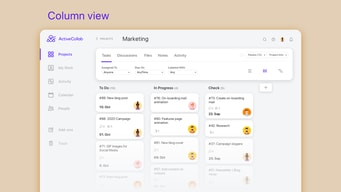
ActiveCollab is a project management solution for creative professionals. It offers cloud-based subscription plans or a self-hosting license with organizational features that can be viewed according to what is most convenient among users. Automatic rescheduling allows for the child's tasks to follow the change made to the parent task automatically and tasks can be viewed as a timeline or a kanban board, a calendar, or a list.
( 1 )
| Capabilities |
|
|---|---|
| Segment |
|
| Deployment | Cloud / SaaS / Web-Based, Desktop Mac, Desktop Windows, Mobile Android, Mobile iPad, Mobile iPhone, On-Premise Linux |
| Support | 24/7 (Live rep), Chat, Email/Help Desk, FAQs/Forum, Knowledge Base, Phone Support |
| Training | Documentation |
| Languages | English |
Compare ActiveCollab with other popular tools in the same category.
Easy to customize for the unique needs of our organization
I'd like to see better integration into Git
Internal process and communication, engineer and gatekeeper ticket routing/management
Active collar is simple enough for start ups with small teams, yet has enough features that can cover all the basics as the company and team grow. It's been a great tool to organize projects and tasks.
Would have love to have more controls in budgeting projects by phases and idle the out on the computer is important so that you don't forget the timer running! Need check in and check out feature.
Task management and time tracking have been simplified where before it was manually done.
ActiveCollab 5 has improved User interface and looks great and very intuitive. The provides great flexibility to include Project team members from various geo locations as well as providing to 3rd party consultants working on the projects. ActiveCollab also offers on-premise installation option apart from the hosted SaaS model which makes it very flexible catering to companies with varied data security and clod hosting policies. Sharing project files and assigning tasks to 3rd party consultants through single point. Overall the collaboration component has become a lot easier. Team task
The system does not have the flexibility to integrate with any thrid-party file storage like a Google Drive, Dropbox or Amazon S3 which makes it cost effective easier to manage, especially when we are using a self-hosted version. All the files related to a specific project are not presented in a very easy to sort manner where we can navigate through files without having to dig through the tasks related to the files. Theme/branding customization options are harder
Managing teams of software developers and consultants across multiple geographic locations to deliver support services to customers. The project members are not always full time employees of the same company but would need access to specific projects and files and information. All the project submissions including the code files as well as documentation are submitted, exchanged and collaborated through activecollab.
Simple Project Management and Task Management Software. We also used as a CRM and this was not the best use of the product as it wasnt as searchable as we needed.
Did not interface with as many of our other products as we would have liked.
We no longer use ActiveCollab. We switched to a different PM software and CRM
You can add all the ongoing/upcoming/completed project details in active Collab so that you and team can continuously monitor it's status, add updates and multiple tasks to keep track of it.
Sometimes it takes more time then usual to update the project status, it may be due to server issue, thoug it had not been observed multiple times, but sometimes it happens.
Complete tracking of the project, day to day activities, updates by multiple teams, project time estimation, resource allocation, task definition and much more can be done so as to keep you up-to-date on your project.
I like how you can track your time and see what you've done. I also like how you can see the layout of your week!
I disklike how it is not in alphabetical order and its easy to miss tasks!
we have been able to solve problems with ActiveCollab by timing out tasks so we can make sure no one gets overbooked! I would say this helps with productivity.
I like the look. It's very modern and clean.
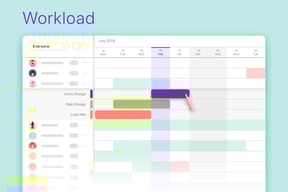
There are so many bugs. From time allocations not loading in workload view (which they took forever to roll out). When searching for a project, old and completed projects clog up the autofill results so it's hard to find what you're looking for quickly. Most recently, we have tasks acting like they have dependencies when they in fact, do not.
We're scheduling work to our various employees but also using it to track the progress of client projects and work. We can go back and reference when things were created and completed.
We use ActiveCollab primarily for time tracking. I like that you can assign a task as non-billable or billable by default. It's also easy to see what hours you've tracked and where those hours were tracked to.
A lot of my job involves quoting future projects, and I like to look at past project time reports to help with this. I find that really difficult to do in ActiveCollab's new interface. I sometimes need to pull a particularly old project, possibly several years old, from a list of hundreds of projects. I may not know the exact name of it. From there, I need a list of the time entries. I use the legacy time report to do this, but it's not easy. I also wish that ActiveCollab supported assigning different billing rates at the project level. For example, I have an internal project that runs at a discounted billing rate. I bill as a web designer. I wish that the web designer rate could change on that project instead of remembering to bill a different rate every time. Or, if a project could have a default billing rate set, that would be easier too.
We're able to integrate ActiveCollab with a custom billing system, including pulling time tracking numbers for billing on a schedule. This has helped remove a lot of manual work.
Not provided
Not provided
Not provided
Active Collab is a great overall space for running, maintaining, and checking off tasks within a project. I like that you can see what has been done, get updates on what needs to be done, and that everything is visible in one place.
It's not as user-friendly for new teammates who need to get into the groove on how each project is run and where items like documents and comments end up. Also, I struggle with the mobile app so I often resort to the desktop version.
We use Collab for group projects to see what is involved step-by-step, who is involved, and what we have done. I like that everything about the project becomes transparent to the group, minimizing questions and confusion.