

Unclaimed: Are are working at Adobe Dreamweaver ?
Adobe Dreamweaver Reviews: 4.1/5 — Solid Choice
Adobe Dreamweaver is part of the Adobe Creative Cloud which also includes Photoshop and Indesign. The platform lets you create and design websites, with a combination of visual and HTML editing tools. With Dreamweaver, web designers have the option to build fully responsive sites and bring their ideas to life, especially in terms of design and functionality. The solution also offers multimonitor support for Windows and is most suitable for developers with extensive coding knowledge.

| Segment |
Small Business
Mid Market
Enterprise
|
|---|---|
| Deployment | Cloud / SaaS / Web-Based, Desktop Mac, Desktop Windows |
| Support | 24/7 (Live rep), Chat, Email/Help Desk, FAQs/Forum, Knowledge Base, Phone Support |
| Training | Documentation |
| Languages | English |
Adobe Dreamweaver Pros and Cons
- Adobe Dreamweaver ties in seamlessly with other tools in the Creative Cloud
- It’s ideal for developers with coding knowledge.
- You’ll benefit from complete customizability and control over your web design and responsiveness.
- Adobe Dreamweaver supports HTML5.
- If you don’t know how to code, Adobe Dreamweaver presents a steep learning curve.
- Adobe Dreamweaver isn’t very affordable. In addition to the software, you’ll still need to secure your own web hosting and domain name before your website can go live.






Compare Adobe Dreamweaver with other popular tools in the same category.
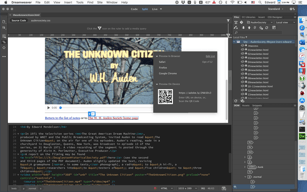
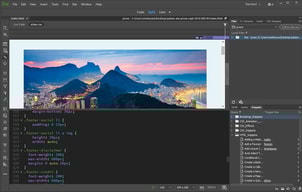
Dreamweaver was the basic application to develop HTML since much years ago, it's a reference. On of the best things, which is what I value most is the possibility of has the code in one side and the preview of the website in the other side, its really handy.
You need basic knowledge to start to using it. With "the mouse" just you can do a few options, and the rest you need to write the code. Apart Adobe Dreamweaver adds some parts of code that is not needed.
Basically I edit all websites from clients with this program. Also in new websites developed by content managers (CMS) its useful to edit some parts of the web with better WYSWYG that includes the normal CMS.
I love the text editor on Dreamweaver because it has alerts when tags are missing by showing invalid message. I like to see the html and the design side by side when I work on a project.
I dislike the auto tags sometime. When I type in a open tag, it automatically creates the closing tag when I don't need it yet.
Creating html files. Benefits are seeing the code and design side by side helps with workflow.
Ease of use. Slick interface and easy to find tools and features. Everything is very organized.
Honestly there is not much I don't like about Dreamweaver. It's a very cool program that I use a lot.
I am able to update my own website and not rely on outside developers.
That I can build amazing sites with Dreamweaver. I use the WYSIWYG platform (what you see is what you get) . I find that Dreamweaver is easy to use. There are so many tutorials on the web that it makes learning easy. I love that I can put the live version of my page next to the code so I can see what the page looks like as I'm editing.
Something I do have to be aware of using Dreamweaver is that sometimes using WYSIWYG can add code that I don't want. I just have to make sure to keep an eye on it.
I have been using Adobe Dreamweaver for years and it is my go-to solution for web design.
La gran cantidad de herramientas disponibles para realizar un sitio web forma rápida y sencilla incluso sin conocimiento de código html o css. La capacidad de crear sitios web locales. Poder ver en vivo lo que programas que en html o css. Un gran entorno en el trabajar. Por eso y mas lo considero el mejor programa para desarrollar sitios web.
Realmente no hay nada de lo que pueda quejar y si lo hay solo seria su precio un poco alto.
En nuestra empresa nos vemos en la necesidad de crear sitios web y este software ayuda con esta función.
If you are used to Adobe products the look and feel is the same or very similar in all their products.
Nothigg really, this software meets all my expectations.
I work for a furniture store and we designed the website and normally we update it with it.
Es muy potente y junto con la combinación de otras herramientas del pack adobe te permite hacer auténticas obras de arte marcando la diferencia.
Es un programa a parte y actualmente se usa la edición de webs y creación en entorno web no con programas instalados en PC por norma general.
Nos permitió maquetar varias webs para clientes por encargo quedando bastante profesionales.
Me encanta que tengan mantenido Dreamweaver para usuarios avanzados y no intentado hacerlo útil para iniciantes ocultando / dificultando el acceso a herramientas avanzadas a usuarios ya acostumbrados con el programa, todo lo que necesitas está a 2 clicks de distancia y la edición es bastante rápida en el. También nos encanta lo limpio que hace los códigos al utilizar la edición WYSIWYG, que no se compara a otras alternativas como el Adobe Muse, de dónde puedes esperar un código extremadamente complejo aunque hagas una página sencilla. Sendo el lider del mercado, igual que con Photoshop y tantos otros programas de Adobe, puedes esperar que seas el programa con mejor soporte, lo que facilita el aprendizaje, pero aun así, no esperen ser un programa fácil de utilizar (más detalles en la sección de lo que no me gusta), Dreamweaver es un programa bastante complejo que exige bastante conocimiento de HTML antes de poder ser utilizado.
La verdad es que no tengo ninguna queja de Dreamweaver, es excelente, pero le faltan templates y muestras de código, estaría bien incluir una biblioteca ya que eso reduciría la curva de aprendizaje y permitirá a usuarios nuevos empezar a usarlo más rápidamente. Dreamweaver no es un programa apto para usuarios iniciantes.
La creación y mantenimiento de nuestra página web está toda hecha con Dreamweaver, y haremos la nueva en el también.
What I love most about Adobe Dreamweaver is its ability to bring Photoshop to life. I also love that I can copy stuff from webpages like photo galleries with text and paste it into Dreamweaver and it takes care of the code for me.
What I dislike is also what I like - the learning curve because there are boundless opportunities and it takes a while to master.
I created my first website using Dreamweaver. I also used it to populate my webpages with galleries by copying directly from other websites I was promoting.
Como muchos programas de adobe, Dreamweaver es el estándar de la industria para la edición HTML, sus actualizaciones frecuentes te aseguran que siempre tiene compatibilidad con los estándares más recientes y Bootstrap (4.0 en la versión más actual) que le permite desarrollar páginas web receptivas para dispositivos móviles con una industria marco estándar ... sin duda una potencia de HTML5 que más que vale su inversión. También es una ventaja que, al ser un líder de la industria, la cantidad de material de aprendizaje y el contenido del foro para este producto es enorme, lo que facilita cualquier transición.
Es un poco difícil de navegar al principio porque no todo está delante de ti como en las opciones del menú. también debe conocer el lenguaje HTML y CSS antes de usarlo, por lo que es importante que vea videos. Además, no pierdas tu paciencia mientras trabajas en él, lo que hace que un sitio web sea difícil. Si estás acostumbrado a usar cosas como Sublime, entonces estarás bien. Cuando comencé a usar el programa, aprendí los conceptos básicos y eso todavía era difícil, así que esfuerzate..., también te muestra una descripción general de los elementos del menú. Tener que volver a revisar todo es un poco difícil, pero con la práctica todo mejora.
Uso el programa para modificar textos y la web de la empresa en la que trabajo, el área logística de la web la diseño yo con Adobe Dreamweaver.