
Unclaimed: Are you working at Adobe Dreamweaver?
Adobe Dreamweaver Reviews: 4.1/5 — Solid Choice
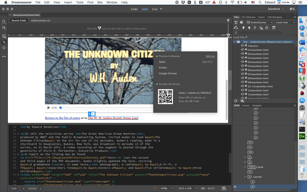
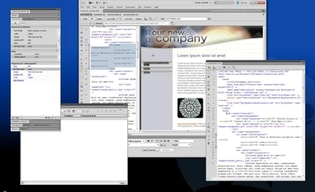
Adobe Dreamweaver is part of the Adobe Creative Cloud which also includes Photoshop and Indesign. The platform lets you create and design websites, with a combination of visual and HTML editing tools. With Dreamweaver, web designers have the option to build fully responsive sites and bring their ideas to life, especially in terms of design and functionality. The solution also offers multimonitor support for Windows and is most suitable for developers with extensive coding knowledge.

| Segment |
Small Business
Mid Market
Enterprise
|
|---|---|
| Deployment | Cloud / SaaS / Web-Based, Desktop Mac, Desktop Windows |
| Support | 24/7 (Live rep), Chat, Email/Help Desk, FAQs/Forum, Knowledge Base, Phone Support |
| Training | Documentation |
| Languages | English |
Adobe Dreamweaver Pros and Cons
- Adobe Dreamweaver ties in seamlessly with other tools in the Creative Cloud
- It’s ideal for developers with coding knowledge.
- You’ll benefit from complete customizability and control over your web design and responsiveness.
- Adobe Dreamweaver supports HTML5.
- If you don’t know how to code, Adobe Dreamweaver presents a steep learning curve.
- Adobe Dreamweaver isn’t very affordable. In addition to the software, you’ll still need to secure your own web hosting and domain name before your website can go live.





Compare Adobe Dreamweaver with other popular tools in the same category.
It was user friendly and allowed for a split screen
The debugging feature can be cumbersome. It does find all the errors and warnings which is nice feature to have.
It allows a seamless way to build a website
I love the easy features, also how they allow us to be able to get quick access to the tool on the keyboard!
To be honest, there is nothing that I dislike about this software, it has succeeded my needs, and much more.
Being able to set up html for websites, and different style formations.
Its a very useful software for programming Web pages for principiants, also it have a friendly interface
Its a limited tool for hard programming web pages
Only editing templates downloades via internet, its easy to do with that software
Adobe Dreamweaver is exactly that...a dream. Every new iteration includes more features that help me as a developer. What I like best are a couple things. First is the ease to switch between my source code and whatever linked stylesheet or script I have without having to have a tab dedicated to each one. Second is with the code-live view. Dreamweaver allows you to see your page in real time on the same screen.
Adobe Dreamweaver isn't browser based so what you see inside the program isn't always what you get. This can be particularly bad when it comes to the absolute positioning of items you sometimes need to have. It is definitely something that you have to be aware of to guarantee you don't have issues on multiple platforms.
I am a Front End Web Developer who daily works on the .com website for Autodesk. I regularly get asked to work on custom landing pages and projects so when I need to get a page working or delve into the code, Adobe Dreamweaver gives me the ability to clearly see errors and test out what I'm doing before I bring it back over to our server.
Easy layout ability plus great integration with other Adobe software
I don't think it creates the cleanest code
Great for use for designing email ads
Clean, user-friendly interface and lots of great features. I’ve been using Dreamweaver for 10 years and it has served me very well with a wide variety of clients. I love the flexibility it offers in terms of design compared to more rigid web design software like Wordpress or Squarespace. When a client is looking fur sjndthhbg unique I always use Dreamweaver.
I am not happy with Adobe’s new subscription model, which penalizes smaller shops that might not have a steady flow of jobs. It requires you to pay a monthly fee whether or not you are actually using the program. I much prefer the older model of buying the program in one fell swoop and then not having to worry about monthly fees.
When a client needs a unique website design that cannot be accomplished with a Wordpress template, I turn to Dreamweaver. It allows me total control over all aspects of the website and it has allowed me to create many unique designs over the years.
coding is an amazing world my friend, for sure you have to learn things like "Zen coding", maybe "less CSS", "php SYMFONY", some SQL stuff (like the Stored procedures) and you ll be ready to go (oh! of course, Javascript and Jquery so you could be some of those cool guys with their bootstrap t shirts walking on the streets) :D believe me, you are losing a whole experience.
This software has such a history. I remember using it in 2010 to till now
Dreamweaver Zero coding is a lie. I say that as a user. Of course you can do a lot of things wthout coding, but if you know some hand coding, you will get total full control on everything.
Dreamweaver helps a experiences coder feel like a developing master. Dreamweaver's features help me create code fast so that I can get work done for clients in a timely manner.
I can honestly say that there is nothing I can complain about using Dreamweaver. You are going to want this program.
Time. Dreamweaver helps you save so much time. If you already know what you want, it can help you fill in the blanks fast and has so many presets if you want to add any fancy code to your websites.
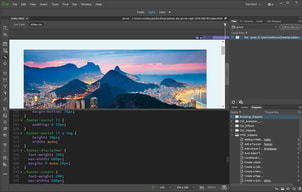
I like how you can switch between design and code view.
Sometimes things can get a little buggy if you copy and paste from word and also I find it hard to find certain functions in the creative cloud version after moving from an older version.
I can create a template for different types of html pages for our website and it makes it easy and fast to update small things.
the nice interface. it incorporates the best of Photoshop and illustrator. It allows for easy prototyping and check of codes for errors.
I design in basic html. I wish it had more auto suggestions for code. also definitions of code so i could learn new things on the fly
I design the web page of my magazine using this

easy to use interface. helpful colour coding for text
sometimes my changes do not upload to the server.
creating a website for personal advertisement
The easiness of working with DW along with it's site-integration option makes the whole process of web designing much faster than ever.
The only drawback of this software is that it could lag sometimes, if your computer is not a fast one.
The quickness of designing web pages with DW can speed up the projects and the business, consequently.
What I appreciate ost about Dreamweaver is the fact that you can jumpstart the creative process by avoiding a lot of html with the built in and easy to use features including the ability to preview as you code.
Perhaps what one would dislike the most about Dreamweaver (and what drives many to places like Wix) is the fact that you need to have a certain degree of understanding about HTML.
Problems: not being able to fully customize a website. Dreamweaver helps solve this and allows the freedom to design as one visualizes.
The interface is so clean and easy to use. The prompts for code help a lot when I'm doing something quick and just need to get it done. The application makes web design a much faster, smoother process.
I honestly don't have much I dislike, but I do wish there were more high-level tutorials available from Adobe.
Web design and development made easier and quicker. The benefits are that it's easy to use, clean interface and intuitive software.
Creating web pages ! I love the fact that the tools are embedded in the keyboard! My friend pointed it out to me! There are cool shortcuts to use on keyboard instead of having to click on icons
There is nothing I dislike to Be honest.
It’s super quick and easy for me to creat multiples webpages on one file on multiple art board.
One of the great features about Dreamweaver is that it works great for users who are experienced with working with HTML code, but also has an option, which makes it usable for HTML beginners. By putting it into the split screen, you can use the Design side to type in plain English what you want and it shows what the code looks like on the Code view side. This enables the beginner user the opportunity to learn what the coded view looks like and assists in teaching them how to write HTML code.
I haven't really found anything about Dreamweaver that I don't particularly care for. For my particular use, the Knowledge Base articles I wrote were housed in a different application, which was also HTML based. By writing in Dreamweaver, I then had to copy the articles over to the other application, which added extra work. I often wrote my articles directly in the other application to save time. Our company decided to move away from the other application and rely more on Dreamweaver, as it was more dependable - less glitches - so I went back to writing in Dreamweaver, which also allowed for easier backup of my work.
We write all of our articles in Dreamweaver, which allows for easier back up of our work and then from there export the completed Knowledge Base articles to the applicable application.
Pretty easy to use and figure things out. I like that I can view it with grids to select on things I'm trying to edit, and to see it in live view. Love the color coding in the code so you can tell things apart or if you made an error.
Sometimes when I'm starting to type code, it'd be nice to hit enter to have it finish itself. I feel like it should or that it's possible but doesn't seem to work. I know that I don't use DW to it's full potential but since I mainly do email design, there isn't much fancy stuff extra that is needed.
We mostly use it to create promotional emails, easy to have templates and use things over and over. It's fairly intuitive for people who don't know much HTML, although I"m sure some of those people would beg to differ. It's nice that you can look in design mode or code mode or both. To me the both mode helps me visually see what is going on but I like to make sure the code is correct also.
I love the clear layout of code with this software.
I've been using this software for a few months and haven't found anything I dislike yet.
It makes coding a lot faster and easier. Less troubleshooting.

Split screen with live view is my favorite. Adobe just makes it better with each update!
Program has a slow load up time on my PC, as well as others I have used.
Allows for quick coding and points out possible errors.
As a web designer, Dreamweaver is a life saver. As you type in some coding, dreamweaver auto populates the rest for you. You can set up themes, use templates and find coding for anything you're looking for. It has every essential tool you need to build a website. Dreamweaver also informs you if you've made a mistake in the coding and it shows you where. That is a huge benefit because it's a time saver. It is time consuming to look for the a line of code by scratch. Every time I use this program I discover something new. You can now use Bootstrap 4. There are always new features.
If you're new to web design, you may not know how to start with this program. You must know what you're doing before opening this program. It's not straight forward for new users. I wish the previews would load faster. I wish it was possible to view Javascript and PHP within the program instead of just on previews.
It's easier to build websites when the coding is provided for you. It's a huge time saver not to have to code from scratch. I edit between 4 to 10 websites and Dreamweaver makes it easier for me to switch between websites.
It is pretty intuitive and gives you great control over detail. I like the new coding engine, it is great for creating intricate html site codes and doesn't take too long to process.
Some of the tools could have a more thorough description/instruction set. Most of the time it is pretty user friendly but sometimes I find myself making mistakes that could be avoided with clearer tool definitions.
I use it for my freelance design website material. It's a pretty nice platform for coding and designing, I feel like it is a useful tool in showing my individuality as a designer.
The best thing about Dreamweaver is that it is easy to use at varying skill levels. You can be new to web design or a seasoned pro and still maximize the program.
If I'm being nit picky, I guess some of the menus have become a bit obscured over time as it's grown. I've being using it since the early 2000s, when it was a macromedia product, so I've seen it through many evolutions.
Well, we use Drupal, and the templates are incredibly shut down to access. I use Dreamweaver mainly to parse the css files and find what I need to edit to present to the developers for changing.
Adobe Dreamweaver offers a great user interface that has real-time previews for code editing. The dashboard can be changed as you like. I can open and edit any type of code file; I like the plugins and the templates of Adobe Dreamweaver.
The price is a bad thing about this tool. It’s expensive. It’s not dealing well with JavaScript. Several times the application looks like it’s running slow when I want to upload some content into tool.
We have used Dreamweaver at his minimum functions, but for us this is the best way to create our eLearning content. Our HTML documents are created with Dreamweaver and also our internal web tool was created with Dreamweaver.
its similar to Wordpress in a sense that you can take your content and view it in either code or design
I dislike the amount of tutorials of how to begin a site for responsive layouts
web design for beginners

I've been using Dreamweaver since it was owned by Macromedia and my first version was 2.0 in December 1998.
The tool is getting a bit big but I wouldn't say bloated. It just has a ton of great features to share.
Our digital marketing team uses Dreamweaver to easily create landing pages and responsive email code and debug code as needed.
Dreamweaver is an amazing development tool. With ease of use and navigation.
There is really nothing that I dislike. I am still working to understand the tool.
Dreamweaver delivers the opportunity to link Computer Based Training with web services to bridge the gap that is currently there.
Dreamweaver has a Good syntax highlighting
The Preview in Dreamweaver isn’t always updated
HTML, css coding
Being able to use split screen. I love that I can type in my code and see the live version.
It auto defaults to code fill. I am used to always typing all my closing tags so for it to auto do that, I end up with double code.
Being able to see the live preview of my code is super helpful. Also being able to view different applications such as iPhone, Tablet, it's great!
The best aspect of Adobe Dreamweaver is its amazing capabilities to allow for creative expression and interactive websites.
Disliked is the amount of inconsisancies that can be encountered when using its File Transfer Protocol (FTP) feature. It can be difficult to use, tempermental at best
We are solving small business issues with ready made template providers and providing solutions to best accomidate their goals and sales.
What I liked the best is the seamless integration such as, FTP, SFTP, SSH.
The program is big, therefore, takes time to load.
Uploading directly to FTP and SSH services and benefits include, having all web sites stored in one program.