

Unclaimed: Are you working at Adobe Premiere Pro?
Adobe Premiere Pro Reviews: 4.6/5 — Highly Rated
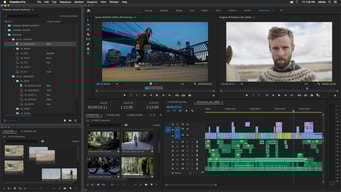
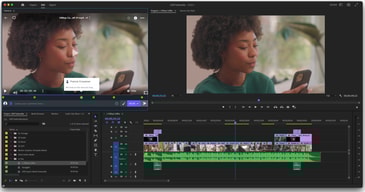
Adobe Premiere Pro is the industry standard for video editing software and offers a huge selection of features to choose from. It can be purchased as a standalone product or as part of the Adobe Creative Cloud. Regardless, Premiere Pro offers a feature-rich selection of tools used for the creation of short films, TV shows, and YouTube videos. Access to a host of smart tools in an ever-evolving portfolio means Premiere Pro users can easily design and edit 4K, 8K, and even VR videos to suit different needs. It also offers access to other Creative Cloud apps, so you can easily access photos, effects, and other tools.

| Capabilities |
AI
|
|---|---|
| Segment |
Small Business
Mid Market
Enterprise
|
| Deployment | Desktop Mac, Desktop Windows, On-Premise Linux |
| Support | 24/7 (Live rep), Chat, Email/Help Desk, FAQs/Forum, Knowledge Base, Phone Support |
| Training | Documentation |
| Languages | English |
Adobe Premiere Pro Pros and Cons
- Extensive professional features for photo editing
- Create and edit your photos in various file formats
- Access all the features of the Creative Cloud for touch-ups
- Frequently updated feature set
- Filters, adjustments, and fixes
- Takes a while to learn






Compare Adobe Premiere Pro with other popular tools in the same category.
For such an industry standard, premier is deeply ubiquitous, and accessible. Adobe has done a great job taking on education as part of their platform and it has made premier much easier to use
Hard to master. Expect a learning curve. Premier is a powerful and diverse tool that, when harnessed knowledgeably, can achieve unimaginable results. If you know how to do it. Because of the potent tool that it is there are millions of ways of achieving the same result, making it a hard to master tool.
Premier has made it possible to diy the company’s demo video
The straight forward drag and drop style of editing. Once you learn the keyboard shortcuts editing videos and audio is quickly completed.
The linking of files to specific locations - if you move the file the program forces you to link it again. Searching for the file is cumbersome.
We use Premiere Pro to edit training videos and splice audio. It's easier to do it in-house and be able to make updates faster.
The fluidity and multi functional interface.
Updates are minimal in nature and do not really add any benefits.
Problems are not being solved with this software. It is utilized to develop videos from cell phone clips taken in the field.
For a program so robust the functionality feels fairly intuitive.
I'm still learning how to setup my workspace in a way that works for me. My monitor is not particularly large so I need to ultilize screen space very efficiently.
I use Premiere to edit short clips to upload on a retail website. Others in the company prefer After Effects for this, but I find the built in functions of Premiere Pro suit our needs much better.
The ability to create basic or complex videos.
A lot going on. Not many tutorials by Adobe on the actual software.
Video editing. Quick video editing and templating.
I have worked with many different video editors, Windows movie maker (at all development levels, XP was the best), Sony Vegas, and then thank god for Premiere honestly. Premiere has all the features you need to make a professional video.
As with all things Adobe, the price is always a factor of whether or not one can use the product. Cheaper Adobe!!!
Making videos for marketing and donation campaigns.
It is extremely intuitive and easy to use
There is nothing about this app that I dislike
We use it to record VHS tapes
As with every adobe software I lovthe ease of integration with their other adobe softwares. Being able to customize your screen so how you like makes the job super easy!
Rendering is so dependent on the GPU, would be nice to see better rendering time for those who use MacBooks. But that is just a minor thing.
At my company we are in the film making industry(Music Videos), being able to collaborate with our editors, colorist and directors is key! Adobe makes it very easy when it comes to sharing project files between us. The great market of plugins make it even better.

I liked the online community and support that this product has which makes learning a bit easier. There are a lot of features so I could do anything I dreamed of with video after some google searching or youtube tutorials.
I disliked the steep learning curve to get started. A tutorial from Adobe would be nice.
I am creating product videos for my company and I have been able to increase the quality with this product.
I like the editing features of this application. It is easy to learn and customize.
I do not like how much ram the program takes and power it uses on my device.
I created films for a research assistantship. I realized that the video quality can be greatly enhanced using this product.
Premere is the best editing software out there for everyone from simple vlog video narratives to top of the line professional promotional videos!
While Premere is designed to do everything, it is complicated to learn, and while I ultilize it for most of my projects, I often have to use something easier when I need to operate quickly.
I have been using Premiere in combination with After Effects to create compact HD animated logos.
I can make professional looking videos without having to have a lot of technology or software or spend a lot of money.
There is a bit of a learning curve to understand how parts of the software work.
With the Creative Cloud, I can make videos for my job or personal use and I only pay a monthly subscription rather than a large price to buy the software.
I love the ease of use and the straightforwardness. Premiere is a powerful tool and has everything I need. It has a clean interface and awesome effects and tools. I love being able to easily find the settings in the effects panel and
There's not much to dislike. I would like to see real HSL Sliders like the ones in Lightroom. Right now, there's a color selective editor but I'd like to be able to edit all of the colors individually in one panel.
I'm able to send clients professional videos.
I love Premiere's intuitive interface and functions. Even the small functions are incredibly useful– my team uses color coded clips, markers, labels, etc. for everything. It feels like the Premiere developers have thought of everything when it comes to fast, organized video editing.
Premiere runs very slowly on my iMac. I know it is more compatible with PCs, but increased functionality, and reading and writing speed for Mac would be incredible.
We are producing videos for all branches of the non-profit organization we are a part of to raise money for what we do. Our videos allow our teams to share the work we do with partners as well as the general public. Premiere is versatile and flexible for what we need it to be to produce all the video content we need.
Final Cut Pro no more. Fully compatible with other adobe software and has all you neeed for professional use!
Has a lot of settings that aren’t exactly easy to discover.
Video editing
Fairly user friendly, and easy learning curve.
It takes forever to render and export videos
It's very versatile and I can create so many things
I love the depth of the Premiere– I am always learning new functions. It's intuitive yet customizable interface is perfect for what I do. I also love that it is update-able through the Creative Cloud, so I do not have to keep purchasing the newest version of the software, I can simply get what updates are available through my subscription.
I don't like how poorly my Mac functions with Premiere's processing unit.The two aren't very compatible, and it would be amazing to have a Mac-compatible version of Premiere (though I know that would mean reprogramming the entire system), but I know that would make a lot of user happy. Premiere just crashes SO often on my Mac.
Creating video projects for documentation, journalism, marketing, and content creation purposes. Premiere provides a (mostly) efficient way for us to create video assets for internal and external clients (my team functions as an internal Communications/Marketing department for the nonprofit, Convoy of Hope).
I like the ability to organize sequences when editing large projects.
There is a bit of a learning curve because the software is pretty complex.
The ability to send projects easily and collaborate.
The ease of use for a video editing program
With so many options, it takes a lot of time to get things situated and learning, after lots of Time and patience you will love what you create and do to make videos.
How to reach the community. We use it to teach new visitors and doing small groups and meetings, making videos with graphics and pastors talking.
Adobe premiere’s layout is simple and easy to learn. It gets the job done in the most professional way possible.
When adding captions the program freezes/ has bugs needing fixed
I need to edit video footage and Adobe Premiere’s easy to use editing tools and quick change keys make getting the job done easier than any other platform.
Adobe Premiere Pro is organized and easy to use. It’s self explanatory, and makes for a clean cut, professional looking video.
There have been many times I have to look up how to do something, because I couldn’t find it in the software.
Adobe Premiere Pro helps me edit my footage in a timely manner. It also lets me do things I wasn’t able to do with other software.
Adobe Premier Pro is yet another phenomenal pieces of software from Adobe that very effectively integrates many advanced features into a consistent and familiar feeling interface.
Given that the software is created by Adobe, I'd like to see more of an effort to integrate Photoshop and vector features from Illustrator. I would like for there to be some additional functionality similar to how Photoshop treats imagery.
I utilize Premier Pro to create mockumentary style short videos. We combine footage we've shot along with stock footage to push solutions to our clients.
I love the connectivity between other adobe systems. Dynamic linking is a life saver.
I wish they would let you customize the damn markers. Fortunately, I figured out how to hack the software to do it anyway.
A much more streamlined editing workflow.
I love the advance capabilities of Premiere Pro. The ability to cut, edit, color grade, adjust audio, add effects, text, lower 3rds, animate, and so much more. The only thing holding you back is your imagination. Also, Premiere Pro has the ability to work effortlessly with the other adobe apps in the cloud. So if you need to edit some intense audio then you can send it out to Audition and back. Need to work on some lower 3rds, then send it to After Effects and back.
I do have the occasional crash which can be very annoying. It is good about recovering the work about 70% of the time though.
I am a Media and Communications Director for a church of about 450 members. I make all kinds of videos and bumpers for our church services here. This allows me to be as creative as I would like without getting in the way.
So versitile. Great to use for various videos.
Can crash easily and can’t recover saved materials.
Creating high quality promotional videos for companies.
I love the interface of Adobe Premiere. It's so easy to learn to use, especially if you're already familiar with Final Cut.
I have yet to find something I dislike about this program.
I work at a video marketing agency. Premiere makes it easy to pump out videos for our clients.
I like that Premiere is easy to use, and the user interface is pretty intuitive. The tools at the top are self-explanatory for adding new sequences, titles and which windows you'd like to use: color, editing, etc. There are many options to add different text. I like the hotkeys for the different tools, which makes video editing faster. I love editing video, it is one of my favorite things to do. Having Premiere Pro makes a very time-consuming task much easier.
If you are not familiar AT ALL with video editing, you may not understand how the windows can be moved around, and the views changed. If you watch the video tutorial on Lynda.com though, you'll be able to figure it out. Sometimes I accidentally click on a little button on the side of the timeline that unchecks the ability for the audio to be brought to the timeline with the video. It took me forever to figure out that all I had to do was to click on the little button again to bring that ability back. Now it's fine, because I know to look out for it.
I am a photographer who is self-taught learning Premiere Pro. The tutorial on Lynda.com and the ease of use of the software has made it easy for me to launch into video projects right away. I can now add videographer to my list of skill sets! We now have a schedule for when we shoot videos and it doesn't seem daunting to me to make the deadline to edit the video.
The visual interface just makes logical sense when learning to use Premiere Pro. I'm self taught, having used many video editing softwares previously. The workflow just clicks.
With power comes great ram requirements. You need to keep your machine clean when you start using advanced effects. I usually close every program I can while using Premiere Pro, because I have a base level macbook pro.
I makes lots of promo and highlight videos. I download templates often, so it's nice using one of the most common softwares. There's so much great material out there to purchase at very reasonable prices. I've learned a lot of the more advanced features by tweaking purchased, professional templates.
I like the ability to create sequences with syncronized sound from multiple camera angles and then edit using those sequences from the source monitor.
When sycronizing audio with multiple audio clips and one video clip. The second audio clip always moves the video clip instead of the audio clip just moving to the video.
Editing video.
I strongly feel that Adobe Premiere Pro is among the best professional video editing software available simply because it takes all the essential tools you need to edit a video and presents them in a way that is convenient , intuitive & innovative. I think its ease of use is what makes it stands out from the crowd and is simply the reason I put it up there as my favourite video editing software.
Linking media can be a issue when working with multiple people on the same project. If folders and files are not properly organised then you will run into issues when switching between machines.
For my organisation everything video resulted I use Adobe Premiere Pro. From quick edits to extremely complicated video production Adobe Premiere Pro is capable of dealing with either request. The end result is always professional and with the ease of use from the software makes it a no brainer to use.

