

Unclaimed: Are you working at Adobe Premiere Pro?
Adobe Premiere Pro Reviews: 4.6/5 — Highly Rated
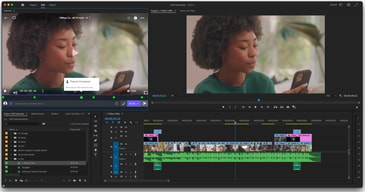
Adobe Premiere Pro is the industry standard for video editing software and offers a huge selection of features to choose from. It can be purchased as a standalone product or as part of the Adobe Creative Cloud. Regardless, Premiere Pro offers a feature-rich selection of tools used for the creation of short films, TV shows, and YouTube videos. Access to a host of smart tools in an ever-evolving portfolio means Premiere Pro users can easily design and edit 4K, 8K, and even VR videos to suit different needs. It also offers access to other Creative Cloud apps, so you can easily access photos, effects, and other tools.

| Capabilities |
AI
|
|---|---|
| Segment |
Small Business
Mid Market
Enterprise
|
| Deployment | Desktop Mac, Desktop Windows, On-Premise Linux |
| Support | 24/7 (Live rep), Chat, Email/Help Desk, FAQs/Forum, Knowledge Base, Phone Support |
| Training | Documentation |
| Languages | English |
Adobe Premiere Pro Pros and Cons
- Extensive professional features for photo editing
- Create and edit your photos in various file formats
- Access all the features of the Creative Cloud for touch-ups
- Frequently updated feature set
- Filters, adjustments, and fixes
- Takes a while to learn
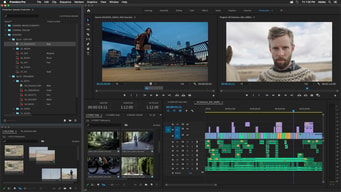
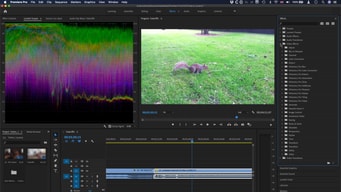






Compare Adobe Premiere Pro with other popular tools in the same category.
Premiere is easy to use, somewhat fast, and powerful. It allows me to do pretty much anything I need to, whether for broadcast, digital, social, 360, etc.
Render times slow, crashes all the time, and new updates are generally buggy.
It's all I use to edit.
I like Premiere's flow. Everything I need for basic editing jobs is there: audio editing, titling, spfx, etc.
Premiere has really evolved since I started using it in 1993. At this point, I don't dislike anything about it.
It's my all in one for basic projects. More involved projects have me using After Effects and Audition. But, again, for down and dirty quick editing jobs, Premiere is my go-to.
As with most all Adobe CC products Primer Pro puts industry leading technology and tools in the hands of everyone in a way that is accessible and functional regardless of your skill level. Beginners can perform simple edits and create text effects easily while my team can dive deeper using cutting edge particle generators and physics engines.
There is t much I dislike. I have had some issues in the last regarding the layouts and the implementation of third party plugins but Adobe has reacted well to public opinion when updating their software.
Not problems necessarily as much as necessities. We are able to streamline our workflow and turn out creative for our clients quicker than ever before.
The easy of connection to other video software in the cloud, and how much sense the program makes.
I dislike the difficulty for sharing files, especially across versions.
It allows us to professionally edit videos.
I enjoy the easy compatibility of Adobe Premiere Pro with the other Adobe programs. The layouts are easily customizable, given I work with 2 screens.
I haven't really found a lot of things about it that I don't like, maybe a small aspect being working on exporting a project that contains different compression rates.
No business problems so far. I can easily export FROM the program onto a platform online to show clients or something like that.
Easy to use, can create anything, good support if needed
WIsh it were easier to switch between Premiere and After Effects
Creating content and consistently modifying and updating it
Premiere has it all: the tried and true nonlinear editor, the pseudo-file-system for managing your linked assets, and deep integration with the rest of the adobe suite.
Even on powerful machines, Premiere is frequently unstable. I cannot even express how many times I have had Premiere crash in the middle of sometimes even basic tasks.
My organization is using Premiere to create and deliver next-generation 4K video content to our constituents, and we're absolutely loving it.
Easy to edit and understand shortcuts. Gives a variety of uses for a variety of situations for video recording or editing.
Can be hard to see certain files even when you enlarge them compared to avid.
It’s great that I have the products accessible to me. A bit pricy though
Premiere Pro is continually evolving to better itself and allow the users more capabilities to generate their creative flow.
I dislike how many updates the program needs to have on a regular basis, and the monthly steep price of the program.
Premiere Pro has helped us use video content on our internal company-wide (80,000+ employee) platform. The design capabilities of the video program make it the most engaging way to get communication out to all employees.
When I first used Adobe Premiere Pro I was concerned, however the layout of all the tool bars and simple functions blew me away.
The only complaint that i have for Adobe Premiere Pro is that there is some DLC that you have to pay extra for.
We are using Adobe Premiere Pro to edit together videos.
I love the freedom to create my own work of art from scratch. When edited film, I may have an idea that I want to do this and that and for the first time, Adobe Premier Pro allows me the freedom to insert my creativity.
Sometimes learning Adobe PP can be a challenge because there is such a vast database on what you can do. I often find myself relating to youtube for help to do certain aspects of my work. Maybe if Adobe had a more prominent help section that is easily accessible it would be helpful to be more timely and efficient in my work.But all in all hands on work does make a better user!
Most other video editing softwares that I used, I found were stuck in the early 2000's it seemed. Everything looked dated and I struggled to produce modern edited film that I needed to satisfy my customers. Glad Adobe does literally everything right.
Easy to use, highly reccomend for learning purposes
Some of the glitches in the software are buggy.
Getting things done in a timely manner. Ive realized that premiere pro allows me to multitask for almost any project!
This is the best version of Premiere there has been so far (hence the title). It is factually the most useful version of premiere that I have ever used. Coming from iMovie 2004 and Pinnacle, Premiere is a dream. I animated an entire Korean dance commercial in a single day with no previous experience (search "Cupbop Bacchus Saxophone" on YouTube). I had no training and created a professional video full of effects, green screening, everything.
The visual organization is confusing and nonlinear, which is not at all what you would want from a program dealing with time.
I make videos to animate my music and advertise business.
easy to use with other adobe programs through dynamic link
regular updates sometimes break projects, interface and feature changes are erratic too
media creation and publication made simple
As I learn new skills in the workplace and expand into new territory, I like that as a newcomer to the platform I can jump into a project and not feel lost about how to use the program.
Adobe is really great about providing help and tutorials for their products so at this point, there isn't anything to dislike as long as you keep your program updated and take heed to the instructions provided.
We're doing in-house video editing for our client campaigns. Having multiple people on hand to do the work that would otherwise be outsourced is ideal and cost-effective.
I like how easy it is to use once you learn the shortcuts. One can make a superior video using images or motion video.
I dislike how difficult it is to manage titles.
I am solving the issue of finding a one stop shop for combining audio effectively in my projects.
Everything! I am a big fan of Premiere. Being a Broadcast Journalism major, I used this all through college editing my videos for our newscasts. The school program had fully adopted this software by my Sophomore year
Sometimes it made my computer freeze or would take a reeeeeally long time to export a short video. But Really I think that depends on your computer age/speed
It made it so easy for everyone in the journalism department to standardize their editing process. Exporting was a breeze since you can enter in the exact formats and resolution desired.
The ability to do and create anything you can envision for your videos.
It has some clunky, not so beginner-friendly features that take some time to navigate and learn.
Creating my own video content for online use.
Used in conjunction with Photoshop and After Effects, Premiere Pro is an excellent software for asset management and video editing, offering highly professional results, and with export in different file formats, suitable for social networks and mobile devices.
In some cases the software absorbs a lot of memory, especially if used with Illustrator or with Speedgrade, when for example there is the need to work on color correction. For the rest, the software is really a great tool for those who want professional results.
Normally I use Premiere Pro to create video montages or motion graphic advertising to be inserted on Facebook, YouTube or Instagram, and it's perfect for me that I use almost all the other Adobe Creative Suite software. I have always met the expectations of my clients or collaborators.
I have used many video editing software but none of them comes close to the features offered by Adobe premiere pro CC. the software is very popular with video producers and thus its very easy to find content, add-ons, and tutorials which makes your job so much easier. the adobe premiere pro is a part if the adobe creative cloud suite and thus has a lot of advantages over other similar software. it integrates easily with other creative cloud products like illustrator, premiere, and audition, thus easy work like you can edit your vectors on illustrator and import them directly to premiere.the software offers a free trial for 30 days to check it out, and I think its really cool.it got options to capture your screen and then edit the recording. the software got a wide variety of transitions and effects to create the perfect video.
the pricing of the software can be l little burden for an average user. the updates through the creative cloud software can be slow sometimes. the software needs a lot of memory and CPU for smooth running especially when working through other creative cloud products. the inbuilt rendering options are very limited and really slow.
edit videos and create videos
Adobe Premiere Pro is extremely user-friendly but still holds a professional edge. I love that it comes in the Adobe suite allowing you to cross easily between programs.
Usually when I encounter a problem, I just search on the web for my answer. 90% of the time I've found a solution.
It's extremely beneficial to my workflow creating video elements.
My go-to video editing tool for over four years now. Almost any company you work at either uses it or is familiar with it, it's affordable, and once you get over the initial learning curve it's fairly intuitive.
Sometimes it crashes on older computers. It's pretty affordable for individual, personal use, but it has been a bit of an obstacle for companies that want to equip multiple team members with Adobe Premiere on their computers. Right now, I am actually using my personal subscription for Adobe Premiere to edit work videos, because they don't want to purchase another seat on their account, if that gives any indication for how expensive it is for businesses.
In addition to editing "traditional" videos that were filmed with a DSLR, I've also used it to edit videos for mobile, "Boomerang" style videos, add subtitles, etc. It's a great all-purpose tool for turning footage into something digestible for audiences. Sometimes, I do wish the color-editing was more robust though.
The timeline and work bays are extremely easy to navigate
Render options. Sometimes It's nice to have MP4 directly without going through media encoder.
Streamlining video editing. It is fantastic for both long form and short form video.

For me, the best thing about Premiere Pro is the sheer amount of tools that you can use to accomplish your work. You don't have to be a professional to get started, but, because there are so many different tools to use it helps to have an idea of what you're doing.
Not exactly something that a complete novice would be able to grasp easily. Also, wish you could personalize the background more.
Adobe Premiere Pro is great for fixing poorly shot video (lighting, sound, etc.), and exceptional for creative editing uses as well. Saves time by preventing re-shoots. Much like any other Adobe product, there are useful tools and presets which help to adjust exposure, video duration and speed, re-coloring, re-keying...you name it.
Premiere is one of the best film editing software on the market. Its compatibility with sister animation programmes such as 'After Effects' sharpens the workflow for film makers and designers alike. I personally like its layout, and the extensive editing tools which gives users full control over their raw footage.
Rendering times. I have a powerful machine, however even I find the rendering times on Premiere pretty laggy. Even after making one tiny change (such as just cutting a piece of footage) the entire clip must be rendered again. This is fine if you have a solid workflow within the programme, and you understand it does this. There are work arounds, however I do feel that it could be rectified
I have been able to collaborate with artists on film making opportunities as well as photography. Because I use the full adobe suite, it has really made a huge difference to my work.
I love the ease of this program. It's not a simple program like iMovie, but it's not for the average user wanting to create a vacation video. The import settings and timeline options are easy to use and figure out. I love that the effects are searchable so I don't need to know where each different thing is located and can still find it in a second.
I don't like the updated title creation boxes. I was used to the classic title bar creator and had to search where it was now located when it was updated in 2017.
I have to create 1-2 videos a week for my job and this program allows me to do that in a quick way. I love that it has so many export options so I can quickly get something on the web when needed.
It is very powerful, and easy to use. I also like that the user community is large, and there are a lot of videos and tutorials out there to assist you, if you don't know how to do something.
I really don't have anything to say negatively about Premiere Pro. It does what I need it to, quickly and easily. What more could I ask for?
I was using another editor previously, which was very powerful, but it could be buggy and was not very intuitive. Premiere Pro enables me to put together professional looking videos, efficiently, and easily.
If you're familiar with non-linear editing then you know that Premiere Pro is now the standard. It's very customizable, and has a constant stream of updates. Whether you need basic editing, color grading, sound work, titling, you can do basically all of it right in Premiere. I've been editing for 14 years and this is all I'll use.
It does crash more than I'd expect. You'll occasionally come across a project that Premiere just doesn't seem to like, and if that happens you'll face a steady stream of crashes.
We use Premiere for our in-house editing needs. We create a steady stream of basic video content for my company's social media, and this lets us do that and much more.
Very satisfied with the simplicity of the controls and at the same time of the professionalism of the various tools that Premiere Pro makes available, from the creation of video editing to the final export, where there are many codecs.
Maybe for those who work more with motion graphics or cideo compositing it would take some function more similar to those present in After Effects, so that only the Premiere Pro can be used
For the company I create many professional advertising videos, both for inclusion on TV and for web platforms, such as YouTube, Facebook or Instragram.
I like the extent of features available and the new INCREDIBLE sync feature where you can live sync projects in audition and aftereffects, etc so that they update without rendering. I also like how you can now open multiple projects at once.
Premiere Pro is only as good as your computer. I’ve had to upgrade to an SSD, add a graphics card, and will soon be getting an entirely new tower unit. On less-capable computers, it crashes a lot and can be totally useless.
Making projects for clients.