

Unclaimed: Are you working at Adobe Premiere Pro?
Adobe Premiere Pro Reviews: 4.6/5 — Highly Rated
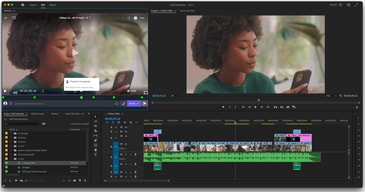
Adobe Premiere Pro is the industry standard for video editing software and offers a huge selection of features to choose from. It can be purchased as a standalone product or as part of the Adobe Creative Cloud. Regardless, Premiere Pro offers a feature-rich selection of tools used for the creation of short films, TV shows, and YouTube videos. Access to a host of smart tools in an ever-evolving portfolio means Premiere Pro users can easily design and edit 4K, 8K, and even VR videos to suit different needs. It also offers access to other Creative Cloud apps, so you can easily access photos, effects, and other tools.

| Capabilities |
AI
|
|---|---|
| Segment |
Small Business
Mid Market
Enterprise
|
| Deployment | Desktop Mac, Desktop Windows, On-Premise Linux |
| Support | 24/7 (Live rep), Chat, Email/Help Desk, FAQs/Forum, Knowledge Base, Phone Support |
| Training | Documentation |
| Languages | English |
Adobe Premiere Pro Pros and Cons
- Extensive professional features for photo editing
- Create and edit your photos in various file formats
- Access all the features of the Creative Cloud for touch-ups
- Frequently updated feature set
- Filters, adjustments, and fixes
- Takes a while to learn





Compare Adobe Premiere Pro with other popular tools in the same category.
The best part about Premier is its ease of use. I was just starting out a youtube channel with no experience and within a week I was able to put together and edit videos without any trouble. While it takes work to learn all the ins and out of Premier its very user friendly for beginners.
The biggest complaint about Premier is that at times it can be a little overwhelming. There were several times where I found myself confused as where to go because there was just so many options.
It allows a business to create its own video content without going through the expensive process of hiring an outside firm.
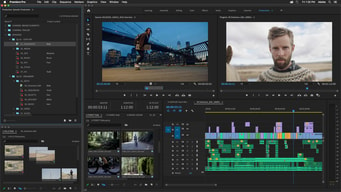
the interface of the software is really beautiful, there are tons of options and everything you need to edit a video is out there including the latest technologies covered. the interface can be edited according to the need of the user and save the workspace with is really awesome. the software integrates with other Adobe creative cloud software easily and makes your job really easy. the software has a lot of additional add-ons and a wide range of elements library which can be downloaded with the click of a button. the tracking options are also extremely good. it supports all types of files including VR and 360 ones. the camera options provided are also extremely good and gives the creator a lot of options. the export options are really easy and the software integrates easily with adobe media encoder for easy exporting to your favourite video format.
the pricing isn't cheap and many users won't be able to afford it.it can be hard for a newbie to learn the program and the learning curve is steep that it can take some time to know the options within the software. the software needs a lot of resources when working on large projects. options like transitions and animations are really limited and need additional resources for more options.
creating as well as editing videos, this is one of the popular and best tools in the market. it does the job beautifully.
The integration with the rest of Adobe CC, including AfterEffects is without rival.
It's not quite as seamless and natural to use as Final Cut Pro.
Editing video for YouTube. It is handy to use within a group setting.
Once you've learned the basics it's really easy to pick up new tricks and free plugins. There are so many resources out there that are free and you find a tutorial to walk you through anything you are trying to do. On the plus side you don't need to purchase the full Adobe Suite and it's become much more affordable to try it out and see if you like it.
With the CC updates I find that it crashes randomly. It does have a bit of a steep learning curve if you don't know anything about video editing.
I am the sole editor of video for my site and having the CC bundle allows me to do everything I need to do from beginning to end with video editing.

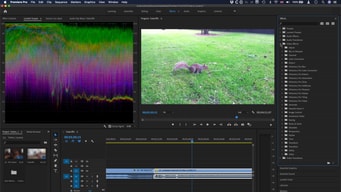
The thing I like about premier is brand-new capabilities for importing and manipulating closed captions. You can export media with closed captions, either embedded or as separate files. A new Mercury Playback Engine means editors get real-time performance when working on complex sequences, thanks to support for a wider range of GPUs. Enhanced, cross-platform support for OpenCL and CUDA promises to helo you render less often and work faster with third-party effects. Sync your settings with Creative Cloud, and all your customized settings, including workspaces and keyboard shortcuts, will be accessibe from any internet-connected computer. Improved multicam editing means you can set up multicam edits faster with a streamlined workflow. Sync single shots or entire bins of footage all at once using audio waveforms; mix frame rates and codecs in the same sequence. A new scriptwriting tool means you can import scripts and the associated metadata with the new Story panel in Adobe Premiere Pro. This means you can quickly navigate to specific scenes, locations, dialogue, and characters as you edit
The interface clashes with usual Mac look and feel , Visual interface is starting to feel dated , Subscription-only model , you have a limited number of tools to choose from to craft your project into a finished product
For video editing, movie editing, music videos and adding subtitles
The numerous options and seamless design of the software. Also how it works with other Adobe products like After Effects, Photoshop and Audition
The learning curve can be a little steep, but there are a number of very good tutorials on the web.
Creating video for social media and the web. I have realized the benefits of a smooth workflow, adaptable interface and software that is capable of creating videos with a variety of features
The layout of the editing platform is expertly designed. At no point am I ever confused where I am within the 'workspace' feature. The tools are clear in what each of them does and they are easy to use. Once you get the hang of manipulating the timeline, editing takes no time at all.
There is a weird glitch that occurs sometimes when I try to pull video into my timeline. Essentially, I will grab the video from my folder and drag it into the timeline. However, only the audio shows up. The fix is easy: I just delete the audio and re-import the footage. It's just a weird little glitch with an easy work around. Also, the audio options in Premier are limited. When I need to fix audio, I tend to pull the video into Premiere Pro, and then I pull it into Adobe Audition to fix the audio.
I address many issues with Premiere. I will add title cards to videos that do not already have them. I will turn the volume up on audio that was not recorded well. And, of course, I put together many videos as promotions for other departments.
I love the integration with Adobe Products, the power
Often times bugs get rolled out with updates that impact exports and user experiences. I generally wait a week or two before updating to the new build incase they need to add a patch. The annual fees are a bit obnoxious as someone who used to just buy the software package and not have to worry about overhead for fees for a while.
We are able to create promotional material, do complex and simple edits, as well as have a vast well of resources available to us such as prebuilt plugins, templates, etc.
It's flexibility to make animations. We are able to take ads that we created for print, and animate them to use for social media marketing.
It's not the most intuitive program out there. Could be simpler.
We create a lot of video. We have the Adobe Creative account and it was great that it was in there to use already.
I like that there are so many different editing tools within the program. It makes it really easy to make basic to advanced videos. I like that you can visually see the preview of the video, I find that to be really helpful. I also like how there are other programs that you can use to enhance your videos.
The only thing I don't like is I feel it isn't as easy to use as iMovie. I learned on iMovie and it was so easy to add video clips and text. I don't like how confusing it is to export videos. The settings have to be PERFECT for the resolution of the video to look good. It was trial and error for me and when you have a client that wants you to work fast it was really inconvenient.
Premiere Pro makes it really easy for people who aren't familiar with video editing to make simple videos for things like YouTube, Instagram and Facebook. If you're not trying to do any fancy video editing Premiere Pro is ideal, but there are still ways to make advanced-looking videos.
It's very easy to use. Super easy to use, import different files, and fills every basic editing need.
The software will occasionally crash, but overall it's great!
We need to quickly import and cut videos, and Premiere is perfect. It's much cleaner and faster than other software.

Adobe Premiere Pro has virtually every feature a video editor could ask for. Over time, our repertoire of video skills has expanded due to the functionality built into Premiere Pro. One of my favorite features is how all of the programs in the Adobe Creative Cloud work together. I can select an audio track in Premiere Pro and choose to edit it in Adobe Audition and then save it back to Premiere Pro seamlessly. Additionally, by using each tool, you know that you are getting the best results out of your video project. I also like the selection tool that allows you to quick select the In and Out points of the video and drag just that section to the timeline for editing. Other video editing programs require you to drag the entire clip to the timeline and then shorten each end from there. This creates a sloppy workspace. There is also a large community around Premiere Pro, so finding instructions or advanced techniques online is easy.
Premiere Pro does have a steep learning curve compared to some of its competitors. For full-time video editors, this isn't a problem. However, employers require their employees to have an expansive skill set beyond their specific function a the company. As a corporate trainer, I'm required to have experience with video and photo editing software, learning management systems, eLearning software, etc... There are other video editors out there that are easier to use than Premiere and would do enough of what I need. YouTube is your friend when learning how to use Premiere Pro. In relation to my first dislike, Premiere Pro can also be unintuitive at times. I believe this is due to how many features it has. They all have to live somewhere, but finding out where can be a challenge. I have used software that makes it easier to do tasks that are not clear in Premiere Pro. However, those programs are not as full-featured either.
Premier Pro allows us to create quality videos for our online training programs. This saves us tens of thousands of dollars each year versus outsourcing the work. We have been able to expand into videos that utilize green screens as well. The link between each Adobe Creative Cloud program makes it easy to do things like edit audio in Adobe Audition on the fly and save the changes to Premiere Pro. This creates a faster workflow and turnaround on the projects.

So premiere is adobe's answer to movie maker pro and it's a great video creation tool. It has a lot of options for creation video from editing audio, video, to adding and subtracting tracks. You can create 3D, work with green screen and it has a lot of different options to create the ultimate video.
The interface in my opinion isn't the easiest to use, furthermore because it has so many options in terms of video creation I think it's almost impossible to learn it's full functionality and that in and of itself can be frustrating. I have used linda.com in the past to learn some of it's functions but if you don't know what you are looking for it's hard to learn how to use the product effectively. I would say if you are going to purchase this you need to either take some courses or pay for ledet training.
We have been trying to create high end training videos. This product makes that possible in a fast efficient way. With the emergent market being gen y and z video is the way to go and this creates some of the best.
Adobe suite integration provides easy workflow
Media cache renders can slow me down depending on what has been applied to the clip
Offline cuts can be done quickly
the effects, I have used many tools to edit videos but none of the effects associated with them was as perfect as in premiere, there is a wide selection to choose for your need and it can be tweaked according to your need for the perfect video. the software is popular so there are a lot of resources online to help you out, the documentation and adobe forums are helpful but more than that there are several add-ons available for adobe premiere which makes your job so much easier. the adobe premiere pro is a part of creative cloud and it offers you free storage to back up your project files so that you can stop worrying about losing them, also adobe premiere automatically saves your file time to time so that the project won't be lost in case of a system failure. the project files are really small and most of them are easy to render too. the best thing about the premiere is that it works very well with other creative cloud products that you can simultaneously work between them to make the best project. the support is also great.
the pricing can be a burden for a normal user. when working with 3d, the inbuilt tools are insufficient. the user interface can be complex even thou you can edit them to make your own workspace.
editing video files.
I like having the ability to create an outstanding video from various sources. The layout is easy to navigate and change as needed. I can import video or images easily; use Illustrator files; easily rearrange those media files; and publish a quality video.
The learning curve was a little longer than I would like. Since there are a lot of things that can be done in the program, it took some time to get used to everything and become familiar with all the editing tools.
Creating quality training videos for new and existing customers to give them a quick overview of a task or product. The videos have be be created, edited, and published quickly to meet the needs of customers.
Premiere is an excellent editing program that has a powerful set of features most notably its compatibility with all other Adobe programs.
Stability. Every new version introduces a new set of problems and bugs that sometimes take months to be resolved. The software crashes more often than it should and can be incredibly frustrating.
I use this everyday for work and the compatibility with photoshop and after effects help significantly when collaborating.
Easy to start to work with. Work on almost any configuration even on a slow computer.
Sometimes Premier crashes and you need to make sure the progress is saved
I use it to edit videos. Mostly commercial and corporate videos

iMovie was great as I was introduced to video editing, but Adobe Premiere Pro has enabled me greater freedom and additional tools to produce the highest quality videos possible. Where Premiere has been most helpful is in sound editing, particularly eliminating background noise without affecting the audio; in image and video layovers; and in the ability to place text anywhere on the video.
The one difficulty I have had with Premiere was in navigating the new tools and interface. I wouldn't recommend it for people with no video editing experience with out tutorials and the ability to be educated on it.
Producing videos for the participants in our research study to guide them in the study. It's allowed us to create higher quality, more entertaining videos than iMovie did.

I really like that Adobe has found a way to make this editing system stable and reliable, and has editing options that minimize needs outside of Premiere (effects, keyframes, color, audio).
I don't like that new updates are risky to "try out" and can prove to cause problems. Many hours have been spent on troubleshooting problems brought on by updating to a new version, creating a project, and having to move forward with the troubles brought on by updating to new versions.
Creating outstanding visual content for corporate, web and television. This tool has become the industry standard in creating profitable commercial content.
The video effects, the transitions, the annotations, all of these are features I can't live without.
It could use more transition and video effects.
Instead of editing raw clips in photoshop, i can do it modify straight from the program. I don't have to add text on images, but make more realistic animated annotations using the application.
It makes editing sermons look much more professional
there is not much to dislike about premiere pro its the best editing software
video, video promos
The dynamic link feature, means I can edit files outside of Premiere Pro and the changes are immediate in my open file.
The titling feature has been demoted to 'legacy', forcing you to use After Effects for titling. Not helpful when you need to product something fast.
We where able to showcase new products in not just graphic, but video format across all our social media channels.
I go way back 20+ years for non-linear video production. I have used much older versions of Premiere, Final Cut Pro, and many other. I will say that Premiere is a very stable even when editing 1080P. Go check out the "More Than An Intranet" video on Passageways dot com (click For Employees on the HP) - all edited on Premiere.
I would say that I wish more After Effects like capabilities were included for titling and motion effects. I do not like to have to go to another program to accomplish things, so many times I just get creative or compromise because of this.
Since I have been a long time user I am not sure if the platform would be that easy to jump in as a novice to use. Having said that, if you have done any timeline based editing before it should be easy. I recommend everyone in Marketing get basic skills for video editing and just as importantly video production (especially audio capture and, possibly even more importantly, lighting!)
You can edit any video format and change the user interface windows really easily
The keyboard shortcuts mapping is a bit confusing
Offline editing, quick audio and video lay ups, encoding...
I love that I can design in PS or AI and then import into the Premiere program. Adobe is so fluid from app to app. Premiere allows for so many options! I use their built in effects sometimes as well as their various cross-fade options.
I wouldn't say that I have had too many problems, especially compared to what else is out there. It's a solid program. If anything, sometimes it crashes. :/ From there I have to reboot it and hope that it saved my recent changes.
We create videos for marketing online. Because the program basically does what it advertises, I've realized how smooth & convenient it can be.

Premiere, like all pro-level Adobe software, is incredibly feature-rich. It seems like every time I use it, I discover something new to take my videos to the next level. Also love the cross-compatibility with Adobe Audition, allowing you to edit your audio files down to the finest details.
With everything above being said, there's definitely a learning curve when it comes to using Adobe Premiere for the first time. I was previously a Final Cut user which helped, but it took me a good couple of hours to become familiar with the ins and outs of Premiere.
Instead of training our customers over the phone or in person, we can now shoot and edit tutorial videos that these customers can view on an on-demand basis. Naturally, Premiere's been a big part of this upgrade and we've realized how much more engaging video content can be than written or pre-recorded audio content.
Premiere works very well with other Adobe software such Photoshop, illustrator, audition or After Effects
More effects and transitions into effects panel
I created motion graphics for my clients
Premiere works perfectly with all the other adobe software such as photoshop, after effects, audition
more animation effects and transitions in Premiere Pro without using plugins
I often work with video editing and motion design
Premiere is one of the best professional video editing products on the market within it's pricing range. Provides all of the tools necessary to accomplish professional editing for any video product. Highly recommend for video editors.
Inter-face is a little dated and hasn't changed musc h over the past few years. An upgrade would do allot of justice.
I find the product easy to navigate, select and move content around to accomplish my goals. I've used the product for several years and able to meet the demands required by my clients in a timely manner