

Unclaimed: Are you working at Buddy Punch?
Buddy Punch Reviews: 4.8/5 — Highly Rated
Buddy Punch is a cloud-based time tracking and attendance solution for small and mid-market businesses. It provides web and mobile clock-in/out, GPS/geofencing, multiple punch methods, reporting and payroll integrations, add-on modules (scheduling, onboarding, real-time GPS), and an API for automation. The product focuses on time, scheduling, and payroll readiness rather than full HRIS features.
| Company | Buddy Punch |
|---|---|
| Year founded | 2013 |
| Company size | 11-50 employees |
| Headquarters | Appleton, Wisconsin, USA |

| Capabilities |
AI
API
|
|---|---|
| Segment |
Small Business
Mid Market
|
| Ease of use |
Beginner
|
| Deployment | Cloud / SaaS / Web-Based, Desktop Chromebook, Mobile Android, Mobile iPhone |
| Support | Chat, Email/Help Desk, Knowledge Base |
| Training | Documentation, Videos |
| Languages | English, Spanish |
Buddy Punch Pros and Cons
- Multiple clock-in methods (PIN, QR, webcam/photo, facial recognition)
- Robust GPS & geofencing with optional real-time tracking
- Strong reporting and payroll integrations
- Modular add-ons and transparent pricing tiers
- Clean UI and relatively easy onboarding for typical SMB use cases
- Advanced features and integrations reserved for higher-tier plans or add-ons (can increase cost)
- Localization limited to English and Spanish
- No evidence of offline punch capability (connectivity-dependent)
- Not a full HRIS — limited benefits/HR administration features






Buddy Punch advertises time tracking at $4.99 per user a month, and no customer has ever paid that. Every plan carries a flat $19 base fee per month on top of the per-seat rate, and that fee does not shrink with your team. At fifty users it is rounding error. At five users it is nearly half your bill — the effective rate is $8.79 a head, not $4.99. At one user it is $23.99. To Buddy Punch’s credit the fee is printed in plain type directly under every price, in the same size as the rest of the card. It is disclosed. It is just not in the number people will remember.
- What it is: Time tracking, scheduling and job costing for hourly teams, with GPS and kiosk punching.
- Best for: Teams of roughly 15 and up, where the base fee stops distorting the per-seat price.
- Pricing: $4.99–$12.99/user/mo annually, plus $19/mo base. Verified August 2026.
- The honest catch: The advertised per-user price is an asymptote you approach, never a rate you pay.
What Is Buddy Punch?
Buddy Punch is a time clock for businesses that employ hourly staff — construction crews, restaurants, cleaning companies, healthcare practices, anyone whose people clock in somewhere other than a desk.
The core product does time tracking, time-off tracking, job and project costing, and payroll integrations, with punches captured through mobile apps, a browser, a shared tablet kiosk, a QR code or a webcam photo. GPS is attached to punches on every plan; live GPS tracking and geofencing sit higher up the ladder.
It is well regarded. The Findstack listing carries 230 user reviews at an average of 4.8 out of 5, which is both a large sample and an unusually high score for this category — most time clocks accumulate complaints about the mobile app or the payroll sync, and Buddy Punch largely has not.
One small thing worth noticing before the pricing, because it changes the arithmetic: administrator users are free on every plan. A ten-person crew with two office managers who never punch is billed for ten seats, not twelve.
How Buddy Punch Works
Three plans, and the split between them is coherent rather than arbitrary.
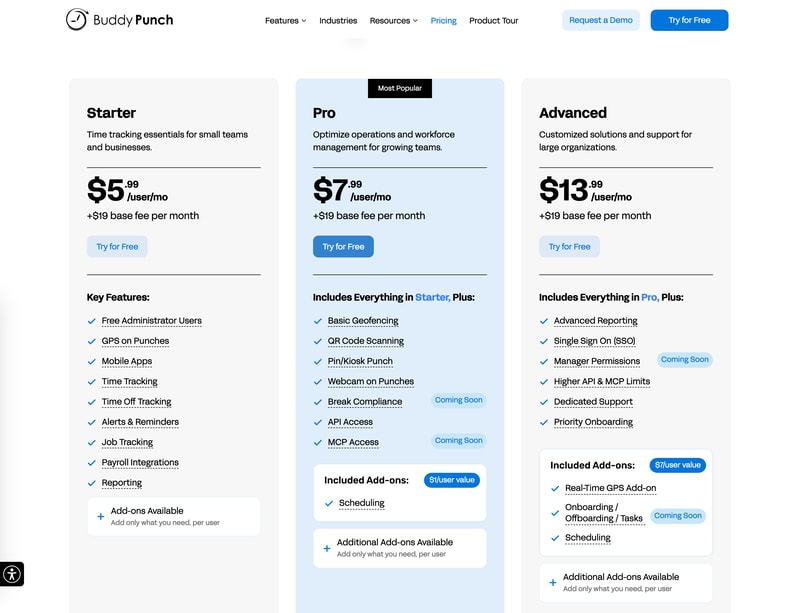
Starter is the time clock: free admin users, GPS on punches, mobile apps, time tracking, time-off tracking, alerts and reminders, job tracking, payroll integrations and reporting.
Pro adds the things you need when people punch away from an office — basic geofencing, QR code scanning, PIN/kiosk punch and webcam on punches — plus API access. It also bundles the Scheduling add-on at no charge. Two items on the Pro card are marked Coming Soon: Break Compliance and MCP Access.
Advanced is the administrative tier: advanced reporting, single sign-on, higher API and MCP limits, dedicated support and priority onboarding, with Manager Permissions marked Coming Soon. It also bundles three add-ons the vendor values at $7 per user — Real-Time GPS, Onboarding/Offboarding/Tasks, and Scheduling.
Everything else is an add-on, priced per user per month: Real-Time GPS $2, Onboarding/Offboarding/Tasks $4, Scheduling $1, Data Retention $2. Note that Data Retention is included on no plan at all — it is the one add-on you pay for regardless of how far up the ladder you climb.
There is a 14-day free trial with no credit card.
Buddy Punch Pricing
| Plan | Annual | Monthly | Base fee |
|---|---|---|---|
| Starter | $4.99/user/mo | $5.99/user/mo | +$19/mo |
| Pro | $6.99/user/mo | $7.99/user/mo | +$19/mo |
| Advanced | $12.99/user/mo | $13.99/user/mo | +$19/mo |
The base fee is $19 on every plan and in both billing cadences — it does not rise with the tier and it does not fall with annual billing. That consistency is worth something: there is no hidden second fee waiting at the top of the ladder, and no cadence where the fee is quietly larger.
The $19 changes the price more than the plan does
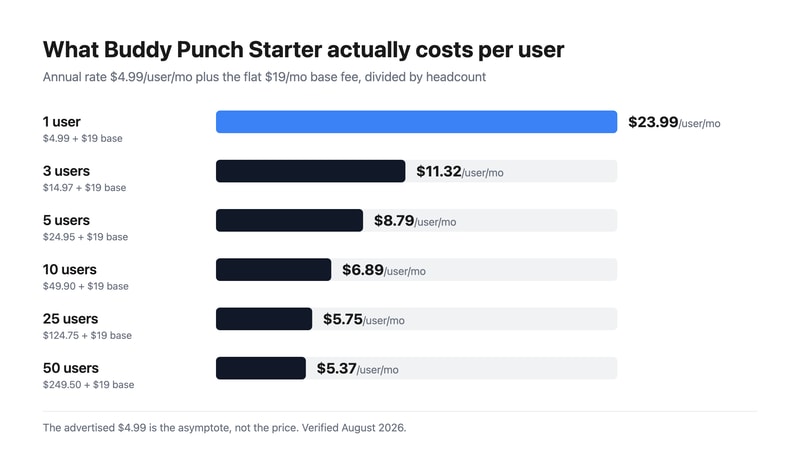
Divide the real monthly bill by your actual headcount and the Starter plan looks like six different products:
- 1 user — $4.99 + $19 = $23.99 per user
- 3 users — $33.97 total = $11.32 per user
- 5 users — $43.95 total = $8.79 per user
- 10 users — $68.90 total = $6.89 per user
- 25 users — $143.75 total = $5.75 per user
- 50 users — $268.50 total = $5.37 per user
At five people you are paying 76% above the advertised rate. At ten, 38% above. You do not get within 10% of $4.99 until you are past twenty-five users.
This matters more than it would at most vendors because of who Buddy Punch sells to. A tool built for small hourly teams has a pricing structure that penalises small hourly teams, and the sub-ten-person businesses reading “$4.99 per user” on a comparison page are precisely the ones who will be most surprised by the invoice.
Work out your total monthly bill before you compare Buddy Punch to anything else. Per-seat prices from different vendors are not comparable when one of them has a fixed fee attached.
The annual discount does not reach the number on the badge
The toggle promises “Save up to 18%.” Per seat, none of the three plans gets there:
- Starter: $5.99 → $4.99 is 16.7%
- Pro: $7.99 → $6.99 is 12.5%
- Advanced: $13.99 → $12.99 is 7.1%
And because the $19 base fee is identical in both cadences, the saving on your actual bill is smaller again — the discount only applies to part of what you pay. A ten-person Starter team goes from $78.90 monthly to $68.90 annually, a real saving of 12.7%. A five-person team saves 10.2%. Even a fifty-person team, where the fee barely registers, only reaches 15.7%.
Annual billing is still worth taking. Budget it at 10–16%, not 18%.
Advanced costs the same as Pro plus the add-ons you were going to buy anyway
This is the most useful thing on the page, and Buddy Punch says it out loud with a “$7/user value” badge on the Advanced card. The arithmetic is exact:
Pro $6.99 + Real-Time GPS $2 + Onboarding/Offboarding/Tasks $4 = $12.99 = Advanced.
Identical. And it holds in the monthly cadence too — $7.99 + $6 = $13.99, which is Advanced monthly to the cent. Scheduling is already included on Pro, so those two add-ons are the entire gap.
Which means if you are on Pro and you need live GPS or the onboarding module, Advanced costs you nothing extra — and throws in advanced reporting, SSO, manager permissions, higher API limits, dedicated support and priority onboarding for free. There is no configuration where Pro-plus-those-two-add-ons is the right purchase.
One caveat on that badge, though: Onboarding/Offboarding/Tasks is marked Coming Soon on the Advanced card, so $4 of the $7 in bundled value is not a feature you can use today. The Pro-to-Advanced identity is sound on list prices, but if onboarding is the reason you are upgrading, ask when it ships before you commit to a year.
Payroll is a second product with a second base fee
The Payroll add-on is $8 per user per month plus its own $49 base fee. That is not a small addition — for a ten-person team it is $129 a month, which is nearly double the $68.90 they pay for the Starter plan itself. Total: $197.90 a month, with $68 of that in fixed fees before a single seat is counted.
Buddy Punch also integrates with external payroll providers on every plan including Starter, at no charge. Price the integration route before the add-on route — for most teams already running QuickBooks, Gusto or ADP, the integration is the cheaper answer by a wide margin.
What actually decides your cost
- Your headcount, which sets how much the $19 distorts your per-seat rate — massively under ten people, barely at all over forty.
- How many admins you have, since they are free and do not count as billable seats.
- Whether you need live GPS or onboarding, because those two add-ons are the entire Pro-to-Advanced gap.
- Data Retention at $2, the one add-on no plan ever includes.
- Whether you use the payroll add-on or a payroll integration — $8/user plus $49/mo versus $0.
- Billing cadence, worth a real 10–16% on the total bill rather than the advertised 18%.
Who Should Use Buddy Punch
Buddy Punch fits a hourly-workforce business of roughly fifteen people or more that wants a time clock which is genuinely good at the punching part. The 4.8 average across 230 reviews is not an accident — the mobile apps, the kiosk mode and the payroll integrations are the things this product does well, and job tracking on the entry plan means small contractors can cost jobs without upgrading.
It fits badly for a team of three to five. Not because the product is wrong, but because the pricing structure is: at $8.79 to $11.32 an effective seat you are paying a mid-market rate for an entry-level plan, and there are competitors with free tiers at that headcount. It also fits badly for a solo operator, where $23.99 a month for one seat is indefensible against tools that are free.
Honest Pros and Cons
What works well:
- 230 reviews at 4.8/5, a large sample and a high score for a category that usually collects complaints.
- The base fee is printed under every price in plain type, not buried in a footnote.
- The fee is identical across all three plans and both cadences — no escalating second charge higher up.
- Free administrator users on every plan, which quietly cuts the bill for any team with non-punching managers.
- Advanced is exactly Pro plus its two missing add-ons, so the upgrade is free if you needed either.
- Job tracking on the entry plan, not held back for a higher tier.
- Payroll integrations included at every level, so the payroll add-on is optional rather than a toll.
- 14-day trial with no credit card.
What to watch:
- The $19 base fee makes the advertised $4.99 unreachable — five users pay $8.79, ten pay $6.89.
- The structure penalises exactly the small teams the product targets.
- “Save up to 18%” is not reached by any plan; per-seat savings are 16.7%, 12.5% and 7.1%.
- The real saving on your bill is smaller still — 10.2% at five users — because the base fee is never discounted.
- Data Retention at $2/user is included on no plan.
- Payroll adds a second $49 base fee on top of $8 per user.
- Four features are marked Coming Soon: Break Compliance, MCP Access, Manager Permissions, and the Onboarding module that accounts for $4 of Advanced’s $7 bundled value.
Buddy Punch Alternatives and How It Compares
- Connecteam is the direct comparison for deskless teams and is free up to ten users — which is precisely the headcount where Buddy Punch’s base fee hurts most.
- Jibble runs a genuinely free unlimited-user time clock with GPS, and is the honest baseline any paid tool in this category has to beat.
- Hubstaff goes further on workforce monitoring — screenshots, activity levels, productivity scoring — which some teams need and others actively should avoid.
- Toggl Track is the better fit if your problem is billable hours on knowledge work rather than clock-ins on a job site.
- Time Doctor sits alongside Hubstaff on the monitoring side, with stronger reporting for distributed teams.
- Homebase and When I Work compete hardest on the scheduling side, where Buddy Punch charges $1 per user unless you are on Pro or above.
The honest comparison: at twenty-five users and up, Buddy Punch’s $5.75 effective rate is competitive and its reliability record is better than most. At five users, $8.79 against a free Jibble or Connecteam tier is a hard case to make, and the base fee is the whole reason.
The Verdict
Buddy Punch is a good product with a pricing model aimed at a larger customer than its marketing is. The $19 base fee is the entire story — it is disclosed honestly, it is consistent everywhere, and it doubles the effective price for a small team while being invisible to a large one.
Above roughly fifteen users, none of this matters much and you are buying a well-reviewed time clock at a fair rate. Below ten, the number on the card has almost nothing to do with what you will pay, and the free tiers at Jibble and Connecteam are competing at a price Buddy Punch structurally cannot reach.
Do the total-bill arithmetic first. Multiply your billable headcount — remembering admins are free — by the annual per-seat rate, add $19, and compare that against competitors rather than comparing per-seat prices. Then check whether you need live GPS or the onboarding module: if you do, go straight to Advanced, because Pro plus those two add-ons costs the identical $12.99 and Advanced hands you SSO, advanced reporting and dedicated support on top. And take the 14-day trial, which needs no card — the punching experience on a real crew’s phones is the thing that decides whether this works, and no price table will tell you.
FAQ
How much does Buddy Punch cost?
Three plans, billed annually: Starter $4.99, Pro $6.99 and Advanced $12.99 per user per month, each with a flat $19 base fee per month on top. Monthly billing is $5.99, $7.99 and $13.99 with the same $19 fee. Add-ons are priced per user per month — Real-Time GPS $2, Onboarding/Offboarding/Tasks $4, Scheduling $1, Data Retention $2 — and a Payroll module runs $8 per user plus its own $49 base fee. Administrator users are free on every plan, and there is a 14-day trial with no credit card.
What is Buddy Punch’s $19 base fee?
A flat monthly platform charge added to every plan, in both billing cadences, regardless of team size. Because it does not scale with headcount, it dominates the bill for small teams: a five-person Starter team pays $43.95 a month, or $8.79 per user against an advertised $4.99. Ten users pay $6.89 each, twenty-five pay $5.75, fifty pay $5.37. Buddy Punch prints the fee in plain type under every price — it is disclosed, not hidden — but it is not included in the headline number.
Does Buddy Punch’s annual plan really save 18%?
Not quite, and less than that on your actual bill. Per seat the savings are 16.7% on Starter, 12.5% on Pro and 7.1% on Advanced — none reaches the advertised “up to 18%.” And since the $19 base fee is identical monthly and annually, the discount applies to only part of what you pay: a ten-person Starter team saves 12.7%, a five-person team 10.2%, a fifty-person team 15.7%. Annual is still the better deal, just budget it nearer 12% than 18%.
Should I choose Buddy Punch Pro or Advanced?
Advanced, if you need live GPS tracking or the onboarding module. The prices are exactly equivalent: Pro at $6.99 plus Real-Time GPS at $2 plus Onboarding at $4 comes to $12.99, which is Advanced’s price to the cent — and Advanced additionally includes advanced reporting, SSO, manager permissions, higher API limits, dedicated support and priority onboarding at no extra charge. One caution: the Onboarding module is marked Coming Soon on the Advanced card, so confirm the ship date if that is what you are upgrading for.
Is Buddy Punch’s payroll add-on worth it?
Only if you have no payroll provider already. It costs $8 per user per month plus a second $49 base fee — for ten people that is $129 a month, nearly double the $68.90 those same ten users pay for the Starter plan. Meanwhile payroll integrations are included on every plan including Starter at no charge, covering the major providers. If you already run QuickBooks, Gusto or ADP, the integration route is dramatically cheaper and worth pricing first.

Compare Buddy Punch with other popular tools in the same category.
It was very easy to implement and it also has a mobile app for easier clocking in/out.
Nothing against the product itself, but some employees tend to forget to punch in/out a lot and I receive too many email notifications.
We needed an easy time clock system that didn't require someone to punch in at a stationary center (such as a fingerprint reader). As our main goal was to make sure our non-exempt office personnel tracked their time, Buddy Punch offered easy-to-use solution to our problems.
That the employees can make all changes from their own personal devices. Editing or deleting their own times.
I do not like that it can not sync with Quickbooks online with more than 1 pay rate. I do understand this has been something buddy punch has tried to address with QBO.
I have stopped wasting time developing my own in house time sheets via excel and reloading them each week. I have saved a lot of time and stress.
Easy to check in on timesheets, easy to export and send to my bookkeeper. I really like being able to see what device employees log in with so I know they are not checking in on the road or at home.
A little tricky to navigate at first, but came fairly quickly once I got going with it.
Easy time sheet transfer to do payroll.
I think that having an app that's as intuitive as Buddypunch makes it easier for the staff to be accountable for themselves.
I wish I was able to sign off on my timesheet using my PIN code, as I often forget my login for the website.
its solving the issue of having to keep track of payroll ourselves. Back in the day we'd have to write everything down. Having a kiosk at our entrance as well as an app on your phone makes that process easier.
The best feature is being able to export payroll and reports to an Excel document. Another great feature is being able to limit what devices can clock in and clock out.
One thing I do not like about Buddy Punch is an admin cannot log their own time. They must create a separate user for themselves, which is not a very big deal, but it would be better if admin could control their time.
Buddy Punch is always making sure there are no bugs
Buddy punch is a great clock in system that can be used in a variety of settings! I don't have much else to compare it to, but I love the option to search late clock ins and clock outs, missed punches, etc
It could be more user friendly when searching for specific people and their clock history. Sometimes buddy punch will reset the criteria for searching for a person after a person was already selected.
It is solving the problem of having one system for employees to clock in and out in different settings, such as clinic versus home environments. It provides one location to find an employees time information.
Easy to use and has a straightforward interface.
Nothing I don't have anything I dislike.
It keeps track of all my times and punches.
It's easy you can use your QR code or just login with your login.
None , I haven't had any problems so there isn't any dislikes.
It's fast and easy to work.
I like that it keeps my schedule and hours nicely organized and clear. Also lets me keep tabs on who is here.
Currently, there nothing that I dislike. I'm thrilled with the system
It keeps my hour and work schedule handy and straightforward. I can access it when i'm home
Easy to use. I like that I can schedule shifts for my employees, that way they have their schedule.
Glitches with punching in and out where an employee said they punched but I don't see it.
Tie tracking and time sheet
I like the practicality of it. I think the categories are well ordered and that help me to go quickly to the option I need at any given moment
I think the seconds on any auxiliary should be showing on the screen as well so to avoid discrepancies when punching back
I am not sure what has changed so far , I have not noticed anything to be honest
Ease of use and availability. I keep track as I work.
Puting in leave time and deleting it if input is wrong.
No more hand time sheets
Scheduling is very easy with Buddy Punch, and it exports to our payroll service, Gusto.
I wish I could schedule staff for flexible shifts without it showing that they arrived early or late.
Buddy Punch allows my staff to input their availability, so I'm not shuffling between a dozen emails and texts.
I like that there's an app available so I can use my phone to punch in and out of work. Faster than doing it on my computer, so I give a more accurate time of when I start and end work.
There's not necessarily any dislike that I have about buddy punch. I have experienced some difficulties with punching in and out and it not registering so my time never starts or it keeps going, and then I have to ask my manager to edit it. But I think that may be an internet connectivity issue.
Like I said before, it's quicker to punch in and out because of the app. it's very convenient, and so I can more accurately give the time I entered and exited work.
I like the fact that it is so simple to use and accurate
No problems so far easy to log in and out
Accurate time keeping
Easy to use, staff likes it, very efficient. Love the fact I get a quick report and can process payroll even faster.
The Settings tab is a little clunky to me, Everything I need is there, but it takes a while to surf through all of the different sections to find what I am looking for. It could be more intuitive.
We used Excel Spreadsheets before, they were inefficient, often wrong, and easy to mess-up the formatting. With Buddy Punch I have fixed all that. Now I am just retraining the staff to actually punch in and out.
The ability to clock in and clock out on the road and as you go. Very easy to use as an end user and as a manager of employees that punch in and out.
If you forgot and punched out at the wrong time, then it requires manager approval to change it and that could delay things.
Being able to track temp workers' hours.
I am able to keep track of my hours from my work computer
It's a little clunky. I'm not able to delete a mistake I've made regarding time off
Time keeper
Calendar -- would like to improve but it's great for now.
Status update does not start where we left off if we clock on a comment.
N/A
Good way to keep track of hours I worked.
The fact that I am not able to enter my times on the timecard using my mobile phone.
Time management