

Unclaimed: Are you working at Chatter?






Chatter Reviews: 4.1/5 — Solid Choice
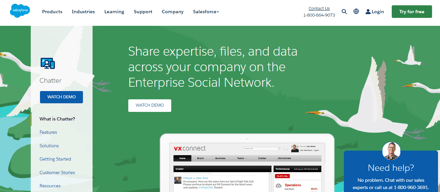
Chatter is live chat solution that connect employees with the files, data, and experts they need at the speed of need, anywhere in the world. The cloud-based platform helps users visualize data and simplifies integration.
| Company | Salesforce |
|---|---|
| Year founded | 1999 |
| Company size | 10,001+ employees |
| Headquarters | San Francisco, California |
| Social Media |





| Capabilities |
API
|
|---|---|
| Segment |
Small Business
Mid Market
Enterprise
|
| Deployment | Cloud / SaaS / Web-Based, Mobile Android, Mobile iPad, Mobile iPhone |
| Support | 24/7 (Live rep), Chat, Email/Help Desk, FAQs/Forum, Knowledge Base, Phone Support |
| Training | Documentation |
| Languages | English |


Compare Chatter with other popular tools in the same category.
Chatter is a web app on which you can collaborate with colleagues and ask for help on an topic. I already asked some question to relevant colleagues through the platform. Also, it allows you to follow a topic
I dont like salesforce. The page look like a Facebook page, with conversation, "like", "share". For me it looks very unprofessional and I dont feel at ease when using it
I dont see any particular benefit with this platform
The ability to connect with coworkers... but that’s about it!
Keeping it in salesforce is limiting, if some teams don’t “live” there, not easy to use, and not accessible remotely
Interconnection.... but also - a negative, if you have too many windows open it will appear that you are offline!
Chatter is useful as a one stop shop for business and communicating with a group. It's nice that you can get email notifications when someone posts on the chatter board.
It's disorganized and some conversations get lost as new ones appear. Also when tagging, some people spell things incorrectly or abbreviate when they shouldn't and you end up with way too many hashtags.
It saves you from having so many threads on Outlook. When tagging, some people spell things incorrectly or abbreviate when they shouldn't and you end up with way too many hashtags.
For a team that is well integrated into Saleforce this is a good tool but there are many other tools (ie. Slack and Gchat) that are a lot more sophisticated and easier to use.
Hard to login and use. I have been using Slack for a long time and find that it is one of the best chat products i have ever used
Benefits are that it lives in Saleforce for companies that are highly integrated within Salesforce this is a nice feature
This is like a social media platform but amongst work colleagues
Chatter does not have its own app, and the Salesforce app (which includes chatter) can run slow and ctash
Communicating with and sharing business ideas and prospects with work colleagues
Integrated neatly into the rest of salesforce, it serves as a sort of internal twitter for staff.
It is basically abandoned, with most of the users preferring Gchat.
It allows integrated chatting, though people have moved on.
SSO available, and it integrates nicely with the salesforce app.
The app is horrible, though, and so that part is useless. The clunky interface is hard to find your way around in on the website as well, and the groups are not easy to tell if you are inside of them or in another group. I just do not think it's the best chat collaboration tool out there. Slack is much lighter and better for chatting. As for posting items to your colleagues, Chatter does shine in this area.
Can't say there are truly benefits. We can accomplish the things we use Chatter for on many other platforms, most of them even free of charge. This app needs major work to be competitive, and frankly, to remain useful in today's collaborative market.

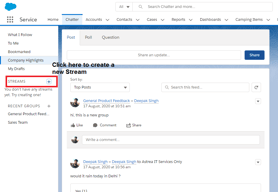
Much better solution than email to sending brief messages. Good to group messages by topic as this saves time and effort when searching for conversations or just reading threads
We've trialed other solutions and ended up settling on Slack as our chosen software
Internal communications to keep people informed of projects but without the need to hold meetings; circulate wordy reports via email and generally organise updates around specific topics.

It functions best with SalesForce. It works.
The chat app does not turn off the SalesForce Chatter, so you can miss messages or send out the wrong status. Can not set user-defined status. Buggy like is common in SalesForce. When chatting with a few people, such as 4, sometimes only 3 names display. So it is really weird. No fix and reporting an issue to SalesForce if you do not spend a million dollars a year has no purpose. Interface is odd. A bunch of tabs that do not have useful purpose. I get emails at odd times with a summary of a few random messages. I am not sure when it turns itself off. It often did not allow me to log in. Sort of random. Does not work if SalesForce not loaded. I wanted to continue communicating with staff, with or without SalesForce loaded.
The need to communicate with other staff using SalesForce. It has no other use.
It works - sometimes. Also keeps chats in SFDC
Basically everything - logs out constantly, doesn't push to mobile, not good for collaboration
Collaboration / tracking of conversations
A positive aspect of it is that it is directly in sales force and that all members of my organization are able to see posts and that i can read others comments on reports and dashes and share information. This comes in handy when new reps in our company are checking out the sales force interface and are trying to get the "down low" on what is happening with internal affairs or on specific leads and offer promotions
I dislike that it is sort of un necessary, all things that can be done inside chatter can be done with Outlook, Skype and other resources --- chatter is sort of extra. I have been working for my company for around 5 months and we work in sales force a lot and i can honestly say I've heard the words "Sales Force Chatter" uttered around 3-5 times. We used it once to remind sales reps of an incentive we were running for them and another time to share information among states/diff time zones within the company. The lack of use can be attributed to an ugly interface as well as the ability to do the same job through other more useful mediums.
I am problem solving for myself, sales representatives, management, upper management and global sales issues. Ive had no benefits of using SF chatter other than a trainer in Chicago was able to upload information and share it with us.
I just dont really like it. It doesn't add anything special skype or email doesnt.
That there isn't a whole lot of functionality
I haven't solved many business problems by using this software.