
Unclaimed: Are you working at ClickMeeting?
ClickMeeting Reviews: 4.2/5 — Solid Choice
ClickMeeting is an efficient webinar management platform for businesses who want to boost their digital reach through professionally hosted and branded webinars. The platform’s tools and features are notably intuitive and user-friendly, making it one of the simplest options available today, especially for internationally hosted events. ClickMeeting is also customizable, with users able to tailor everything from the webinar room as well as other key elements needed to establish effective branding for any event. Types of content that can be hosted on ClickMeeting include Facebook and YouTube Live, presentations, surveys, and polls, just to name a few. It also comes with accurate analytics that can provide deeper audience insight for future events.
| Capabilities |
API
|
|---|---|
| Segment |
Small Business
Mid Market
Enterprise
|
| Deployment | Cloud / SaaS / Web-Based, Mobile Android, Mobile iPad, Mobile iPhone |
| Support | 24/7 (Live rep), Chat, Email/Help Desk, FAQs/Forum, Knowledge Base, Phone Support |
| Training | Documentation |
| Languages | English |
ClickMeeting Pros and Cons
- Supports full audio and video recording of live sessions
- Offers chatfunctionality and interactive sessions
- Integration with Facebook Live and YouTube for added engagement
- Supports HD video presentation for multiple presenters
- System delays caused by larger number of guests
- Lacks automatic transcription
- Relatively expensive






ClickMeeting is a European webinar platform that ships GDPR compliance and end-to-end encryption on every plan, including the free tier, and prices well below GoTo Webinar. For organizations that care where their attendee data lives, that combination is the reason to shortlist it. The trade-off is a smaller ecosystem and a less polished experience than the market leaders.
- What it is: Webinar and virtual event software covering live webinars, automated and on-demand webinars, meetings, and paid events.
- Best for: European businesses, educators, and trainers who need data residency and encryption without enterprise pricing.
- Pricing: Attendee-tiered. Widely reported entry pricing is around $32/month for Live and $48/month for Automated, with annual billing saving up to 20%. Verify on ClickMeeting’s page before buying, for the reason explained below.
- The honest catch: ClickMeeting does not publish prices in a way that can be read without configuring a plan, and prices scale by attendee tier from 25 up to 10,000.
What Is ClickMeeting?
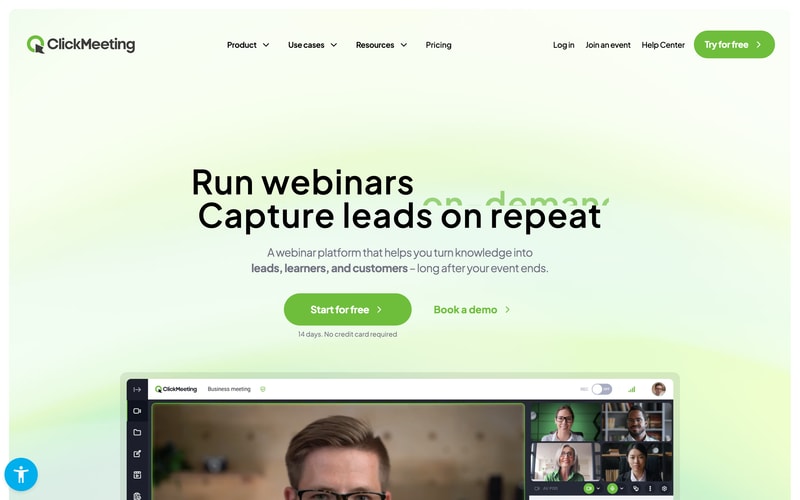
ClickMeeting launched in 2011 in Gdańsk, Poland, originally as part of the GetResponse group before becoming an independent company. It has stayed focused on webinars rather than expanding into unified communications, and it competes primarily on price and European data handling rather than feature count.
That European origin is the most useful thing to understand about it. GDPR compliance and end-to-end encryption appear on every plan including the free tier, and the company operates under EU jurisdiction. For a European organization running webinars with customer data, that removes a category of legal review that a US-hosted platform can require.
The product covers three event types from one account: live webinars, automated and on-demand webinars for evergreen content, and standard online meetings. Paid events and donations are supported, so a trainer can charge for attendance without a separate commerce tool.
The independent rating is solid, on a modest sample: 4.5 out of 5 on Capterra across 181 reviews, with 91% positive sentiment. That is a much smaller evidence base than Zendesk or Trello, so weight it accordingly.
How ClickMeeting Works
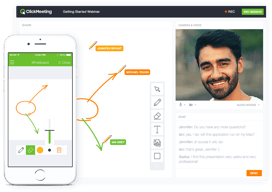
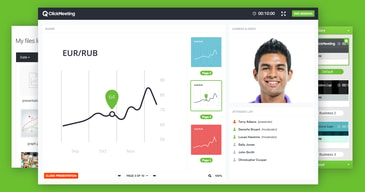
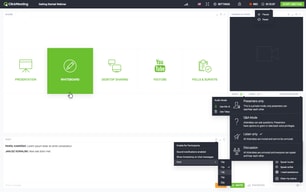
- Live webinars. Browser-based with no installation, custom room branding, polls, surveys, Q&A, screen sharing, whiteboard, and a presentation tool. Streaming out to YouTube, Facebook, and LinkedIn is included.
- Automated webinars. The Automated plan turns recordings into scheduled or on-demand events, with automated reminders, certificates, and auto-streaming to social platforms. This is the evergreen marketing pattern, and it is the main reason to choose Automated over Live.
- Meetings and collaboration. Standard meetings with breakout rooms, so one subscription covers both webinars and internal calls.
- Edu mode. A dedicated teaching mode, reflecting how heavily ClickMeeting is used in education and training.
- Security on every tier. GDPR compliance and end-to-end encryption are available across all plans rather than reserved for enterprise, which is unusual.
- Monetization. Paid events and donations on Live and above.
ClickMeeting Pricing
A transparency note first, because it affects how you should read everything below. ClickMeeting’s pricing page renders prices dynamically once you select an attendee tier, and the figures are not present in the page source. That makes independent verification harder than for most vendors, and it is a fair criticism of the buying experience.
What is verifiable on the page, in July 2026:
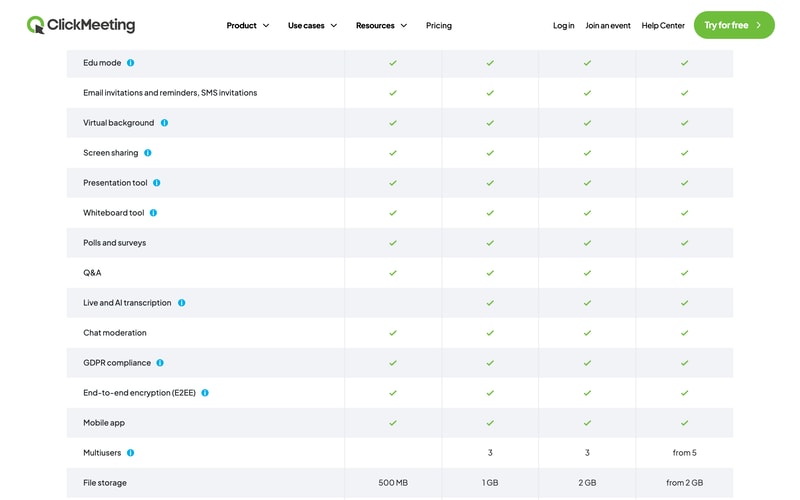
| Plan | Attendees | Recording | File storage | Notes |
|---|---|---|---|---|
| Free Events | 25 | 30 min | 500 MB | 14-day trial, no credit card |
| Live | 50 to 1,000 | 6 hours | 1 GB | Custom branding, 3 multiusers, paid events and donations, live and AI transcription |
| Automated | 50 to 1,000 | 10 hours | 2 GB | Automated and on-demand webinars, automated reminders, certificates, auto-streaming |
| Enterprise | Up to 10,000 | From 10 hours | From 2 GB | Dedicated account manager, white label and reseller options, from 5 multiusers |
On price itself, third-party sources consistently report Live starting around $32 per month and Automated around $48 per month at the smallest attendee tier, and ClickMeeting states annual billing saves up to 20%. Treat those as indicative rather than confirmed, and check the live page with your actual attendee count.
Two further points:
- Attendee count is the main cost driver. Tiers run 50, 100, 200, 500, and 1,000 on Live and Automated. Moving up a tier is the most common source of bill increases, so estimate your largest expected audience rather than your average.
- A promotion is running as of this writing. Code SAVE30 offers three months free on annual plans through 31 July 2026. Promotions like this recur, so if you have missed it, it is worth asking whether another is available rather than paying list price.
Who Should Use ClickMeeting
- European organizations with data residency requirements. The clearest case. EU jurisdiction plus GDPR and encryption on every plan is a genuine advantage over US-hosted competitors.
- Educators and trainers. Edu mode, certificates, and paid events make it well suited to teaching, and this is visibly a core audience.
- Budget-conscious webinar programmes. Meaningfully cheaper than GoTo Webinar for comparable core functionality, particularly since recording is included on the entry paid tier rather than gated to the middle one.
- Teams wanting evergreen webinars affordably. The Automated plan covers on-demand and scheduled replays without the price of a dedicated funnel platform.
It fits less well for large enterprises wanting a deep integration ecosystem, where Zoom and GoTo have far more partners, and for teams that prioritize interface polish, since ClickMeeting is functional rather than elegant.
Honest Pros and Cons
Strengths
- GDPR and end-to-end encryption on every plan. Including the free tier. Most competitors reserve comparable assurances for higher tiers or say little about jurisdiction.
- Genuinely affordable. Reported entry pricing around $32 per month undercuts GoTo Webinar substantially, and recording is not gated to a middle tier.
- Three event types in one account. Live webinars, automated webinars, and meetings without separate subscriptions.
- Browser-based with no installation. Consistently praised, and it directly improves attendance rates.
- Built-in monetization. Paid events and donations without bolting on a payment tool.
- Good reported support. Fast and responsive across multiple channels, per reviewers.
Limitations
- Prices are not readable without configuring a plan. A real friction point when comparing vendors, and the reason this review hedges on exact figures.
- A small review base. 181 Capterra reviews is a fraction of what the market leaders have, so the 4.5 rating carries less weight.
- Occasional quality complaints. Some reviewers report connection issues and video inconsistency, alongside the majority who report stable HD.
- Storage costs extra. Additional recording and file storage is charged separately, and reviewers flag it.
- A learning curve on advanced features. Basic use is simple; the deeper toolset takes exploration.
- A smaller ecosystem. Fewer native integrations than Zoom or GoTo, though ClickMeeting advertises broad connectivity through integration platforms.
ClickMeeting Alternatives and How It Compares
- GoTo Webinar is the enterprise incumbent, more expensive and with cloud recording gated to its middle tier, but with a longer reliability record and deeper CRM integrations.
- Livestorm is another European option, browser-based with a free tier and a more modern interface.
- Demio is stronger for marketing-led webinars and demand generation, and is US-hosted.
- WebinarJam targets marketers and sellers, with stronger evergreen funnels through EverWebinar.
- Zoho Meeting is cheaper still and adequate for straightforward webinars, especially inside the Zoho ecosystem.
For a broader comparison see our guide to the best webinar software.
The Verdict
ClickMeeting is a sensible, well-priced webinar platform with one clear differentiator: it takes European data handling seriously and does not charge extra for it. GDPR compliance and end-to-end encryption on every plan, including free, is a meaningful position, and for an EU organization it can shorten a procurement conversation considerably.
Set expectations on two things. The evidence base is modest, at 181 Capterra reviews against thousands for the market leaders, so you have less collective experience to draw on. And the pricing is genuinely awkward to compare, because the figures only appear once you configure an attendee tier. That is not a reason to avoid the product, but it does mean you should get a real quote before assuming it undercuts a competitor.
If data residency, price, and included recording matter more than ecosystem depth and interface polish, ClickMeeting is a strong pick and one of the better values in the category. If you need the deepest integrations or the most proven reliability at large scale, GoTo Webinar remains the safer enterprise answer at a higher price. Use the 14-day free trial with a real audience before deciding, since audio and video quality is the one dimension where reviewer experiences genuinely diverge.
FAQ
How much does ClickMeeting cost?
ClickMeeting prices by attendee tier, from 25 attendees on the free trial up to 10,000 on Enterprise. Third-party sources consistently report the Live plan starting around $32 per month and Automated around $48 per month at the smallest tier, with annual billing saving up to 20%. Because prices only appear after selecting a tier on ClickMeeting’s site, verify the figure for your own attendee count directly.
Does ClickMeeting have a free plan?
There is a free 14-day trial supporting up to 25 attendees, with 30 minutes of recording and 500 MB of file storage, and no credit card required. There is no permanent free plan. Notably, GDPR compliance and end-to-end encryption are included even at this level.
Is ClickMeeting GDPR compliant?
Yes. ClickMeeting is an EU-based company operating under European jurisdiction, and it lists GDPR compliance and end-to-end encryption across all plans including the free tier. For European organizations this is its main advantage over US-hosted webinar platforms.
What is the difference between the Live and Automated plans?
Live covers real-time webinars with custom branding, paid events, 6 hours of recording, and 1 GB of file storage. Automated adds automated and on-demand webinars, letting you run recordings as scheduled or evergreen events, plus automated reminders, certificates, auto-streaming to social platforms, 10 hours of recording, and 2 GB of storage.
What is ClickMeeting best for?
European businesses, educators, and trainers who need GDPR-compliant, encrypted webinars at a lower price than the enterprise incumbents, and who value having live webinars, automated webinars, and meetings available from a single account.

Compare ClickMeeting with other popular tools in the same category.
Clear scheduling and basic features through api
Some key features are not available through API
Webinars
The ability to train people across the country but still "in person"
Set up was a bit wonky for us! We are not very IT savvy here but we watched some videos and did a lot of troubleshooting and then it was fine. We do have to check everything in-house before each meting to be sure of our computers.
We can train multiple people in multiple provinces and still have Q&A during the training!
Goof when it works. Too many issues, particularly;arly audio.
too many audio issues with audio, clunky
client communication
I like being able to set a custom window for sharing my screen - super handy. Instead of having to choose the whole screen or a particular application. Also like the new recording feature where you can pick what parts go into the video.
It would be nice if it was easier to switch branding (i.e back and forth) Since we have different branding for our software. It would be nice if there was a way to have the moderated chat be "on" to begin with. Really just looking for a place for people to submit questions. Disappointed that I lost a recording - did not record right and customer support was not able to recover it for me.
Mainly Customer Training on new software features that we send out. Then post the recording for later events.
I like how the support team of this service works, also, the user interface is convenient.
Automatic subcription renewal is the only option of payment. If I need to increase my webinar room capacity for one day, I need to pay a whole month at higher price. The quality of sound in a webinar recording is usually poor.
I organized online classes for my students
The fact that you can record the webinar and upload it for future viewing
Don't really dislike anything, but except for I am technical iy would be impossible
Educating Business Owners on reducing their taxes
Easy setup and invitations, customization is simple enough
during the webinar, I was playing around with some of the chats (I was one of 3 presenters). Even though we were sharing a presentation, and that should have been the only thing they saw, they were able to see me moving around that chat panel (I wasn't familiar with it)
Trying to increase engagement with our brand. Its been pretty good for that
The Best i like, that it is even works, and you can play YouTube videos.
I do not like converting presentations, that could be only in pdf, so of you have any animations, they do not work. Moreover you can use only videos from YouTube.
You can connect to meeting by link in web browser. But if you do it, someone is login by your Name.
ClickMeeting allows us to hold webinars with our clients to announce new functionality or provide in-depth functionality walkthroughs. We never have any problems with lag or access as with other software, and the chat function helps us address issues or answer questions live.
Audio quality is poor, especially in recordings, and time format is always UTC which confuses our clients.
ClickMeeting facilitates communication with our client base, especially later since the recordings can be referred to by our support staff.
- reliability of streams - user friendly interface
- some features available in upgraded plans are not working properly - files attached to the webinars could not be downloaded by the participants - certificates of attendance were not sent to all participants - customer service is a joke - all they managed to say is that apparently customers are using improper web browsers (all of them!) and we had to provide the files through different website, which looked really unprofessional
The question should be what bussiness problem had clickmeating caused.
Nothing... Nothing... Nothing... Nothing...
Expensive, FULL OF BUGS, We lost more than 500 clients because of technical problems and Clickmeeting do nothing with knowledge of what is not working right.
NON... this is crap...
It records our proctored assessments that we administer
Customer Services is extremely poor, not user friendly, does not automatically delete rooms after a certain amount of time
Proctored Assessment

This application looks good and it worked well when we trialed it but...
We had a terrible experience. The platform worked well when we trialed it, but when we had more than 3 people in our live webinar it wouldn't allow our second presenter to fully join. We could see them as a presenter but we couldn't see their video or hear any audio. We spent 30 mins before the webinar went live trying to resolve the issue with no joy. Support wasn't able to help. When we went live users also had problems many of our 80 guests said they were getting 2 - 3 sec stalls every 40 sec's or so. We ended up losing over half of our audience - with comments of 'great content but they couldn't handle the tech problems!' Would not recommend if making a professional impression is important to you.
Just wanted a standard webinar platform that worked!

The only thing I like was that it was easy to pay and organise my first webinar.
I tried clickmeeting for a few days, thinking it would be the perfect solution for giving my webinar. I was very wrong. The image quality was horrible. And when I mean horrible I'm not joking. I tested a lot of other webinar software, but clickmeeting was really the worst and their software is working, wait... with flash player. Yes they use flash player in 2018. I bought the plan with "HD quality". After testing the software for 2 hours, as I asked for a refund: they said me they never make any refund, and so I had to loose 50 bucks for testing their bad software. Thanks clickmeeting, they are really a scam company. I paid for HD quality, it was definitely no HD, and they said me something that you can find nowhere on there website and definitely no when buying: their HD option is 640x480p, also 480p. That is NO HD. Expensive scam company selling bad product, lying to their customers and stealing your money. There is a lot of better webinar software out there, with better quality, honest support and lower price. Don't loose your time and money with clickmeeting.
I'm giving a webinar each week for my student on a special premium webinar course.
Last design update made the room pretty beautiful. The platform is intuitive and you can find good features available for your meetings, events or webinars.
It uses Flash Player. Really, it does, no jokes here. This app freezes constantly putting eggs on my face. Last comment from a prospect during a live session with audio issues: "tighten the string on the tin can". According Click Meeting support my internet connection and the outdated browser is the one to blame. I'm starting to believe that all internet connections we tested from Brazil, Costa Rica, United States and the Philippines are terrible and none of Mac/Windows browsers are good enough for this software.
It is just creating a new problem, the recurring audience comes to the event expecting a bad experience: audio issues, the app freezes, screen sharing issues, etc. But the idea of having an online room where for "face-to-cafe" meetings is great, I'm still looking for a software to do that with a reasonable price (reasonable is different of "cheap", ok?).
Draw on screen, the YouTube Sync and the ability to customize the interface to meet your webinar's needs. We used this platform to provide access to our experts through a live webcast interface and the features were great and met our needs.
Very glitchy and unreliable. We discontinued use of the platform after too many errors and glitches cause the video to not work for half of our viewers, the webcast recordings didn't work, and sound was often problematic. Their customer service was not great about making it right and helping us feel good about working with their team. They told us it was our fault for not regularly checking the status board (which cannot be found easily on their site if at all) and their solution was to extend our service with their dysfunctional product.
Live webinars and interactive education.
customizable UI.................................
the price, and bad screensharing app / features
screensharing of 3D geometry
Pricing was fair (if the tech worked), online chat support was responsive in answering simple questions, CM was fairly easy to set up
Tech was completely unreliable. We experienced countless complaints about the quality of our streams (audio and video). We had at least 2 occasions where the tech failed completely while we were trying to broadcast to 1000+ people. It was humiliating and we finally got tired of writing apology emails to our viewers and quit CM. The answer from CM was always that it was our fault, never CM's tech or servers fault. We had our internet connections maxed out, had tech experts come into our facilities and check all connections and speeds, and they said our internet connections were smoking and there were no problem on our end. We ran multiple tests,rehearsals, and speed checks in preparation of our webinar events. The last straw was when we paid extra to increase our seating for a 1000+ for our big webinar, and paid to have a CM tech on call during the webinar in case there was a problem. Once we went live, the tech immediately melted and we could not broadcast. Our paid CM tech support was no where to be found for over 10 minutes as this nightmare unfolded. When they finally responded, they once again said the issue was on our end and there wasn't much they could do. Since then we switched to a new webinar vendor. We have broadcast the same webinars, big crowds, same setups with this new vendor,, and amazingly have had ZERO tech issues. Our viewers responded that it was the best audio/video they had ever seen from us. ClickMeeting was so promising in many other ways, but when it can't perform consistently well at its one job -- providing a decent broadcast experience -- we had to move on.
We were looking for an affordable and reliable webinar platform to use regularly for presentations to our customers. CM failed at providing the reliable part.
The many features... Video connections, Internet, document sharing, and chat
Connectivity was a problem for our meetings. We had video connections that were dropped an issue with audio echos.
We left ClickMeeting as a platform six months ago.
I liked the price - it was very competitive.
The main reason I use software like this is for screen recording. But the recorded file shows the whole software and not just the particular application I was using. I can't sell a recording that is a full view of the back end of a webinar platform.
I was hoping for it to be my longstanding recorded webinar tool.
The ability to show videos (youtube) and Powerpoint
The audio is NOT good, and people on smartphones cannot see the videos, and it is very difficult, esp smartphone users, to switch back and forth between chat, and presentation mode...
I have used it exclusively to share training topics and info with my business team, globally...
It's easy to use once you get the hang of it
- They only have a 50 person cap for webinars- after that you have to manually approve people- we have over 10 webinars a week, and going in to manually approve attendees is not time efficient. I asked if they would stop the registration page after 50 sign-ups, and never received a reply. - HORRIBLE customer service. I'm still waiting (it's been 8 days) for an email response from Łukasz. He/she just left me hanging after I contacted support. I tried to live chat with them once as well since all of the waiting rooms had the same presenter, and I was trying to figure out the problem. The liv echat person said it was my fault. and provided to help. - We've received many complaints from members that the platform is hard to sign in to, and when they contact customer support, they're are rude and condescending.
The ability for our membership to connect and learn.
Not a lot, they were fairly responsive to my support questions.
1. No testing for Webinars had to set up a separate meeting for each webinar test 2. The recording is clugy. It was difficult to set up a full screen recording. 3. Four months after I bought a 30-day use, they tried to charge my credit card. My company credit card company blocked the charge and shut down my card until they spoke with me.
I conducted two webinars.