

Unclaimed: Are you working at Google Analytics?





Google Analytics Reviews: 4.5/5 — Highly Rated
Google Analytics is a platform that runs on the internet designed to give users in-depth insight into their website traffic as well as user behavior. Google Analytics is well known for its ability to track site visitors, monitor website performance, and review user engagement so users can improve their visitor’s site experience and boost conversions.
Google Analytics is also often used as Digital Analytics of choice in Indie Hacker and Marketing tech stacks.


| Capabilities |
AI
API
|
|---|---|
| Segment |
Small Business
Mid Market
Enterprise
|
| Deployment | Cloud / SaaS / Web-Based, Mobile Android, Mobile iPad, Mobile iPhone |
| Training | Documentation |
| Languages | English |

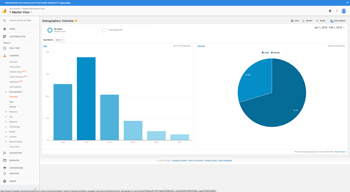

Compare Google Analytics with other popular tools in the same category.
I like the best about Google Analytics is its comprehensive reporting capabilities. It provides me with detailed insights into of my website it gives the report of visitor demographics, traffic sources, and user behavior. Its dashboard is user friendly and easy to use. The best part is I can integrate multiple website and track the report with just one google account. Easy to implement code in website.
I have been using this from past 3 years but still not able to explore all the fetures. I have not encountered with any issue till now.
Google Analytics has played a crucial role in solving problems in my business by providing actionable insights into my website's performance. It has helped me identify areas for improvement, such as pages with high bounce rates or poorly performing marketing campaigns. By analyzing the data provided by Google Analytics, I have been able to optimize my website's user experience, target the right audience, and refine my marketing strategies.
Google Analytics is primarily used to collect and analyze data about website traffic and user interactions. It provides valuable insights into how users find and navigate a website, which pages they visit, how long they stay, and much more.
It's worth noting that Google regularly updates and enhances Google Analytics
Google Analytics integration with other Google products, such as Google Ads, Google Search Console, and Google Tag Manager, provide us a comprehensive view of my brand online presence and marketing efforts.
All channels data at one place, close to accurate data
Nothing to dislike as of now, so far so good
All metrics can be seen at one place for various channels
Easy to use Very rich data Customizing conversions or reports is very helpful Rarely has downtime or issues Support team is good
Doesn't offer actionable insights (you have to analyze data yourself & make those calls) Support can sometimes not be available (free version has least amount of support)
See how users get to our site How people interact with our content See how many conversions are happening, when, and through what marketing channels See basic google optimize test results GA4 is especially easy to use, once you get the hang of it and offers more advanced features and tracking vs. Universal Analytics
It's the ease of use, especially when integrating the platform with other software such as Google Ads, SEO, and even Display programs to provide a succinct snapshot of multiple channels in one.
With the changeover to GA4, it will take a bit of time to re-learn where all the standard features are again as well as what and where the newer features are and what they can do.
Succint summary of data from multiple channels such as paid media (Google Ads), paid social (Facebook, Twitter, and Instagram), Email (MailChimp) in one platform so it is easy to view and report on.
The ease of use and implementation are what I like most
I think that integrating with some systems is a bit more difficult than it should be
It allows us to see some of our website analytics and other analytics

Google analytics breaks down key performance indicators to make analyzing your data easier. You can take a deep dive into page performance and see what's really working.
some of the titles are difficult to understand and it's not always the easiest to navigate around in. I sometimes find myself googling terms to understand what they mean.
Google Analytics is allowing us to understand where key traffic is being driven from and what efforts we're making to make that happen. it's easier to understand the fruit of our labor.

gives you the best analysis about the business products, revenue, leads.
Monthly and yearly report viewing can be more better
Best analysis of sales and revenue
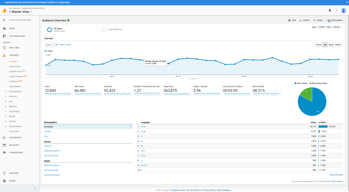
The detailed demographics which is provided by GA is very useful and we can funnel down our audience easily.
UI is slightly boring and the sync time and processing data time.
It helps me for analysing the path of audience and I can further improve my marketing stratergy.

Google Analytics offers various customisation options. I can create custom reports, set up filters to exclude specific traffic sources or IP addresses, create custom dimensions and metrics to track detailed data, and even integrate additional tools. This is the best thing about this tool.
Though this tool provides me with immense support and features, It is hard to learn Google Analytics. It can be complex and overwhelming for new users to understand and start with the tool.
I can integrate Google Analytics with other Google products, helping me gain more comprehensive insights into my online presence. Plus, many more aspects of this are benefiting me in different ways, like create custom dimensions and metrics to track specific data and even integrating additional tools and plugins for enhanced tracking and analysis
- Different types of data collected - Options to create various reports - Accuracy of data collected - Visualisation/Representation of the data
- User interface in GA4 is a little buggy - The ease of UI can be improved
It helps us understand how a user is landing on our website, which web pages are being discovered in the search and getting the most engagement and how those users are engaging/navigating within our website from there.
What I like most about Google Analytics is that it gives you a complete, live picture of web traffic, allowing you to drill deep into data from different portals.
What I'd like to see more in Google Analytics is the option to export data in formats that are easy to read and understand, such as a multi-page PDF or PPT document.
Google Analytics allows me a complete overview of the web traffic data across different websites, and most importantly the conversions of users that could become potential customers.
The depth of reporting is the advantage of GA
It's a little cumbersome, and some of the features are hard to find or buried.
It's solving the question of where our clicks/leads are coming from, who they are, traffic, etc.
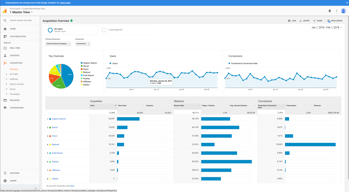
Channel grouping to separate soruces of traffic
Time of charging the pages with a large amount of data
It helps to separate the traffic sources in order to analize the different behaviour beetween for example from the social media like Meta or the Google Paid Search
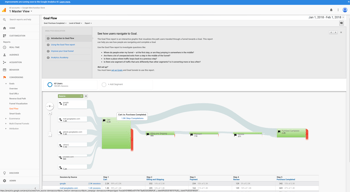
Understanding GA is almost like understanding Marketing. I love its page flow, where you can track how users flow between your website pages, its detail-rich rankings of popular website pages, and also its display of referral traffic, where it shows people visiting your website from 3rd-party sources.
Although it isn't even close to being a dealbreaker, an occasional gripe I have with GA is it sometimes doesn't match up well with website numbers. But this requires internal controls and close tracking to sort, so it isn't s major issue.
Helps us track how our content is performing by establishing clear KPIs we can target to improve our reach, engagement, and goal conversions. The feedback is instant, too, and clearly displays the traction we rake in every time we promote a piece with a campaign.
I like all the depth we can get from all of our traffic sources. I like the breakdown of mobile devices vs desktops and tablets. Mainly we can breakdown our performance at the campaign level from google Ads, Organic etc.
There is not much to dislike about GA in the dashboard. However, reporting is a different story. The information is too convoluted and there are very dew ways to standardize reporting out of the box.
We basically use Google Analytics to see our performance from all of our traffic sources. We can then determine if we need to work on Google Paid Ads (PPC) or work on our SEO.
GA-4 has most of my analytics all in one place. Very helpful for demographics and customers that visit my website.
GA-4 not all of the information is pulled. A little confusing at first with all of the data.
Helped me figure out the demographics and user information to help target my customers

I can have an analysis of numerous metrics related to my website traffic, such as: origin, age, date, and time and location
I believe that after migrating to the GA4 version, users need to understand the new logic of the tool
GA helps me discover the source of my leads and know where I should focus more attention for demand generation
With analytics, you can measure website performance and determine the scope for improvement.
Many tools provide website heatmaps and recordings, and in analytics is recordings not avaliable.
"It helps me measure the performance of my blog content.

We integrated Google Analytics in all website. Best part is Google Analytics have multiple options to integrate with website. Easiest way just copy it and paste it into the header file. It captures all the details that helps us to improve and increase the business insights. Its report dashboard interface is easy to use and interactive. I use it to increase our sales as per the trends and patterns given by the Google Analytics. The best part is I can easily ecport the data and can use it into Power Bi for Further research. Few features use frequently like Real time visitors, interactive dashboard, in and exit page, geographical data, device data and most visited website url all these help me to improve our services.
When I use Google Ads to promote our services, Google Analytics not able to gather information for low traffic keyword like which keyword is searched by the visitors on Google that helps them to lands on our website.
Google Analytics helps me to get the detailed report of the visitors. With the help of trends and patterns we easily improve our website and landing page like in which city our services are more popular, How much time a visitors spend on our website, which device they mostly use to visit. All these types of information helps us to improve our services according to the visitors behaviour that directly proportional to the higher sales.

Google analytics can easily measure my business activity and give better performance in the marketplace. I can work accordingly for marketing my business so that i can get more customers.
Few months ago only i started working in analytic so for now don't find any negative or dislike points but whenever i find it will definitely discuss with customer support team.
Previously we are not using any platform for market performance but after started working in google analytics we are getting market details easily for our content and about our products.
Accurate and reliable data. Data-Driven attribution, as well as ease of integration with Google ads. Most of all, it is pretty easy to use and set up compared to other analytics platforms.
The switch from Google Analytics to Google Analytics 360 has come with quite a bit of hiccups
It has helped to track data in its original form, helping us to get an accurate picture of where we stand regarding our efforts in advertising and generally growing our web presence
I like best the ability to create custom reports and track goals and events. It is so essential that we review reports daily within Google Analytics. Very intuitive.
There really isn't much to dislike. The one report I would like to see is user flow be improved. It would be so valuable if you could see each page a user visits while navigating your site.
The biggest benefit is the ability to gain insight into our website traffic sources. We are able to track the effectiveness of ad campaigns, social media campaigns, and much more.
The ability to see an overview of how a client is performing through the marketing efforts of a website
That the new ga4 system isn't great and a lot of the features from the previous generation have been lost
It is solving our data visualisation, we are able to see everything that is happening on a website
all filters, breakdown every detail, conversion tracking
They often change a lot and its not always convenient to keep up.
to know exactly what's going on on our websites and apps
It's so easy to use Google Analytics. It has every feature to track my users, like where they are from, all the pages they are visiting, and the live traffic.
Google's recent change, the new analytics called Google Analytics 4, is something I don't like. Due to the new UI, it's tough to use it. It would be great if they could continue supporting the old version.
I'm using Google Analytics to track my visitors. I haven't found any similar software as good as Google Analytics until now.

I really like the interface, the visual ease with which data is analyzed, allows us to have a general overview of the most profitable sales channels
I don't like the fact that it's always changing and it's quite difficult to keep up with new trends, namely google analytics 4
the purpose of google analytics is to discover the marjeting channels with the best roi for our online store

Google Analytics is top-line for website data tracking, bar none. After setting up a property, your website will send you valuable data that can be used to shape your business decisions. It's great to see what parts of our website are lagging in popularity, how many people are visiting the site (and when), and what applications are being filled out. When paired with Tag Manager, you can start tracking button presses, goals, and micro-conversions, providing granular details about your site activity. GA remains a potent tool after a bit of training, and because it's free, there are zero reasons for businesses not to use it.
Users must be careful when setting up a GA property because injecting the code snippet in the wrong place can result in missed or duplicated information. Using Tag Manager to inject the code for you is recommended, which in turn preserves your code stability. GA isn't an easy service to learn, and it will take you practice, patience, and many youtube videos to pull out the most vital information.
My company didn't know how much activity our website was getting. While a third-party agency initially "tracked" these details for us, I could not confirm or deny their claims. After launching our own GA property, I could not only see the raw data for myself (and where to improve) but could reliably discredit the third-party service and their inflated results.
The detail! Google analytics is so detailed, it can pull all of the analytics clients need.
It is a little difficult to learn at first, so there is a fairly big learning curve.
Pulling detailed analytics from paid ads!
Being able to track how content is doing, and finding out the demographics of my audience. It is also pretty fun to watch the live updates to see what pages are being visited now
There's a ton of information so it's kinda tricky to figure out how to find the reports that you need, so it is not a very intuitive process, but after taking some masterclasses on GA i have been able to use it better.
keeping track of not only what content is working better but also finding out which sources are bringing the traffic in so i can dedicate more time on the ones that are working