

Unclaimed: Are you working at Hubstaff?
Hubstaff Reviews: 4.3/5 — Solid Choice
Hubstaff is a project management software as well as a time tracking platform designed to oversee employee productivity and ensure transparency across team projects. Businesses are partial to Hubstaff’s time-tracking tools which are coupled with a budget and financial planning for projects while facilitating better team communication.

| Capabilities |
API
|
|---|---|
| Segment |
Small Business
Mid Market
Enterprise
|
| Deployment | Cloud / SaaS / Web-Based, Desktop Mac, Desktop Windows, Mobile Android, Mobile iPad, Mobile iPhone, On-Premise Linux |
| Training | Documentation |
| Languages | English |




Hubstaff charges $1.67 per seat for data retention and $2.50 per seat for additional screenshots — on all four plans, including the $25 Enterprise tier. Every other add-on eventually becomes “Included” as you climb; those two never do. So an Enterprise seat is $29.17 rather than $25, and a Starter seat with everything it can have runs to $16.66 against a $4.99 headline — more than three times the advertised price.
- What it is: A time tracking and workforce management platform with screenshots, GPS, payroll and scheduling.
- Best for: Distributed teams needing proof-of-work tracking alongside payments.
- Pricing: Starter $4.99, Grow $7.50, Team $10, Enterprise $25 per seat monthly on annual billing. Verified July 2026.
- The honest catch: A two-seat minimum on every published plan, and six separately priced add-ons.
What Is Hubstaff?
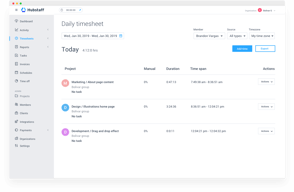
Hubstaff tracks time and activity for distributed teams: a multi-platform timer, timesheets and approvals, screenshots, idle-time detection, GPS locations, scheduling, and payroll. It holds G2 Leader status with more than 1,700 reviews.

The structure is four tiers plus a customisable add-on layer — Insights, Tasks, Data retention, More screenshots, Locations and Silent app — each priced per seat per month and each gated differently by tier.
A 14-day free trial runs with no credit card, backed by a 30-day money-back guarantee.
How Hubstaff Works
- Priced per seat, with a two-seat minimum on all published plans.
- Six add-ons, each priced per seat per month.
- Two add-ons are charged on every tier, Enterprise included.
- Locations is unavailable on the two cheapest plans at any price.
- Annual billing beats its own “2 months free” claim on Starter.
- Enterprise is annual-only.
Hubstaff Pricing
Captured from Hubstaff’s pricing page in July 2026 in US dollars, reading both billing toggles.
| Plan | Annual (per seat/mo) | Monthly | Saving | Minimum |
|---|---|---|---|---|
| Starter | $4.99 | $7 | 28.7% | 2 seats |
| Grow | $7.50 | $9 | 16.7% | 2 seats |
| Team | $10 | $12 | 16.7% | 2 seats |
| Enterprise | $25 | Annual only | — | — |
| Add-on | Starter | Grow | Team | Enterprise |
|---|---|---|---|---|
| Data retention | $1.67 | $1.67 | $1.67 | $1.67 |
| More screenshots | $2.50 | $2.50 | $2.50 | $2.50 |
| Insights | $2.50 | $2.50 | 3-month trial | Included |
| Tasks | $2.50 | Included | Included | Included |
| Silent app | $2.50 | $2.50 | $2.50 | Included |
| Locations | Not available | Not available | $3.33 | Included |

What actually decides your cost:
- Two add-ons never become included. Data retention at $1.67 and More screenshots at $2.50 are charged per seat on Starter, Grow, Team and Enterprise alike. Every other add-on resolves into the plan at some tier; these two do not, which means the $25 Enterprise plan is really $29.17 per seat if you want either.
- A fully-equipped Starter seat costs $16.66. Add Insights, Tasks, Data retention, More screenshots and Silent app to the $4.99 base and that is the total — 3.3 times the headline, and still without Locations, which Starter cannot buy at any price. Grow lands at almost exactly the same place, $16.67, because Tasks comes included there.
- Grow is the better buy once add-ons are in play. Starter at $4.99 plus five add-ons and Grow at $7.50 plus four cost within a cent of each other, and Grow brings advanced reporting and an integration. If you need more than the bare timer, the $2.51 gap closes itself.
- Locations is genuinely unavailable below Team. Not expensive, not gated behind a bundle — “Not available”. If GPS tracking is why you are evaluating Hubstaff, your entry price is the $10 Team plan plus $3.33, not $4.99.
- The annual discount beats its own advertising on Starter. The toggle says “2 months free”. On Grow and Team that is exactly right — $9 to $7.50 and $12 to $10, both precisely 16.7%. On Starter, $7 falls to $4.99, which is 28.7% — closer to three and a half months free than two. Hubstaff is under-claiming on its cheapest plan.
- Two seats is the floor. Every published plan states a two-seat minimum, so the real entry cost is $9.98 a month rather than $4.99. A sole trader cannot buy Hubstaff at the advertised rate.
Who Should Use Hubstaff
- Distributed teams needing proof of work. The clearest case — screenshots, activity levels and idle detection.
- Field teams. GPS locations from the Team plan, included on Enterprise.
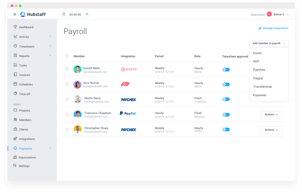
- Agencies paying contractors. Payments and scheduling arrive at Team.
- Small teams on a budget. Starter at $4.99 is genuinely cheap if you need only the timer.
It fits poorly for sole traders, given the two-seat minimum; for anyone needing GPS on a budget, since Locations requires Team; and for buyers comparing headline rates, because the add-on layer changes the answer substantially.
Honest Pros and Cons
Strengths
- $4.99 per seat for capable time tracking.
- The Starter annual discount is 28.7%, better than the “2 months free” advertised.
- Every add-on price is published per seat and per tier.
- A 14-day trial with no card, plus a 30-day money-back guarantee.
- G2 Leader with 1,700-plus reviews.
- Tasks included from Grow, rather than sold at every tier.
Limitations
- Data retention and More screenshots are charged on every tier, Enterprise included.
- A fully-equipped Starter seat is $16.66, 3.3× the headline.
- Locations is unavailable on Starter and Grow at any price.
- A two-seat minimum on all published plans.
- Enterprise is annual-only with no monthly option.
- Six separate add-ons to price before comparing.
Hubstaff Alternatives and How It Compares
- Toggl Track and Clockify are the simpler time trackers, both with generous free tiers.
- Harvest pairs time tracking with invoicing for professional services.
- Connecteam targets deskless and field teams with scheduling and communication.
- TimeCamp and Everhour focus on project time and budget tracking.
- ActivTrak and Teramind are the dedicated employee monitoring platforms.
For a broader survey, browse our time tracking directory.
The Verdict
Hubstaff is a capable and well-reviewed workforce tracking platform, and at $4.99 per seat on annual billing the entry price is genuinely low for what the timer does. It also deserves credit for publishing every add-on price openly, per seat and per tier, rather than hiding the modular layer behind a sales call — and for an annual discount on Starter that is 28.7%, comfortably better than the “2 months free” it advertises. On Grow and Team the two-months claim is exactly right, at 16.7% each.
Where care is needed is the add-on layer, because it changes the comparison substantially. A Starter seat with everything Starter can have costs $16.66 — 3.3 times the headline — and even then cannot get GPS Locations, which is marked “Not available” below the Team plan. Grow with its four applicable add-ons lands at $16.67, within a cent, while including Tasks and adding reporting and an integration. So if you need more than a bare timer, the apparent $2.51 gap between Starter and Grow disappears entirely, and Grow is the better plan.
The detail worth knowing before any negotiation is at the top of the range. Data retention at $1.67 and More screenshots at $2.50 are charged per seat on every single tier, including Enterprise at $25. Insights, Tasks, Silent app and Locations all resolve into “Included” by the time you reach Enterprise; those two never do. A company paying $25 a seat and expecting a complete product will find its actual rate is $29.17. That is not a large sum per head, but it is an unusual thing to meter on a top tier, and it is worth raising explicitly when a quote is being drawn up.
FAQ
How much does Hubstaff cost?
Captured in July 2026 in US dollars. On annual billing: Starter $4.99 per seat per month, Grow $7.50, Team $10, and Enterprise $25. On monthly billing, Starter is $7, Grow $9 and Team $12; Enterprise is annual only. Every published plan carries a two-seat minimum, so the real entry cost is $9.98 a month. Six add-ons are priced separately per seat.
What does Hubstaff charge extra for?
Six add-ons, each per seat per month: Insights $2.50, Tasks $2.50, Data retention $1.67, More screenshots $2.50, Locations $3.33, and Silent app $2.50. Most become included at higher tiers, but Data retention and More screenshots are charged on all four plans including Enterprise. Locations is not available at all on Starter or Grow.
Is Hubstaff’s Starter plan enough?
Only for basic tracking. At $4.99 it covers the timer, timesheets and core reporting, but Tasks, Insights, Data retention, More screenshots and Silent app are all paid add-ons, and GPS Locations cannot be purchased at all. Adding everything available takes a Starter seat to $16.66 — at which point Grow, at $16.67 fully equipped, is the better plan because it includes Tasks and adds reporting.
Does Hubstaff really give two months free on annual billing?
On Grow and Team, exactly — $9 falls to $7.50 and $12 to $10, both 16.7%. On Starter the discount is better than advertised: $7 falls to $4.99, a saving of 28.7%, equivalent to roughly three and a half months free rather than two. Enterprise is billed annually only, with no monthly rate to compare against.
Does Hubstaff have a minimum number of users?
Yes, two seats on Starter, Grow and Team — stated on each plan card. That makes the cheapest possible subscription $9.98 per month on annual billing rather than $4.99, and means a sole trader cannot buy the product at the advertised per-seat rate. Enterprise pricing is quoted per seat with no stated minimum on the page.

Compare Hubstaff with other popular tools in the same category.
The time tracked on each task is very satisfying to watch.
The time I spent doing overtime is not reflected in the minimum hours of my shift and thus making me abandoned my shift.
Time management
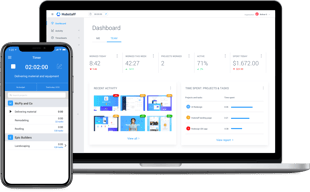
This platform allows us to keep track of time through desktop, web and mobile applications that are super simple and easy to use; Hubstaff allows us to carry out various jobs through a single control panel, in addition to this, it integrates with various applications so that your company can function more efficiently. You manage to keep track of how work is done in real time, track location, identify obstacles and find a solution to move forward effectively.
We really haven't had a problem with Hubstaff. It is an excellent application, very easy to use and rich in features. It has brought us huge improvements in all areas and a satisfying product to use. Something they need to improve is that sometimes time is temporarily wasted, which creates uncertainty for contractors.
Hubstaff makes it very easy to manage team or empowered staff. The interaction of the screens allows us to keep abreast of what each developer is working on, whether they are in or out of the city. The level of activity has helped us monitor how much each developer is investing and we can give an immediate response to any problem

Since I have implemented this tool in my organization, I am at ease to easily judge the work progress of my particular team member in this it has become easy for me to evaluate them and thus I can give read them in addition it has becomes easy for my entire team to manage numerous projects at one time because we always have the transparent idea about the urgency of the certain project.
There is nothing which I do not like about this tool. It is very effective and profit generation software but one thing I want is that its interface looks bulky and there should be some graphical representation for the monthly and annual analysis, as it gives a sudden glimpse of the progress.
This is the most user friendly application and it has become my daily need too as I am capable of organizing my work in an effective way. This software has helped to take and insight of the work progress and it always keeps me up to date by provide effective reporting about the utility of the time.
It is a platform that allows you to manage billing, create reports through a complete and unique dashboard. You will be able to visualize in real time how the work is carried out and track the location with GPS and geo-delimitation. It is available for Windows, Mac, Linux and on mobile devices, iOS and Android. It is composed of a variety of integrations such as Asana, Paypal, Basecamp among others. It is easy to use, and its interface is clean and organized for optimal user performance and management.
We are happy because our experience with hubstaff has been satisfactory and we obtain the results that we were looking for for our company, however after the updates it freezes or rents on some occasions, it makes us lose a little time, this does not mean which is a bad platform, but it could be much better.
We use Hubstaff to track the time of all the work team that we have distributed in different time zones and cities, it is easy to use and the work time tracking is accurate, in fact if you are not connected to the internet, as soon as the connection is reestablished, it sends you the data. It also helps us improve the billing we do to customers, allows the entire support team to point out any concern that may arise with the teams they manage. It also provides a controlled method to continue scaling businesses that we run in different countries as if we were in a single space, in general it is very complete. The results are truly gratifying.

About the web interface I really like it, the layout it's very cool and with great animations
It takes too long in some reports but its fine
I use Hubstaff to register time to the tasks of some projects in readmine and me and my team are happy with this solution.

Its ease of use and functionality. The app is very comprehensive with the screenshot of activities
custom cannot select 1 month, only goes by week
none, we are just using it for productivity tracking

I most appreciate that I can use hourly contracts as if they were fixed price contracts - my contractors complete their work, and then bill for the allotted hours.
When I mistakenly rejected a contractor timesheet, it was hard to undo the mistake. Hubstaff support was responsive and helped me out.
For long-term projects, Hubstaff's rates are better than Upwork, which imposes pretty severe penalties on contractors who take small jobs. So I feel the payment is fairer.
I really like the capabilities of the platform to allow to have a descentralized team of freelancers or even our ordinary team members doing home office. Time tracking and payment reports are great. When I had to request customer service it was efficient and prompt.
Activity reports are not very easy to understand. Pricing seems fair for a company that gets paid in US Dollars but for a latinamerican company such as mine the monthly cost is very significant (for you to know, right now we pay hubstaff approximately the 10% of what our employees earn and also the 10% of our office rent monthly cost). We are still happy to pay hubstaff for the value that it provides but if we keep growing our team a point will be reached in which we will begin to look for options that are less costly.
Having people working on homeoffice or as freelancers is difficult to measure without a tool like hubstaff. I have recieved feedback from my employees that use Hubstaff that it is "fair and just" so I dont have to have this conversation with them about how many hours are they going to work or if I perceive that they didnt worked as much as I thought they would. Hubstaff allows me to forget that part of managing our team.

I like there are many ways to enter time and the integration to TeamworkPM keeps everyone organized.
I still have to hunt a bit for the reporting I need. Support has been very helpful letting me know what is possible. Also looking for more build out in the time off request/reporting.
We are measuring employee load, monthly project costing and tracking time off.
I was asked to use this when I worked on a remote project. It was accurate, had a reasonable user interface, and was available on desktop and mobile.
Took a while to realize it takes random screenshots of all my activity. I should haven't knowing this, but it took me a bit. I then restricted my work outside my project to either my phone or other devices. The timeouts are also frustrating; I was on a webinar once and it timed me out after 10 or so minutes. I told my employer, who said "well move the mouse or something." Well yes, but give me the 10 mins or so back. Another problem was that the UI can be frustrating. I would click on a project, then start, and the timer wouldn't start; one time I lost 90 minutes when I expected the timer to be running. It was not. Was not pleased.
As an employee, I guess timing project work times is helpful. And keeping clients on their toes by not going off track to other projects.
I like how simple it is to monitor employees' work.
I think the UI can be improved for the employee tracker.
Hubstaff has allowed us to improve our employees' productivity.
the ease of use and set up. It is great for our company.
I don't have anything specific to report that we dislike at this time.
We have a remote employee that will be on leave for a short time but working from home. It has allowed us to manage the time and tasks better.
What I like best and to know that for this tool I can trust that my collaborators are working without traps.
I think part of the filters a bit tricky.
Hubstaff solved all my problems with my virtual collaborators.

Good remote freelancer management with time reporting and invoicing
Haven't spotted anything major yet - sometimes it is difficult to find the latest invoice to pay.
Automated time tracking improves accuracy of time reports and staff invoices
I love that I am able to see screenshots of my employee's computer. My employee works in a different country so it is very helpful to see what project they are on.
The support team isn't very helpful when it comes to technical difficulties. My employee ended up fixing the issue on his own because the support team wasn't really providing any solutions.
Hubstaff has been a big help in tracking my employee's time as well as what they are doing on any given workday. My employee is a graphic designer, so it is helpful to see their screen so I can jump in and correct something if they are headed in the wrong direction.
It has everything we needed to run our business.
The software is great but sometimes their site is a little slow and takes sometime to load screenshots.
Employee monitoring
I like that he has the ability to keep track of the work of the employees very easily. This tool allows us to know which employees are working efficiently and who does not, the wide variety of configuration options allows this tool to adapt perfectly to what one wants.
The only thing I do not like about this tool is the Android app, it does not work with the same effectiveness of the computer, because it has some restricted functions, for example, productivity metrics and screenshots, that limits a lot the usefulness of the app and I think that this really should be improved.
We have solved the problem we had to bill our clients in the projects carried out according to the time used. we have also improved the management of employees' working time, thanks to the ability to track this tool's time to see what our employees do, this also helps to save time and money.
client/projects/reporting integration.
the client software, it could be more modern.
Remote management of employees.

I appreciate the wide range of features given the reasonable price. Makes keeping track of my employee easy and reliable
I wish payments could be easily connected and automatically paid with paypal.
Keeping accurate count of employee hours and holding them accountable to remaining active.
It's dead simple to start tracking time on the day to day basis (just one click!) and the idling counter helps me not accidentally stay clocked in during lunch. The UI for the desktop viewer makes it very easy to see how many hours I've worked this week, which I find very helpful.
I don't love having screenshots taken, or not being able to add my own items to the to do list (admin has to do that.). Sometimes the browser version can be strange in the way you have to click through to change tasks, like how you have to stop tracking entirely. They feel quite different in use.
Keeping track of my time. At a previous job we did it manually, and I would often forget to-- this way, I'm making sure I'm tracking all of my time.
Love that Hubstaff integrates so well With other tools and allows us to have scope for our business developing. Easy to use and has helped our team who all work remotely.
Took a bit of time to learn - slightly clunky interface.
We all work remotely and were struggling to track time but also allocate tasks which needed doing. We also had issues with ensuring staff were claiming for the work they had done at our HQ when they aren’t there.
Simplicity of deployment and help desk is alwasy online (if not ASAP)
Licencing is not corect, upgrading from 5-10 it was vaste off money, for small companys 1+ licence is more preferable
Home Office
It gives business owner flexibility and a tool to manage your team all in one place.
Cant' pay workers directly through their system. Everything is handled through third party companies. Also setting up everything does take a bit.
Ability to have workers anywhere in the world, keep time tracking on project and to become more effective as a company
We needed some outside help but didn't want to bring someone on full time. This service allowed us to find someone for one-off work with ease.
The reporting is a little basic. It could be expanded to include more features if we were to scale larger with it.
We've been able to outsource lower-end tasks that save us on paying higher cost contractors for basic work. As a small company, everyone wears multiple hats. This allows us to be more cost efficient and focus talent where it's best utilized.
I like the wide variety of tracking features included that not only let employee register work time, but allow us to actually see activity such as screenshots and location trackers. The overall data we receive from Hubstaff gives us great insight into the efficiency of employees and whole departments. The software itself is easy to work with and has many visual features that are great for reports and presentations.
To certain employees, tracking software like Hubstaff can be a hindrance to the quality of work they provide. Some may be reluctant to use it or find ways to unfairly manipulate the system to their advantage.
We use Hubstaff as a means for tracking employee work time and activity. We can link the system with computers and devices to check in unobtrusively with employees to monitor their work activity and to keep everyone more accountable. We're also able to provide documented data that can be used to refine our workflows and other productivity issues.
I like the convenience of my remote employees being able to click when they are "on the clock". It is quick and easy for them. I also like the multiple screenshots each hour that automatically populate.
So far not much I dislike! It is easy to use and solves the problems I was having.
Employee accountability, employee metrics, and ease of keeping results front of mind.
I find it very useful for monitoring what my team is actually using their time for. Reports are convenient, and the screenshot feature is great.
Sometimes it's hard to see why reports don't tie into each other. There is no granularity on the management role for a timer.
I'm able to make concrete decisions about the profitability of given jobs,
I like that Hubstaff because it's really intuitive and easy-to-use.
I had a recurring problem of not being able to shut down the app. Although I haven't come across this issue lately. But it's been very annoying.
I'm using Hubstaff to be more organised.