

Unclaimed: Are you working at Kit?
Kit Reviews: 4.4/5 — Solid Choice
Kit's (formerly ConvertKit) popularity among bloggers and content creators is credited to the platform’s ability to remove the complications behind email marketing. The software provides a seamless experience that ensures they can focus on creating content that their audience will appreciate. Kit’s interface is simple and comes equipped with simple design forms and landing pages that truly convert.

| Capabilities |
API
|
|---|---|
| Segment |
Small Business
Mid Market
|
| Deployment | Cloud / SaaS / Web-Based |
| Support | 24/7 (Live rep), Chat, Email/Help Desk, FAQs/Forum, Knowledge Base, Phone Support |
| Training | Documentation |
| Languages | English |
Kit Pros and Cons
- Reliable deliverability
- Interface is simple and easy to use
- Broadcast email functionality is seamless and convenien
- A choice of 50+ templates and quality themes
- Handy additional elements like a countdown timer and past edition feed
- Lacks integration with ecommerce platforms
- Not ideal for multiple clients
- Solely specializing in email means that you’ll need heavier integration all round
- Clunky builder
- Lacks spam testing

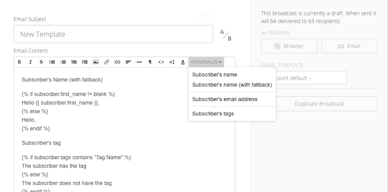
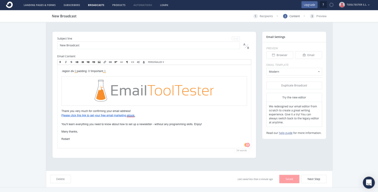
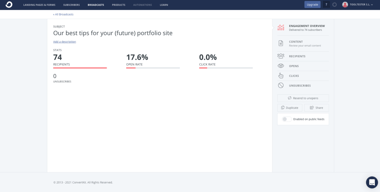
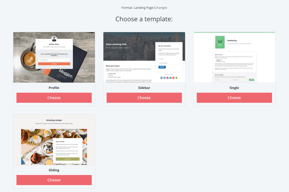






Kit, the platform formerly called ConvertKit, has the most generous free plan in email marketing: 10,000 subscribers, unlimited broadcasts, landing pages, and the ability to sell digital products, for nothing. In a year when MailerLite cut its free tier to 250 subscribers, that is a striking position. The trade-offs are a rebrand that has confused its own audience and paid pricing that is expensive relative to general-purpose email tools.
- What it is: An email marketing platform built specifically for creators, with newsletters, automations, landing pages, and digital product sales.
- Best for: Newsletter writers, course creators, and solo founders building an audience and selling to it directly.
- Pricing: Free to 10,000 subscribers. Creator $33 and Pro $66 per month at 1,000 subscribers, cheaper billed yearly. Verified on Kit’s pricing page in July 2026.
- The honest catch: The free plan allows only one basic automation, and automation is the reason most people eventually pay. Expect to reach that wall well before the subscriber ceiling.
What Is Kit?

Kit launched in 2013 as ConvertKit, built by Nathan Barry for bloggers and course creators who found Mailchimp’s list-based model awkward. Its subscriber-centric approach, where one person can hold many tags rather than living on multiple lists, suited creators better and became the platform’s identity.
In October 2024 the company rebranded from ConvertKit to Kit and simultaneously expanded the free plan to 10,000 subscribers. Both changes were consequential. The free tier is now among the most generous in the category, and the name change created lasting search friction, since a decade of reviews, tutorials, and recommendations still say ConvertKit. If you are researching this product you will encounter both names constantly, and they are the same thing.
The independent rating is solid: 4.6 out of 5 on Capterra across 239 reviews, with an average near 4.5 across Capterra, G2, and GetApp. Reviewers consistently praise the interface and automation builder.
How Kit Works
- Subscriber-centric data model. One subscriber record with tags and segments rather than duplicated list entries. This is the original differentiator and still the cleanest way to model an audience that engages with several things.
- Visual Automations. A visual builder for sequences and branching logic. The free plan includes one basic automation; paid plans make them unlimited.
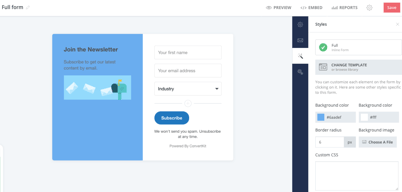
- Landing pages and forms. Unlimited on every plan including free, which is unusual and genuinely useful for list building.
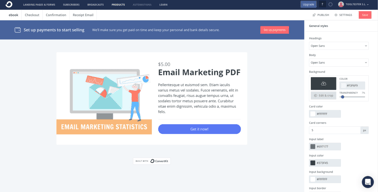
- Commerce. Sell digital products and paid subscriptions natively, on the free plan too. For creators this removes the need for a separate checkout tool.
- Kit MCP. Model Context Protocol support on paid plans, allowing AI assistants to interact with your Kit account. Very new, and a signal of where creator tooling is heading.
- Deliverability tooling. Subscriber Signals, engagement analytics, and deliverability reporting on Pro.
Kit Pricing
Pricing scales with subscriber count, and the free tier is the headline. Figures verified in USD on Kit’s pricing page in July 2026, at 1,000 subscribers.

| Plan | At 1,000 subscribers | Key features |
|---|---|---|
| Newsletter (Free) | $0 | Up to 10,000 subscribers, 1 basic Visual Automation, unlimited landing pages and forms, unlimited broadcasts, tagging and segmentation, sell digital products and subscriptions |
| Creator | $33/mo, or $390/year | Unlimited Visual Automations, unlimited email sequences, Kit MCP, A/B test subject lines, subscriber polls |
| Pro | $66/mo, or $790/year | Subscriber Signals, engagement analytics, unlimited users, insights dashboard, deliverability reporting |
What matters when choosing:
- The free plan is genuinely exceptional, with one deliberate limit. 10,000 subscribers, unlimited sending, unlimited landing pages, and native product sales, all free. But you get one basic automation, and automated sequences are precisely why most creators upgrade. That is a well-designed trade rather than a trick, and it tells you where the wall is.
- Paid pricing is subscriber-scaled. $33 and $66 apply at 1,000 subscribers. Move the slider to your real list size before comparing against anything.
- Annual billing saves $78 to $158 per year. Roughly 20%, paid upfront.
- Kit is expensive against general-purpose tools. At 1,000 subscribers, MailerLite’s comparable tier is around $10.80 and Kit’s is $33. You are paying for creator-specific commerce and the subscriber model, and whether that is worth triple depends on whether you sell to your list.
- Migration is free. Kit will move you from a competitor at no charge, which lowers the cost of switching.
A 14-day free trial covers the paid plans, though with a free tier this generous most people should simply start there.
Who Should Use Kit
- Newsletter writers and creators. The intended audience and the clearest fit. Tagging, sequences, and native product sales match how creators actually work.
- Anyone selling digital products to a list. Commerce is built in, including on the free plan, which removes a separate tool and its fees.
- Lists under 10,000 with simple automation needs. The free plan is close to unbeatable here, and it is a legitimate long-term home rather than a trial.
- People leaving Mailchimp. The subscriber model is cleaner, migration is free, and it is the most common switch in this category.
It fits less well for ecommerce stores, where Omnisend’s abandoned cart and product-feed tooling is purpose-built, for teams wanting sophisticated behavioural automation, where ActiveCampaign is deeper, and for cost-sensitive general business email, where MailerLite delivers comparable sending at a third of the price.
Honest Pros and Cons
Strengths
- The most generous free plan in the category. 10,000 subscribers with unlimited sending, pages, and product sales. Notably counter-cyclical in a year when competitors cut their free tiers.
- A genuinely better data model for creators. Tags and segments rather than duplicated lists, which avoids paying twice for the same person.
- Native commerce. Digital products and paid subscriptions without a separate checkout, available even on free.
- Clean, well-liked interface. 4.6 on Capterra with the interface and automation builder most often praised.
- Free migration. Removes the main friction in switching.
- Kit MCP. Early support for AI assistant access to your account, which few competitors offer yet.
Limitations
- One automation on the free plan. The deliberate constraint, and the reason most people upgrade. Know it before you build a workflow around the free tier.
- Expensive against general-purpose alternatives. Roughly triple MailerLite at comparable subscriber counts.
- The rebrand causes confusion. A decade of content still says ConvertKit, which makes research harder and, as reviewers note, creates some trust friction.
- Weak for ecommerce. No meaningful product-feed or abandoned-cart tooling compared with commerce-focused platforms.
- Automation depth is mid-tier. Fine for creator sequences, well behind ActiveCampaign for complex behavioural logic.
- A modest review base. 239 Capterra reviews is a fraction of what the largest platforms carry.
Kit Alternatives and How It Compares
- MailerLite is considerably cheaper with a better visual editor, and its free plan was cut to 250 subscribers in June 2026, which makes Kit’s look remarkable by comparison.
- Omnisend is the ecommerce pick, with commerce automation Kit does not attempt.
- ActiveCampaign is substantially stronger on automation logic and more expensive.
- GetResponse covers a broader marketing surface including webinars and funnels.
- Beehiiv and Substack compete directly for newsletter writers, with Substack taking a revenue share and beehiiv focused on growth and monetization tooling.
For a broader survey see our guide to the best email marketing software.
The Verdict
Kit is the strongest free offer in email marketing right now, and that is not a small claim. Ten thousand subscribers, unlimited sending, unlimited landing pages, and the ability to sell digital products, at no cost, is a serious product rather than a demo. For a creator building an audience, starting anywhere else in 2026 requires a specific reason.
Understand the shape of the limit, though. One basic automation is the constraint, and automated sequences are the thing creators reach for once a list starts working. That is where the upgrade decision arrives, usually well before ten thousand subscribers, and Creator at $33 per 1,000 subscribers is not cheap next to general-purpose tools at a third the price. What you are buying is the creator-specific combination: the subscriber model, native commerce, and sequences designed around how creators sell.
If you sell to your list, that combination justifies the premium comfortably. If you send a newsletter and monetize elsewhere, MailerLite will do the sending for much less. And whichever way you go, remember that Kit and ConvertKit are the same product, because most of the research you find will still use the old name.
FAQ
Is Kit the same as ConvertKit?
Yes. ConvertKit rebranded to Kit in October 2024. It is the same company and product, and most existing reviews, tutorials, and course recommendations still use the ConvertKit name. The rebrand coincided with the free plan expanding to 10,000 subscribers.
Is Kit’s free plan really free for 10,000 subscribers?
Yes, with one significant limit. The free Newsletter plan supports up to 10,000 subscribers with unlimited email broadcasts, unlimited landing pages and forms, audience tagging and segmentation, and the ability to sell digital products and subscriptions. What it restricts is automation: you get one basic Visual Automation. Since automated sequences are why most creators upgrade, that is where the free tier ends in practice.
How much does Kit cost in 2026?
At 1,000 subscribers, Creator is $33 per month or $390 billed yearly, and Pro is $66 per month or $790 billed yearly. Pricing scales with subscriber count, so set the slider to your real list size before comparing. Annual billing saves roughly $78 to $158 per year, and migration from another platform is free.
Is Kit worth it compared to MailerLite?
It depends on whether you sell to your list. Kit costs around three times more at comparable subscriber counts, and in exchange offers native digital product and subscription selling, a subscriber-centric data model, and creator-focused sequences. If you monetize your audience directly, that pays for itself. If you only send newsletters, MailerLite is markedly better value.
What is Kit best for?
Creators, newsletter writers, and course sellers who want to grow an audience and sell to it from one platform, without running a separate checkout. Its free plan makes it the natural starting point for anyone under 10,000 subscribers with straightforward automation needs.

Compare Kit with other popular tools in the same category.

I like that the first 1000 subs are free.
All is good actually. I don't have anything that the tool doesn't do at that point.
To send emails to my subscribers.
I like that I am able to control and edit my email templates to be more custom to my needs.
I dislike how plain the templates can be if you do not know how to navigate the platform fully.
ConvertKit makes it easy for me to have all my business automations in one place including a landing page and products. The benefits is that everything is in a centralized location.
It's easy to use and quite intuitive. You don't need a lot of technical experience to create a sharp looking landing page. It's much simple to use than mailchimp, for example.
I've had a problem verifying my email address. I created a info@gmail account specially because convertkit recommended it and it won't send the verification message. Can't find any help in the FAQs so for now my problem is with out a solution.
It has solved my problem of square space charging to send email campaigns. It's enabled me to create a landing page with a freebie for signing up. No financial benefits yet but expect to see them in the future
I love the ease of use and plug and play templates. I can create a landing page in literally 10 minutes or less.
It's difficult to connect a custom domain because they usually don't authenticate.
I'm solving my email marketing problem - it's the easiest solution that I've used on the market so far. I am able to convert customers and see high level insights quickly.
I love that it's super simple to use, set up and get going on day one. I've tried a lot of email companies and the ability to easily create a landing page that's already connected to your email list is fantastic. I love a lot of the new features they're adding to be more content creator-focused as well. That's been super helpful!
I've used a lot email providers and I honestly can't find any issues with the service. I think they work very hard to keep making it better and it shows in the new features they release.
The biggest thing was always landing pages. Having to previously link a bunch of tools together to make sure all these various programs communicated so when someone completed an opt-in action, it registered with the email service provider was huge for me. At first I didn't have a website but I still wanted an email list and ConvertKit made that easy to do.
I love the fact that it's built with a simple interface whose main focus is on growing your audience, and that it's easy to integrate with other marketing platforms.
It does miss some of the freedom to code freely your own modules and email logic (in comparison to Zoho) and the other (minor) issue is that if I need to change the text of a broadcast email after I scheduled it, it defaults to "send now," forcing me to schedule it again. This can be particularly dangerous if scheduling an email that is timely with something that hasn't happened yet (e.g., asking a client or potential client what they thought about something they haven't yet received).
My favorite thing about it is how complete it is for an app that is free for up to 1,000 contacts. I also love the fact that it comes with an extensive library of modules to capture leads that can be easily incorporated to any website without needing to spend time searching for and setting up plugins.

Once I signed up it was easy to get started using ConvertKit. They have plenty of templates to choose from. Very user friendly.
Overall it seems like a solid software. Once my numbers grow I'm interested to see if it will hold up.
I'm able to get information out to potential buyers quickly with their templates. They're very eye catching too.

I think their UI is the best. Probably the next best thing is their email server. Open rates & click rates are usually high. I don't know how but it is what it is.
Quite expensive for beginner creators who want to experience Convertkit
Benefits were popup forms and embedded forms. They look great.
Easy to use, beautiful templates, great for those that aren't tech savvy. It's not a huge learning curve which is a major plus.
Would always love if the price was a bit less, but overall cannot find much to complain about.
Email marketing, capturing leads, creating beautiful emails quickly and easily.

Interface User experience Ease of creation of emails Best automation solutions
Not many customize options to add design.
I am using this for email marketing.
The most helpful features are the marketing products like landing page builders and forms. There are many helpful and useful templates to choose from. Plus they will help you have a site page with your own url for easy linking.
The downside is perhaps pricing canbe a bit high and the mobile landing page and form builder is sometimes glitchy. My experience with this builder onmt android smart phone has been frustrating, but on laptop it is easier than most other builders.
Convertkit has solved my issue with having visitors bIt those online visitors were not signing up nor buying. Convertkit helped turn traffic to leads and to customers. This just by using their free services and products. After becoming a paid member I have increased conversions and sales.

I love that ConvertKit is not just another email marketing software. You can create landing pages, sell courses/ebooks/newsletters, etc. through the platform. It really is becoming a great one-stop solution in being able to tend to your various marketing needs.
Can't say any real dislikes because I have really enjoyed using the software to date.
I wanted an email software that was affordable, effective, efficient, and user-friendly. ConvertKit checked all of those boxes and then some!
Ease of access and great response rate from the team
The sequence setup takes a little getting used to and could be a little more user-friendly in terms of creating lists, etc. before setting up the sequence
It's helping not only me better understand marketing funnels but also explain /show them to our clients

ConvertKit focuses on creating. This tools makes it easy to start collecting your first leads and get those emails out to build momentum. If you want to build a following through email marketing, then this is a great tool to get started. It's easy to use, offers more than enough features that marketers and businesses will want (even if you don't need them yet when you're just starting out). I like the user interface and how you can get pretty much everything done with just a few clicks. No unnecessary steps that can confuse you, this is a straight-forward email marketing tool that's been getting a lot of updates and improvements.
Pricing is a little higher than some other tools. At least it looks like that on the surface. But you're actually NOT paying for duplicate subscribers (one email contact is only counted once even if the email subscribes to different lists/email campaigns). Other email marketing tools count the same email address multiple times. ConvertKit doesn't. One unique email address only counts as one contact, even when it's added to various email lists.
Convertkit offers simple email marketing with good deliverability. It's a modern and reliable tool for sending out email newsletters. I use it for automated email series and email broadcasts to my customers and blog subscribers. It does a good job.

I love so many things about ConvertKit, and I'm happy I made the switch. The thing I like best is how easy it is to set up automations. I have several automations setu p for my newsletter subscribers, including adding members to my email lists, a welcome series, and custom RSS feeds based on how people want to receive emails (for every post, daily, or weekly). ConvertKit makes it easy. I like the look of ConvertKit emails and forms and the emphasis on text and not using too many images also.
There was a small learning curve when I started using ConvertKit, for example learning how to use tags. But ConvertKit has lots of helpful tips and guidance in their knowledge base. Twice I had to ask for help in chat and someone responded to me within a few minutes. I needed help figuring out how to set up multiple choice checkboxes for readers so they could select which newsletters they wanted to subscribe to. The employees who responded in the chat directed me to the instructions and I was able to set this feature up easily after reading the links they sent me.
I run a local news website. My readers want choices for receiving emails. The RSS automation features offered with ConvertKit helped me serve those readers. The deliverability is excellent too, and now that I'm launching a freemium newsletter, I can use ConvertKit to charge premium subscribers. ConvertKit seems to care about user success and often offers courses and helpful emails that include tips on how to improve what you are doing.

Great customer service, support, conferences, webinars and community.
Some coding involved now and then to customize templates, but otherwise, it's absolutely perfect. Seriously.
Rethinking email marketing as a way of cultivating relationships with clients in a more targeted, helpful way (to the clients).
When we did email marketing, especially for blog content and welcome emails to all new investors, convertkit was super helpful in creating automations and workflows for emails. It's super easy and intuitive and I believe it is priced very well.
The only thing I didn't like was that it didn't have as many integrations to crms or other tools like mailchimp might.
Automations for welcome emails and tracking open rates and such is super useful.

I love that you can create landing pages, tags, and the ease-of-use on the client side as well. For example rather than creating multiple list and paying for the same people in duplicate lists they can just get a tag added. You can also send out an email with a tag, for a launch, for example. If they want to opt in to hear about that launch all they have to do is click the button without re-filling out a form
The price is more for those just getting started, but once you grow your list the price is actually cheaper. The landing pages are not as good as lead pages. I wish I could cancel my lead pages membership and just use ConvertKit but they're not at the same level.
Having to have multiple lists in my email provider! Plus being able to automate my email marketing and drip content out to course subscribers

I love the sequences and automations. Being able to easily move people between sequences based on purchases or completing other sequences is huge - I can move people through various email courses, sales funnels, etc... all automatically. I also LOVE that you don't get duplicate subscribers, if one person signs up for 3 different list segments, they still count as one subscriber, whereas other providers would give you 3 different email subscribers.
Small learning curve, and I don't find visual automations all that useful, and it's a bit pricey. But well worth it in my opinion.
Auto-delivery of products and courses when people opt-in to stuff or purchase, I can easily see who's active and who's not, segment people based on where they opted in or what links they've clicked - it makes it very easy to manage both email subscribers, and paying customers depending on the product.

I really enjoyed the webinars given about the platform and community. Very helpful in the use of their products! They have provided great info and strategies to build your email list.
Nothing, they have been great! The customer service was amazing and the interface was easy to use.
Building an email list and connecting with people.
Convertkit makes it SO easy to segment our list and send emails to the exact audience we want. We switched to them for this reason and couldn't be more pleased. Tagging, sequences, automations, visual funnel builder...just love them.
Once during a launch, they had some tech glitches that was hodling up emails from going out, so that was very irritating. Thankfully we got a hold of them and they manually pushed the email out.
Segmenting our contacts, nurturing them through sequences that are easy to automate, and making sales.

Makes sending automatons so easy. Also makes adding people to your list easy with a simple form.
Took some time getting used to. Make sure to watch videos.
emailing marketing and automation.
I like that you can track the clients that click a link in your email and that you can easily resend or duplicate email content.
I do not like that you can't personalize the emails with colour backgrounds, different spacing, fonts, etc. If you want to make something unique you need to know how to use HTML but most of the time it doesn't work.
We are able to easily send out mass emails to clients. A huge benefit it sending mass emails out to potential new clients whereas a few years ago we had to emails each client directly and it took hours.
It’s EASY to use for such a complex and powerful marketing program.
I wish i could export old broadcasts more easily than copying and pasting individually, and see the relative reach/effectiveness at a glance.
Connecting with audience regularly. I need to make sure I’m getting through to my audience so they’ll connect with me, and vice verse.
I love Convertkit for scheduling and keeping track of subscribers.
I don't like the mobile use. It's a much better program to use on a desktop.
Planning emails in advance is something that I didn't realize I needed before Convertkit.
I am a fan of convertkit and that it has advanced segmenting and automating features but is still easy to figure out.
The visual automation tool had glitches when it was first introduced.
I can segment emails and personalize them based on previous customer behavior
What I like best about ConvertKit is it’s automation. It’s self-intuitive and user-friendly.
I switched from Infusionsoft and their customer service was second to none. I wish ConvertKit would up their game to answer questions quicker as I usually don’t have the time to wait around for technical questions.
ConvertKit has allowed me to stay in touch with my email list. It gives me open rates, click rates, and other pertinent information I need to make sure my emails are performing. I haven’t used this feature, but I like that I can split test subject lines.
All the features that you want to have as a blogger/marketer are right where they are supposed to be. An easy to use interface, great help system and pre made forms. For beginner and advanced businesses this is exactly what you need.
It is hard to list something to dislike, as convertkit pretty much has all of the features you want in mailingsoftware. If anything, the addition of extra templates would be nice.
Reaching my audience at the right time. Delivering great emails with no tech issues that take time. Setting up an email sequence that welcomes new customers to my services really takes of the load of my workflow. It is a one time setup, and it will work forever.