

Unclaimed: Are you working at KWFinder?
KWFinder Reviews: 4.4/5 — Solid Choice
KWFinder is one of the top keyword research tools that marketers use and are preferred thanks to its powerful search features, seamless interface, and intuitive user-friendly design. It’s a great tool for beginner bloggers or veteran webmasters to want to improve their SEO efforts for their own sites.
| Company | Mangools, s.r.o. |
|---|---|
| Year founded | 2014 |
| Company size | 11-50 employees |
| Headquarters | Bratislava, Slovakia |
| Social Media |

| Segment |
Small Business
Mid Market
Enterprise
|
|---|---|
| Deployment | Cloud / SaaS / Web-Based |
| Support | 24/7 (Live rep), Chat, Email/Help Desk, FAQs/Forum, Knowledge Base, Phone Support |
| Training | Documentation |
| Languages | English |
KWFinder Pros and Cons
- 'Pulls its keyword information from multiple sources (Moz, Majestic, etc.)
- Simple, non-intimidating user interface
- Higher-tier plans allow simultaneous logins (up to 3 for Premium and 10 for Agency)
- There’s a limit on how many keywords you can research in a day
- You can’t perform deep competitor research







KWFinder Overview
KWFinder is an advanced keyword research tool. Its main function is to help the user find the most relevant and high-performing keywords and compile them into keyword lists. But KWFinder also has other features that can help improve the effectiveness of a search marketing campaign, like data aggregation tools for keyword analysis.
It’s worth noting that KWFinder isn’t a standalone app, though. It — along with other apps like SEOWatcher and SERPChecker — is a part of the Mangools SEO toolkit. So, when you subscribe to KWFinder, you’ll also have access to other apps that are a part of Mangools.
KWFinder Pricing
Mangools offers Basic, Premium, and Agency tiers. See KWFinder pricing for current rates.
KWFinder Alternatives
Findstack’s Review
A good keyword research tool is essential if you plan on running a search marketing campaign, and KWFinder, which is part of the Mangools SEO ecosystem is often touted as one of the cheapest options on the market. But are there catches behind its extremely competitive price tag?
Here’s everything you need to know about KWFinder and how it can help you supercharge your search marketing campaign or blog SEO optimization.
KWFinder Pros and Cons
Pros
- Other tools under the Mangools’ umbrella are available with a subscription to KWFinder
- The service is among the cheapest on the market
- Intuitive UI
- Capable keyword research and analytic toolset
- Good customer support
Cons
- No free tier is available
- The Basic plan is very limiting
KWFinder Features
Without mentioning other tools in the Mangools toolkit, KWFinder is built specifically to help you with finding and researching popular SEO keywords.
- Find hidden long-tail keywords : This helps you find long-tail keywords that are more specific than short, standard-form ones. Though less popular, they have a higher conversion rate thanks to their specificity and can be a great way to increase traffic to your website.
- Find competitors’ keywords : This helps you find and analyze the keywords that the top-ranking competitors use.
- Google Suggest keyword source : Allows you to find unique keywords by leveraging Google’s phrase-matching algorithm (Google Suggest).
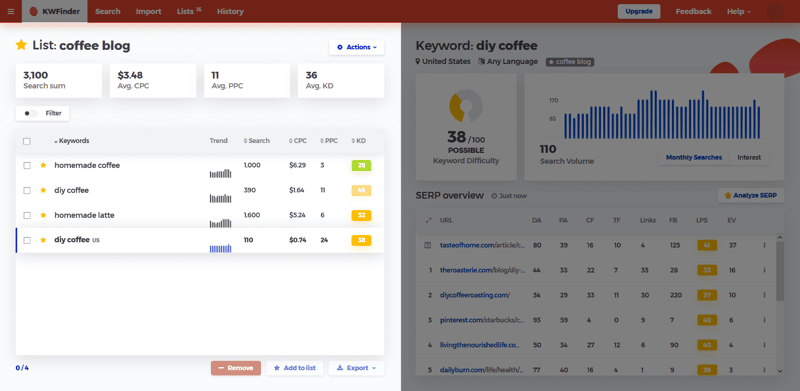
- Organize keywords with a keyword list : This aids you with organizing all of the promising keywords for future reference with a keyword list.
- Import keywords in bulk : You can import your own keyword list into KWFinder and analyze them using the tool’s import function.
- Filter keywords that aren’t profitable : Filter out keywords with low-traffic and high SEO difficulty.
- Local keyword research : Help you boost your SEO ranking across a variety of geographic regions, with location-specific keyword research function.
- The most accurate keyword difficulty : Tells you exactly how hard it’s going to be for your site to make it to the first SERP (Search Engine Result Page).
- Search volume and keyword metrics : Visualize the search volume and other keyword metrics to help you determine the best-performing ones.
- SERP analysis and SEO metrics : Dashboards to help you analyze SERP and SEO data.
How to Get Started with KWFinder
One of the many highlights of this tool is its intuitive interface and easy onboarding process. You can start by registering a Mangools account, which won’t take more than a minute.
The app is entirely web-based. So, after you’ve registered an account, you only need to access its main dashboard to start using all of its services.

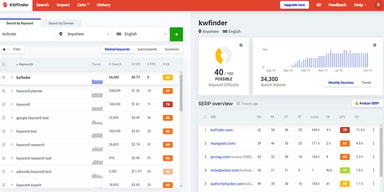
The main interface of KWFinder
To use the tool’s basic function of searching for new keywords, there are two basic tabs that you need to focus on: “Search by Keyword” and “Search by Domain”.
With the “Search by Keyword” tab, type in the seed keyword and the tool will spit out thousands of relevant, promising keywords for you to add to your site. There are three search modes that you can use to further fine-tune the results.
- Related keywords (Suggestions): This is the main search mode and will yield the most results. It can help you find the most relevant and unique keywords relative to your seed keyword.
- Autocomplete : This mode takes the seed keyword and attaches different words and letters. The results are entirely new keywords. For example, if you use the seed keyword “homemade coffee”, you can get “homemade iced coffee” as one of the potential keywords.

- Questions : Prepends the seed keyword with question words to create question-type keywords, that you can use to add Q&A content to your website, e.g. “How to make homemade coffee pods”

As for the “Search by Domain” tab, this one is useful for researching the keywords that your competitors are currently using. Type in the link to the website you want to scout, and KWFinder will display all of the top-performing keywords that the website is currently using. Add these keywords to your list, which can help you gain an edge over your competitor.


Click on any keyword that suits your fancy, and all relevant data about it will be displayed in the dashboards, on the right side of the screen. Here, you’ll be given an overview of the keyword difficulty, search volume, and SERP state.


This data can help you decide which keyword will be the most effective for your marketing campaign.
KWFinder Pricing
To gain access to the KWFinder suite, you’ll have to pay for the entirety of the Mangools marketing suite. Fortunately, the pricing structure is simple and the pricing is very affordable.

Pricing currently includes three tiers.
Mangools Basic
The Mangools Basic plan will be a good choice for small businesses and basic users who don’t need to use the tool’s full power. It’s a single-person plan, meaning the account can only be used by one user. In terms of features, it’s also quite limited compared to higher-tier plans.
- 100 keyword lookups a day
- Keyword suggestions are capped at 200 suggestions a day
- Can only import 200 keywords per upload
- Only display 20 competitor keywords per search
- Limited to 100 SERP analysis a day (Using the SERPchecker tool)
- Only allowed to track 200 keywords every day (using the SERPwatcher tool)
- Only retrieve 100,000 backlinks every month (using the LinkMiner review tool)
- 20 URL analysis per day (using the SiteProfiler tool)
Mangools Premium
For power users, the Premium tier offers more features and gives you a freer range of searches and analyses. The Premium tier will allow you to share the account with 3 others. If your marketing department has more people that require access, you can add more “seats” to the plan at an additional per-seat fee.
- 500 keyword lookups a day
- Unlimited keyword suggestions
- 700 keywords per import
- Display an unlimited amount of competitor keywords per search
- 500 SERP analysis a day (Using the SERPchecker tool)
- Track 700 keywords every day (using the SERPwatcher tool)
- Retrieve 500,000 backlinks every month (using the LinkMiner tool)
- 70 URL analysis per day (using the SiteProfiler tool)
Mangools Agency
This is the best plan on offer. Rather than individual users, it’s aimed more toward large businesses and agencies. This plan offers all of the features that KWFinder (and Mangools) can give the user.
Right out of the gate, you can enroll 5 others into the plan. If you need to give more people access, you can purchase additional seats for an additional per-seat fee.
- 1,200 keyword lookups a day
- Unlimited keyword suggestions
- 700 keywords per import
- Display an unlimited amount of competitor keywords per search
- 1,200 SERP analysis a day (Using the SERPchecker tool)
- Track 1,500 keywords every day (using the SERPwatcher tool)
- Retrieve 1,200,000 backlinks every month (using the LinkMiner tool)
- 150 URL analysis per day (using the SiteProfiler tool)
See KWFinder pricing for current rates across all tiers.
KWFinder Alternatives: Your Other Options
KWFinder is a powerful suite of keyword research tools. Not only is it effective, but with the reputation for being one of the most affordable on the market, it’s quite popular among SEO specialists, marketing agencies, and businesses. But there are many alternatives to KWFinder that are also out there.
Semrush
Similar to KWFinder, Semrush is a full-fledged SEO toolkit. It has a keyword research module responsible entirely for helping the user find new keywords and providing in-depth data, like keyword search volume, keyword difficulty, CPC estimates, and more.

This keyword module is basically what KWFinder is to Mangools!
However, the densely-packed interface of Semrush can be overwhelming for a lot of people, especially those who are new to SEO. Veteran web admins may find the data-dense dashboards of Semrush to be better, though.
Semrush is a paid service and their pricing is significantly pricier than KWFinder and Mangools.

Ahrefs
Ahrefs is yet another complete SEO toolkit like Mangools and Semrush.
The analog to KWFinder that Ahrefs has is the module called “Keywords Explorer.” It uses algorithms to trawl through many search engines and find high-performing, relevant keywords. Whenever you need to know more about the performance of a particular keyword, the analytic tools baked into Ahrefs can also show you key data metrics.

Overall, the UI is a lot more pleasant to look at than Semrush, but it’s still not in the same order as KWFinder in terms of intuitiveness and ease of use.
Pricing-wise, you have four different plans to pick from. A small thing about their pricing page is that underneath each plan, Ahrefs outlines exactly what type of user or organization that particular plan is good for. You’ll be able to choose a subscription plan more easily because of it.

KWFinder Review: Finishing Thoughts
If you need an affordable, capable tool to help you find and research keywords for your search marketing campaign, then KWFinder — and Mangools, by extension — will be a great choice. It’s not perfect and may not have as many features as some other toolkits out there, but for the price, it offers excellent value for the money.
What was your experience like with KWFinder? Do you have any Mangools reviews to share with us? Tell us in the comments down below! Alternatively, browse our software categories page, which will provide you with all the information you need to know on multiple business software!

Compare KWFinder with other popular tools in the same category.

The best thing about KWfinder is that we can find hidden long-tail keywords that even the google keyword research tool won't give.
They provide a few keyword results once you sign up, but later they will provide 0 results unless you purchase any of their paid plan.
KWfinder solved my struggle to find long-tail keywords. This tool provides lots of hidden long-tail keywords with their search volumes.
It gives you basically everything you need to do the right keyword research and is more cost effective than the other main brands.
I feel like it could use some more features that arr helpful for seo overall.
We use it for keyword tracking to help see our progress and our seo efforts.
KWFinder is simple and easy to use. There's no learning curve. I also like that it's affordable even for individuals and small businesses. It may not be as comprehensive as Semrush or Ahrefs, but those tools aren't affordable for most beginners.
The only thing I dislike about KWFinder is that the keyword difficulty scores are not automatically calculated for all of the keywords that are related to the term you're searching. With competitors like Semrush and Ahrefs, you can export the results and you'll have a difficulty score for every suggested keyword. With KWFinder, some of them will have a difficulty score, but you'll have to click on others so the score will be calculated.
KWFinder helps me determine which keywords and phrases to target with the content for my websites and blogs. I can see how many people are searching for the terms and see how difficult it will be to rank on the first page of Google.
The ability to download XML files of keywords and longtail keywords in comparison to the rankings and CPC value. This tool is great for identifying undervalued keywords that can help improve ROI and search volume.
I don't like that there is not an API connection to import selected keywords into my CRM or Google Adwords account. This tool is nice on its own but in today's environment companies are looking for tools that can integrate directly into your work environment.
I am identifying new keywords and SEO competitors to improve my digital advertising across channels. KWFinder allows me to look at CPC and find ways I can maximize my advertising dollars.
The ease of use of the software is great. Keywords in - results out. The UX is ultra-intuitive and really makes I t pleasure to use.
Sometimes the incorrect data is provided when niche words are used.
Planning ad campaigns, planning blog and other content are all planned based on KWFinder

KWfinder provide very helpful keywords suggestion for SEO purpose with long tail keywords as well as relevant keywords.
Nothing I dislike about KWFinder. Its very helpful tool.
KWFinder help to decide best keywords to target as their best keywords results with relevant keywords.
It is very easy to use and gives me the required results. Very accurate tool. Gives me all the relevant keywords and suggestions. With the help of this tool, I have improved my digital marketing results.
There is nothing much that I came across while using this tool.
It is giving me very relevant suggestions and the bid of the keywords with its competition. I love this tool because of its relevancy.
Its very easy to use, Helps to find both Long tail and Shorttail keywords. It helps to know the overall analytics like KWD and Volume which makes us easy to select right words for our overall SEO Strategy
I don't have any dislikes as of now, It does its job fairly well
Helping to find the keywords for SEO Strategy. It helps you to enhance your ranking and find gaps
The best thing I liked about using KWFinder tool is that is works really quick and it's user interface makes it easy to use. It returns the results in no time. I keep this tool handy and I use it almost every day because of it's simplest user interface. The Keyword Difficulty Score also helps me to choose the Keyword.
The tool is working as expected. I haven't came across anything that I don't like. As an improvement feature the language filter should also work with the domain search.
It helps in keyword research and choose the right keywords to target for my audience.
One of the best things about KWFinder is we can do in-depth keyword research that includes a variety of keywords like a long tail, short tail, and mid-tail with the exact values of Global and country-specific search volume. My favorite thing about it is its interface. It's straightforward, just what most SEO tools should be.
It does not provide a keyword position tracking feature like Ahref & SEMrush provide and also needs to improve customer support.
We were having trouble doing keyword research for long tail keywords with low competition and high search volume until we found KWFinder. It has made keyword research much easier and improved our website's organic traffic.
Rank tracking and an emphasis on long-tail keywords make it easier to compete in our space.
More tools that give better insight into how competitors rank higher would be a plus
KWFinder is helping us to identify gaps in our SEO strategy as we target new products against more high-profile businesses in our industry, giving us a competitive advantage
KW Finder is a no-frills keyword research tool that does what it says. It's straightforward, not cluttered with needless features, and the best part about it is that you can find relevant keywords for different countries and regions.
Unable to bulk calculate keyword difficulty. Have to click each keyword to calculate the difficulty score
Find keywords with medium to low difficulty
It's a fully functional and featured keyword research tools, suggests best keyword ideas. Gives information about keyword rank, historical data, search volume etc
I love this tool, I use it on regular basis.
This tool has helped me with my keyword research and seo activities, saves plenty of time.