
Unclaimed: Are you working at LastPass?
LastPass Reviews: 4.5/5 — Highly Rated
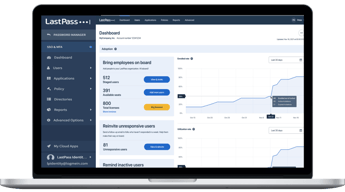
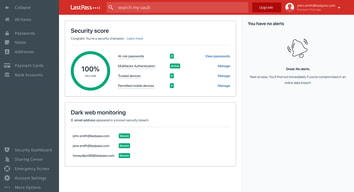
LastPass is a popular and easy-to-use password manager with premium features and great security tools and multiple account recovery options. Adding an advanced layer of security, the platform offers multi-factor authentication and time-based one-time password protection, dark web monitoring, a one-to-one authenticator, and secure notes. LastPass also offers effective pricing, with a freemium plan that covers extensive features and tiered plans with more robust security features and tools.
| Company | LogMeIn, Inc. |
|---|---|
| Year founded | 2003 |
| Company size | 1001-5000 employees |
| Headquarters | Boston, MA, United States |
| Social Media |

| Capabilities |
API
|
|---|---|
| Segment |
Small Business
Mid Market
Enterprise
|
| Deployment | Cloud / SaaS / Web-Based, Desktop Chromebook, Desktop Mac, Desktop Windows, Mobile Android, Mobile iPad, Mobile iPhone |
| Support | 24/7 (Live rep), Chat, Email/Help Desk, FAQs/Forum, Knowledge Base, Phone Support |
| Training | Documentation |
| Languages | English |






Any honest review of LastPass has to start with 2022, when attackers exfiltrated encrypted vault backups for the company’s entire customer base. The vaults were encrypted, and well-protected ones remain so. But that data is permanently in criminal hands, and researchers have traced cryptocurrency thefts to it as recently as late 2025. For a product whose only job is safeguarding secrets, that history is the review.
- What it is: A password manager with autofill, sharing, dark web monitoring, and business administration tooling.
- Best for: Existing users with strong master passwords who value the mature admin console — and who have already rotated anything sensitive.
- Pricing: Free (one device type). Premium ~$3.37/mo, Families ~$4.53, Teams ~$5.13/user, Business ~$7.54, Business Max ~$8.84. Billed annually.
- The honest catch: The free plan works on computers or mobile, never both, so it cannot sync your phone and laptop.
What Is LastPass?
LastPass is one of the longest-established password managers: a browser extension and app that stores credentials in an encrypted vault, autofills them, generates strong replacements, and shares them with family or colleagues. The business tiers add an admin console, security policies, directory integration, and single sign-on.
Functionally it is a capable, mature product. The admin console in particular is well developed, with over 100 configurable security policies on the Business tier, and the family plan covering six people is priced competitively. Dark web monitoring and a security dashboard are included even on the free tier.
The company operates on a zero-knowledge model, meaning your master password never reaches LastPass’s servers and the company cannot decrypt your vault. That architecture is what limited the 2022 breach from being an outright catastrophe — and understanding exactly how far it limited it is the point of the next section.
What Happened in 2022, and Why It Still Matters
The breach ran in two stages between August and October 2022. Attackers first compromised a developer’s laptop, taking source code and technical secrets. They then used what they had learned to target a DevOps engineer’s home computer, which gave them access to AWS S3 buckets holding customer vault backups. They obtained encrypted vault backups for the entire customer base.
Three things make this worse than a typical breach:
- Some data was not encrypted. Vault contents were encrypted, but metadata including stored website URLs was not, giving attackers a map of which accounts each vault held.
- Disclosure was slow. LastPass did not publicly connect the two incidents until 27 February 2023, months after the intrusion, and the communication drew heavy criticism from security researchers.
- Stolen encrypted data does not expire. Attackers can attempt to crack those vaults indefinitely — “harvest now, crack later.” Blockchain analytics firm TRM Labs has traced a years-long series of cryptocurrency thefts to these vaults, with incidents continuing into late 2025, typically where master passwords were weak or accounts predated later security hardening.
The consequences have been formal as well as technical. LastPass settled a class action for $24.5 million in 2025, and the UK’s Information Commissioner’s Office issued a monetary penalty against LastPass UK Ltd in November 2025.
What LastPass did in response: it raised the PBKDF2 iteration count to 600,000 rounds for all accounts, a substantial increase that makes brute-forcing a stolen vault far more expensive. Older accounts had been running on dramatically lower counts — some as low as 5,000 — which is precisely why certain vaults fell and others did not.
If you held a LastPass vault before August 2022, the actionable advice is unambiguous: assume that vault is in criminal hands and rotate every credential it contained, prioritising cryptocurrency seed phrases, financial accounts, and email. Changing your master password now does not help, because the copy they hold is encrypted with the old one.
LastPass Pricing
LastPass injects prices via JavaScript and blocks automated rendering, so the figures below are third-party reported for July 2026, while the plan structure, user counts, and trial terms were verified from LastPass’s own pricing page.

| Plan | Reported price | Users | Notes |
|---|---|---|---|
| Free | $0 | 1 | One device type only — computers or mobile, not both |
| Premium | ~$3.37/mo | 1 | All devices, 30-day trial, 30% off for new users |
| Families | ~$4.53/mo | 6 | Shared folders and family dashboard |
| Teams | ~$5.13/user/mo | up to 50 | Admin console, 25 security policies, 14-day trial |
| Business | ~$7.54/user/mo | Unlimited | 100+ policies, Families for employees |
| Business Max | ~$8.84/user/mo | Unlimited | Unlimited SSO apps, advanced MFA |
- The free plan’s restriction is severe and easy to miss. You choose either computers or mobile devices. Since the entire value of a password manager is having credentials wherever you are, this is a plan that cannot do the job. Bitwarden’s free tier, by contrast, syncs across all devices.
- Families is the best value in the lineup. Six people for ~$4.53 a month works out under $1 each.
- All paid plans bill annually. There is no monthly option, so the trial is your only low-commitment evaluation.
- Business Max is where SSO lives. Unlimited SSO applications and advanced MFA require the top tier.
Who Should Use LastPass
- Existing business customers with a working deployment. Migrating an organization’s password manager is genuinely disruptive, and the admin console is good. If your accounts postdate the breach and enforce strong master passwords, staying is defensible.
- Families wanting cheap coverage for six. The per-person economics are strong.
- Teams needing a mature admin console. Policy depth on Business is a real strength.
It fits poorly for anyone starting fresh, where equally priced competitors carry no comparable history; for cryptocurrency holders, given the documented and continuing pattern of thefts traced to these vaults; and for anyone wanting a usable free tier, which the one-device-type limit precludes.
Honest Pros and Cons
Strengths
- A mature, capable product. Autofill, sharing, and generation all work well after many years of refinement.
- Excellent admin console. 100-plus security policies on Business, which smaller competitors do not match.
- Strong family value. Six users for roughly $4.53 a month.
- 600,000 PBKDF2 iterations. A genuine and significant hardening after the breach.
- Dark web monitoring included, even on the free tier.
- Zero-knowledge architecture. LastPass cannot read your vault, which is what prevented the breach being total.
Limitations
- The 2022 breach is unresolved by nature. Stolen encrypted vaults cannot be recalled, and thefts traced to them continued into late 2025.
- Unencrypted metadata. Stored URLs were not encrypted, revealing which accounts each vault held.
- Slow, criticized disclosure. Months passed before the incidents were publicly connected.
- Regulatory and legal consequences. A $24.5M class action settlement and a UK ICO penalty in November 2025.
- The free plan cannot sync devices. Which defeats the purpose for most users.
- Annual billing only on every paid tier.
LastPass Alternatives and How It Compares
- 1Password is the most common destination for departing LastPass users, with a strong security record and comparable pricing.
- Keeper is the enterprise-oriented alternative with a robust compliance and security posture.
- Dashlane competes closely on features with a clean interface and bundled VPN on some plans.
- Zoho Vault is markedly cheaper and compelling for organizations already running Zoho.
- Bitwarden is the open-source option, auditable and with a genuinely usable free tier that syncs across all devices — the direct answer to LastPass’s free plan restriction.
For a broader survey, browse our password manager directory.
The Verdict
Judged purely as software, LastPass is good. The autofill is reliable, the admin console is among the best in the category, the family plan is excellent value, and raising PBKDF2 iterations to 600,000 was a serious and correct response. Nothing here is incompetent.
But a password manager is not judged purely as software. It is judged on whether you should hand it every secret you own, and LastPass is the only major option in this category asking that question against a breach in which encrypted vaults for its entire customer base were taken. The severity is not hypothetical: researchers have traced cryptocurrency thefts to those vaults into late 2025, the company settled a class action for $24.5 million, and a UK regulator issued a penalty in November 2025. Stolen encrypted data has no expiry date, and no amount of subsequent hardening retrieves it.
So the recommendation splits. If you are choosing a password manager today, choose a different one. 1Password, Keeper, Dashlane, and Bitwarden cost about the same, do the same job, and carry no equivalent history — there is no benefit LastPass offers that offsets the risk of starting here. If you are an existing customer, particularly a business with a working deployment, staying is defensible provided your account postdates the breach or your master password is long and unique. Migration is disruptive and the product is competent.
If you held a vault before August 2022, act regardless of what you decide about the software. Treat every credential in that vault as compromised and rotate it, starting with crypto seed phrases, financial logins, and email. Many affected users never received a direct warning, and the thefts have continued for years precisely because people assumed encryption meant safety. It meant time, and for weak master passwords that time has run out.
FAQ
Is LastPass safe to use in 2026?
The software is technically sound and now uses 600,000 PBKDF2 iterations, a substantial improvement. But encrypted vault backups for the entire customer base were stolen in 2022 and cannot be recovered, and cryptocurrency thefts traced to those vaults continued into late 2025. Accounts created after the breach with strong master passwords are in a materially better position than pre-2022 accounts, but the history is a legitimate reason to prefer a competitor when starting fresh.
What exactly was stolen in the LastPass breach?
Attackers accessed AWS S3 buckets containing encrypted customer vault backups, obtaining them for the entire customer base. Vault contents were encrypted, but metadata including stored website URLs was not, revealing which accounts each vault contained. Source code and technical secrets were also taken in the first stage of the attack. LastPass did not publicly connect the two incidents until February 2023.
I used LastPass before 2022 — what should I do?
Assume that vault is in criminal hands and rotate every credential it held, prioritising cryptocurrency seed phrases, financial accounts, and email. Changing your master password now does not protect the stolen copy, which is encrypted with the old one. This applies whether or not you still use LastPass, and whether or not you were ever notified — many affected users received no direct warning.
Is the LastPass free plan any good?
Not really, because of one restriction: it works on a single device type. You choose either computers or mobile devices, so your phone and laptop cannot both hold your passwords. Since having credentials available wherever you are is the entire point, this makes the free tier impractical for most people. Bitwarden’s free plan syncs across all devices and is the obvious comparison.
What is LastPass best for?
Existing business customers with a mature deployment who value its admin console and its 100-plus security policies, and families wanting six-person coverage cheaply. For anyone selecting a password manager for the first time, competitors at similar prices without a comparable breach history are the more sensible choice.

Compare LastPass with other popular tools in the same category.
It makes saving your password a breeze! And everything is all in one place.
It is very bugy and tends to slow down my browers even if I turn of last pass for certain websites.
It is keeping a lot of my information safe by not having my passwords listed on random documents on my computer.
I can add or remove team members and give them access to our shared password folder. With LastPass, they can always log in, but they never see the actual password. Moving usernames and password to the shared folder is a piece of cake. Our team uses it every day.
Sometimes the user interface is confusing to use. It will be a tad confusing if you also use Google Chrome's password manager.
It's helping our team members gain access to password-protected logins, websites, and other information, without actually seeing the password. So if they leave our company, they can't take the sensitive information with them.
Generator. Ability to store. MFA feature
The inability to HIDE the autopopulate from any webpage. It used to be a feature that was taken away.
Ability to have a unique password for each site
The customer service was great. After the breach, we received communications, and they continued to arrive thereafter.
Lack of transparency. We were left in the dark about what was happening when the breach occurred. At first, LastPass made it seem like the breach was not of significant concern. Weeks later, we began to hear differently from news outlets. Then finally, we were officially alerted through LastPass. This action created a trust issue.
It was helping us solve our password vault problem by providing a secure and trusted space where we could store all critical service accounts in an easy to access platform.
Super useful password manager. I like how there are use cases for all my devices.
A bit concerned about security with the leaks in the past. Really only downside.
Managing all my passwords, and allowing me to setup complicated, unique passwords without worrying about remembering them or having to look them up.
Easy to use and prepare for new users trough integrations
Subscription administration and not responding support
Insecure passwords and password share in clear text
Number of Features Multi-platform Native MFA
"Sharing Item" features are not secured. Hard to implement The registration process is not clear and has bugs Not friendly UI for beginners Bugs not fixed after escalation Pure customer service
As the usual password manager, we use it to level up the protection of our critical services, in most cases for the specific group of people who have administrative permission in company-wide systems and infrastructure.

I've been using lastpass for a long time, since before they were acquired. It is simple enough to use, and to train my family on how to use. I appreciate the security features, the security score, the ways I can manage my family, and that as a business user, I also get family benefits.
The difference of features between business and personal can be confusing for someone who uses both products. Keeping work passwords and personal passwords separate is a pain. While you can link the two (and assumingly use your business account as the one you log into primarily), it means that stuff like MFA codes are not usable on the personal side. I also don't understand the LP authenticator app. I don't understand the benefit it adds vs. using google authenticator, authy, etc.
Maintaining unique passwords for every account that I have on the internet and keeping them complex enough to be secure. Keeping information shared between family members accessible for all of us that need it.
As a Security Researcher, it's a daily job to login to multiple tools, authenticate. Lot of tools require a strong password, using multiple passwords and remembering them is tough. That's when Last pass comes in picture I have been a premium user of Lastpass, some of the good things about the product are Strong encryption features of the product(That's where you decide whether to go with it or not) Reliable interface of the tool The passwords can be used on multiple devices, sync is a good option which is in the tool I have been able to digitize and organize all my passwords on finger tips with the help of LastPass
I the recent years, where we see the LastPass was hacked and the customer data was breached. That makes it highly unreliable to use. Other the threat of breaches, it is sometimes considerably slow and makes it unreliable at times. Also the there is a issue of auto filling the passwords. Not everytime it auto fills the passwords. We might need to copy paste it multiple times Also the tool abruptly closes at times.
LastPass mainly helps in Multi factor Authentication for lot of sites and tools. And the most important which is used in day to day tasks is to act as Password Manager to save multiple passwords
One password unlocks everything. Seamless between laptop and mobile.
No TouchID on OSX. Sometimes the app just "hangs" and needs to be restored.
Storing and retrieving hundreds of passwords, safely, quickly
It is quite easy to use, and it integrates nicelly with all my browsers and even my androir. Love the possibility of a family license, it does make things easier and consistent.
They were on the news several times for an encrypted database leak with customer info, and this was due to very poor internal practices, which brings into question how secure the product really is.
The shear amount of different passwords one must manage to keep with minimum security best practices turn passsword managers to must have products. LastPass really simpliflies synchronizing, not all my passwords, but lots of sensitive information.

Easy of setup and password management. Ability to have passwords in a business environment that can be shared, but the password kept secret.
browser plugin sometimes would not connect and would leave you with offline options only The amount of times the system is hacked!
password management across multiple devices, and the ability to see what passwords and accounts have been leaked using the dark web monitoring
LastPass is good at recognizing when to step in and help with completions, whether it's login credentials or profile information. Of all the products I've used, it is the best at blending into the overall browser experience.
Like a lot of people, I'm put off by recent cybersecurity incidents. Beyond that, we found business features such as shared password repositories were difficult to configure.
It simplified password management for individuals.
Very simple to use for both home and work, whether using my PC or phone to connect to websites or apps.
When the most recent breach occurred, the communication was delayed and I did not see the email about it for several days if not weeks after that. They should have pushed the notification through the app itself to help people see the concern and the need to update their passwords. They should have also protected the data better using our master passwords or other ways to mask it.
Ability to use more complex passwords to better safeguard my accounts.
It's effortless to use & share complex passwords. I also use the shared family settings to keep important family documents & passwords in one place.
Mobile app can be a little troublesome sometimes on Android.
Easy to keep complex passwords in one place.
The most important thing: use a password manager. LastPass is a capable option, though there are others. Use randomly-generated passwords, never reuse them, and sync between your devices. Then, you'll only need to know one password...your Last Pass, if you will. LastPass Pros: • Cross-platform compatibility and syncing (browser-based, OS-based, and mobile) • Shared folders for enterprise/teams allow lots of flexibility (particularly for MSPs or large organizations) • Built-in password generator with flexible options • Password history is saved in case you *meant* to change something but got distracted • Offers one-click password change for some sites (it logs in as you, goes throught he password change process, and generates a new one all at once) • Vault is saved locally in every context, so you don't need to be connected to the internet to grab credentials • Authenticator app is secure, attached to your account, and backs up for recovery to new devices (so you're not hosed if you lose or change your phone, and you don't have to rebuild your entire library) • Authenticator app also lets you rename, manually arrange (though no gorups/folders), and search for entries • Entries can be saved with TOTP 2-factor keys for simple sharing • Automatically recognizes credential and PII fields and offers to auto-fill (usually) • Syncing is quick but there's also the ability to manually sync if you *just* changed something and need it reflected • Lots of different templates for saving different kinds if information beyond website credentials (PII, credit cards, server/database credentials, etc)
LastPass Cons: (Note: this is all for current versions as of November 2022; any of these may be fixed by the time you read this) • Multi-platform use requires paid account (can't fault too much but it's a ding) • Only one admin can manage Shared Folders (I have to ask the other guy to do it even if I'm the one working with a customer...this may depend on our subscription tier) • It's counter-intuitive but for Apple ecosystem users, the iOS app is the way to go because of the ability to copy-paste across devices...but LastPass doesn't do a good job of recommending this for users • Native macOS app (which is also the Safari extension) is borderline unusable because of performance freeze-ups, even on well-speced devices (extension is fine though) • In iOS app (not sure if this also applies to other mobile platforms), joining a saved SSID is a pain. Only website passwords are searchable with the automatic pop-up, and WiFi credentials are "Secure Notes" rather than sites, and you also can't move back and forth between WiFi login and another app. The required workflow is to copy the password, switch to settings, join the SSID, and hope your clipboard hasn't expired by the time it's done loading. This is particularly annoying for hidden networks, as you have to manually type the SSID quickly enough before pasting the password. This may be an iOS quirk more than LastPass, I'm not sure • If you search the Authenicator app for a 2-factor code, the confirmation pop-up that the code has copied doesn't reposition itself to be above the keyboard you used to perform the search, so you have to hope it copied • TOTP cannot be used from the mobile app (so you must use the separate Authenticator app even if you have TOTP configured) • TOTP settings clear when passwords change • There is no QR reader for TOTP setup, so you have to use a separate app to extract the key (unless the service you're using provides the key for manual entry) • Doesn't always handle sites that present User ID and Password fields separately • Mobile app and browser extensions seem to have been designed by separate teams that don't coordinate, as menus are completely different (example: the manual refresh option mentioned in Pros is in Extension> Username> Advanced> Refresh Sites on the desktop browser extension, but Settings> Actions> Refresh Valut on mobile...made more confusing because the app also has "Advanced" but it's a completely different set of options) • Lacks the ability to manually say "These are separate sites" so LastPass doesn't suggest credentials for a bunch of subdomains within one site (service1.organization.com, service2.organization.com, etc). The reverse is also lacking, in that you can't assign multiple addresses to a single site credential (local IP, external IP, and DNS address, for example). The Pro/Con volume is the same, but IMO the Cons are all nitpicky gripes rather than major issues.
As an MSP that coordinates with on-site admins, it's important to have a shared bank of secure credentials for myriad services and devices. LastPass performs that task admirably.

I like the full-on integration with Mobile and Windows so you can use your passwords everywhere. Need to log in on a site regardless of device or app. No problem.
The pricing and the data storage in the US. We are a European company and like our data stored in Europe.
Lastpass is a perfect password management solution but it wasn't what our company was looking for.

There are many reasons to use LastPass, but the most important to me is its ease of use. I initially tried using Password Managers like Enpass, but the Desktop Application is a must if you want them all to work. They are very difficult to set up quickly. But LastPass is very easy to set up. We can download Browser Extensions very simply and start managing everything.
LastPass recently discontinued their SMS based 2 step verification process. At times I found this more convenient than the App based 2 step verification process. I don't know why LastPass changed this. And in their latest Android version, when trying to enter passwords through the browser, that option does not show. All of these seem to me to be issues that LastPass needs to address as soon as possible.
Of course, apart from passwords, I can save credit card details, bank account details, and many other things in LastPass and use them when needed. I use LastPass almost as my Digital Library. That is what I need. Also, I can sync and use LastPass Password Manager with their 2 Factor authentication application provided by LastPass itself.

The browser extensions, desktop app, and mobile apps work together to put all of my passwords at my fingertips whenever I need them.
Sometimes, since it isn't a native app, I have to take many extra steps to copy/paste my password. Most of the time it works seamlessly, auto-populating browser fields; but, occasionally a website doesn't register. Sometimes a website will record multiple passwords, and it is difficult to choose amongst them. Personally, I have also had a continuous issue whereby my initial login registers incorrectly. It takes me to the enterprise manager subscription instead of the family management. In those instances, I need to log out and log back in to correct the issue.
Managing passwords and generating difficult to guess, secure passwords are necessary and relatively easy. I am more productive because I don't have to worry about secure passwords.

I really like having an all-in-one place to keep secure information like usernames, passwords, and bank info. I like having a seamless experience from desktop to app.
I find Lastpass to be fairly buggy in the mobile app. There are many instances when Lastpass doesn't recognize that I need to enter a password, and the fill-in prompt doesn't pop up. Then I have to navigate over to the Lastpass app, search for the website or app I need a password for, copy the password, navigate back to the original window, and paste it.
Lastpass is great for making sure that I use unique passwords, keeping my work accounts more secure. If I didn't have a password manager, I would probably use the same password for every work account. Using the "create password" feature makes me have very unique, secure passwords.

Saves me timing looking up passwords somewhere else.
Trying to get my master password reset has been hard, but that could be a company related thing.
Trying to remember all the passwords I have to remember as an IT professional.
Free plan, good value for premium, two-factor authentication, and multi-platform support. Easy to use, browser extensions make it easy for businesses to adopt this type of solution.
Syncing limitations for free users, known for using trackers, and no stand-alone desktop app. LastPass is also known for changing its user agreement policies, which caused them a decline in user-based loyalty, recently.
One place to store all my passwords without having to remember each one of those is very handy for either work or personal use. Password managers like Lastpass also have a password strength report, which is handy for keeping passwords up there when it comes to security best practices and standards.
LastPass makes password sharing (already inherently insecure) as secure and easy as I have seen. The browser extension makes the tool very easy to use and integrate.
The extension and browser can interact in funny ways that make administration confusing. The security score system is often hard to use because it is inconsistent and doesn't reflect reality. It will say a user has a score of 0 when they should have one much higher.
We used LastPass to solves password management and encourage good password practices. LastPass ensured that users were not reusing passwords or using weak passwords. It made the right thing the easy thing.
LastPass allows users to share passwords easily with other members of their company. It allows you to organize passwords based on groups and folder, and also includes the ability to store payment methods. Lastpass will also autofill passwords on websites when prompted.
Some of Lastpass' functionality leaves something to be desired. Often times passwords will take a long time to appear after being shared, or autfilling passwords will not function correctly. The lastpass autofill option can also sometimes interfere with your native password manager present on your computer as the lastpass autofill button will sometimes block the defualt one.
Lastpass makes working withing a shared workspace much more enjoyable. Instead of just trying to message and share passwords, which would also be a lalrge security risk, Lastpass allows you to manage them withing one concise hub.

Everything is in one central place and stored directly in Chrome. It also has a phone app so that you can take your passwords with you across multiple devices. You are also able to easily invite outside team members to access specific folders, so if you are working with partners who need access to specific accounts, they can access those specific logins and nothing else on your account.
You cannot reset your password if you forget it. If you forget the password, you are locked out indefinitely unless you have the password saved somewhere else or magically remember it. It is a major flaw of the software because if you cannot get back in, lastpass now has all of your information saved and you cannot recover it on your own. There's also a bug where it consistently thinks that my account has been deactivated and kicks me out of my browser extension.
We use lastpass as a company to store shared logins for clients and shared license keys for software that we use as a group. In the past we shared an excel doc that was always out of date. The shared folders in lastpass automatically update for everyone in the company on the enterprise plan. You can also link your personal lastpass accounts with company ones, so the lastpass application will have all of the logins that you ever need readily available at all times instead of having to log out and log into a different account to get to different logins.
This was easy to use, and seemed secure. It was easy to share and unshare passwords and was great for teams. I liked the platform a lot until recently.
The free version only allows one device now. That's not very useful, so I ended up switching to Bitwarden.
Managing hundreds of passwords and generating new ones regularly. Much more secure than using the same 3-4 passwords for everything.
I like storing all of my passwords in one place.
I do not like the lagging and the constant logging in even if you check the box saying to keep you logged in for a certain amount of days.
Keeping all passwords in one place for personal and professional use is very useful.

The ability to have an Online Authentication app on my phone with a fingerprint option
Sync only on 1 device as of March 2021 .
This is a password manager which utilizes all the passwords from ehatever source to be accounted.
Nice sensitive information manager. Generating passwords is easy and you can select criteria involved. You can use the app in groups or teams.
UX/UI needs to be improved, since the platform is not very intiutive. Some times it doesn´t capture automatically your new passwords, so be sure to copy it somewhere else until you are sure Lastpass recorded it.
Centralizing password management for a company and individuals.
Very friendly and informative demos. Clearly explained the services features and differences from competitors
We do not yet use last pass, so I cannot comment
Our use case would be for provided user access monitoring and provisioning.