

Unclaimed: Are you working at LiquidPlanner?






LiquidPlanner Reviews: 4.2/5 — Solid Choice
LiquidPlanner is a project management solution built for teams who want to prioritize planning and intend to anticipate user needs to ensure seamless operations. With the platform, you can align your people, projects, and priorities to ensure the right team is able to work seamlessly. Predictive scheduling dynamically adapts to change and manages uncertainty, so you always know in real time when work will be done. LiquidPlanner is backed by the power of planning intelligence, ensuring that teams deliver and optimize their work in the best way possible.





| Capabilities |
API
|
|---|---|
| Segment |
Small Business
Mid Market
Enterprise
|
| Deployment | Cloud / SaaS / Web-Based, Mobile Android, Mobile iPad, Mobile iPhone |
| Support | 24/7 (Live rep), Chat, Email/Help Desk, FAQs/Forum, Knowledge Base, Phone Support |
| Training | Documentation |
| Languages | English |

Compare LiquidPlanner with other popular tools in the same category.
The automated priority based scheduling and ability to keep all project details and communication in one location. Emailing to tasks.
Lack of pushing Google calendar events into system. Lack of mobile app. Lack of Slack integration.
Task management Centralized project detail upkeep Historical project time tracking Weekly timesheet export

Likes: Gantt chart and baseline reporting, analytics and dashboards, time tracking, lists within tasks with multiple owners Can manage both waterfall and agile projects side-by-side; adding docs from other sources (google, dropbox); communicating about project tasks on the task page.
Current challenges are exporting to MS Project and timesheet mgmt only via export
LiquidPlanner allows us to structure projects across teams and manage deadlines for internal and client-focused projects. We manage deadlines, SoW criteria, track time, assign and update projects efficiently with the tool. We've looked at other options and find that LP continues to give us what we need at a reasonable cost.

The ease of setting up your projects in the LP.
You need to be creative when working Agile projects with Sprints.
Allocation of resources is a huge problem LP helps me solve. We have limited resources, yet management assigns these same resources to multiple projects. LP helps me show how the resources are being used and what happens to project deliverables when we lower the percentage of time those resources spend on assigned projects.
Creating, appointing and managing teams and projects is simple. For LiquidPlanner it is easy to track progress of projects. The software enhances consumer reporting in a timely manner. This app allows time tracking on activities and projects.
No difficulties to point out that this software is very useful for the management of the project.
It program ensures that all activities and programs are well coordinated and handled. The productivity has increased tremendously with this program. This program makes it possible for all teams to work more effectively on their projects.
I really like the ability of this software to customize the functions and adapt them in the best way to the company, the assignment of the work of the employees is very easy as well as the management of the projects. It also makes data analysis a lot easier.
I do not like that the learning curve is long, even if you do not have previous experience with this type of tools, even though some users with some experience with the management of these software should have taken some time to make some configurations in the initial use of the tool.
Organizing the projects of the company was a very difficult task, with this great tool we have solved this problem, we are working more organized, this saves a lot of work time. This software allows the different work teams of the company to work more organized, avoiding large delays of the projects in progress. Communication functions are used daily.
The ability to create multiple tasks in a project folder, assign estimated hours to a project and then share the project with my manager. Keep tracking of users time spent on a particular task or project.
The ability to create reports of the data that has been inputted into multiple projects and tasks. Getting down to the checklist level, the ability to report on completion would be great. Mobile needs some work as it lacks a lot of features.
Keeping track of internal users hours being spent on projects. Not knowing how many hours or where someone is on a project, made it difficult to assign new projects without falling behind.Forecasting new projects and ability to estimate a projects time spent.
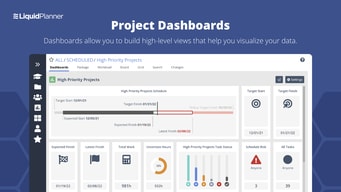
LiquidPlanner truly is the best way to capture both the most minute details and the most important big picture aspects of a project. One of its biggest strengths allowing all project contributors to log time on a task by task basis, then summarizing that work output in customizable, easy to understand dashboards for management to make decisions off of.
It does take some time to learn. Some of the less tech-savvy members of my company continue to have issues using it, even though we have been phasing it in for about 6 months. Probably the biggest drawback is that, at least for my company, anyone can reorder or rename a project. This is a big deal for us, because each box under the "All Projects" tab corresponds to a different engineering R&D project. The order of these determines the allocation of resources, so that order makes a big difference in which projects get priority. To my knowledge, there is nothing stopping any user from manually reordering that list. It would get corrected immediately, of course, but that power is disturbing. Plus, anyone can rename any project. A colleague of mine accidentally renamed one of the R&D projects to his domain login password! He did not realize his error until someone else in the company brought it to his attention half an hour later. Anyways, this seems to indicate that LiquidPlanners biggest strenghths (user empowerment, flexibility, customizability) can also be its biggest risks.
Solves the problem of prioritizing R&D projects and allocating company resources based on that priority. Brings all the resource groups (design team, machining center, lab testing etc.) together to work off of one priority list
Liquid planner allows me to easily keep track of the projects I am working on and track my time against tasks I complete. The ability to add a custom field to track the current state of tasks further enhances the granularity and detail of the reporting.
The interface can be a little cumbersome sometimes I feel. I still haven't figured out how to work well out of the Timesheet view and work mainly in the projects view.
LP allows my organization to accurately keep track of billable time and ensure projects are on schedule. It has improved our time management and tracking.
Anytime we thought we might want to find a new product to suit our needs we spoke to an agent with LP. Every time we contacted the company they showed us different functionality that we could integrate and grow our LP involvement.
A bit expensive for the amount of work we had to put into using it. It's not as intuitive as other products.
Our marketing/creative team is using LP as a project management and agile tool.
Liquid Planner has so many built-in capabilities. I personally like the way I can create tasks for a project, assign them to resources, and immediately see the completion date. I can set deadlines on tasks or folders and see where there might be problems in the timeline. I also use this software for its timesheet capabilities. It is easy to see how much time has been logged against a task and if that is over or under the estimate. Liquid Planner has a great support team that we have leveraged as well.
One thing I disliked most was the inability to understand what was causing risk on a particular project or individual task. However Liquid Planner just came out with a release that highlights exactly what I was looking for.
Wow, I can't even imagine my daily work without Liquid Planner. We schedule all of our work in Liquid Planner and track all of our time there. We have tried a few other project management platforms and time tracking software but this one is the best all-around option by far. I love having everything I need in one place.
This tool covered everything we needed and more - time tracking, reporting, templates for projects, multiple views, collaboration, visibility into peers and directs work.
Really a great tool, I understand it was quite expensive (~$50/user/month?) - so that seems like an anomaly amongst other seemingly comparable solutions.
Great visibility into time spent on processes. Tracking, reporting to managers, etc. Simple process.
I like that you can easily direct comments to specific people. However, you are able to keep all comments in a specific place so that it is easily searchable and you can look through the history, as opposed to an email chain, in which certain emails might not be accessible to all. I also like that things are organized by project, so that it makes it easier when you need to go back and look for an old comment or project.
The search function is a little too restrictive. If I want to search for XX-11 but I'm not sure whether it is "XX 11" or "XX-11", searching for "11" will not find "XX-11". You have to know to search for *11.
We use this software to list out projects and specific project tasks. It has allowed us to delegate tasks to specific people, and keep track of tasks that need to be done. We do not use the time management parts of the software.
Straight forward to get started, most actions are easy to take and the display is clear to the user.
The delay between changes and the server catching up is not ideal, group changes and cloning of items in the planner could use some further refinement, simple access breakdowns for people or time ranges would be a plus.
We are using Liquid Planner to manage the various projects being worked on. It allows us to clear express to the teams in the company what priorities are, what progress is being made and when milestones are expected to be hit.
- The flexibility of LP - Good summary
- The possibilities with 1 task && more colleagues - not possible to pack in different packages
Webshops / IT We make webshops. So the whole process we manage in LP
Ease of use, the interface is very clean and modern and the learning curve is very small.
Not really anything about the product but it is sometimes difficult to get proper estimates if your team is not consistently making updates.
Trying to keep projects on time and determine how much time we are sinking into projects.
We are a big insurance company, which eventually means the projects are complex and teams are large. LiquidPlanner helps with scheduling of assignments and tasks with its intelligent scheduling technology which makes things simpler for employees. It also offers a wide range of integrations with apps we usually use to work and this honestly made life easier than ever.
Although it is one of the top-not, highly intellectual and advanced platforms to manage projects, they missed out on the billing and budgeting part which is like the backbone of a project. It is kind of a bummer but if you look around not many apps are offering the billing option and those who do are also lacking somewhere in between.
LiquidPlanner basically helps the team to manage the projects and related work smartly and effectively. It is equipped with some quite unique features that help companies in achieving the milestones in less time, more quality and less labor. When a platform is technically sound it saves lots of time and energy and it can be used to work better rather than just trying to learn the platform. With plenty of basic and advanced features that it has to offer you, this platform solves the issues like integrations, resource management and project management in quite reasonable pricing plans in comparison to what it offers. Shortly, I think it is worth the shot.
The user-friendly interface and predictive planning algorithm help us know where we are and what's next. I enjoy working in LiquidPlanner.
LiquidPlanner does not provide basic financial features that would allow our team to know where we are on project scheduling AND budget.
LiquidPlanner solves our problem of always building projects from scratch – the templates section allows us to quickly bid out a project and then quickly schedule it when we are ready. It takes a lot of the guesswork out.
Automatic scheduling and ease of user interface
Not enough analytics, Dashboards needs updating to be fully functional
Determining what timelines to complete work on, benefits is less time spent on project planning and review
Flexibility, ability to play out multiple scenarios.
GUI is not as modern as it could be. Could be more dynamic.
Product development planning.
Analytical reports, Custom fields in task, ability to assign same task to multiple people, leave events
Though the features are great, I feel that it needs a facelift. The look and feel can be modernised.
It helps me in project planning and task assignments. I can track the tasks across projects, and also the time spent by team members.
See where are my team's hours are being spent.
Not counting the hours marked as complete towards the total hours of the project.
Helping ensure the hours worked towards projects are the hours being billed.
Easy communication between team members and even people on the outside i.e. clients
I would love if it would easily track where you started from and not by using a baseline which you need to think of to capture.
Easy communication with team. Easy output of a timeline for our clients and also the addition of what our budget and hours estimated are.
LiquidPlanner is one of those platforms where management is easy, tasks are assigned and scheduled times, and team members know the tasks that are assigned to them as well as their progress on them. It comes with all the latest and most advanced features that help in making it even possible. This is not your ordinary platform, they are always making efforts to make it even greater and up-to-the standards of today’s needs.
LiquidPlanner has been with us for years now, the work and its management on this platform have made our lives easier but it comes at a cost that we don’t know! Seriously, we don’t know till the end of the year. The billing is done at the end of the year and that huge amount can make company owners frustrated. Also, the invoices or billing procedure is not satisfactory. This raises serious concerns and needs improvements for the betterment of everyone. When there are many team members on the platform, the management becomes a bit difficult and the platform becomes crowded. It results eventually in mismanagement and similar issues. To avoid this there should be a way to handle these things by taking some serious steps.
LiquidPlanner has been with us for years, we have been using it and since day one our project management and maintenance becomes so easy and manageable. Management of tasks and most importantly schedule allowed us to enhance the work we do and even make improvements in this regard. LiquidPlnner is one of those platforms that do what they say. It is easy, enriched with the latest features and new world technologies. You can manage everything with just a few clicks and there are endless possibilities that might interest you. The only issue we face is its billing methods and it needs improvement, apart from that it’s a very good investment.
I like that we can track all the work being done for clients and project the availability of our team members to bring on new projects without becoming overwhelmed.
I don't like how LiquidPlanner schedules work for individuals by using a prioritized hierarchy system based on the order from top to bottom because we have some things that are of the same priority and it pushes and adjusts team member's schedules based on that.
We are really keeping tabs on how long it takes to complete certain tasks which gives us a better idea of what to charge clients and how to be more efficient with our time as a company.
It is easy to categorize tasks and projects for all the different departments in our company. I like that a task can be scheduled to go from one team to the next until the project is completed.
It is hard to find a completed task if you don't know EXACTLY how to search for it. It doesn't pull up similar results in the search bar, only exact matches.
LP helps our company keep track of tons of tasks from hundreds of clients and categorize them by being a high importance deadline or putting them on hold until we need it again.
The ability to forecast resource availability
No ability to customize user access levels
Project planning and tracking all in one tool. Helps us stay on budget.

I like the ease of use and navigation of the program, as well as the options for customizing the data and converting it into specialized reports. You can also give different permissions to multiple people. LiquidPlanner helps me and my colleagues complete all tasks on time. Now you can record the daily time for each project, so you can easily see how many hours you are spending on different jobs. This program is not ashamed of its name because it is very easy to change the goals of a project and the effect is almost instant. You can easily categorize the activities and projects of all departments in your company. I like the way I schedule tasks to move from one team to another until the project is complete.
The program requires some training to get the most out of it; for example, it's difficult to recognize a completed work if you don't know exactly how to search for it because it doesn't show comparable results in the search box, just exact matches, which may be quite aggravating. The database might be a little sluggish at times because it is a cloud-based solution. While this is not an issue in day-to-day operations, it was a challenge when I first set up our database structure.
LiquidPlanner assists our company in keeping track of hundreds of tasks from hundreds of clients, categorizing them as crucial deadlines or holding them till we need them again. We couldn't know which hours were spent on which jobs before LiquidPlanner since we had to manually enter project hours into our system. Some of the advantages of utilizing LiquidPlanner include time management, project management, job assignment, and project time monitoring. All of this has assisted us in keeping track of the work for each project independently, allowing us to identify what may be improved or amended in the future.

LiquidPlanner is very easy to use and generally easy to learn and avoid. It doesn't work without organizational hierarchy methods, so if your project makes sense, it's useful for telling you which structure to use for folders, subfolders, and so on. Creating projects and assigning tasks is very intuitive and easy to track and navigate. LiquidPlanner allows you to intuitively prioritize tasks through predictive algorithms. You can always organize your tasks by using this element because you have a list of tasks that you need to perform based on priority. It also includes a task management tool that keeps projects, schedules, and files in one place for all team members to access.
From a design/UI standpoint, there are undoubtedly some things that might be better. It may appear awkward when going into projects and attempting to utilize a more familiar Gantt chart visually, but this is not a deterrent; rather, it is something that will take time for you as a user to become used to. In terms of annoyance, LiquidPlanner would not enable me to add subtasks for any of my team members, which was a major source of frustration when it came to allocating duties.
The key advantage is the ability to classify and prioritize a full portfolio of work, and to utilize LiquidPlanner as the primary resource or point of consideration for all ongoing projects in our organization. Everyone knows where to receive the most up-to-date information on a project at any moment, which maintains all project team members speaking the same language in terms of our delivery goals. LiquidPlanner has been quite useful in my workflow since it provides an interactive platform where we could leave comments on tasks, which helped us stay on the same page during projects because we would be exchanging ideas, modifications to make, and updates.
The card view, simplifies visual tracking of ticket status
Search. Hard to find what I'm looking for. I often would search for a keyword that I know is in the ticket but it often doesn't find it and I'm not sure why. I
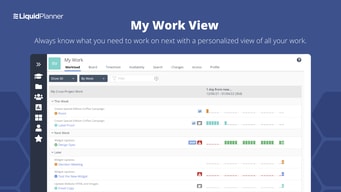
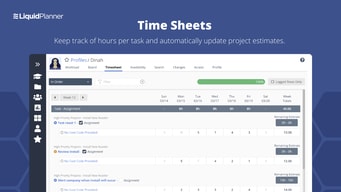
Timesheets, who's working on what and the progress
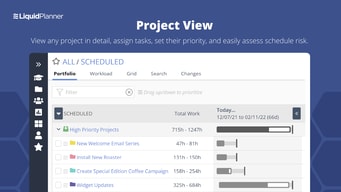
It's easy and simple to get started. You can quickly get a project setup without resources being a member, also, like the roll-up feature within a task. Compared to other project management tools, it gives you a quick view of target date vs projected target date based on the resource availability.
It's an excellent planner to see the resource availability but lacks certain features like setting up recurring tasks and other features compared to other project management tools.
Using LiquidPlanner for resource planning and also to manage projects. LiquidPlanner provided the necessary views to see and plan resource availability against multiple project target dates.