

Unclaimed: Are you working at Stackby?





Stackby Reviews: 4.7/5 — Highly Rated
Stackby is a task management platform designed to help companies build better workflows, collaborate with team members efficiently, and organize operations seamlessly. It features built-in integrations, templates, and more which all contribute to the efficacy of the platform.





| Capabilities |
API
|
|---|---|
| Segment |
Small Business
Mid Market
Enterprise
|
| Deployment | Cloud / SaaS / Web-Based, Mobile Android, Mobile iPad, Mobile iPhone |
| Support | 24/7 (Live rep), Chat, Email/Help Desk, FAQs/Forum, Knowledge Base, Phone Support |
| Training | Documentation |
| Languages | English |
Compare Stackby with other popular tools in the same category.

The value of the product as well as it being very useful for my business.
I really do not have any dislikes for it so far.
I have been using it to track of custom DNS entries that I enter for clients domains/websites. Using the form makes it so easy to populate the tables with the information making it a time saver.
Awesome product that has helped and my team reduce our workload greatly! It is flexible, powerful and feature full. Their API first strategy makes Stackby a powerhouse of features!
Nothing to dislike! And awesome piece of work with a lot of potential.
Organising my work and my team’s work. Organising my projects and organising all my resources and data into accessible and understandable stacks.

Whether you want to organise data, create systems, keep track of your sales, your marketing, your business assets, and the use cases go on and on and on, this tool can help you achieve that. Also with the new Zapier (Beta) integration it opens up possibilities to bring data to and from the rest of your technology ecosystem.
Is it all fireworks and champagne? No. Not yet. There are a few functional things I've encountered that need improvement. The good news about this though is the company is super responsive and get's to work fast to solve stuff.
The two main use cases I've started using with Stackby are as a Digital Asset Management System (for my business and I've set up one of my clients in the same way ... they purchased multiple codes also) and as a Deal Management System for financial transactions. Given I'm in the PE/VC space I was pleasantly surprised that the system had relevant templates for this industry already out of the box, in addition to loads of other (what look like) very useful templates. I've poked around several and love how the one's I've checked out have been put together. It feels like whoever created them knows the requirements of the respective industries.

The enormous potential of the API-centric approach taken by StackBy is absolutely fantastic and completely new on the market. It will offer unbelievable automation & visualization + data entry - all in one.
Lack of integrations... But don't let yourself being unconvinced by the lack of integrations at the moment: this will grow quickly and deliver immense business value: I invested now and I am convinced this is a good bet.
Data management & automatiokn: all in one!

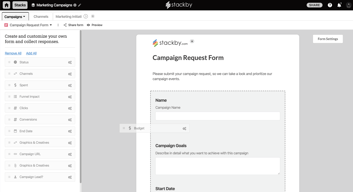
Stackby combines the use of databases, spreadsheets, task-management and forms in one tool. It also let you view your content and modify it in different views, based on your needs. Stackby also let you work closely with your team-members through task-notifications, a built-in chat, and different kind of reminders. You can create forms, that feed info into your sheet(s)/database, and embed or share the form outside the tool as you like. In this way you can ask people for their input, and get their answers directly into Stackby where you can work further with their input as you like. Advance filtering enable you to easily find the information are looking for - it becomes a very valuable thing, as you amount of data grow. Currently Stackby comes with 75+ templates for different purposes and markets. A template is basically a system/advanced spreadsheet out of the box, that let you get started quickly without you have to start from scratch. I really don't understand, why the Stackby team, has not promoted this even more, as you get 75+ systems out of a box - it is amazing - and I know from their support, they plan to deploy even more templates on a regular basis.
I love the idea of system integrations and the use of API’s, as I have not seen in other tools. However the current 15 integrations (January 2020) are too little. Luckily I know from their support, the adding more integrations on a regular basis. Some of the stuff they have planned (e.g. integrations with FB and Zapier) will be a game-changer, but I will still recommend them to list the integrations in scope for the future. While the system works with revision on a per row basis, I have suggested the team, they also implement a 'roll-back feature'. I think both things are needed, when you work with critical data.
Anything complicated spreadsheets and databases can solve. Stackby just do it faster and more easy.
It is a true life changing business management tool, with some outstanding AI features for quick task completing. Provides the best and great feature for generated an automated report for the work. And creating the documentation and spreadsheet for all the projects and data keeping capabilities are amazing. The automated features available on this helps to grow your work and companies reputation and image in market or on digital platforms. This is also procussing and keeping track of our social media channels and targeting more and more audience for our business. Keeps you connected with all the social media audience and with other third party web pages or platforms too. This maintains and keeps organised all the important and official documents all together on this platform, everything is save and easy to access any time as it is a cloud based software.
The working or the processing is sometimes effected due to complex document processing or importing in it. Lags are also experienced, larger number of datasets are when loaded in this at same time. I think there is requirement for upgrade in the OS of Stackby.
Stackby software helpful and easy document creating and spreadsheet preparation for all our projects has helped us a lot to manage our work properly on daily basis. This is structuring and guiding us to plan for our assignments and tasks. We are also pleased to distribute the work equally and decrease the load of work. Easy to share and creat the attractive marketing content and managing multiple channels for our business.
I was very happy to use Stackby, even as beginner it is fairly easy to use as it there is no need for coding or training. Using this platform my organization was able to able to add checklists, reminders etc. I was happy with 200+ templates Stackby provided that too across various topics sales, product, Marketing, video production, etc. I haven’t gotten to the best thing I like about the platform, which is the fact that it supports various types of data such as text, number, dates, and attachments, due to which my work was done efficiently. It was easy to implement.
I was not impressed with the interface of the platform it is not smooth at all. On one side we see that Stackby integrates with third-party platforms but while using it I found that the number of platforms is limited. I did experience a smooth experience when I was using features like analytics & reporting, also they should work on optimizing the platform for mobile users especially for iOS. Another feature that did not impress me is the text generation. The customer support was also a bit slow and lagged slightly.
Stackby is an amazing database management platform for small to middle enterprises. With the help of Stackby one can easily create multiple databases to manage editorial calendars, track contents ideas, assign tasks to team members and monitor content performance. Stackby also provides collaboration with third-party platforms, with an amazing feature fortheir users which allows them to save their time and efforts. The platform needs to work on some features such as improving the interface and customer service.
Stackby has become an invaluable asset for our team, completely revolutionizing how we collaborate and manage our projects. This all-in-one platform seamlessly combines the power of spreadsheets, databases, and project management tools, providing us with a truly flexible and customizable workspace. One of the standout features of Stackby is its remarkable adaptability to our unique requirements. The platform allows us to create personalized databases and workflows that perfectly align with our specific needs. Whether it's organizing data, tracking tasks, or analyzing information, Stackby offers endless possibilities. Its support for various data types, such as text, numbers, dates, and attachments, ensures we can work efficiently with diverse sets of information.
While Stackby is generally user-friendly and intuitive, mastering the more intricate functionalities can require a bit of time and exploration. Some team members who are less tech-savvy or new to the platform may find it slightly challenging to fully leverage the extensive capabilities initially.
First and foremost, Stackby has eliminated the issue of scattered and disconnected data. Previously, we struggled with multiple spreadsheets and disjointed systems, making it difficult to access and manage information efficiently. However, with Stackby's unified platform, we can centralize our data and workflows in one place. This consolidation has greatly improved our data organization, accessibility, and overall productivity. Furthermore, Stackby has greatly enhanced our collaboration capabilities. In the past, collaborating on projects and sharing updates across different tools and platforms caused unnecessary delays and miscommunication. With Stackby, we can seamlessly collaborate in real-time, making simultaneous edits, leaving comments, and sharing our work with ease. This streamlined collaboration has fostered better teamwork, accelerated project timelines, and ultimately improved our overall efficiency.

I am currently reviewing different apps to kick start my sole trader business. Among all the apps I have used, Stackby is one of the most intuitive ones for starters. Furthermore, it's built-in integrations hold so much more potential to be more than just another cloud spreadsheet database and yet it is still adding new features.
I'd like to see more plans or add-on options to allow small startups and beginners like myself to slowly expand and grow my database with my business. Also it will be good if data among different stacks can be accessed and shared for more flexible data management.
I have developed a lot of VBA based Excel sheets but I needed something more flexible that can be accessed everywhere, making changes without a computer, and sharing information with clients or coworkers who have very limited programming or Excel knowledge.
1. There are endless possibilities here. 2. Flexible spreadsheet style databases. 3. Great Customer Support. 4. Templates database.
There is nothing to dislike as from my point of view. It is upto you how you use it , for many people it is so easy and for many it seems complex. This is still growing.
1. Its template database 2. For organizing my database 3. Automatic API pulls . 4. In marketing
I love the way Stackby is presented - very visual, using a color-coded tagging system to categorize. It has easy-to-use drop downs that you can customize. These are way more user-friendly to use tha excel or Google Sheets. I really like the way so much of the stack is visible on the screen even with small laptops. I also really like how you can embed documents within the stacks and have ready-to-use and adaptable templates. Another great feature is the ability to connect to software like Zapier or Pabbly so that form submissions can be automatically sent to your Stackby CRM, then other actions taken from there - i.e. notifications sent to team via Slack etc.
I don't dislike anything really. The software can be as straightforward or as complex as you wish it to be. I've loads still to learn; however, the founder Rachit is very responsive in the support group.
Stackby is an easy to use spreadsheet solution that works as a visual CRM and a place to run several automations from. Benefits include enjoying working within Stackby because of its colorful and clean UI rather than dreading using Google Sheets.
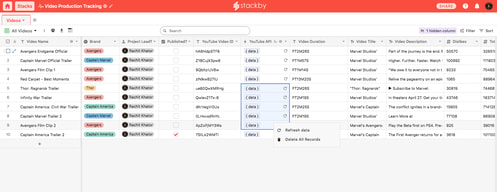
I really like the way, how Stackby connects to API. I use this in one instance for comparing different youTube Channels in the amount of reach and subscriptions they have, or in another instance to compare the stats of lots of YouTube Videos against each other. Another function I like is the Form Feature. I created a Form that I distributed to experts and their answers filled a sheet, which I could use to aggregate data and derive answers.
As an european user, GDPR ist very important for my work. I dislike the shortness of stackbys GDPR page, since other vendors provide more information on how the service can be used in a compliant way.
See above. One benefit is that the API data collection is much quicker and also cheaper than manual data entry.
Using stackby as a simple yet powerfull CMS wich is fully flexible to my needs, ease of use, simple to setup & learn, fast import of google sheets.and having all relevant data in one tool exactly as i want/need. swiching to different views (list, agenda/kabanboard) as needed. also the webclipper is a timesaver, simply getting info from email/websites quickly into stackby without swiching
Sometimes adding a field with copy past does not take directly (due slow internet) but this is easy fixed
Custom CMS. Data Lists, todolist

Stackby brings together all our data in a single place - via forms, webhooks, and the native API integrations. Once the data is added, we could then visualize & share different views and organize everything effectively for our team and our clients. Adding (Checklists & Reminders) to everything was a great feature that significantly impacted the process and helped to get things done faster than ever.
Color options need more improvements. There is no desktop app
For digital agencies, it is the perfect solution for all types of projects: content, development, design and more. It's the best productivity, organization and resource workspace
Yellow is the stackby logo, which represents a unique data processing quality, organized in a correct way for the disposition of professional collaborative procedures, information leveling scales developed from api, time administration activation's of commercial management automatics, simplifications of work templates of qualified communicative networks, centralization of advanced business growth response, professional calculations of asset invoicing are found within the programming of this server.
When I want to synchronize my contact portfolio I could realize that in stackby there are big problems of coordination of presentation delivery supports, because their leveling of secured access of files, are harmed by losing the quality of analysis necessary for their free transit of effective data sharing executions, wrong services of balanced connections projection, disproportionate coding dimensions are treated within this program.
It has been the effect of frequent updates, its presentations of economic plans, numbering of discussion projects, scalable navigation service, an incredible communication panel, financial management programming of relational content records, messaging chat, sharing of proven documentation, programming of regulations by e-mail, appropriate segmentation of scalable chronological monitoring, real time follow-ups, are part of the informative projection that is achieved by correctly activating the stackby system.

Let's face it, spreadsheets are a bore and generally require you to create even more spreadsheets to show the data you need. With Stackby, you can alleviate some of that spreadsheet fatigue. Directly hooking into API's or other apps with native integrations make everything a breeze.
If there's anything to dislike it's that there aren't templates to handle every use-case yet. I'm certain they're coming, as the Stackby is hard at work to bring new features and templates monthly.
We use Stackby to create content, social media, and campaign calendars for clients so that they can easily be kept up-to-date on their project progress.
it is easy to use and you don't have to switch for files, you can directely upload here
it can be more user-friendly, its need technical guidance if you have never used airtable or similar software
all things in one place and pulling of data from api directly, watching real and tracking of social media posts is awesome
I like that Stackby easily manages projects in one secure platform. Tracking both time and expenses utilized on projects is easy.
Stackby though tends to lag behind while when the internet is poor and doesn't have offline access capabilities.
I am now able to manage tasks and projects in an encrypted location.

Stackby has been thoughtfully designed to offer the power of a database in an online platform. I'm using it to set up an speaker management portal. The ability to link to other sheets and pull in data from the link is essential. At this stage, the developers are hungry for growth and are very responsive. This is fun. The platform is designed to be aesthetically pleasing. While there are still some UX rough spots, I'm very pleased.
Since Stackby is a new product very much in development, not every part of the user experience is perfectly polished. At times, I've had data not save when I navigated away from a field. However, once you learn the way the ball bounces, it's not hard to confirm that data entry was successful. I wish there were a way to keep a live-updated copy of Stackby data on a local device, allowing us to run mail merges from a CSV that continually updates from Stackby. I'm not sure if that sort of thing will ever be feasible, though, given that Stackby's data types are richer than what Excel offers.
I'm using this to view data across events. Before, our information was in spreadsheets but that became unwieldy. This allows us to unify our view of cross-event data.

Stackby's killer feature is its API integration with other applications. It can ingest data from those other services and display it or combine it with other data. Stackby can be the data storage and analysis brain of your company.
It's a bit easier to use than a traditional database but it isn't "easy". The person in your company who is going to create the "stacks" (databases) needs to be technically inclined. Most of it is not hard, but it requires a bit of effort. You might stumble a few times on building a formula that does something uniquely useful to your company. The documentation, videos, forum, and customer support will help you get it figured out. Once you've built the stack, it's easy for anyone in your office to use. It also needs a lot more integrations. It currently has 44. This covers most of the big services that you might use (Google, MailChimp, etc.), but you probably use a few services that aren't on that list. They provide webhooks. That should get you wired up correctly, but webhooks are a bit harder to configure than native integrations.
At the moment, I'm just using it as a vanilla database for internal company data. I purchased it specifically for its API features, which I'm not using yet. I have a couple of projects planned for this, which I plan to work on soon.

The ease of use. I can use a spreadsheet as a database. I can do formula calculations on my data before I use it.
Paid upgrades that should be part of the main product like export to excel.
I am managing data for several projects.
The Stackby App is an excellent tool for organizing data and creating custom relational databases that are simple to share and maintain.
The only thing I would add is more integrations with other platforms.
Stackby is great to have for projects that have a lot of data that you need to keep organized.
It covers all the basics for an online relational database well at a fraction of the price of Airtable. It's got a straightforward UI (very similar to Airtable). Getting data in and out is simple. Great value for money, especially on a lifetime deal.
The integrations can be patchy, especially when you stray off the beaten path away from market leaders like Zapier or Mailchimp to more unusual vendors. There are a few unexpected behaviours and you have to be careful with data typing.
Great for simple relational databases for small teams. It's saved lots of money compared with Airtable when you don't need that level of detail.
I like the ability to create any type of database that I want with functionality that is different than spreadsheets.
My biggest dislike is the number of native integrations, even though I expect them to add more down the line.
We are utilizing Stackby to keep track of client information and for managing online video and audio production. Stackby is helping us put structure to these processes.

Stackby really shines when it comes to organized sheets. You have lots of formatting options to personalize how you view your sheets.
I think can improve greatly on the speed
organizing my business
Easy signup with the single sign-on option with Google, and option to experience the platform using the trial version and cheap to upgrade workspace. The Guide video after login was really helpful to explore the platform. A huge amount of templates are available to explore more out of it. There is multiple Integration option like page speed, hunter this is great for all the type of collaboration. Kanban board feature is more useful.
The UI is basic, would like to have a dark theme as more time spends on team collaboration. The chatbot is useless, it's predefined, and don't want to see it on every window. Need more features in the community forum. Forms option is not working as expected
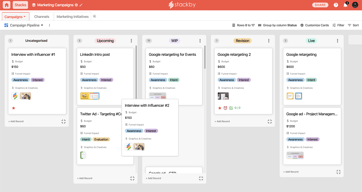
Creating a Kanban board for organizing events and roadmap. Collaboration with the team. Pull the data from the different source and analysis as a team and do project management
I like how easy it is to use it in a basic manner and once you learn how to use it, it's incredibly versatile. The software works quite quickly and smoothly. It has a lot of integrations that I've found work well.
The visual look of pages where you open your stacks seems quite basic before entering the software itself. There are a few issues that make it less easy UI wise, such as when choosing a date, the button to go to the next page moves around a bit when clicking the next month.
I am using it to hold a database for advertising providers and where we are up to with their adverts. It's been the best tool for this after using multiple tools as it holds the info without needing it in one row only, and also keeps the info linked.
In Bezug auf Management und Organisation hat Stackby einfach die lobende Erwähnung, dass es in wenigen Minuten große und komplexe Prozesse auf so praktische, einfache und schnelle Weise organisieren kann, dass ich all unsere Arbeit in einem Schritt erheblich beschleunigen kann Überraschenderweise erweist sich die jederzeitige Benutzerfreundlichkeit auch als bemerkenswert in Bezug auf die Verwendung dieser Anwendung, da wir eine große Anzahl von Aufgaben auf ganz praktische Weise vereinfachen können. Die Lernkurve ist praktisch nicht vorhanden, dh für uns in Insbesondere war es für uns sehr einfach zu lernen, wie man es benutzt, und wenn wir eine große Anzahl von Anleitungen und Lehrmitteln wie Video-Tutorials haben, stellt sich heraus, dass dies auch eine große Hilfe ist, wenn die ersten Schritte mit dieser Anwendung unternommen werden Die Leichtigkeit, mit der ich meine Dokumente mit den anderen Kollegen teilen kann, stellt sich ebenfalls als etwas heraus vor dem praktischen, da ich auf diese Weise meine Dateien sehr einfach und schnell senden kann, wenn sie es anfordern, ohne lange Zeit darauf warten zu müssen.
Meine einzige Beschwerde könnte sein, dass der Kundenservice ziemlich schlecht ist, aber es betrifft mich nicht sehr, denn in all der Zeit, in der ich ihn nur zweimal verwendet habe, musste ich mich wirklich an den Support wenden Anwendung gibt nicht viele Probleme wie andere ...
Es hat uns sehr geholfen, die Aktivitäten, die wir in unserer Arbeit ausführen müssen, auf sehr praktische, agile und effiziente Weise zu planen und zu organisieren, damit wir alle unsere Probleme auf sehr einfache und schnelle Weise lösen können. Dies hat es uns ermöglicht, die täglichen Aktivitäten unserer Arbeit viel einfacher und einfacher voranzutreiben.

Stackby was quite easy to learn and get on board right away especially you had been using other similar spreadsheets products before. Everything was very straightforward and simply flexible enough to do just about anything. What makes Stackby so unique is the API and all the built-in integrations. It became so convenient to be able to link up with other apps straightaway. And the ways the company has been working and adding new integrations just about weekly is really impressive.
Sometimes I feel the app get a bit slow. However, I think it is much faster and smoother than when I first tried at the beginning of the year. Also, I would love more selections of the templates if possible.
We use Stackby for Inventory management and lightweight CRM. My team was able to get to work right away migrating from another similar platform.