

Unclaimed: Are you working at TeamGantt?






TeamGantt Reviews: 4.8/5 — Highly Rated
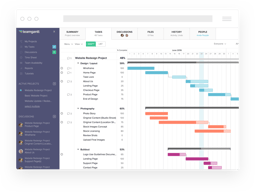
TeamGantt is a cloud-based Gantt chart and project planning solution specifically built for small, midsize, and large enterprises. With its comprehensive project collaboration tools it facilitates better efficiency within teams using Gantt charts, time tracking, file sharing, and task-level communication features. A drag-and-drop interface also ensures better usability and ease of use.





| Capabilities |
API
|
|---|---|
| Segment |
Small Business
Mid Market
Enterprise
|
| Deployment | Cloud / SaaS / Web-Based, Mobile iPad, Mobile iPhone |
| Support | 24/7 (Live rep), Chat, Email/Help Desk, FAQs/Forum, Knowledge Base, Phone Support |
| Training | Documentation |
| Languages | English |

Compare TeamGantt with other popular tools in the same category.
Good user interface, easy to use and very clear. Has all the functionality to plan and deliver most projects (unless you are launching a space shuttle!)
Haven't found anything yet but I'll keep trying and let you know if I do!
Multiple projects ranging from change projects to start-ups. All on plan.
TeamGantt saved my bacon on a project that allowed me to clarify the process, show progress, dump the initial scheme into my proposal to sell it and then give the client the "feelgood" that their project was being handled in tip top fashion. Then I was able to have others input and view and manage the data going forward.
Sometimes slow, tough to see in refresh mode.
I already mentioned team Gantt to a colleague to try to convince a project team located in several places to adopt the process. I have a hard copy of a Gantt chart-style they sent me now that I can't tailor to my needs for the project and then update to the team. Team Gantt saved me a lot of mental anguish. Also, now I can duplicate elements of previous projects and speed up my time to generate project planning. If Team Gantt had legs, I'd marry it. Oops, already married.
At first I was a bit apprehensive about using this product versus MS Project but it's very simple to use and that makes it addictive. You can get to where you want within 5 clicks. It reminds me of Microsoft Project but even that was not this simple. So I totally recommend this product, no I don't have a stake in this company or relatives working for them. I just use it for my projects. Many departments in our company started using TeamGantt for their projects and I have yet to hear any negative feedback.
Just a couple things I don't like about the product. 1. No Active Directory integration (SSO) 2. Not yet ITIL certified
Using it for Project Management. It was easy to adapt across multiple departments within the company.
If you are loooking for a simple inexpensive way to introduce your company to running projects Team Gantt is a great way to go, Team Gannt has enabled us to track multiple tasks across concurrent projects in a way that made it easy for everyone involved to see what thier tasks were and when they needed to be completed.
There is nothing I dislike about this product, it works great.
We use Team Gannt for our new branch setups, involving multiple departments and divisions.
TG allows me to stay organized. I can see each project's status at a glance and access documentation easily. The program is helpful for one or multiple projects. Using the TG charts with 3rd parties and capitalization partners also serves to quickly and easily give updates and to demonstrate the current status for projects.
Not all users want daily email reminders. If desired, it would be nice to enable some users to opt for a weekly email reminder. Otherwise the program is very user friendly and quickly becomes a central piece for project management.
I am solving the challenge of coordinating the multiple, disconnected moving parts involved in real estate development. One of the benefits of TG is that all active participants can gauge progress and monitor the status of the project easily online. Document administration and access is also easy and a functional part of the TG program.
The folks at TeamGantt have clearly gone out of their way to provide an easy-to-use, easy-to-configure interface. This is a simple product with a lot of potential.
There was nothing to dislike here. The only reason this software may not work for you is if you have more complex requirements for your project management.
We were getting involved with a project more complex than we have in the past that involved multiple resources. TeamGantt was just what we needed to track the project across multiple developers, right through to completion.
This product is very easy to use, and I can send the link out to management knowing that we have captured the key components which they care about.
Still missing a few features such as ability to multi-edit many items at one time.
Gives us the ability to properly track our projects. Prior to this, we used too many tools at the same time, which added overhead on something with a lot of visibility in the company.
TeamGantt is not trying to be the most feature-rich project manager. It keeps things simple, which is important when trying to engage people who never touched project planning before. But PM is a team effort, not a 100% centralised function.
It took a very long time to get "undo" implemented. But it's there now! User attestation and access security is still a concern. As the application is not integrated into Active Directory, we have to be very careful with handling leavers.
Advertising agency - hoarding creatives and trying to get them organised. It's still impossible, but a little less with TeamGantt ;-)
Team Gantt offers solutions to all of our planning needs. Our projects are repetitive. We are able to archive and bring them back, improve them, and bring forward all the lessons we learnt the hard way rather than repeat mistakes. Sharing is brilliant and easy and avoids having to make sure everyone is operating with the current version.
There is nothing I dislike about the product
Keeping everyone in the loop and accountable for projects and events is the biggest solution teamgantt offers. The biggest advantage is that our clients see us as organised and excellent communicators.
Ease of use. Excellent UX / UI. Affordable options. Web based. Great Apps. Excellent customer service. Large range of pdf options, views nicely for clients. Resourcing tasks breakdown.
Inability to schedule tasks by the hour effectively. Tasks on same day with dependencies sometimes don't input well.
General timeline problems. Basic resourcing problems.
Its intuitive, easy to find what I want and the updates are so simple yet powerful.
They've updated the things I didn't like
I am an SDLC project manager and I found it difficult to find a platform that I could track shared resources across project workstreams. I have also found it easy track hours for individual tasks and roll it up to the top view. List or gantt I can get my clients the plan view they want.
It is so easy to use and understand. Visually it is very easy on the eyes. I couldn't be happier!
There are no features that I dislike, yet.
Multiple project planning for a small residential construction company. It has allowed me to give better timeline estimates to my clients as well has help me keep track of progress throughout the course of a project. Also, I have spent less timing keeping my projects on track.
By using Gantt charts, I look to get a comprehensive visual overview of what I am looking on, which deadlines I am facing and do so while investing as little time as possible in the Gantt chart itself. TeamGantt is inuitive: when I demo it to my colleagues, we create a new chart for one of their projects. Within minutes of training, their first Gantt chart is complete. By removing the "learn new software" from the equation, I have more time to focus on how to do what needs to get done. I have tried a number of Gantt chart solutions, Team Gantt is the easiest one I have tried and yet have tremendous complexity that allows it to support even large and complex projects, unlike some other solutions that are only good at basic tasks.
It would be great to have a desktop app that would sync with the web browser as this would possibly be more responsive. I haven't tried it on a disconected laptop so maybe it already works when offline?
Organisation of the marketing effort of a financial asset management company. We manager a number of investment funds, for each fund we produce a number of documents, we have recently done a rewrite of some of the major documents, each rewrite required the coordination of 5-6 people per document. Keeping track of this without a Gantt chart would have been impossible. Two main benefits: saving time and reducing stress.

It is so simple and easy. It is very intuitive and whenever I did have questions, there were quick, concise videos to answer any questions I may have. Editing timing of project items is so fast, it makes my job so much easier, keeping many team members on task and on time.
Honestly, there is not really anything I dislike.
I work with team members that are located all around the country that own different pieces of many different projects. It makes it so much easier for all of us to log-in and see all our current, past and future projects. Team members can update their progress as they go so I don't have to harass them for updates. It is their responsibility which takes the pressure off of me!
This is a fantastic web-base platform that is simple, clean, and easy to customize. TeamGantt is a great tool when some of your team members lack experience using project management tools, but it's also robust enough for advanced project managers. I have been using TeamGantt for about four years with a wide variety of projects and found it extremely helpful every time.
I honestly can't think of anything. It's really a great tool.
A variety of projects. I've used it for events, grants, and all kinds of other projects.
we do not have a full time project manager, but we do have important milestones to achieve. TeamGantt offered a low cost way for our small team to constantly monitor and update progress against plan. we found it easy to use, and has so far thrown up no software glitches
Need an icon on my screen to link me in; the feature probably exists, I just haven't found it yet
across company sharing and updating of important information. Daily reminders are also great for focussing the mind on what needs to be achieved.
Teamgantt is easy. You don't have to think how to use the software, and this leave the time to focus on manage the projects. For someone that approach for the first time the challenge of organize and schedule things over the time this is very important.
The web interface sometimes have little glitches and doesn't respond to the speed I try to type. But this could be a problem of my internet connection, and it's common to the web apps with a complex interface
I'm a freelance software developer and I have to manage multiple projects at the same time for different customers. I'm also starting a couple of startup project. The problem here is to try to track all the steps needed and visualize the things I have to do vs the things already done. The benefit is that I'm learning to distribute the work weight in a better way, so I don't find myself trying to do 15/18 hours of work in a single day to respect unrealistic deadlines...
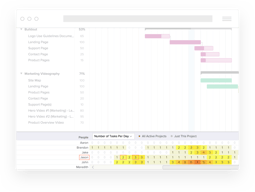
Very easy to use. Easy to get a quick overview of my team's availabilty without detailed planning. Intelligent filters.
Sometimes fiddly to get the right hierarchy of tasks and subgroups. Unclear when a person shows up as a resource or a person (sometimes I manage to get people into the resource tab)
Overview of how we use the entire development team. More even resource balance.
Completely online for everyone on the team to see. Email notifications make life easier for the PM. Can't be any easier to add/edit tasks.
Needs a few more editing tools. Undo button is priority #1. Dragging tasks around can be finicky.
Project management simplified.
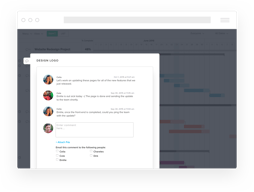
The best features in Team Gantt are the collaboration capabilities. We use this extensively to keep all project members and stakeholders informed of project tasks and sue dates. In addition, we share documentation and comments that represent critical information.
Sometimes it is difficult to change the duration of a task and have it automatically adjust other tasks and milestones in the project.
We view most of our important work as a project and manage it that way. Team Gantt provides a comprehensive and user friendly method of tracking and reporting project status.
The overview of a project is splendid. I could dig into a team members list of objectives, see history, what has been done before (i.e. a new member could go back in time to investigate how a project has developed). I needs a small daily effort to keep track! And I love the drag and drop of tasks
have not discovered major issues yet! work online is sometimes lagging but its not too big deal.
How to manage a creative team of five people in order to solve web design tasks, organising marketing events and press events. The aim is to be content and fulfilled at the end of every workday.
Easy multi user interface; The best for time management in a very dynamic contest
No time sheet available and no friendly smartphone interface available
The time management in a very dynamic contest, with a 20 persons team that have to manage himself activity and to coordinate each other.
Easy to use and very resourceful our tem integration is very easy.
Some time is difficult to select many lines at the same time. We like more buttons;
Managament of time and deliverables.
I like using TeamGantt for scheduling my projects. The best thing I like about it is the collaboration. I always add my colleagues to the projects and assign the tasks to them. This way I can have a high-level overview of everyone's task and makes the whole planning much easier. I really like the color-coding for the different assignees which works cross-projects. Since I like to keep things in order, I use the grouping feature almost all the time.
Changing the hierarchy between the different groups is sometimes hard to achieve. For instance, if I want to drag a group under another one, it's a bit tricky to achieve, especially on the Scheduling view. For that I always switch to the List layout, reorder my groups and switch back to the scheduling view. A feature that I miss is that there's no possibility to set a task's length to 0.5 days. Sometimes it might be really useful. And the exported PDFs could be a bit nicer :) I usually send those to our clients to give them a brief summary of what the plan for the upcoming period looks like, but I'm not convinced they use it. Even I find it hard to read it.
I work at a company specialized in mobile app development. Using an Agile Methodology the planning is a must in our field.
TeamGantt isn't burdened by all of the options and buttons that I frankly never used on the previous PM software I used. It is clean, simple, and easy to use. Also, transferring my work from the old site to this one was a cinch - a simple CSV file import and column assignments are straightforward.
Editing the dates is a little difficult as the buttons are so small. Hovering the mouse over the right point requires I move a little slower.
I like that the Gantt chart format allows me to quickly glance at some items I need to advance this week without needing to consistently update a paper to-do list or delaying things further.
We love the fact that everything is visually based. When can see holes in our schedule, plug in projects, adjust timelines and update project milestones all with the slide of a mouse. One of our biggest requirements of a Gantt chart was the ability to pull in Basecamp data to sync. Running two separate Project Management systems and trying to keep them in sync was a battle that we just don't have time to fight. Instead Team Gantt enables us to continue using Basecamp that is in use throughout our organization, and add a Gantt chart system. We are looking forward to rolling out Team Gantt to as many departments as possible!
I wish there was the ability to split a task over different days and or assign the task to two different people. There is also no way to be able to resort the order in which the projects are displayed.
Scheduling for video and design projects was a nightmare. We were always fighting against the conversation of our team's capacity. When you can pull up the entire department's schedule and show an internal client that you are booked for the next 3 weeks with all of the other projects for the company, there isn't much conversation about values or who comes first. It's plain and simple!
TeamGantt has everything a Project Manager needs and without any of the clutter often found in some other software programs. It helps me keep track of everything and my colleagues easily understand it, even people who have not worked with Gantt charts previously. A great product!
I do not dislike anything here. It's all good!
I can easily export a chart as a .pdf file to a colleague and this is very helpful. Most colleagues don't want to sign up and be part of the Gantt chart process, even if they are a resource, so this is a great feature where I can still enter their tasks and goals and keep everyone informed. It's a great product! I love TeamGantt !
The ease of use of TeamGantt is great. I had never used gantt generating software before and this was easy and quick to learn. It makes us look very organized and timely in the eyes of our clients.
There is not much not to like. TeamGantt keeps things simple.
When project start we begin with a rough timeline in TeamGantt and they as we see more definition of tasks we refine and adjust the timeline. It is great that the clients can feel confident that we are making progress by following our percentages completed.
It's so straight forward and easy to use. It was also extremely easy to get all my team up and running on it.
The only thing I dislike is that it doesn't have an option to plug in hours BUT I am told that that functionality is being added in within their next release within a couple of weeks!
Every day management of a lot of marketing projects.
I love the integration with basecamp and how easy it is to update your project schedules from both apps.
When I share a link with a client or partner I wish my company logo was there. White label option would be great.
When developing web projects sharing a schedule with your client or partner is very important. Keeping everyone up to date regarding schedules is an awesome benefit.