

Unclaimed: Are you working at Accelo?
Accelo Reviews: 4.4/5 — Solid Choice
Accelo is a professional services automation software featuring an end-to-end cloud-based platform that manages all aspects of client work delivery, from prospect to payment, including sales, projects, tickets, retainers, timesheets, resourcing, and more, regardless of where you are.

| Capabilities |
API
|
|---|---|
| Segment |
Small Business
Mid Market
Enterprise
|
| Deployment | Cloud / SaaS / Web-Based, Mobile Android, Mobile iPad, Mobile iPhone |
| Support | 24/7 (Live rep), Chat, Email/Help Desk, FAQs/Forum, Knowledge Base, Phone Support |
| Training | Documentation |
| Languages | English |
Compare Accelo with other popular tools in the same category.
Great customer service, good features and up to date visualisation
No WIP report - has to be downloaded manually from timesheets or pay $000 to Accelo for a custom report
Accelo saves everything in the cloud so we don't need other products to save the documentation
The software is easy to use, user friendly and we got all we need
the only thing is the "schedule" we are unable to modify a schedule, we have to delete it and redo it
With accelo, we see the time tracking of our employee, it's easy to follow the work in general
The ability to combine your CRM, Project Management Tools, Ticketing, Time Tracking, Billing and Sales all in one!! No other system that does it better! I've seen Accelo implemented more than once, which is why I chose it as our ultimate one system to rule them all! Works amazing in the digital marketing space, and beats any of it's competitors like Monday, Hub Spot, Pipedrive and the likes... Beyond just the platform, the team and customer support is exceptional, all the way from the demo phase to the onboarding and system migration/implementation/integration, you cannot fault Accelo. Overall, including the ease of use and intuitive interface, Accelo is the go to daily tool any agency should consider using. It brings you great reporting, visibility and deliverability that is second to none!
Not much to dislike, but could do with more automation features!
Combining all our different systems into one, where we now can manage our client records, projects, tickets, time tracking, billing and sales. Historically, we were using a handful of different systems to do this, and for a digital marketing agency with over 500 clients, this transition to Accelo was a no-brainer for us! If you have any doubts about moving across, don't! Accelo delivers in all respects, which is very hard to come by in the tech world.

Task and email management are built into the ecosystem, with seamless time logging and billing. I haven't seen this offered anywhere else. Rather than just integrate with your email, you can work from within the program all the while recording your time and billing rate for each task automatically.
It can be very daunting when first starting out due to the sheer amount of capabilities and options available. Everything is connected so a simple mistake early on in your workflow such as how you set up your tasks can show up eventually when billing. I recommend working with their professional services team to get your workflow set up properly and avoid the headache of the trial and error approach. I worked with Siobhan and she was very adaptable to my learning style and schedule, which is very rare in the consulting space! I highly recommend this option rather than stumbling through it as I first did.
My biggest problem has been that after my workday, even if I've completed a full day's work, I'm never able to relax. Due to the number of clients I work with, each with their issues and details to keep on top of, my evenings and weekends consisted of reviewing my work in my head to make sure that I didn't miss anything. I'm very organized but still had too much trouble trying to see all my current work right in front of me to where I can confidently shut off for the day. Learning to use Accelo properly means that I can now be sure that I record an issue correctly as it happens. Almost as important, I can now recall these notes very quickly, even if I'm jumping from one client meeting to another, or just picking up a call and being able to catch up on the situation. I've barely scratched the surface as I'm only using a few tools so far and I'm working on perfecting them. I used to dread when clients called with a new issue as this is another thing that I have to keep on top of. I always felt like I needed to finish all of my work to be able to stop. Now I can just schedule new tasks immediately and let the client know then when I'll be able to complete this for them. So I don't have to always play catch up or do the work from the client who's shouting the loudest.
Their help team are informed and responsive
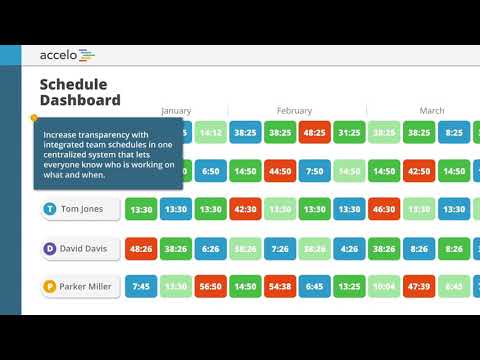
They didn't think through the usage impacts of some key product features like the scheduling dashboard.
Lack of a single source of the truth about work to be done and work actually done.
The Client Portal and the ease of editing reports. I find the layout well designed. I like that it's easy to create templates and run most of my business using the platform.
I wish there were more tiled windows and required less opening new tabs. I'm hoping in the next release, you can adjust the column width on the Project Overview window.
I need a single platform to track projects, sales, invoices, billing and client communication. I'm just getting started and Accelo is really helping me to organize my workload and assign tasks to others.
its easily navigational. easy to transfer tasks
not so easy to print reports on basic plan. it doesnt update status automatic. You have to refresh. the accelo mobile could be better
makes it easier to track tasks and transfer task. also, sending emails through accelo keeps it with that task.
Accelo allows us to easily know the critical information about each project. Keeping a project on schedule and on budget is so much better now that we are using Accelo to do it.
We are constantly having to monitor where hours are being placed by Accelo in retainer periods. If we leave a retainer period from a previous month open, Accelo will often assign entered hours to an old retainer period even though the dates dont match.
Making sure projects are staying on budget, and knowing where projects are financially during the entire process is a problem we dealt with for years before Accelo. Now we have it in real time, anytime. Accelo is saving us time, which saves us money.


From sales to project management, Accelo is a seamless platform that works across all departments. And if you don't need a particular module, you don't have to pay for it!
As with any comprehensive platform, there is a learning curve. The training process is excellent, and you can have Accelo do much of the setup for you. And as long as you're paying attention and utilize the resources provided, it's easy to learn and customize for your organization's unique needs.
We can manage, from prospect to client, the entire sales and project management journey in one place. It's where we clock all of our hours, understand where we are in each project, know who is working on what, and follow specific timelines that are SUPER easy to incorporate into each project plan. It's not perfect, but it's the BEST solution we have found in our search for a platform that fully manages our agency's day-to-day work.

Accelo makes it easy monitor incoming support tickets and distribute them amongst my team. The ability to track the priority of tickets is fundamental and easy to use.
Sometimes the triggers are difficult to setup and is quite a long process to implement
Communication with our clients. This sets BITS Technology Group apart from other MSP's
i like how easy and efficient it is to bill clients as well as tack out time for clients
the invoicing gets a little confusing since its so specific but overall it's fine
None
- I like that each Activity (email or time tracked) is directly linked to a specific Project, Task, or Ticket, which is also linked to a specific Client. It makes navigating/keeping track of everything much easier and keeps us more organized. - I like that you can link your Gmail directly to Accelo and never really even have to open Gmail in order to send emails. - I like the transparency it provides businesses
Certain things about the Accelo inbox can be frustrating. For example, the lack of 'Draft' capabilities. There have been quite a few times when I have written a lengthy email only to accidentally click into a different message and have my email draft gone forever. It would also be awesome to filter through old (Actioned) inbox items by date or project. I also wish the Client Portal feature was more customizable.
We run almost all of our daily processes through Accelo, so the number of problems it solves for us as a team is likely more significant than I can put a number to.
Billing and logging time are the best features. Automated planning and processing invoices makes my job easier!
I don't dislike anything about Accelo. I'd recommend to anyone.
Accelo takes the guessing out of time management and delegation within your organization. No questions on what is due when, and billing is very easy.
User friendly software and relatively easy to learn.
Some of the help articles are out of date and show previous versions, so that makes it a bit harder to find what you are looking for in a newer version
Being able to show profitability
I like the interface and the simplicity of preparing weekly reports
I don't have anything I dislike. Its a very flexible tool that have everything we need.
As an employee, I can use the previous week of activity for the new week when I have a similar task.
Project tracker, employee time logging and invoicing
Time lag for processing invoices and quotes
Figuring out what my employees are working on across multiple projects is helpful to understand utilization and budget tracking
Accelo has allowed us to put all of our project management into one place. We arecan able to handle more projects!
In a dream world, Accelo would have slack like tools to be able to fully communicate on the platform.
Accelo has elimnated the need for multiple project management tools. Everything we do as a company is in one place!
Reporting is made simple. Accelo has cut operational costs by more than 30%. User-Friendly Navigation. Can quickly run your entire business out of Accelo.
Limited Ordering Functionality in Customer Portal.
Turnaround Time. Accelo improved our operational costs by more than 30% and Turnaround Time by more than 24 hours (or 65%). Accelo plays a significant role in our ability to accommodate customers as well. Due to its streamlined functionality, we can customize customer experience, which has improved customer satisfaction by 40% since 2018. Accelo is truly the backbone of our business.

Accelo is easy to use with either a simple interface should a simple system be required or a more complicated implementation for power users.
There is a steepish learning curve, but once this has been scaled the system is very powerful.
Accelo serves as our internal ticketing system. It has brought structure and repeatability to our technical processes.
I love that when you create an invoice, you can easily hit the BACK button without fear that you have just destroyed all of the work you created. This program is wonderful!!
The only complaint I have is that when a transaction is created and a number generated, if you have other transactions that you would like to add to an invoice, for instance, you created an invoice, and it was finished, but now you would like to add another transaction to the same invoice, you cannot pull the original in. You have to add it in on a line, but it doesn't pull the original transaction number into it.
Accelo is an all in one solution to business! It helps to keep contacts, projects, accounting, from start to finish. You have the ability to see in charts, what your progression is and where we can use some work bettering our system.
It allows us to track the progress of our projects on multiple levels simultaneously. The way the data is organized, we can drill down into specific areas to evaluate our performance and to quickly address areas for improvement. The "Project Stream" is a great tool as well. New projects move seamlessly from Sales to the studio with all of the relevant information already set up.
Not much. I wish the calendar views and interactions were more intuitive and easier to navigate. Otherwise, we have been extremely happy with Accelo and grateful for the many, many ways it has empowered us to manage our business more effectively.
All of the managers are able to view the critical information on their projects in a matter of seconds. Our old method of quickbooks, and spreadsheets and calendars in decentralized formats was VERY ineffecient. We spend more time serving our clients and far less time chasing down data from decentralized sources. Setting up and administering contracts is easy and the templates tie to our delivery schedules. It allows a level of detail in the inputting of time by our employees that lets us see where the time goes in our projects and empowers us to craft better and more accurate proposals.
Accelo makes it easy to track projects, budgets, opps and more...all in one spot!
There are a few quirks of using Accelo, but once you get used to them, they aren't a bother.
Allows us to consolidate work from all our team members into a single source of truth. Sales, Marketing, IT and more all use it!

The ease of use and collaboration with our team. The ability to create checklists for tasks and include numerous people for each item.
Due to vast capabilities it had a slight learning curve that we had to learn on our own.
Keeping track of our client work and opportunities. It helps us ensure all members with in different departments can see the status of client work.
We have gone through a few project management software's and Accelo is by far the most robust.
I am not in love with the billing system, but it is manageable
We have increased our billable hours TREMENDOUSLY after using Accelo. It easily pays for itself and we are no longer losing time.
The simple and clean design of the website is what i love the most.
I do not like that there is no friendly mobile website version to access on the go. The app should be the answer to this, but it lacks our custom lists and sorting options.
We are able to keep track of our tickets from clients, and our internal projects stay up to date with the Accelo system. Importing templates, once you know how to do it iwth tasks and assignments is amazing!
What I like most about Accelo is the specific tabs that are given. It makes everything from finding your existing tasks to logging all of your hours very simple
I personally have not run into anything in particular to complain about
Accelo is solving the problem of an unorganized workspace
The intuitive nature of the interface, and the flexibility in how it can be used.
I haven't found anything to dislike yet.
We always had to keep track of projects and hours separately, as most tracking software was geared more toward one or the other. Accelo does both.
The most helpful aspect of Accelo is that you can go back and review all of the time you spent in the past on certain tasks to easily keep track of everything you have done.
One thing I dislike about Accelo is that it does not have a direct connection to emails and attachments. It would be a lot easier if we could email or send messages to clients through the Accelo program.
The update in Accelo made the site easier to navigate with symbols and titles so that you always know what page you are on.
It helps keep track of what's important and makes it easy to see the end result.
It could use a modern look for presentation purposes.
The organization part of the job has a new meaning thanks to Accelo