

Unclaimed: Are you working at Adobe Experience Manager?
Adobe Experience Manager Reviews: 4.0/5 — Solid Choice
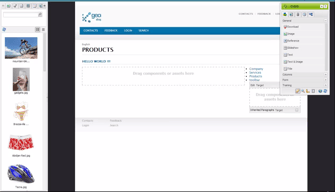
Adobe Experience Manager is a cloud-based content management solution to help businesses create websites, mobile applications, and web forms. The AI-enabled platform lets content creators create, manage, and deliver marketing content to customers using machine learning algorithms. Additionally, it enables content designers to create, modify or publish web pages using the in-context WYSIWYG interface and drag-and-drop functionality.

| Capabilities |
AI
API
CLI
|
|---|---|
| Segment |
Small Business
Mid Market
Enterprise
|
| Deployment | Cloud / SaaS / Web-Based, On-Premise Linux, On-Premise Windows |
| Support | 24/7 (Live rep), Chat, Email/Help Desk, FAQs/Forum, Knowledge Base, Phone Support |
| Training | Documentation |
| Languages | English |





Compare Adobe Experience Manager with other popular tools in the same category.
easy updates - drag and drop feature blah blah
2 different dashboards - like using the old/ outdated one most
real time updates
Built on Java based technologies, easy to learn (only if coming from java background), integration with existing applications
Complicated installation, setup, maintenance, lots of settings to remember (big checklist); Not adequate documentation from Adobe; Expensive; No developer edition to test/try
Developing multiple regional websites for the enterprise, with translations, marketing needs for every region yet being on the same look & feel, integrating with existing web applications using REST
Ease of use, Intuitive author experience, Preview capabilities and real time publishing.
Too much configurations . Need alot of IT involvement .
Implementation of CMS systems for various web properties. Easy of publishing, real time updates to market.
When we looked at various portal and CMS solutions to replacing our aging legacy intranet portal, our committee evaluated about 10 different technology solutions and arrived at Adobe AEM as the best solution for us. It's not cheap, but while many competing solutions "CAN" meet requirements, it's worth the time to request a demo of "HOW" an editor and end user would use the platform and witness the steps involved to better understand the process. One of the features I like the best about the product from layout and design perspective is that you can drag and drop column control components on a row by row basis to layout your page. Gone are the dark days when you are constricted to a 2 or 3 column layout template for the whole page. You can decide that you want 3 columns of content components (text, video, images, or widgets, etc.) in the first row, and then decide on the fly that you want 1 or 2 columns on the next row. This allows designers and authorers the flexibility to layout each page as needed without resorting to templates. Of course there are page templates as well, but this was one of the many selling points. The fact that you can simply select text and in a couple clicks update the content makes updates easy, and encourages a culture of self publishing made easy.
The product definitely needs a 3rd party implimentor to set up the necessary templates, configurations, customizations of components and of course testing etc. Expect this to take at least a full year before actual launching the product - more if you want to ensure a truly bilingual experience for administrators and content editors.
We were looking to replace an aging oracle based portal intranet solution. We honestly aren't leveraging many of the marketing features and personalized content features yet, as we are focused mainly on migration from our old platform at this point.
Being newer to the AEM CQ platform, I feel that overall the background structure is quite simple to understand and maneuver throughout with having basic content management experience from different platforms. I also like that even though it is a simple process, it feels very secure when activating and making changes live. It takes going through a few confirming steps to make something go live on the website, which is good and causes us to make deliberate actions. I like the widgets, and the ability to have them customized for our use. The tree structure given allows us to house multiple global websites and keep them consistent across the board.
I dislike that the current version I have, does not do simple things such as automatically alphabetize tree structures/lists. In some areas you are not able to mass activated, which drags out something that should be simple and quick. I also find that after being within the program for awhile, it slows down quite a bit (not sure if this hinges more on the AEM program, or poor internet connection - that should be considered).
We are trying to get all of our global websites onto one platform to keep them consistent with each other, and this has been a great solution for that. It is currently housing several different websites, all in foreign languages, and we are finally being able to create a consistent brand for ourselves. It handles much content management storage without problem such as images, pdfs, etc - and offers a nice search feature. I like the ability to tag, add meta data, etc. For someone newer, at times this can be an overwhelming training process. However, we are confident this is the best route to go for our company and continuation of global development with our sites.
I will start by saying that I am a big fan of Adobe products in general. Have been using quite a few over the last decade....that said, so far, I’m happy using the AEM portion of the platform. It’s clean, easy to use and user friendly when it comes to classifying and organizing your digital assets.
Haven’t really come across any features yet that I dislike, hoping that once we get to do a whole “integrated campaign” all the other parts of the platform will work nicely and integrate well with the AEM portion.
Using AEM for enterprise content management and web marketing management. Hoping the see the benefits of doing more holistic integrated marketing campaigns once we get all the other portions setup.
author instance is very user friendly. for a CMS, great UX. workflows are seamless - flexibility for customization. great enterprise solution.
not necessarily a cq5 issue, but since we build and test on our (agency) server, then push to client's server for dev and prod, we have to bundle packages and push over for installation. have found that things break in the process, causing more qa time.
enterprise solution for multiple sites
It's like having a sophisticated command center that aligns perfectly with our intricate project needs. For targeting demographics and user preferences, the features it offers have been enabling and empowering our marketing team really well.
However, it's not all smooth sailing. For starters, its complexity, for non-marketing team team members, can be quite daunting. And then there's the cost factor, it's definitely an investment, making it a bit of a stretch for smaller projects.
AEM has transformed how we handle digital projects because all teams are now aligned. It's like having a digital assets manager that ensures efficiency and consistency in our content delivery. Our project communication lines have become more streamlined, and maintaining a unified brand voice across various projects is now much more manageable.
AEM has been super useful for doing targetted marketing. Handling the web-content has been easy and the integration with the Adobe suite makes the work flow to be efficient.
The complexity and features it offers are great but it is overwhelming not knowing where to start.The costing for this tool might not be for everyone.
Repetitive tasks have gone due to the automation feature and due to this, a lot of time is going towards brainstorming to create great campaigns. Furthermore, because of the automation features, scalability is no longer a worry and is easily manageable.

It enables me to create, manage, and optimize my content as I like while providing a complete security and privacy of data.
Can improve on load times and real- time updates. Lack of integration.
Its allowing me to eliminate differnt resouurces I used to manage my content and provided a single platform that takes care of all my needs.
Intuitive interface and robust content management features. It simplifies the process of creating and managing digital content, enhancing overall workflow efficiency.
The licensing fees and additional expenses for advanced features may be a concern for smaller businesses or organizations with budget constraints.
Addresses content efficiency, streamlines digital workflows, and offers a user-friendly interface. This results in a more consistent web presence and responsive content delivery, improving overall efficiency and user experience.
Majorly Adobe Experience manager is easy to use and to integrate. Adobe provides user friendly dashboard which help me alot to check the data and create reports.
It's sometime costly to buy and integration is difficult in some cases
1.First of all it's easy to integrate. 2. It provides personalized content. 3. It's ability to target customers easily. 4. Flexibility and scalability

Our endures due to recent volatility of fuel prices, requires almost instant pricing changes and dynamic pricing algorithms so AEM was so fast in terms of having these changed.
For the industry I was in, two things were extremely important first the load time, unfortunately AEM was not best in terms of providing this infrastructure and this CMS was not SEO compatible like the others.
Creative changes via DAM, as wells as simultaneous content updates for more than one country and more than one languages, AEM was instrumental regarding these.
Readily available and wide array of objects you may use.
Lags, resetting changes, some delays on change to reflect.
Easily understandable built up framework

Adobe Experience Manager has been a game-changer for my digital content management needs. Its user-friendly interface and powerful features have made it a breeze to create, organize, and deliver personalized experiences. With this tool, I've unlocked my creativity and streamlined my workflows, resulting in captivating digital experiences that resonate with my audience
As of now, there's nothing I dislike about it.
Adobe Experience Manager has revolutionized my digital content management by solving key challenges. It simplifies content creation, organization, and delivery, enhancing efficiency and productivity. The platform's robust features and intuitive interface enable personalized experiences, resulting in increased audience engagement and positive business outcomes.
There is a lot of great features that Adobe Experience Manager offers. For a large scale organization, there are deep and end-to-end content management capabilities.
While the features are deep and fleshed out, it can prove to be overwhelming to the average user. Also, the cost can prove to be too much for smaller organizations with limited budgets.
Content distribution consistently and effectively can be difficult without a streamlined and end-to-end solution, Adobe Experience Manager helps with this. The automation features are also a life saver.
More organized way for the content management
Maybe crashes sometimes would be the most annoying thing to me
As I stated before, For me organizing is the key for great work and more powerful results, and that I think was achieved using it at our work using it and how it helped
Experience Manager is a powerful tool and probably most optimal at the enterprise level. Plugging in the asset library separately gives users the ability to organize their visual elements separately, and the library connects seamlessly for use on pages. The tagging tool is also extremely robust, and allows a user to make dynamic pages on the fly using tags.
Document linking is finicky, and creating links to PDF takes a little work. The best approach I've found is to keep a thumbnail sheet with the url naming structure, but even then, testing those links can be a little aggravating.
Building a page is actually pretty simple, and I am able to get entire sites migrated and up quickly. Users with less experience who will be doing edits can be instructed through a series of web videos, and permissions (so that breaking of the site doesn't occur) are plugged in so that permissions can match skill level.
The structure of website management and using regional websites is the best. So, AEM is excellent for entities with more sites, users and employees.
The backend work is more complicated than other platforms and tools like Wordpress, Drupal or Joomla.
Managing the regional and global websites is so easy with AEM. User roles are also significant!

Cloud share with the clients and the customer journey help me manage all the programs i have woth Adobe and its content and commerce feature. Nobody else in the market is letting me connect my Adobe files with them
Data insights should have more KPIs. Every content and pictures should have the file details in there as well so i can figure out which client is getting low res files and which is my hi res client so i can optimize my computer and the files according to that
I need to use multiple tools in order to deliver what I have produced with Adobe products and I believe Adobe experience cloud has solved all the problems i was facing in supporting and tracking my client's progress
Intelligent Search Approach, easy filtering information to quick results.
Quite complex for non-technical users and cost is high for medium and low end companies to afford.
Helping client update the content and the UX designs.

Adobe experience manger in an innovative and best in class product available. Best part is the collaboration across almost all applications from legacy to modern tech stack. Customisable environment and easily managed across. Suitable for multi language and multi site implementations. Styling components are consistent across the platform and the website. Lots of ways to save money and time if properly implemented using expert technology teams and support availed from Adobe experts
Costly and not a competent support in terms of training or providing test environments to enterprise users. Adobe Analytics will need a strong expertise to deal with it. Certain styling restrictions or limitations which can be resolved at a product level.
Using AEM we have implemented websites and branding portals for US Oil Gas Major across the globe. Localisation of the content and customisation of features was implemented which varies country to country and region to region. We achieved a surge in the brand sales for sure after the implementation.

I like how AEM integrates seamlessly with many other Adobe SaaS products, like Tag manager & Analytics. I have a love-hate relationship with the way styling different elements on the sites work. The reason why I love it is that it allows the styling of components to be consistent and uniform across the entire platform and website.
As i mentioned before, having a love hate relationship with how the styling works with AEM, the one thing that I wish allowed more freedom to do is to make minute style changes to the different stylings if needed on each page or section of the page, instead of being solely restricted to the predetermined stylings that are across the entire site. I am unsure if AEM allows for that. The developers I was working alongside maybe didn't make it easy to customize elements through inline styling or On-page styling. I was told we were not at liberty to add or make any minor changes to already established components.
Ecommerce Website for two sub-operational companies under a fortune 200 company.

The documentation of AEM is very detailed and for the most part the code in it is open source. When working with Adobe consultants, I felt that they helped our development and product teams get up and running very quickly with the new software during our transition.
Because it is very enterprise level and not widely used, when running into issues a developer can't use a lot of the resources they might be used to using with other more widely used solutions.
At the company I used AEM at, we created a way to allow non-technical users to make simple edits to the site, while limiting them to predefined styles and an approval process.
Adobe experience manager has been helpful in getting our digital experiences consistent across channels.
The interface is not intuitive, and ramp-up for new hires is significant compared to our old platform.
Build a more consistent customer experience, digital asset management, content creation.
Uploading images from scene7 was easy to use, and adding components like curated left navigations, banners, CTA's, etc. was always breezy. I liked how the TLPs were listed week by week - it made it easy for visual people to look at changing promotions. Switching between preview mode and editing mode was simple, and activating new changes almost always took immediately to the site as opposed to an hour, or 24 hours; that was probably my favorite part of the entire app, was how quick changes could be made to the site. Overall I found it to be a pretty application to use, and I would recommend to somebody within graphic design, web design, online merchandising, digital retail marketing, etc. Especially if you work within apparel retail.
It was really difficult to build size charts in ASAP, so much so that I almost avoided the task altogether. There needs to be a better way to copy and paste from other size charts or upload templates or something, other than starting from scratch each time. Also, it could be really difficult to find where your page was depending on how many separate verticals there were within your site/business. Also, I thought it was really frustrating you could only copy and paste within one page's TLP listing, and couldn't carry a component between verticals (i.e. If I created a drop-down trending section on the women's clothing left navigation, I couldn't copy and paste it onto the plus size clothing page.) Lastly, when there was an engineering issue, or something wasn't loading to the page, the team was almost non-responsive and completely unhelpful - probably the easiest fix on this list.
I was ensuring the women's clothing page was designed and set for upcoming weeks, along with the graphic design and digital marketing teams. I used it to manage promotional imagery and taxonomy attributes.
It is quite a handy tool that is versatile in its use - although i was so far using it only for brief reports
Could be more user friendly in terms of accomodating new users on how to use it
Company reports
Adobe experience manager is a platform with extremely modular design and provides ease of integration with other adobe products. Its features are well developed. The customer business support is also very efficient.
Its permissions take a lot of time while users are working and can cause interruption. It also sometimes does not allow you to copy text that exists in adobe formats. It is also not easy to install or program. The documents are not always updates.
Adobe experience manager is an experience integrated with adobe analytics products. It provides numerous experience management and content management opportunities and is extremely useful especially for the advertising industry.
Increased volume of content in shorter time
If unfamiliar with adobe products complicated interface
More uniform experience for customers.
it is easy to navigate with both simiplified and complex solutions
it could have more pen like features to really sell in the documetn capes
document and client paperwork