

Unclaimed: Are you working at Adobe Premiere Pro?
Adobe Premiere Pro Reviews: 4.6/5 — Highly Rated
Adobe Premiere Pro is the industry standard for video editing software and offers a huge selection of features to choose from. It can be purchased as a standalone product or as part of the Adobe Creative Cloud. Regardless, Premiere Pro offers a feature-rich selection of tools used for the creation of short films, TV shows, and YouTube videos. Access to a host of smart tools in an ever-evolving portfolio means Premiere Pro users can easily design and edit 4K, 8K, and even VR videos to suit different needs. It also offers access to other Creative Cloud apps, so you can easily access photos, effects, and other tools.

| Capabilities |
AI
|
|---|---|
| Segment |
Small Business
Mid Market
Enterprise
|
| Deployment | Desktop Mac, Desktop Windows, On-Premise Linux |
| Support | 24/7 (Live rep), Chat, Email/Help Desk, FAQs/Forum, Knowledge Base, Phone Support |
| Training | Documentation |
| Languages | English |
Adobe Premiere Pro Pros and Cons
- Extensive professional features for photo editing
- Create and edit your photos in various file formats
- Access all the features of the Creative Cloud for touch-ups
- Frequently updated feature set
- Filters, adjustments, and fixes
- Takes a while to learn
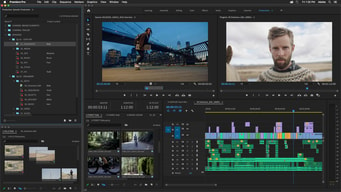
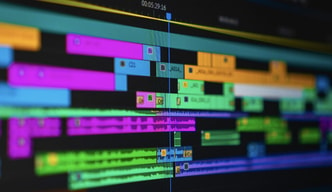
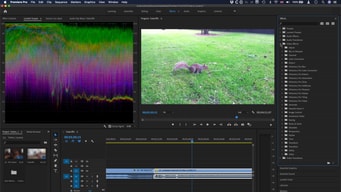
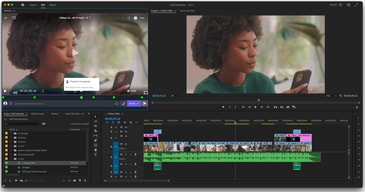






Compare Adobe Premiere Pro with other popular tools in the same category.
Adobe Premiere Pro is a very complete program for editing videos, it offers a series of options that make a video very professional and practical.
I think it can be a little complex for people who are new to the program and it would be nice if they added a tutorial to use the program.
This program is perfect for creators of YouTube content, I upload videos to youtube and it is very useful.

I love this program and its interface. It makes editing simple and smooth!
I don't have anything I dislike! I think that it is one of the best editing software's available!
We needed to create videos and not we can!
My favorite thing about Premiere is the fact that it communicates well with the other Adobe products. If you create graphics on Photoshop or motion animations on After Effects, they drag into Premiere seamlessly. All I can say is that Avid doesn't even compete.
I don't like the warp stabilizer on Premiere.
I have realized that video has way more of a crowd following than just a graphic.
The ability to edit video in such a smooth manner
Sometimes its hard to use and its not always easy to find things
Video Editing
It's easier to use than one might have thought. Keyboard shortcuts explained inside the program are a great touch. You can make a quick podcast to a complete movie. Love its versatility.
Sometimes it can really slow down your computer or take to long to export.
Creating educational content. Quality and sophisticated.

I have been using Premiere pro to edit my vlogs. The best thing about this software is the ease of use. Right from the start I was very comfortable using it. It does what its supposed to do perfectly. Integrating video and audio and replacing the audio with a voiceover, muting the audio, managing transitions, color correction, etc are its greatest plus points.
One thing I struggled with when using it is to insert additional clips on already created sequence. Let's say I have 15 clips and I want to insert something after the 5th clip. The way I do it is by moving the following 10 clips to the right first and then creating space. I found a workaround to it but it was not obvious.
I am a vlogger and I need to edit my videos and make them beautiful for my audience. Premiere Pro has been helping me achieve that very effectively and efficiently. The benefits of using this software is editing videos doesn't take too long and once you're used to it, it becomes easier and easier.
Well, there are lots of video editing software... but no other has the same interaction and compatibility like Premiere... Since I use the whole Adobe Suite, I can work on a same project with several apps at the same time... And the CC version released a couple years ago its tha bomb!!!
The pricing and monthly fees... A couple years ago they changed selling process. Before you could buy the software for good. Now you can download it for free, but you'll have to pay a monthly fee to use it...
We use video editors to create educational videos. Premiere its the best app for any video editor (from beginners to pros). If you have any concepts or knowledge on video editing, you'll find premiere really easy to use. I taught myself to use it, and even though I keep on learning new tricks every day, I started making great content from the beginning.
It is simple to use yet you can do complex tasks.
It is hard to find some features without researching them.
Creating professional videos for marketing material.
Overall, everything. The fact that you're able to do so much more than FCP is awesome.
Of course if you aren't familiar with it it can be a bit of a hassle but once you learn some cool stuff you're pretty much good to go.
Business wise, you can create some great looking videos with this software. Limitless opportunities for video editing.
Premiere can handle long edits with great organization and clean presentation on the timeline.
The feature of dynamic linking could be better.
Editing long videos with graphics.
I love how versatile it is. I can use it for anything. The keyboard shortcuts are super easy to learn and I love that I can truly customize them for what I need. It was nice when I was switching over from Final Cut Pro that I could use Final Cut Pro shortcuts if I wanted. I love the team collaboration abilities, I wish that my work actually implemented it. They saw that there were potential issues with ownership in a large company.
It's pretty buggy sometimes. Just yesterday I found that I had a corrupted sequence and couldn't export an XML from it, so I had to put everything into a new sequence and it worked. Stuff like that happens all the time. I wish that when there was an update, it would go through a short little tutorial of things that they've updated, things that are new, or things that are different. It would be nice to know and have that local instead of needing to go research it externally on YouTube or another location.
It helps us to make our products, we're a tv station.
I personally like the bin system in Adobe Premiere Pro. This is an easy way to have access to all of the files that you are using for your project. With just a quick move you can import all of your files and have small thumbnails of each one or a detailed list if you prefer that. This has been a life saver in looking for different files. Of course, if you are organized it will be that much easier.
I have had some issues with trying to use the editor window. I know it's not a program issue, but a user issue. I'm still a novice with this program, and I mean an early novice so I haven't found much that I dislike yet, just things that I don't know how to use completely.
I currently am using this with our church in our video production area. I have found that this has more features and more of a learning curve than our current program of FCPX. I like Adobe Premiere Pro better one because it is available on both Apple and PC, and this allows for more work at home and collaborations with colleagues.
I like that the interface is pretty similar to all the Adobe products. It was really easy to learn and intuitive. I've been using Adobe products for awhile and the complex tools menu didn't scare me away. Definitely worth learning it. I'm still learning new features, and I appreciate that Adobe is constantly trying to improve and add additional features. Video and audio synchronization is really easy to do, and I really appreciate the ability to edit the audio files, as well as separating the audio from the video file.
Rendering takes up a lot of space for longer videos. It was a bit hard to figure out the exporting settings. I suggest having a really powerful computer if you are working with large files. It will run pretty slow on a regular computer if your files are large or if you have too many applications running at the same time that take a lot of memory.
I use it to create training materials mainly, I've used it before for creating short products overview as well as vlogs.
The best feature of Premiere Pro is that it’s part of Creative Cloud and works well with the other programs.
Motion tracking is limited to After Effects.
Sharing projects is so easy with the “Export Selection as Premiere Project” option.
I love that I can edit pdf files, combine files, and create new publications with this program. It is user friendly and makes my life so much easier!
I cannot think of anything that I dislike. This program significantly improved my work day!
We have a number of people who send us pdf files and this program allows us to edit them and shape them into what we need for our newsletters and office use. It also helped us to create a stunning directory easily with our current program.
Premiere Pro has a plethora of editing tools and options. Just about everything is built into the software, and if it isn't you can install plugins that will add extra functionality to the software!
The learning curve. I switched over from iMovie and Final Cut Pro X, and it took me a little while to re-learn shortcuts and extra features in this software. The render times can also be longer with this software, due to the extra power and features.
We are able to edit wedding videos, product reviews, vlogs and more for YouTube and other sources. The edits are fast, the software is robust, and the experience is smooth.
It is so easy to use. Everything is really intuitive and learning is even easier with the free tutorials on the program itself, or simply by watching your favorite youtuber and their 8-10 minute tutorial. I've tried other products, and nothing really compares or even comes close.
Nothing. I think this is a great product.
We are able to add more dynamic social marketing with the creation of video. AND we can make awesome videos for all platforms, from instagram to in-house training. It's so good!
I love Premiere Pro! I have used multiple editing platforms in the past, but this one is one of my favorites by far. It is not quite as intuitive as Final Cut Pro, but I love that it interacts seamlessly interacts with the Adobe Creative Suite. You can make custom graphics, lower thirds, etc. to use in your videos and they translate beautifully and seamlessly.
It is not very intuitive to use. You really have to watch tutorials and read up on how to use all of the features. Also, if you have any audio issues, good luck fixing them in production. It is not an easy feat.
I use this program to create all of our videos for social media, promotion, and YouTube. I love it.
I like how easy Adobe Premiere is to use. It is very simple and it was very easy to learn how to use.
I dislike nothing about the interface of the program, just that I still have a lot to learn.
Adobe Premiere Pro is solving all the issues I've ever had with Windows Media Player. The benefits are that it is very easy to use.
This program allowed for an easy transition from Final Cut Pro. It works seamlessly with other Adobe products.
Have to constantly update the program in order to share content with other collaborators and make sure that all members of the team are running the same version of the software.
The ability to edit in real time without having to render over and over again has been very helpful. Also the timelines are much more simple when importing files of varying frame rates.
I like how intuitive this program is and how easy it is to learn new stuff. The program is strong and stable.
I would like to have more tools that will let me control the editing through the keyboard. The moving tools are some too loose, I would love to have some way to control that.
If I need to edit really fast and give my client a good movie, in the right format, this program is a really great way to do it.
Made the switch from Final Cut and it’s like I got a brand new computer. Everything is snappier, more control, better interface, more support.
Nothing I can think of that I dislike about this service.
work faster with less downtime
I finally got Premiere Pro a little over a year ago and now I'm mad I haven't been using this program. Firstly there are a TON of video tutorials around, so it was very easy to be able to figure out how to use. And they continue to expand and integrate graphical elements to the program. I love it.
Premiere crashes quite a bit, so I'd say to be sure that you save and save OFTEN.
I used to be a Final Cut Pro user and Adobe Premiere Pro has been a HUGE upgrade. I can do things inside of Premiere Pro I was convinced I would only do inside of After Effects. I'm able to manage multiple projects and timelines quicker than I was in Final Cut and that's saying a lot, considering I've been using Final Cut Pro since around 2008.
Adobe's Premiere Pro continues the software company's long history of best-in-class design software, this time with video editing, design & compilation. This is a video editing suite - you are not animating much in Premiere, and you are doing limited graphic design work - but in terms of straight video editing, this is the best. Audio editing within the program is actually very robust too.
Animation happens in a separate program, as do many other key functionalities for building a cohesive video. For example, while title screens can be built in Premiere, there is a substantial lack of really strong design functionality - forcing you to use other programs and import. But that's the schtick with Adobe programs: you get best-in-class core functionality, and have to use their other programs for other tasks. It's very standard and not a drawback if you can learn multiple programs.
We build 75 - 80% of our videos in Premiere Pro. Everything else we build on a web-based platform like Adobe Spark or Animoto. Anything remotely complex we build in Premiere.

Adobe Premiere Pro is both easy to use for someone with little knowledge about video and video editing, while simultaneously being the most powerful video editing platform out there. The workflow is nice-looking and efficient, and makes for a quick and easy editing experience.
Premiere is great in most aspects. If I had to choose one thing I disliked, it would be that it sometimes takes many clicks to accomplish something that seems like should only take one click. This may only be due to the fact that I do not know the full abilities of the workflow.
Premiere Pro allows us to accomplish all of our simple video editing in-house. Now, we don't have to ship our videos off to a third party to have done for us, at an expensive rate. Having this at hand makes it great for us to be able to quickly turn around edits for our own websites, or for clients. I definitely recommend that you adopt Premiere Pro at your business if you have any editing needs.

Having used both AVID and Final Cut, I was hesitant to move to Premiere, initially. I really enjoy that it is intuitive. It has such a strong user base now there are also so many wonderful videos that explain everything from the basics to advance options for the software.
It is buggy at times and I would love for autosave to happen more regularly.
I use this to edit client videos and have come to create a very streamlined and efficient editing process because I can count on the adobe system.
I truly enjoy the user manageability of this product. It is very self explanatory and there is always shortcuts to find and learn.
The product has been known to crash or close itself on occasion if your computer is not up to speed in conjunction with the latest Adobe edition.
It can lag when mixing many different types of video files and effects all at once. Nesting files can be an issue if your computer cannot handle it. The benefits truly outweigh these issues. The possibilities are endless and it is your canvas for creation.
-the ability to edit text -the ability to freeform comment -the redaction feature -the edit page feature
-the new tools menu when I was used to the old one
Creating professional documents for accreditation solutions
I learned on Final Cut Pro. I prospered with Premiere. I use the entire Adobe Creative Cloud suite of products. I use Acrobat DC and Premiere the most. Premiere is always improving and never have been truly disappointed with any of the CC products.
The Premiere release that came out in early 2016 bogged down my iMac when it came to edit VR video until I figured out proxy files. Proxy files are a godsend when it comes to editing larger files.
Marketing/Advertising, Training, Business Communication
The ability to use keyframes to change the position, scale, rotation or any number of different attributes of my videos. I use it frequently to synchronize photos to music, and being able to create movement in the photos (in the specific manner I would like) is very valuable.
Before I got a more powerful computer, Premiere used to crash often when I exported finished videos.
I'm able to produce professional video and photo compilations for my clients.