

Unclaimed: Are you working at Adobe Premiere Pro?
Adobe Premiere Pro Reviews: 4.6/5 — Highly Rated
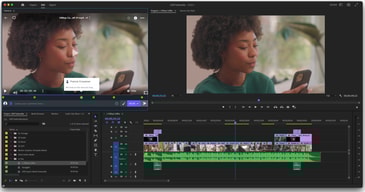
Adobe Premiere Pro is the industry standard for video editing software and offers a huge selection of features to choose from. It can be purchased as a standalone product or as part of the Adobe Creative Cloud. Regardless, Premiere Pro offers a feature-rich selection of tools used for the creation of short films, TV shows, and YouTube videos. Access to a host of smart tools in an ever-evolving portfolio means Premiere Pro users can easily design and edit 4K, 8K, and even VR videos to suit different needs. It also offers access to other Creative Cloud apps, so you can easily access photos, effects, and other tools.

| Capabilities |
AI
|
|---|---|
| Segment |
Small Business
Mid Market
Enterprise
|
| Deployment | Desktop Mac, Desktop Windows, On-Premise Linux |
| Support | 24/7 (Live rep), Chat, Email/Help Desk, FAQs/Forum, Knowledge Base, Phone Support |
| Training | Documentation |
| Languages | English |
Adobe Premiere Pro Pros and Cons
- Extensive professional features for photo editing
- Create and edit your photos in various file formats
- Access all the features of the Creative Cloud for touch-ups
- Frequently updated feature set
- Filters, adjustments, and fixes
- Takes a while to learn






Compare Adobe Premiere Pro with other popular tools in the same category.

Adobe Premier Pro is worlds apart from other video editing software. I have previously used Sony Vegas and Final Cut Pro and Adobe has done something right as I would choose them over the competition any day! Dynamic-link is a godsend. Being able to link projects from other applications within the Creative Suite has saved so much time and improved my workflow.
There's the odd bug and the program will crash but I'm usually working quite hardware demanding projects so make sure you have autosave on and press save every now and again. It doesn't always happen but it's better to be safe than sorry.
I use premier to create engaging video content for over 15,000 employees in the UK and Ireland. Having a piece of software that is so user-friendly and reactive has helped my career progress so much more.
I like most that it provides an easy and streamlined format for editing, and allows for organized workflows.
The one thing that I dislike is the lack if cross-platform compatibility such as in the case of going from a Mac to a Pc with the same project, or switching between updated softwares.
I definitely see convenience as a benefit, I am very appreciative of video rendering times and the reliable media exporting.

This is a great tool for post production of videos from multiple sources has excellent sync utility.
Some of the older effects or obsolete effects still in the effects library. They should clean this up to reduce clutter.
This product can make post production easy and fast with the final product professional.
Premiere pro has great usability. User friendly and efficient.
Minor bugs and you may need a good enough system the run the app.
Premiere pro has increased the turnaround time of my work ten fold. It’s efficient and user friendly without being too simple. I learn new tricks every day.
I am a new user to adobe premiere pro, and it honestly seemed kind of scary at first. When you load the application for the first time, there is a lot going on and not a lot that tells you what to do. However, it is very simple use when you learn the buttons and how to use it. You can make short, long, complex, or simple videos. You can add basically anything you want; pictures, clips, voiceovers, music, etc.
The thing I dislike most is that it has a lot going on on the main screen and looks very disorganized. The buttons are also so close together that it is easy to click on the wrong thing and mess up whatever clip you are making.
With Adobe Premiere Pro I am able to put together walkthrough clips of interiors to show clients what their home could potentially look like. This is a benefit because it gives the client a better understanding.
Like other Adobe products, there are number of resources online (youtube.com, Lynda.com) to learn how to use Premiere Pro.
As a beginner, it's sometimes difficult finding the pull down menu and pop-up screen that I need during editing.
We are creating in-house videos as well as to distribute to the public.
The ability to create and play with all colors within the layers of the image; that is, extract pieces of an image out and only focus on changing the color, look and/or filter of that alone. Plus the free music that is already available to incorporate into your video, is quite beneficial, particularly given all of the issues surrounding using music and the accompanying copyright laws. The resolution, style and polished videos that you can create using Premiere Pro are unparalleled, in my opinion.
The learning curve when you first start using Premiere Pro. There is just a lot of layers and moving pieces to learn and it can challenging and, admittedly, frustrating at times. However, there are many free online tutorials to guide you through, you just have to find them.
In learning how to make videos (trailers, in particular), has allowed me not to have to rely on an outside source to do them. I am able to work on my own time frame, and not someone else's.
The fact that Premiere is integrated with other Adobe products makes it easy to link files and work across different programs (especially After Effects) and keep things organized. Workflow is intuitive and things like color correction keep getting better.
I wish it was easier to search a tagged media asset library or keep those tags/metadata within Premiere. I also wish the essential graphics feature had more options or flexibility, but I'm sure that will come in future versions.
I'm producing and editing videos on a daily basis with Premiere - the more I use it, the more efficient and intuitive it's become. Everyone on our team uses it, so we're all on the same page, but there are multiple ways to do anything and it supports many different editing styles.
Adobe Premier Pro is a powerful package for editing video. Its interoperability with other Adobe Cloud Software makes it an optimal choice for anyone who wants to do video editing. It is fairly easy to learn the basics of this timeline-based editing software, but, takes more time to master. There are hundreds of available plugins that make using Adobe Premier pro easier-- and provide a more powerful toolset.
There's really nothing I dislike. Perhaps rendering times could be improved.
Able to edit video and integrate editing with our other processes that are completed in the Adobe Cloud. For example, we use layered graphics from Photoshop to speed up our process and media management processes.
I love the fact that on the initial launch of the program you are taken to a screen that will teach you the basics of what it is you are doing. Because of this, you can come in even as a basic user and succeed in any task with video editing. I also love the user interface, it is so beautifully crafted that you always know where things are and if you don't you can change it!
I do not like that the program can be unstable at times, MAKE SURE YOU SAVE at all times. I have learned from experience that if there is a small graphics glitch it can and will cause the entire program to collapse causing you to have to start over from your last save point and if you were being really creative that could cause a lot of issues.
We are able to really step up our marketing game with this product and our professors love it to be able to use it for class videos or even for lectures when they want pieces edited out but still want the video to be used later on.
I love how you can customize your own effects to suite the look of your project.
Uploading effects from other editors is a bit of a chore.
It's really great for social media!
The software provides tools and features to convert lousy footage to cinematic video. What I liked the most is it continually improves with every version. It supports video editing, color correction and even audio adjustments. The time line editing has improved with JKL trimming where user can scrub and trim at the same time.
I recognize the Adobe Premier as resource hungry software. Users need to have high-performance computers if the software needs to be run smoothly. It is an expensive software to use by skillful hands. It's an definite advantage the integration provided with Adobe Aftereffects but switching between these two software is slightly time consuming.
We use the software to create our marketing campaign videos and trailers for social media and video walls. As it helps users to work on projects simultaneously, the ideas can be blended and we have final product with high client appreciation.
What I like most about Adobe Premiere, is that it is undoubtedly one of the best programs that exist today to edit videos with high quality, it is the program indicated for those work that has high demands on their professional standards, each video edited With Adobe Premiere it is a video that can be presented in any field of high hierarchy or in any audiovisual space of high competition and I can always be sure that it will meet all expectations. Among the features I most admire in Adobe Premiere is that it supports a resolution of up to 16k X 10k 32 bits per channel, it has a customizable interface and an effect library.
While the quality obtained with this program is very good and the results are worthy of competing in the most demanding audiovisual media scenarios, it is also true that a program difficult to handle, the learning process of an average user is slow, in fact It is also complicated for many professionals familiar with video editing, so in conclusion it is a complicated, complex, very complete and sophisticated program, but not everyone learns to handle it and not everyone has the time to learn how to use Adobe Premiere, there are extensive courses to begin as a beginner and yet it is difficult.
The first and only option that we use in the company when editing videos that require a wide audiovisual quality, is Adobe Premire, because it guarantees that our customers will be satisfied, in the past we used other editors and the result of the video was not as expected. , but with Adobe Premiere we have had success and satisfaction in 100% of cases.
I love the easiness of importing clips and making a timeline with just dragging a clip in. love being able to incorporate the other adobe programs together and if you save a after effects file project, it will automatically update into premiere. Warp stabilizer has greatly improved and is very helpful at times.
How it doesn't accept all file types and you have to open through media browser for some file types which is very annoying and slow. sometimes it will crash when theres big files being edited or if a speed ramp isn't working, the sequence won't export.
Being able to edit videos quickly and efficiently. Especially if you learn or make your own commands, it gets very fast to edit and keep our clients happy with speedy editing of videos.

You can make complex animations and effects easy with preset animations and effects given to you. it is easy to add assets and replace assets. Little detail such as hovering over the video asset and hovering left and right to preview the video makes using it a pleasure and makes the work flow be smooth.
starting off video editing there is a big learning curve on using it and it is relatively difficult to get used to it without watching a tutorial or two online. It seems to be hard to navigate through the different things and tools you can use
making video advertisement for clients in my company.
I've been using premiere for about 6 years. I find it to be the most user friendly and efficient.
It can get buggy- it can lag and be slow. It has shut down and I've lost work, but thats true to all software.
I use it for work everyday. I am consistently editing content and it is by far the fastest way to get it done and have it look professional.
The best thing about Adobe Premiere Pro is the continued commitment to improvement and development by Adobe. They continue to innovate and provide new technology including Content-Aware Fill, Essential Sounds Panel, and Lumetri Color. The software is easy to learn and implement by any level of editor.
The absolute worst part of Adobe Premiere Pro is that the company sends out updates they know have bugs. This would be an acceptible practice if their users were solely using the software for hobby and pleasure. However, when you have an entire team at a production house with high demands and due dates, this can be disastrous. My team and I have lost many, many hours of progress because of constant bugs that keep our progress low. Although I very much like and support Adobe, this has been a huge pain point for us.
My team uses Adobe Creative Cloud for all of our projects.
There is a never ending limit on what you can do with Premiere Pro! I use it DAILY for video editing of workout videos for my clients, Instagram videos & stories, YouTube vlogs, and so much more... I am always learning something new from using the software... as well as learning something I can do better. It’s by far the best video editing software that exists today and while it may seem complex to a first time user, I can honestly say that with time & practice, you will fully realize the power of this platform as well!
Sometimes it unfortunately crashes... luckily I have 10-minute autosave on, but sometimes it’ll crash out on my MacBook Pro, but it’s rare and I never lose more than 10 minutes of work. Even with that being the case, it is still the best editing system that exists.
CLEAN & PROFESSIONAL videos that I can rely on literally every day. I’ve used competitor products like Sony Vegas and Final Cut, but I choose Premiere every time because of the reliability, user interface and ease of use... I do recommend taking a course if you're a first time user or are new to video editing.
Premiere pro can help you do so any things in the editing world.It is user friendly so you can pretty much figure out how to use all of the features on your own.
One downside of premiere I've found using premier pro is that since there are so many keyboard shortcuts, one miskeyed key and my cursor changes all. the. time. Not a big deal, just kind of annoying sometimes.
Premiere pro has improved my editing skills so much since switching from Avid Media Composer. I can experiment with new features and the overall process is simplified.

very easy to get the hang of. can do pretty much anything i want to do
requires quite a bit of processing power so not great for older computers
made it much easier and faster to create and edit videos
I really like premiere for editing audio and video. The interface is clean and simple and you are editing video in real time. It's easy to add files into the time line and splice up the audio and video. I've used it on both Windows and Mac OS and it works great on both formats.
I don't have anything I dislike inside the program but it does have resource intensive system requirements so you want to have a good machine to run it on.
Taking long software simulation recordings and making them into training for our customers and partners. We used to try and record the video exactly how we wanted it produced. Now we record the video less rigidly and edit it to a finished project.
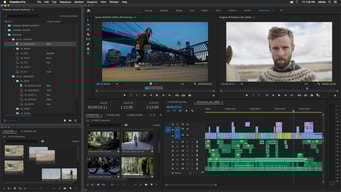
Premiere Pro uses timeline sequencing, and obviously works with the entire Adobe Creative Cloud suite so, for example, you can import an After Effects composition directly, without opening AE. It will even preview in Premiere Pro. I like Lumetri Color for quick adjustments to white balance and other tonal factors. I also like how I can export in any format needed, including presets for vimeo, youtube, etc.
I dislike the Adobe Creative Cloud monthly subscription model. I purchased Premiere Pro before they moved to the monthly subscription model, and I still resent that I now have to pay a monthly fee to get updates. I get it why the business model is smart on their part; I just don't like it as the one who has to pay forever.
Premiere Pro lets me produce professional-looking videos from raw footage whether or not it's shot in perfect exposure and lighting and what not.
I have been using Premiere for years, and before I didn't want to use Premiere because of the price, but it is totally worth it. There is nothing out there that compares to the efficiency of using Premiere along with the endless effects and possibilities available to create the perfect video.
The title cards/graphics workspace is not the most efficient
Editing videos, creating promotional content, literally creating any motion graphic content needed.
I have used a variety of video editing software and Premiere is a joy because it is so similar to the other Adobe programs I used regularly but also, it makes it so quick and easy to edit video content for personal projects and work projects with deadlines.
Sometimes it can take a while to render minor changes (but this might be a hardware issues rather than a software shortcoming.) There are so many amazing things I can do and not enough time to learn them all.
With Premiere Pro I can create compelling content with footage from my phone, or complete professional assignments using stock footage from various stock sites. It is much more user friendly than various versions of Final Cut Pro.
The layout of the program is clear and easy to use. Premier is simple to use and easy to learn by new users. Editing is smooth given the hardware being used and integration with other adobe products is perfect. The whole look of the program is dark, which is easy on the eyes and makes your project being edited the center of your attention due to contrast of color and dark.
Premier does not run too well on older hardware. There is some lag and sometimes premier will run slow depending on the amount of ram you have.
Premier Pro is such a straightforward video editing software. It has a nice layout that makes importing media extremely easy and is simple to use. The program is easy to teach to new editors and gives them skills to use it effectively.

I really love this software and I used it a lot for video editing, mainly for a semi-professional video looks. It has everything in order to make videos good.
The first time opening Premiere Pro looked like a maze. The learning curve isn't very linear. Sometimes the software crashes because of heavy processing algorithms.
Premiere Pro helped me to get into videography, which is one of my best hobbies.
I like the ease of use and interface. Really great to work on.
Peak files and slow rendering. Often crashes.
I can edit my footage quickly and effectively with this programme

This are the thing I like most, 1 Premiere is fully compatible with all Adobe Products, 2 the user interface is very intuitive and easy to use, 3 the stability of the software has been improve a lot in the new versions, 4 you have a lot of formats to import and export options, 5 the render times are faster than in other editing software.
The thing I dont like is that when you finish a proyect Premiere don't delete the temporary files automaticly so you have to delete them by hand and that is not good other thing that is not good is that when Premiere crush sometimes it broke the project and you can't use it again.
We edit all our demoreels and promo videos.
The extent of editing that can be done using Premier Pro is amazing. There are so many beautiful effects and even more can be easily created to purchased. The timeline is very accurate and reliable. There is a learning curve and one you figure it out its very easy to use. There are many types of effects for photos, videos, music and more. The software works seamlessly with other Adobe softwares like After Effects and Photoshop.
The biggest issue I have is that during rendering the dedicated GPU is not used to its full potential instead the integrated Intel GPU is only used which slows the rendering a lot. This issue should be fixed soon. Since the software is so huge it needs a very powerful computer to work well slower computers struggle alot.
I use Premier Pro for lite editing works of videos and also to create new videos.
Premiere speed up our video editing works pretty fast. I learned it in a week. And after 4 months Im at an expert level video editor. I can now edit videos for my company.
Not many downsides I could find being the only software I use for video editing. However when I used Kinemaster on my android device, I really felt that Premiere could also ease the workflow a little bit.
User-friendliness. Rendering to literally any resolution on the planet. Ease of adding plugins.