

Unclaimed: Are you working at Basecamp?





Basecamp Reviews: 4.1/5 — Solid Choice
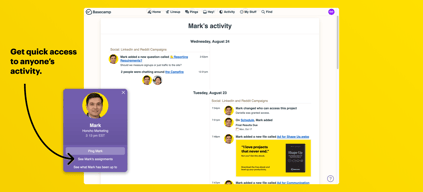
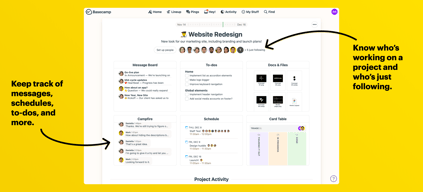
Basecamp has evolved as a project management platform since its launch in 2004 but its mission to help remote teams stay organized, productive, and efficient remains. One new feature that Basecamp recently added is called Basecamp Hill – a visual representation that divides the component of a project into a phase of uncertainty, unknowns, and problem-solving (uphill) and a phase of certainty, confidence, and execution (downhill). This is on top of Basecamp’s core features which include a Message Board, To-dos, Calendar, Documents and Files, Group Chat, and Automated Check-ins. It’s a top-down and bottom-up platform for everyone in a business or organization – from proprietors and C-level executives to project managers and individual team members.





| Capabilities |
API
|
|---|---|
| Segment |
Small Business
Mid Market
Enterprise
|
| Deployment | Cloud / SaaS / Web-Based, Mobile Android, Mobile iPad, Mobile iPhone |
| Support | 24/7 (Live rep), Chat, Email/Help Desk, FAQs/Forum, Knowledge Base, Phone Support |
| Training | Documentation |
| Languages | English |
Basecamp Pros and Cons
- Excellent for schedule and to-do list management
- Automatic check-ins and group chat for remote work
- Helpful message board
- Useful for finding crucial documents
- Easy and customizable environment
- Requires third-party integration for time tracking
- Features need to be a bit more flexible to achieve better functionality

Compare Basecamp with other popular tools in the same category.
You can set business hours and notifications. You can choose certain people on certain projects.
It's another thing to manage, but we try to have all of our work based items in one place.
Our whole team is in the loop, which is very helpful. We try to keep texting to personal and pings/campfires to business.
it is very useful and effective for communication, it is optimal and immensely productive for work performance. It has some nifty features that you can easily become over-reliant on that aren't present in other management software tools. Basecamp is very competent. It's almost close to perfection.
I sincerely can not think of anything negative to say about the tool. It is very useful and convenient to use within our organization.
It helps with task assignments and organization throughout a small team.
I like that I can organize Basecamp documents and communications into different folders. Makes things a lot easier.
I wish there was a map function where I could pin-point personnel (this is because almost all my work is done remotely, as is the work of my team.
Better communication with people who live all over the country and world. We are not repeating the same material over and over.
Easily track our tasks, dates and coming assignments. we can keep our things in organized way. User friendly.
Page layout should be more good. It has limited features.
we can do our project management through basecamp.
Super easy to learn and to become a more connected team.
Integration with iPhone isn’t seamless, there are times that the app doesn’t alert you when it should.
Basecamp makes it easy to set to-dos and timelines for your whole team.
This tool is extremely necessary if you're working with a large team on different projects all the time. In order to keep things organized, keep people organized, and keep projects moving in a forward manner, you need Basecamp. It allows you to comment, have clients on certain things, add due dates and files all in one spot.
Sometimes it can get quite overwhelming if you have a lot going on but if you take the time to go through each task or activity, you'll get the hang out of it.
We are able to organize tasks based on importance and when they need to be done. We are also able to keep the client in the loop on where things are at or how they're looking by tagging them in different tasks. It gets things done and keeps all the information we need in one place instead of in a bunch of different places like email and Skype.
Basecamp makes it incredibly easy to share information with others in your organization.
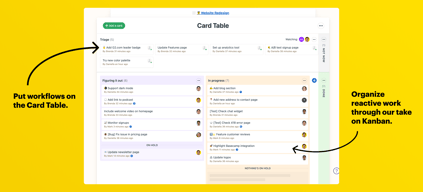
It would be great if they could include a SCRUM/Kaban board feature.
Basecamp let us coordinate multiple projects at the same time, keeping information and conversations separate but accessible.

Basecamp is a good project management software, one that gets a team up and running quickly. The feature I most like is that quickness. Create a project online and then add some member and basecamp will send them invites or link to their existing accounts with a few clicks in their email. If they are a client you can limit what they see from what your team sees.
Even with Basecamp three I still wish they would allow you to assign people to multiple tasks that would also allow multiple due dates and some dependency. Such as assigning a person to create copy for an Ad and that would then trigger the other person in the to-do to design the ad. I can understand its a tough one to implement.
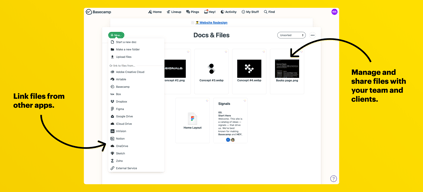
The ability of implementing a project management software without having to install any software. Since basecamp is all browser based, its easy to add members without worrying about software. The ability to directly link to Google Drive is one of the biggest features. No more uploading docs and hoping they are the correct version, link them in basecamp to drive and you know everyone is using the same document.
We use basecamp to share information and events with colleagues around campus. It's a great way for everyone to be a part of the same listservs and be able to ask questions and share events.
I wish it were mobile friendly. Maybe it is, I haven't utilized this feature yet.
Spread awareness between student supervisors about best practices for supporting student employees.
Simple interface. Plus you can send emails to a specific address that adds what you sent to the project. Really useful for forwarding customer correspondence right into the project.
Great for small, startup project management teams. We grew out of this program after about 5 years once our operation doubled in size.
Helped us begin project management on a simple to use tool. This is perfect for small companies or startups.
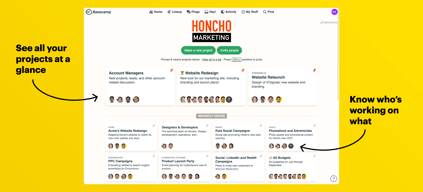
I like that you can keep everything in one place for multiple projects. Everything is organized!
I don't like that sometimes it's not super easy to you.
We are organizing different projects for the marketing department and although it takes some getting used to. I realize that it does help keep things very visual as well as keep others accountable for tasks.
The best tab in Basecamp is by far the To-Do List option. It makes team collaborations on projects much more efficient by assigning roles and allowing for due dates and reminders, as well as discussion threads.
I do wish there were more options to sort, organize, and possible alphabetize lists.
We are solving the problem of task delegation by allowing each user to invite others to their specific projects and showing a step-by-step layout of necessary platforms. This allows us to map our projects and follow progress in real-time as each team goes.

Keeps history of all activity/progress on projects, as well as the ability to keep some statuses private (not customer-facing).
File size is sometimes an issue - takes too long to upload
Using Basecamp to keep customer up to date on project status. This means fewer emails to sent, fewer mtgs to have with customer to let them know what is happening in a project.
Basecamp make communication easy it's not just a tool for scheduling tasks in project. It provide a wide range of features like message board for posting issues and feature request, group chat for discussions etc. it has a user friendly interface making it easy to use. Ability to share files within it is a great feature.
This is a great tool a well-designed concise with full of features like task scheduling, to do list, message board etc. It's hard to find some issue in this software where my only concern is its notification system although you can disable it to avoid the bulk load of emails but I think there can be a better way for to get notified.
Bootcamp is a true life saver it helps us to get on the same page by carrying out discussions on possible fixes and features for our project. It saves us a lot of time by efficiently scheduling all pending tasks.
Es super intuitivo y facil de manejar, es abierto, colaborativo y sobre todo nos permite dar cierta estructura y contexto a las miles de conversaciones no estructuradas que sostenemos todos los días. Permite mejorar la productividad del trabajo y ver mejores resultados.
No me gustan los colores y como esta distribuida la herramienta.
Me ha ayudado a llevar un control de los pendientes y de esta forma son mas efectivas las respuestas de otros colaboradores.
In my opinion, I believe that Basecamp is a platform that in recent years has left much to talk about, providing great ideas to the industry and providing the best quality of projects. I really like that this platform worries so much about the quality and comfort that the client has in his user experience, and that allows the fact of being able to communicate constantly with each of the colleagues, since this at a certain point facilitates the taking of decisions and the ideas that may arise in the elaboration of a labor project.
Basecamp has very high prices with respect to the few features offered in the higher plans. On the other hand, I would like to emphasize that prices are a very influential factor in the purchase decision making, and that it would be better to offer prices adapted to what they actually offer. Another feature that I do not like about Basecamp is the mobile platform, since through this App you can not perform the same work as from the web, leaving computer communication almost unusable.
I have used Basecamp for more than 5 years within my company, and in my opinion, it has had a totally resounding success, providing much better results than expected. Basecamp has helped us to communicate as a team, to share ideas and solutions about the management used in the projects. It should be noted that Basecamp has had a good ROI in our company, providing up to 250% in a period of 2 years.
It makes it easy to communicate with co-workers and helps keep organized
It needs minor tweaking on where the buttons are for adding events, documents, etc.
Solving better communication and benefits have been to have continuous communication between coworkers.
I like that you can have multiple conversations going within different projects. This allows conversations to remain specific and focused and keeps everything well-organized.
Some team members have had a hard time navigating the platform (i.e. learning where to have certain conversations, where certain projects are housed, etc.)
Basecamp is allowing us to monitor progress on various projects as well as maintain a calendar of due dates and to-dos so that we can stay on track.
I like the ability to have private thread discussions which allows us to have a close working relationship with third party consultants and our design team
I can't keep track of a transcript of phone conversations with clients inside basecamp
We' ve been able to streamline our process so that client conversations are no longer in emails and we have stopped using google Docs to store files
I enjoyed Basecamp's features such as email forwarding and task lists. Linking is very easy, as well as allowing individuals to "follow" a task.
The reporting feature doe does not allow for managers to understand specific tasks of their employees in a high but detailed overview. To gain insights you must go into projects and then go view specific tasks.
BaseCamp allows for us to better streamline our process with documentation. We are able to have documents already included inside of Basecamp's template feature. Now, all that our team has to do to send an email from a template is copy the document and insert customize information. It is very convenient.
It's easy to see upcoming tasks and project progress. You can loop in anyone on updates and keep everyone informed of a project's status and updates. What's also nice is that you can hide certain things from your clients, so if you'd like to review something within your team, you don't have to worry about nosy clients coming in and leaving feedback before the team is ready. It also integrates well with other systems, such as Roadmap for time tracking, Formstack and Zapier for tracking requests. It has the capability to create project templates, which makes creating multiple projects with very similar deliverables or tasks very easy. On the average project, I use the discussions, to-do lists, files, and text documents. It makes it easy to see in a snapshot what updates has happened in a project and where the most important information lives.
I wish the pieces of Basecamp would interact more, for example, I wish I could create events in a project that would populate into the Calendar tool. I also wish I could drag and drop my starred projects to be able to better organize them.
Basecamp helps everyone stay informed on projects and provides one nice, neat place for all project information to live, rather than having to go through a million emails to find a piece of information.
Basecamp is an intuitive, attractive project management tool. It's easy to use and allows some customization. I like that there are multiple ways to search for projects or tasks and it's easy to include or remove team members as needed.
Sometimes I need to repeat commands w/in project to make sure information is copied to the right people.
Using Basecamp allows a remote team to share documents across time zones if necessary. It helps everyone on the team stay organized, and its transparent nature holds everyone accountable.
I really appreciate Basecamp for it's ability to keep project team members on track with everything. It is a great collaboration tool for project management team, especially teams of people from various organizations.
There is not really anything that I dislike.
Solving the business problem of not having a one stop shop tool for collaborating with project team members (vendors, outside parties, internal team members, etc) Also, I appreciate the ability to log in from anywhere
record work time and you can easily find selected person's work hours / total hours. It is very well organized app to use for keep track of projects and clients
the platform design looks very old. it could've designed to look more trendy and professional. mobile app is very inconvenient to use.
design/ marketing
Simple interface allows me to parse my tasks easily
Not as customizable as other products that I've used in this space, but this also makes it superior for some use cases because of its simpler design
I've used the free tier in the past as an engineer working on solo projects, so can only speak to that use case. I've found it helpful to keep track of my tasks and have them work towards common goals in a seamless way. Really helps me stay on track better
Ease of adding project plans, scrum methodology integration (stories)
No import options (that I could tell) from MS Project or Gantt charts
Project tracking
The web-based software & App are easy to use.
Nothing. It served its purpose very well.
Ability for people at all levels of the process to communicate. Managers, contributors, editors could all see and participate in the conversations and work flow. Very easy to upload content and see what others are doing. The App was designed and laid out very similar to the website and took no additional training to figure out how to use.

- I like how one can stay informed about what is going on in their project. - I like that people can use it easily. - Task Management, Team Management - I like how we can simply assign task to anyone in our team without verbal explanation. - Mobile App
- Improvement in Graphics and want to see more UI improvement. - The price is bit higher than others available in the market. - Impossible to assign same task to more than one person.
- I can easily track our team member's work and guide them accordingly. - I can manage my team members without having verbal communication. - I can assign task anytime.
Basecamp is very clear and organized with delineations between projects, groups of tasks within a project, and organizing tasks across projects. I love that level of control I have over notifications so I can create non-work hours and work hours when to be notified about a task due or when someone else has completed a task I need to know about.
I do wish the file storage and organization system were a bit stronger but that is not the primary function of this software for us. It works just fine but I wish it were organized more like a list of folders and not large pictures of folders.
Project managment.
Friendly and easy to use interface. Notification feature is great.
There is nothing about Basecamp that I dislike.
The business problem were were trying to solve with Basecamp is keeping a team aligned to a project's deliverables and timelines, with all of the documentation and communications that goes along with that. Basecamp has been, as it's name suggests, the key touchpoint for projects.