Unclaimed: Are you working at ClickMeeting?
ClickMeeting Reviews: 4.2/5 — Solid Choice
ClickMeeting is an efficient webinar management platform for businesses who want to boost their digital reach through professionally hosted and branded webinars. The platform’s tools and features are notably intuitive and user-friendly, making it one of the simplest options available today, especially for internationally hosted events. ClickMeeting is also customizable, with users able to tailor everything from the webinar room as well as other key elements needed to establish effective branding for any event. Types of content that can be hosted on ClickMeeting include Facebook and YouTube Live, presentations, surveys, and polls, just to name a few. It also comes with accurate analytics that can provide deeper audience insight for future events.

| Capabilities |
API
|
|---|---|
| Segment |
Small Business
Mid Market
Enterprise
|
| Deployment | Cloud / SaaS / Web-Based, Mobile Android, Mobile iPad, Mobile iPhone |
| Support | 24/7 (Live rep), Chat, Email/Help Desk, FAQs/Forum, Knowledge Base, Phone Support |
| Training | Documentation |
| Languages | English |
ClickMeeting Pros and Cons
- Supports full audio and video recording of live sessions
- Offers chatfunctionality and interactive sessions
- Integration with Facebook Live and YouTube for added engagement
- Supports HD video presentation for multiple presenters
- System delays caused by larger number of guests
- Lacks automatic transcription
- Relatively expensive






ClickMeeting is a European webinar platform that ships GDPR compliance and end-to-end encryption on every plan, including the free tier, and prices well below GoTo Webinar. For organizations that care where their attendee data lives, that combination is the reason to shortlist it. The trade-off is a smaller ecosystem and a less polished experience than the market leaders.
- What it is: Webinar and virtual event software covering live webinars, automated and on-demand webinars, meetings, and paid events.
- Best for: European businesses, educators, and trainers who need data residency and encryption without enterprise pricing.
- Pricing: Attendee-tiered. Widely reported entry pricing is around $32/month for Live and $48/month for Automated, with annual billing saving up to 20%. Verify on ClickMeeting’s page before buying, for the reason explained below.
- The honest catch: ClickMeeting does not publish prices in a way that can be read without configuring a plan, and prices scale by attendee tier from 25 up to 10,000.
What Is ClickMeeting?
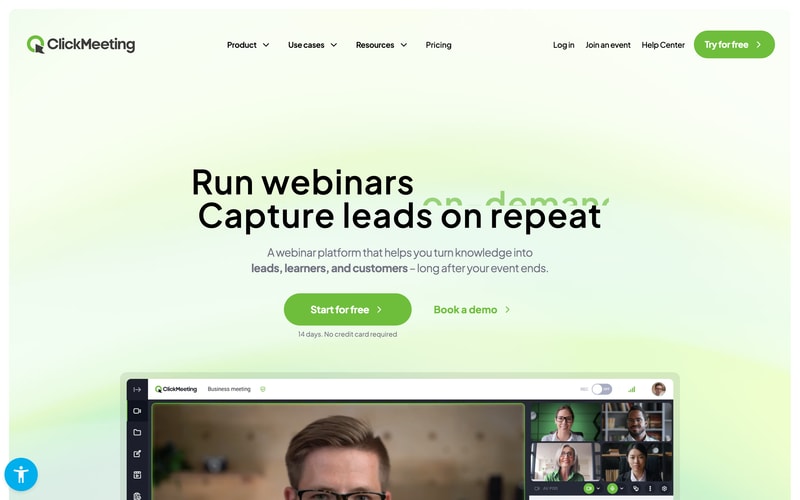
ClickMeeting launched in 2011 in Gdańsk, Poland, originally as part of the GetResponse group before becoming an independent company. It has stayed focused on webinars rather than expanding into unified communications, and it competes primarily on price and European data handling rather than feature count.
That European origin is the most useful thing to understand about it. GDPR compliance and end-to-end encryption appear on every plan including the free tier, and the company operates under EU jurisdiction. For a European organization running webinars with customer data, that removes a category of legal review that a US-hosted platform can require.
The product covers three event types from one account: live webinars, automated and on-demand webinars for evergreen content, and standard online meetings. Paid events and donations are supported, so a trainer can charge for attendance without a separate commerce tool.
The independent rating is solid, on a modest sample: 4.5 out of 5 on Capterra across 181 reviews, with 91% positive sentiment. That is a much smaller evidence base than Zendesk or Trello, so weight it accordingly.
How ClickMeeting Works
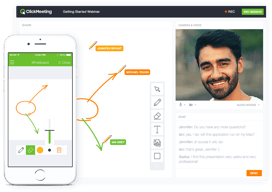
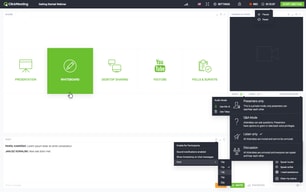
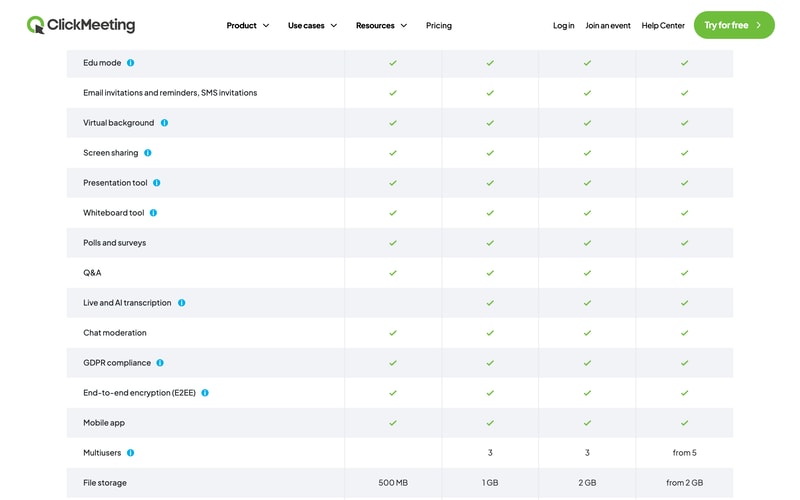
- Live webinars. Browser-based with no installation, custom room branding, polls, surveys, Q&A, screen sharing, whiteboard, and a presentation tool. Streaming out to YouTube, Facebook, and LinkedIn is included.
- Automated webinars. The Automated plan turns recordings into scheduled or on-demand events, with automated reminders, certificates, and auto-streaming to social platforms. This is the evergreen marketing pattern, and it is the main reason to choose Automated over Live.
- Meetings and collaboration. Standard meetings with breakout rooms, so one subscription covers both webinars and internal calls.
- Edu mode. A dedicated teaching mode, reflecting how heavily ClickMeeting is used in education and training.
- Security on every tier. GDPR compliance and end-to-end encryption are available across all plans rather than reserved for enterprise, which is unusual.
- Monetization. Paid events and donations on Live and above.
ClickMeeting Pricing
A transparency note first, because it affects how you should read everything below. ClickMeeting’s pricing page renders prices dynamically once you select an attendee tier, and the figures are not present in the page source. That makes independent verification harder than for most vendors, and it is a fair criticism of the buying experience.
What is verifiable on the page, in July 2026:
| Plan | Attendees | Recording | File storage | Notes |
|---|---|---|---|---|
| Free Events | 25 | 30 min | 500 MB | 14-day trial, no credit card |
| Live | 50 to 1,000 | 6 hours | 1 GB | Custom branding, 3 multiusers, paid events and donations, live and AI transcription |
| Automated | 50 to 1,000 | 10 hours | 2 GB | Automated and on-demand webinars, automated reminders, certificates, auto-streaming |
| Enterprise | Up to 10,000 | From 10 hours | From 2 GB | Dedicated account manager, white label and reseller options, from 5 multiusers |
On price itself, third-party sources consistently report Live starting around $32 per month and Automated around $48 per month at the smallest attendee tier, and ClickMeeting states annual billing saves up to 20%. Treat those as indicative rather than confirmed, and check the live page with your actual attendee count.
Two further points:
- Attendee count is the main cost driver. Tiers run 50, 100, 200, 500, and 1,000 on Live and Automated. Moving up a tier is the most common source of bill increases, so estimate your largest expected audience rather than your average.
- A promotion is running as of this writing. Code SAVE30 offers three months free on annual plans through 31 July 2026. Promotions like this recur, so if you have missed it, it is worth asking whether another is available rather than paying list price.
Who Should Use ClickMeeting
- European organizations with data residency requirements. The clearest case. EU jurisdiction plus GDPR and encryption on every plan is a genuine advantage over US-hosted competitors.
- Educators and trainers. Edu mode, certificates, and paid events make it well suited to teaching, and this is visibly a core audience.
- Budget-conscious webinar programmes. Meaningfully cheaper than GoTo Webinar for comparable core functionality, particularly since recording is included on the entry paid tier rather than gated to the middle one.
- Teams wanting evergreen webinars affordably. The Automated plan covers on-demand and scheduled replays without the price of a dedicated funnel platform.
It fits less well for large enterprises wanting a deep integration ecosystem, where Zoom and GoTo have far more partners, and for teams that prioritize interface polish, since ClickMeeting is functional rather than elegant.
Honest Pros and Cons
Strengths
- GDPR and end-to-end encryption on every plan. Including the free tier. Most competitors reserve comparable assurances for higher tiers or say little about jurisdiction.
- Genuinely affordable. Reported entry pricing around $32 per month undercuts GoTo Webinar substantially, and recording is not gated to a middle tier.
- Three event types in one account. Live webinars, automated webinars, and meetings without separate subscriptions.
- Browser-based with no installation. Consistently praised, and it directly improves attendance rates.
- Built-in monetization. Paid events and donations without bolting on a payment tool.
- Good reported support. Fast and responsive across multiple channels, per reviewers.
Limitations
- Prices are not readable without configuring a plan. A real friction point when comparing vendors, and the reason this review hedges on exact figures.
- A small review base. 181 Capterra reviews is a fraction of what the market leaders have, so the 4.5 rating carries less weight.
- Occasional quality complaints. Some reviewers report connection issues and video inconsistency, alongside the majority who report stable HD.
- Storage costs extra. Additional recording and file storage is charged separately, and reviewers flag it.
- A learning curve on advanced features. Basic use is simple; the deeper toolset takes exploration.
- A smaller ecosystem. Fewer native integrations than Zoom or GoTo, though ClickMeeting advertises broad connectivity through integration platforms.
ClickMeeting Alternatives and How It Compares
- GoTo Webinar is the enterprise incumbent, more expensive and with cloud recording gated to its middle tier, but with a longer reliability record and deeper CRM integrations.
- Livestorm is another European option, browser-based with a free tier and a more modern interface.
- Demio is stronger for marketing-led webinars and demand generation, and is US-hosted.
- WebinarJam targets marketers and sellers, with stronger evergreen funnels through EverWebinar.
- Zoho Meeting is cheaper still and adequate for straightforward webinars, especially inside the Zoho ecosystem.
For a broader comparison see our guide to the best webinar software.
The Verdict
ClickMeeting is a sensible, well-priced webinar platform with one clear differentiator: it takes European data handling seriously and does not charge extra for it. GDPR compliance and end-to-end encryption on every plan, including free, is a meaningful position, and for an EU organization it can shorten a procurement conversation considerably.
Set expectations on two things. The evidence base is modest, at 181 Capterra reviews against thousands for the market leaders, so you have less collective experience to draw on. And the pricing is genuinely awkward to compare, because the figures only appear once you configure an attendee tier. That is not a reason to avoid the product, but it does mean you should get a real quote before assuming it undercuts a competitor.
If data residency, price, and included recording matter more than ecosystem depth and interface polish, ClickMeeting is a strong pick and one of the better values in the category. If you need the deepest integrations or the most proven reliability at large scale, GoTo Webinar remains the safer enterprise answer at a higher price. Use the 14-day free trial with a real audience before deciding, since audio and video quality is the one dimension where reviewer experiences genuinely diverge.
FAQ
How much does ClickMeeting cost?
ClickMeeting prices by attendee tier, from 25 attendees on the free trial up to 10,000 on Enterprise. Third-party sources consistently report the Live plan starting around $32 per month and Automated around $48 per month at the smallest tier, with annual billing saving up to 20%. Because prices only appear after selecting a tier on ClickMeeting’s site, verify the figure for your own attendee count directly.
Does ClickMeeting have a free plan?
There is a free 14-day trial supporting up to 25 attendees, with 30 minutes of recording and 500 MB of file storage, and no credit card required. There is no permanent free plan. Notably, GDPR compliance and end-to-end encryption are included even at this level.
Is ClickMeeting GDPR compliant?
Yes. ClickMeeting is an EU-based company operating under European jurisdiction, and it lists GDPR compliance and end-to-end encryption across all plans including the free tier. For European organizations this is its main advantage over US-hosted webinar platforms.
What is the difference between the Live and Automated plans?
Live covers real-time webinars with custom branding, paid events, 6 hours of recording, and 1 GB of file storage. Automated adds automated and on-demand webinars, letting you run recordings as scheduled or evergreen events, plus automated reminders, certificates, auto-streaming to social platforms, 10 hours of recording, and 2 GB of storage.
What is ClickMeeting best for?
European businesses, educators, and trainers who need GDPR-compliant, encrypted webinars at a lower price than the enterprise incumbents, and who value having live webinars, automated webinars, and meetings available from a single account.

Compare ClickMeeting with other popular tools in the same category.
I think the program has been very effective in creating webinars, I use it mainly for meetings and simple internal or external communication mechanisms. It has simply given good attention to all customers and employees who have used it. It certainly encourages performance.
For the moment the software has been up to the task, I recognize its capacity and has no deficit.
We have been able to create many web meetings with great results, the webinars are extremely robust and we gather a lot of users online. We have also done seminars with a very important experience, hopefully we will continue to please our most active users.

easy to navigate the presenter can upload a presentation multiple presentation options
it took me way too long to figure out how to move the presenter screen so it won't cover the presentation
presenting lectures sharing knowledge with friends

It is able to search for all audio and video devices available on the system not only the default one. Further it works on most of the browsers not only chrome.
Nothing to be disliked. However the price of its planning could be more dynamic. For example if I want to allow only 10 participants then the per month amount should be around 10 USD. At this moment minimum price is 25 USD.
I am conducting online classes for my University students as well as other students. I am also using it for discussion of my software development projects.

Clickmeeting es una herramienta que me ha cautivado con sus funciones y características. Esta herramienta es bastante fácil de usar, esto me encanto desde el comienzo de mi registro en Clickmeeting. Se me hizo fácil desenvolverme y conocer todas sus funciones rápidamente. Me gusta que no necesita de tantas configuraciones para a usar esta herramienta. El diseño me parece que mejoro mucho en cuestión de uso. Uso mucho esta herramienta para mis video llamada, compartir panta, chat y videoconferencia y estoy muy satisfecha con su calidad y función.
Me gusta este programa pero he tenido el problema de que acudo al soporte en dichas ocasiones y este no se encuentra disponible los fines de semana, a veces algunas cosas ameritan de emergencia y no me agrada que deba esperar los días hábiles para atender mis peticiones de emergencia.
Con esta herramienta exploro todas sus funciones al máximo, y cada una de echa le doy una función para mi beneficio en comunicación con clientes y amigos. Esta herramienta es bastante útil, me ha permitido conocer más personas y expandir mi conocimiento e ideas mediantes videoconferencia, llamadas o el chat. Organiza mi tiempo ya que puedo reunirme desde casa con cualquier equipo de trabajo, reunión o entrevista. Me encanta este software, me ha dado muchos beneficios. Invierto mi tiempo y dinero con solo usarla en mi vida cotidiana
Good quality video, audio and fast interface compared to other live meeting web services. Best support, awesome technical help provided. Guys at clickmeeting really know their product very well. Documentation is also very well defined.
On Weekends no support available, some time need help when syncing of recording to dropbox stucks - need to wait for 1 or 2 days - till Monday or Tuesday (I am in IST timezone). Google drive and MS ondrive sync is missing. I expect these guys are working would make it available soon.
I am using this in daily routine for my live training sessions from last 5 years. I am having 2 separate accounts (50 and 25 users) and using exclusively clickmeeting only service for conducting live webinars (fixed schedule) and training on demand for infinite duration. As we are in IT certification education, we are choisy guys. Before clickmeeting we tried all SAAS services, but finalized clickmeeting before 30 days trial end. Dropbox sync for recording upload is awesome, within 1 minute we get the more than 500mb . mp4 file synced to dropbox. No manual download and upload required. No service down, 99.999% uptime and performance is also maintained very well in this duration.
The possibility to customize all of the screens for end users is one of the best features of Clickmeeting. Other pros: Analyitics with email, IP and geotracking for every webinar Chat logs No download needed Easy to use Almost no training needed
Cons: More interactive elements for attendants would be a great idea Lack of multilingual support for end users Weird translations to english sometimes
Recordings are quickly available, which helps students access content almost inmmediately
It´s fast almost the time and it´s easy for all in the office .
the app has a serious problem with hotmail e-mails.
the comunication posibility in all the country
the easiness and friendliness of the platform. I am a teacher and is just, simply, very easy for my students in Latin America to access and talk.
The fact that, if you don't use earphones, there is a very annoying eco
Teaching, consulting, meetings, classes. As I mentioned, I am a corporate trainer and university faculty.
The easy setup of the webinars is what first brought us to ClickMeeting. We then saw a system with everything we needed, Screen writing, easy to use chat and our customers are happy.
The separated tool for the mic sometimes won't pick up the PC's mic and sometimes just stuck on loading.
We have a lot of overseas customers and domestic ones also having trouble to reach a frontal meeting.
Ability to efficiently share screens and interact with large groups of people simply, while recording for those who are unable to attend the live webinars.
There were initial glitches setting up the waiting room, however they seem to have been since resolved. It would be nice to have pre-saved "Rooms" for different groups/ purposes to seamlessly set up and duplicate for regular scheduling.
Rather than renting a space for Seminars which we were doing, it creates the same online environment of learning where people can access the information from the comfort of their own homes.
The platform is quite easy to work and I've never had any problems with their support
I cant change many functions and personalise my webinar.
Online courses

I can have to down to work fast and simple. I can establish a session call for a webinar and other elements in just one click so that will make a nice first impression and attract a large audience. Nice product which I like to use.
Nothing to say bad about this solution. Better to say that its a better key to a wonderful work experience. We never had a problem with connection and file sharing.
We have the ability to spend perfect and helpful webinars on any device and working system. Also much easy to invite the audience to content and make opportunities for connection between participants. Nice helpful tools for all of the group.
The system is simple, plus it has some really cool features which I found others lacked
Sometimes it can be hit and miss to connect up with the screensharing but on most occasions it was a local issue
engaging with clients via webinars is key to us
To conduct training, conferences, a convenient platform for communication with colleagues
Efficiency of organization of training
I teach for my colleagues. convenient scale
I like that I can see when an attendee logged into the webinar. That feature has saved us a lot of trouble! I also looooove the in webinar chat feature.
I don't like that when you play a youtube video for the whole class to see that if there is an ad banner on the bottom of the video you can not "X" out of it. You can see the X, but if you click it nothing happens so that your webinar has to see the banner ad.
We have less technical issues since we have switched to clickmeeting. Far less people saying they don't have audio or can't get into the meeting.
Cloud based Easy to use Customization Personal touch with the email invites
being cloud based Ive had one or 2 days where the internet connection to my office was poor and things struggled a bit to start. No fault of the software, Just my local service providers inability to maintain a steady connection.
The meeting invite and agenda has really helped to control the structure to our seminars.
ClickMeeting has everything I need when putting on webinars for my company. It's simple to use and best of all, fits our budget without compromising its quality.
Some of the invitation/guest list settings aren't completely intuitive, and I wish I could do more with that.
We need a way to share our webinars with an open audience that makes it simple for them to join in. It also helps to have a way to invite them directly from ClickMeeting. Clickmeeting allows us to connect with clients and potential customers.
Easy to setup new webinars, full customizable layout
Trainer layout is the same as atendee layout so trainer can not see all the ateendee names in his layout
We're making webinars for providing technical and marketing Support for the products that we distribute

Our clients love the fact that there are no downloads involved in using ClickMeeting. Unlike the competitors, ClickMeeting doesn't require you to install any additional plugins or apps to watch live presentations, which is particularly helpful when you're in office environments with strict firewalls. The ability to brand and customize the presentation room also makes it for a truly custom-tailored experience that you can use to accent your business, not advertise for someone else's.
I would love to see ClickMeeting move away from a flash-based platform into strictly HTML5 or similar.
We are able to connect with a membership of over 7,500 people around the world and bring them together to deliver quality educational seminars with ease. We attract high profile speakers that may not be able to travel to in-person events, but are always excited to be able to present from their home. This tool is remarkable for non-profits, educational institutions, and just connecting people with similar ideas.
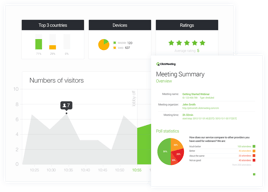
Simple, intuitive interface for both host/presenter and participants. The live tech support folks are also incredibly knowledgeable, thorough and helpful! The post-event reports are informative and handy!
The platform relies on Flash Player currently and one feature in particular (to upload the presenter's photo under Presenter Info) does not work on some browsers, even with the latest Flash installed. I understand that a new version of ClickMeeting is being developed which will move away from Flash - so I am looking forward to it!
ClickMeeting enables me to run training sessions for dozens of people across 16 time zones.
The tool is very user friendly and reliable
That you can't edit the thank you message
We needed a reliable tool for our webcasts, ClickMeeting was the solution. We have had connection issues with tools that we have used in the past but not anymore. The benefit is that we can provide a service (webinars) to our business members
I love the stability and robustness of the solution. Different tools have the approach in which delivering new features is more important than maintaining perfect conditions of the tool. I am using this on daily basis delivering training for my peers as well as customers. Flexibility of the tool and configuration options are amazing. I appreciate that the tool supports the end to end solution so that I can keep the group motivated and engaged with email invitations, event reminders and summaries. It also integrates with the LMS I use and gives me chance to plan series of meetings ahead. Recording of the webinar is good as well. The quality is right, there are no glitches and it works in the background. Saving video in the cloud is amazing idea, as sometimes I forgot to download the file.
I'd like flexible pricing, because sometimes I need to downgrade.
It replaces face 2 face meetings.
Clickmeeting is packed with competitive features at a fraction of the cost. I have like the ability to brand meetings and invitations with a professional and polished look. The video and presentation side by side lay out allows the speaker to stay engaged with the audience while still sharing content. A really nice feature is the ability to poll the audience!
The biggest drawback of the software is the need to upload content in advance. Ideally an integration with Google Drive would be my suggestion. Even so, with minimal planning the software works and works consistently. There is also some room for improvement with setting up invitees. The product integrates with Google but there are issues with loading contacts in real-time and setting up invitations quickly. Finally, we found a need to send out invitations for a webinar with multiple dates/times where we only want the user to choose one. This was not available in the software as far as we were able to tell.
We use ClickMeeting for onboarding new employees which are spread out across multiple states and hosting webinars. Our staff have commented the difference between ClickMeeting and Google Hangouts with favor toward ClickMeeting for lower use of bandwidth and better engagement.
The online chat option. I use this to talk to reps when I am having issues with the meeting I am currently conducting.
There have been some updates to the program here and there that are challenging at times. Also, I would like to see some links that we can send to attendees (this would be automatic in the invite) that gives the invitees the links to the flash players they will need in order to be ready to participate in the meeting.
We hold our company meetings on click meeting. All employees work remotely, so this is our way of meeting.
User-friendly interface, easy to use by presenters and attendees, multilingual platform and support. Clickmeeting is also a polish-based company.
there is no integration with SalesManago, small bugs, no direct phone support. Clickmeeing should also think about 24/7 support via chat/mail/phone/skype etc.
We educate investors about investments in renewable energy sources sector We are presenting our green project to people all over the world via webinars. Its a great software to us.
Ease of use makes it a simple setup to get online in 5 minutes or less.
Being unsure of recording needs. Honestly, this is mostly because I'm new to webinars but I did miss recording one webinar because of space limitations.
Being online helps my business by giving me an online presence and also giving my knowledge and expertise a voice in the market. I don't love being on video, but today, it's imperative. ClickMeeting makes that easy.

Software interface is simple to grasp and has remained fairly constant over time, meaning you don't have to relearn the operational steps over and over. Attendees can access without needing additional software downloads. Recent upgrades added a "kickout" option to remove unwanted/unwelcome attendees, and the variety of display options (whiteboard, screenshot, Youtube videos, live camera) rival any of the other similar software products out there, but for significantly less money.
Software runs on Flash and every time Flash updates I have to update the software on my PC, which always seems to happen at the worst times. But this is really just a minor inconvenience.
I use Clickmeeting to run a live trade room for Forex traders and it allows for easy interaction between the members. Trading is a solitary exercise most of the time and Clickmeeting has allowed us to build a community of like minded traders who can support each other while trading.
We liked the fact that ClickMeeting was great for us out of the box and our team was able to start using it without any problems.
Some minor problems with audio quality from time to time.
We needed to give training to our business partners from time to time
i use their services for years and it's absolutly working as i wanted ! If you are looking for a good webinar service , you are at the right place
Price is not always competitive with new system , but still have a lot of good service that others don't have
It allowed me to show my business to much more customer
I like how great it is when it comes to recording meetings and webinars. It is very professional with available technical support. Has made it easy to select questions and comments on chats. Has amazing features to create organizing engaging meetings.
It is a great platform to organize engaging online meetings...nothing to dislike towards it!
We have had interactive presentations.