

Unclaimed: Are are working at Contentstack ?






Contentstack Reviews: 4.5/5 — Highly Rated
Contentstack is a company based in San Francisco that’s built to offer API-first headless CMS. The platform is built to empower marketers and developers to collaborate around content to create customer journeys and deliver dynamic digital experiences across channels, audiences, brands, and regions. It is Microservices-based, API-first, Cloud-native SaaS, and Headless.

| Capabilities |
API
CLI
|
|---|---|
| Segment |
Small Business
Mid Market
Enterprise
|
| Deployment | Cloud / SaaS / Web-Based, Desktop Mac, Desktop Windows, Mobile Android, Mobile iPhone, On-Premise Linux |
| Support | 24/7 (Live rep), Chat, Email/Help Desk, FAQs/Forum, Knowledge Base, Phone Support |
| Training | Documentation |
| Languages | English |

Compare Contentstack with other popular tools in the same category.

With some turnover and transition, we needed help getting our headless CMS back on track. Pete Larsen and the enablement services team have been incredible, going as far as conducting training for our external developers and positioning them to better support us moving forward!
Some complexities come with a headless CMS that seem to make you more reliant on the developers for changes, but that's offset by many of the other flexibilities.
Our current system is out of date; they're working with us to upgrade our platform and improve our overall capabilities. Additionally, the training and instructional video repository are very helpful!
Highly customizable CMS that is easy to work with and has excellent support. Makes developing easily maintained react apps easy.
There is a bit of a learning curve, and the new UI lacks contrast which can make working in the back end difficult at times.
Centralizing our website content within ContentStack has made it easy to get new contributors into adding to our sites.
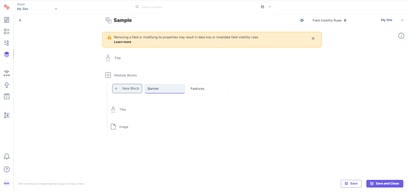
The new editing experience is powerful and flexible. Installing plugins is a breeze. Modular Blocks is a great tool for satisfying tricky use cases where you need to provide content editors with a lot of power, but you want to constrain that power in specific ways.
Query resolver limits in GraphQL can occassionally be cumbersome to work around. There are a few very minor UI quirks in the editing experience that I'd love to see changed.
We're using Contentstack to power common content management use cases (such as blogs, "about us" pages, homepages, etc.) as well as more exotic use cases (caching and augmenting catalog data from 3rd party sources, mapping complex relational data structures between content types).

The interface is very friendly and I can solve many problems by consulting the documentation on website. Contentstak plantaform is very intuitive, it is very easy to teach other people how to use the CMS. We have many examples on GitHub of the contentstack.
The site needs to improve the usability of some components. On some monitors it is difficult to locate the input fields, the field colors are too close. Will be very usefull a envorinment to change and test content-typo before promete to production.
With Contentstack, we give the business team more facilities to change the contents, making the channel more flexible for business needs. Headless CMS allows multiple users to use the same content, making it easier to keep channels up to date.

API and web hook to create a json file in s3.
Nothing comes in mind. If we have had a issue, they have implemented it as feature request.
As we have 12 locale, and 16 language this was the best CMS to help us with that.
I've used many content management systems (perhaps about 15 or so in the course of the last decade, both custom and widely known), and I find Contentstack to be very clearly laid out. I especially appreciate the ability to stage content. Far too many management systems rely on edits being remedied post-publishing, and occasionally the previews are not as accurately reflective of the live content as I'd like them to be envisioned.
Occasionally I am unable to add a certain time to a blog post, but it fixes itself when I refresh. That's the only trouble I've run into. I'm not sure about the breadth of capabilities with Contentstack, but I'd be curious to know whether or not it's possible to have built-in metrics about view, links clicked, or other similar metrics to use for content strategy or implementing other improvements.
I'm not sure if the question directly applies to how our company uses it, since there's no distinctive problem but rather a need. I help create and build content, and the primary benefit is speed -- it's easy to save, make changes, or publish a draft to both staging and to go live.
Content Management Systems have come a long way but Contentstack and heacless CMS have taken it one step further. With the decoupling of the authoring and presentation layers, the front-end engineers and content managers have truly become independent of each other and can get content to their users faster.
As with any CMS, content managers and developers are working in opposite directions. In order to resolve this longstanding issue with CMS, it is valuable for a platform like Contentstack to make such changes be able to propagate seamlessly.
Content consistency across environments; ease of use from business user and content manager perspective,
Good support for integration w/ strong API
The UI is occasionally cumbersome to use
Business being able to easily change and localise content without developer intervention.
We used to require a full time engineer to make even small changes to our site. Using contentstack we were able to turn all our pages into flexible templates so the marketing team can now make virtually all changes on our own, freeing up engineering headcount and making us way faster and more nimble.
It's pricey and requires a lot of technical expertise to implement. Once it's done though it's quite flexible.
We have our whole website on Contentstack and have ported over all our web pages into templates. We no longer rely on engineering to build or edit pages.
The ability to access huge amounts of data that would have otherwise been difficult to access.
There are still areas of the site that are still being developed, and improvements are constantly being made. Although this is a good thing, it can be a frustrating experience developing schema for a new and better feature to appear e.g. Modular blocks.
Definitely being able to set the foundations required for an A/B testing culture going forwards with the business. The benefits are vast, with the future-proofing of data being the main benefit. It will allow relatively easy expansion in the future.
